
Your application is already an MCP server
Building tools, resources and prompts with Tempest
Today, we're publishing tempest/mcp: a new package that lets AI clients work with your Tempest application through the Model Context Protocol.
That sounds technical, but the possibilities are wonderfully practical. A support agent can inspect and update tickets. A project assistant can search internal knowledge. An operations client can check application state and trigger the workflows you explicitly make available. All without rebuilding those capabilities in a separate MCP application.
If your application already knows how to do something useful, the hard part is done.
With tempest/mcp, a server is a class, while tools, resources and prompts are ordinary methods. Dependencies come from the container, validation rules become part of the schema, and return values are translated into MCP responses for you. You keep writing Tempest code, the package makes it available to AI clients.
The package is experimental for now, so it isn't covered by Tempest's backwards-compatibility promise yet. We're excited to get it into your hands, learn which use cases you build, and shape the package from real-world feedback.
Install it as a standalone package with Composer:
composer require tempest/mcp
Or require the latest tempest/framework:
composer require tempest/framework:^3.18
A real use case: an AI-powered support desk
Every protocol tutorial eventually builds an add(int $a, int $b) tool. It proves that the wire works, but it carefully avoids everything that makes application development interesting: dependencies, state, validation and domain rules.
So let's build something you could actually use: a small support desk backed by SQLite. It gives an AI client five tools:
- create a ticket
- assign it to an engineer
- change its priority
- add an investigation comment
- close it with a resolution
Imagine opening your favorite AI client and asking it to show the open queue, assign the most urgent ticket, record what you discovered, and close the issue once it's resolved. The open queue and individual tickets are available as resources, while a prompt turns a real ticket into a focused triage request.
Tickets move from open to in_progress to closed, and their priority is a backed enum:
namespace App\SupportDesk;

enum Priority: string
{
    case LOW = 'low';
    case NORMAL = 'normal';
    case HIGH = 'high';
    case URGENT = 'urgent';
}
All persistence lives in TicketRepository. It receives Tempest's Database from the container and owns the SQL and lifecycle rules. There's nothing MCP-specific in it, so a controller, command or queue handler can use the same repository.
That's the exciting part: MCP becomes another entry point into your application, not another place where you have to rebuild it.
One attribute is all it takes
Here's the complete outer shell of the server:
use Tempest\Mcp\McpServer;

#[McpServer(
    name: 'support-desk',
    version: '1.0.0',
    instructions: 'Use resources to inspect tickets and tools to move them through the support workflow.',
    path: '/mcp/support',
)]
final readonly class SupportDeskServer
{
    public function __construct(
        private TicketRepository $tickets,
    ) {}
}
#[McpServer] makes the class discoverable. The explicit name is what local clients pass to mcp:serve, the optional path exposes the same server over HTTP. Every discovered server is available over stdio, whether it has an HTTP path or not.
The constructor uses ordinary Tempest dependency injection. When a client calls one of the server's primitives, Tempest resolves the class through the container and invokes the method. There's no MCP-specific service locator, protocol context or parallel dependency graph to maintain.
This is where the package starts to feel like Tempest: the application container already knows how everything fits together, so the MCP layer simply gets to use it.
Your PHP signatures become the schema
Turning ticket creation into an MCP tool takes one method:
use Tempest\Mcp\Description;
use Tempest\Mcp\McpTool;
use Tempest\Validation\Rules\HasLength;

#[McpTool(description: 'Creates a new support ticket')]
public function createTicket(
    #[Description('A concise summary of the problem')]
    #[HasLength(min: 8, max: 120)]
    string $title,
    #[Description('What happened, including enough context to investigate')]
    #[HasLength(min: 10, max: 2_000)]
    string $description,
    Priority $priority = Priority::NORMAL,
): array {
    return $this->tickets->create($title, $description, $priority);
}
Tempest advertises this method as create_ticket. The two strings are required, priority is optional because it has a default value, and the enum cases become the allowed values in the JSON schema. #[HasLength] becomes minLength and maxLength, while #[Description] helps the client understand what each argument means.
These aren't documentation-only constraints. Tempest uses the same validation attributes when the tool is called, so the schema shown to the client and the rules enforced by your application stay in sync. A client can't pass a three-character title or invent a fifth priority and hope the repository copes with it. It receives an MCP error result with the validation message instead.
When we ask the running server to list its tools, the input schema for create_ticket contains exactly this:
{
  "type": "object",
  "properties": {
    "title": {
      "type": "string",
      "description": "A concise summary of the problem",
      "minLength": 8,
      "maxLength": 120
    },
    "description": {
      "type": "string",
      "minLength": 10,
      "maxLength": 2000
    },
    "priority": {
      "type": "string",
      "enum": ["low", "normal", "high", "urgent"],
      "default": "normal"
    }
  },
  "required": ["title", "description"]
}
There's no generated schema to commit and nothing extra to keep in sync. Tempest derives it directly from the method using reflection.
The other lifecycle operations follow the same shape. They're named assign_ticket, change_priority, add_comment and close_ticket. Each delegates to TicketRepository and returns the updated ticket as an associative array.
Associative arrays and objects become both JSON text content and MCP structuredContent. Clients that only understand content still receive a useful response, while clients that support structured results can work with the data directly. Scalars become text, and Tempest also provides explicit text, image, audio and resource-link content objects for richer tools.
Give clients live context with resources
We could add list_tickets and get_ticket tools, but these are stable, addressable pieces of application context. That's exactly what MCP resources are designed for:
use Tempest\Mcp\McpResource;

#[McpResource(
    uri: 'support://tickets/open',
    name: 'Open support tickets',
    description: 'Every ticket that still needs attention, ordered by priority',
    mimeType: 'application/json',
)]
public function openTickets(): array
{
    return $this->tickets->open();
}

#[McpResource(
    uri: 'support://tickets/{id}',
    name: 'Support ticket',
    description: 'A support ticket and its investigation comments',
    mimeType: 'application/json',
)]
public function ticket(int $id): array
{
    return $this->tickets->find($id);
}
The first method is registered as a concrete resource. The second becomes a resource template because its URI contains id. When a client reads support://tickets/67, Tempest matches the URI, binds 67 to the int $id parameter and calls the method.
That binding uses the same argument machinery as tools. The repository is still injected into the server, a missing ticket still becomes an application error, and the return value is normalized to JSON resource content. We get live application context without writing URI parsing or protocol response code.
Turn application state into reusable prompts
Prompts become much more useful when they can load the same live state as the rest of the application:
use Tempest\Mcp\McpPrompt;
use function Tempest\Support\Json\encode;

#[McpPrompt(description: 'Builds a focused triage prompt from a support ticket')]
public function triageTicket(int $ticket): string
{
    $ticket = encode($this->tickets->find($ticket), pretty: true);

    return <<<PROMPT
        Triage this support ticket. Identify the likely failure, list the next three investigation steps, and draft a concise reply to the customer.

        Ticket:
        {$ticket}
        PROMPT;
}
The client sees a triage_ticket prompt with one required argument. The returned string becomes a user message in the MCP response, built from the persisted ticket, its assignment and every investigation comment. The support agent starts with the real situation instead of a stale copy pasted into a chat.
Tools change state. Resources expose state. Prompts turn state into a reusable workflow. They're different protocol primitives, but in Tempest they're all implemented the same way: as methods on container-managed classes.
Connect your favorite local client
First, let Tempest show you what discovery found:
$ ./tempest mcp:list

// MCP SERVERS
support-desk ... stdio, http (/mcp/support) — 5 tools, 1 prompts, 2 resources
Then point any stdio-capable MCP client at the command:
{
  "mcpServers": {
    "support-desk": {
      "command": "/absolute/path/to/support-desk/tempest",
      "args": ["mcp:serve", "support-desk"]
    }
  }
}
The mcp:serve command exposes the server over stdio. There's no web server to start or port to reserve - the client launches the process when it needs it.
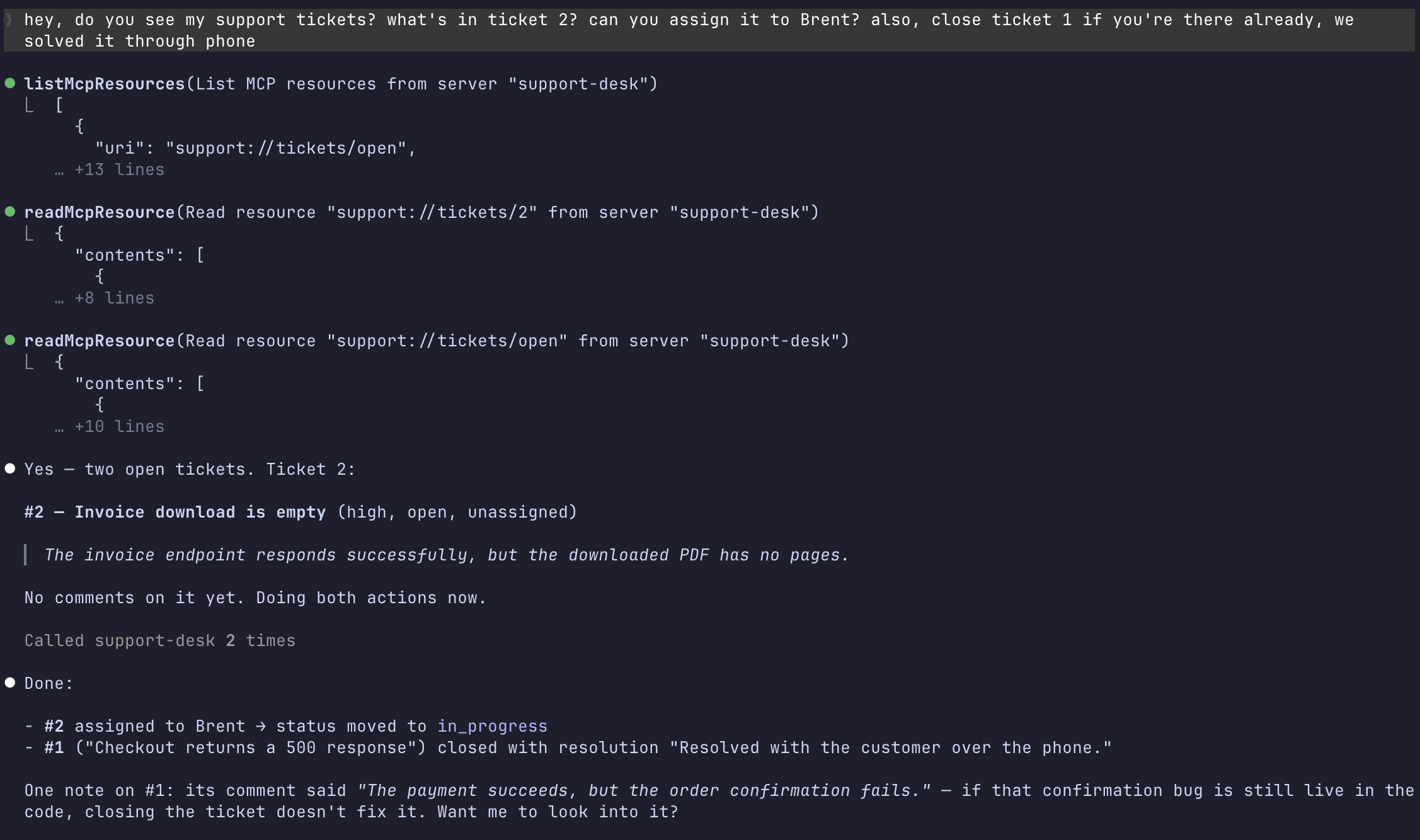
In one conversation, the client reads the open queue, inspects ticket #2, assigns it to Brent and closes ticket #1 with a resolution. It even notices that closing the ticket doesn't fix the underlying bug and offers to investigate it. Every step uses the same TicketRepository as the rest of the application, so the client always sees the same data as your controllers and commands.
Take the same server over HTTP
Because the server attribute declares path: '/mcp/support', Tempest also registers a stateless HTTP endpoint. Stdio is a great fit when the server lives alongside your coding harness - HTTP lets you share the same server with a team or connect to an application running elsewhere.
Point your harness at that endpoint with an HTTP MCP configuration:
{
  "mcpServers": {
    "support-desk": {
      "type": "http",
      "url": "https://support.example.com/mcp/support"
    }
  }
}
Your harness now has remote access to the same tools, resources and prompts. The endpoint is a regular Tempest route, so you can secure it with the authentication and middleware your application already uses.
Test the experience your users get
Tempest's integration test base exposes an in-process MCP client. It performs initialization and lets your test call the server at the protocol level:
#[Test]
public function assigns_a_ticket(): void
{
    $this->mcp
        ->onServer(SupportDeskServer::class)
        ->callTool('assign_ticket', [
            'ticket' => 1,
            'assignee' => 'Márk',
        ])
        ->assertOk()
        ->assertSee('"status":"in_progress"');
}
The connection also provides readResource(), getPrompt() and methods for listing every primitive, as well as send() for raw requests. Responses can be checked with assertions such as assertOk(), assertError(), assertText() and assertStructured(). Everything runs in-process, so you can test exactly what an MCP client sees without starting a separate server.
Your next application feature might already be built
Your application probably already contains dozens of useful capabilities: looking up an order, searching documentation, preparing a report, scheduling a task, triaging an incident or guiding a customer through a support request.
With tempest/mcp, you don't have to rebuild those capabilities for AI clients. Add a server attribute, expose the right methods, and keep your business logic where it belongs.
That's the balance we want: MCP at the boundary, application code underneath it. Tempest's discovery, reflection, validation and container do the protocol work, while you focus on deciding what your clients should be able to accomplish.
The package is experimental, and this is the perfect time to try it. Start with one genuinely useful workflow, connect your favorite MCP client, and let us know what you build.