<?xml version="1.0" encoding="UTF-8"?>


<feed xmlns="http://www.w3.org/2005/Atom" xmlns:media="http://search.yahoo.com/mrss/">
    <id>https://tempestphp.com/rss</id>
    <link rel="self" type="application/atom+xml" href="https://tempestphp.com/rss" />
    <title>Tempest</title>
    <updated>2026-06-18T18:02:40+00:00</updated>
    <entry>
        <title><![CDATA[ A generic tragedy ]]></title>
        <link rel="alternate" href="https://tempestphp.com/blog/a-generic-tragedy" />
        <id>https://tempestphp.com/blog/a-generic-tragedy</id>
        <category term="PHP"></category>
        <author>
            <name>Brent Roose</name>
            <uri>brendt.bsky.social</uri>
        </author>
                        <summary type="html"><![CDATA[ PHP devs talk about generics in real life ]]></summary>
                    <content type="html"><![CDATA[ <p>Most likely, PHP isn't getting generics. There's nothing new under the sun. Some internals have written very elaborate blog posts on why runtime-erased generics are a bad idea, and why they are <a href="https://wiki.php.net/rfc/bound_erased_generic_types#vote">voting no on the current RFC</a>.</p>

<p>However, there's another side of the PHP community that are very much in favor of this RFC, who also wants to voice their opinion. Some of them don't have the platform to do so themselves, which is why I want to give the other side of the story a voice, here on this page. These are the stories and comments from PHP developers who use generics in real life and have embraced static analysis as a core part of PHP. They'd like to share their thoughts.</p>

<ul><li><a href="#from-nicolas,-core-maintainer-of-symfony">Nicolas Grekas</a></li><li><a href="#from-márk,-tempest-core-developer-and-full-time-php-dev">Márk Magyar</a></li><li><a href="#from-azjezz,-the-rfc-author">Azjezz</a></li><li><a href="#from-nuno,-staff-software-engineer-at-laravel">Nuno Maduro</a></li><li><a href="#from-brent,-developer-advocate-for-php-at-jetbrains">Brent Roose</a></li><li><a href="#and-how-about-you?">You?</a></li></ul><hr/>

<h2 id="from-nicolas,-core-maintainer-of-symfony"><a href="#from-nicolas,-core-maintainer-of-symfony" class="heading-permalink"><span><svg xmlns="http://www.w3.org/2000/svg" width="32" height="32" viewBox="0 0 24 24"><path fill="none" stroke="currentColor" stroke-linecap="round" stroke-linejoin="round" stroke-width="2" d="M5 9h14M5 15h14M11 4L7 20M17 4l-4 16"/></svg></span> From Nicolas, core maintainer of Symfony</a></h2>

<p>There's extensively-documented prior research on generics in PHP. The conclusion is bold: the PHP engine can't efficiently implement generics (challenges are inference to not ruin DX, performance to not ruin costs and many others). The only practical solution is an ahead of time static analyser. Dreaming of one built into PHP itself, likely written in C, is fine but not realistic: PHP static analyzers were developed in PHP for a reason. This allowed fast iterations, by people focused on their proficiency language. Moving this experience to the engine-side would eject the very people that made SA in PHP a thing. That'd be a too big loss for the community. </p>

<p>Erased generics as proposed are a direct continuation on this path, which is already proved viable and useful. Thanks to IDEs, SA in PHP has a much wider user-base than just the active users of phpstan, psalm, et al. With LLMs generating code, it's even more critical for PHP to have a stronger verification step. SA tools are a mandatory part of the loop nowadays. We did already wait and dream for years about babysteps towards generics. Even generic arrays has been ruled out as too hard. We waited long enough to draw the conclusion: erased-generics are the only realistic step forward. I'd be happy to be wrong. Let's see in some years (if people/LLMs still write PHP then).</p>

<hr/>

<h2 id="from-márk,-tempest-core-developer-and-full-time-php-dev"><a href="#from-márk,-tempest-core-developer-and-full-time-php-dev" class="heading-permalink"><span><svg xmlns="http://www.w3.org/2000/svg" width="32" height="32" viewBox="0 0 24 24"><path fill="none" stroke="currentColor" stroke-linecap="round" stroke-linejoin="round" stroke-width="2" d="M5 9h14M5 15h14M11 4L7 20M17 4l-4 16"/></svg></span> From Márk, Tempest core developer and full-time PHP dev</a></h2>

<p>First and foremost, I need to tell you: I will be extremely disappointed if <a href="https://wiki.php.net/rfc/bound_erased_generic_types">this RFC</a> doesn't pass. But let me start with the least controversial thing I can possibly say. <strong>I've been writing generics in PHP for years, and so have you.</strong></p>

<p>If you've ever opened a Laravel, Doctrine, Symfony, PHPUnit or PSL class, you've read <code class="language-php">@template</code>. It's <a href="https://wiki.php.net/rfc/bound_erased_generic_types#:~:text=Over%20202%2C000%20files%20using%20%40template%2E">in over 202,000 files on GitHub</a>. It's how every serious collection, repository, and result type in this ecosystem describes itself. We have been shipping erased generics — types that a static analyzer checks and the engine ignores — for about a decade now. So when people talk about this RFC as if it's some exotic new thing, I get a little confused. The only thing the <a href="https://wiki.php.net/rfc/bound_erased_generic_types">Bound-Erased Generic Types RFC</a> actually proposes is to stop writing those generics inside a comment and pretending it doesn't count.</p>

<p>And the comment tax is real. Think about what a generic Laravel class looks like today. It's written in two languages at once: PHP types in the signatures, PHPDoc types in the docblock right above them. The parser validates one and silently trusts the other. You rename a property in a refactor and the comment quietly goes stale. <code class="language-php"><span class="hl-type">ReflectionClass</span>::<span class="hl-property">getName</span>()</code> hands you <code class="language-php"><span class="hl-type">Collection</span></code>, never <code class="language-php"><span class="hl-type">Collection</span>&lt;<span class="hl-generic">TKey</span>, <span class="hl-generic">TModel</span>&gt;</code>. PHPStan, Psalm and Mago each read the tricky cases a bit differently, because there's no actual language for any of them to be right about.</p>

<p>This RFC fixes all of that, at exactly zero runtime cost, and at the moment I'm writing this it's losing <a href="https://wiki.php.net/rfc/bound_erased_generic_types">4 yes / 12 no / 3 abstain</a>. I want to talk about why, because the why is the actual tragedy here, and it's more frustrating than "internals hate generics." They don't. The real reasons are worse than that.</p>

<h3 id=""but-native-syntax-shouldn't-lie""><a href="#"but-native-syntax-shouldn't-lie"" class="heading-permalink"><span><svg xmlns="http://www.w3.org/2000/svg" width="32" height="32" viewBox="0 0 24 24"><path fill="none" stroke="currentColor" stroke-linecap="round" stroke-linejoin="round" stroke-width="2" d="M5 9h14M5 15h14M11 4L7 20M17 4l-4 16"/></svg></span> "But native syntax shouldn't lie"</a></h3>

<p>The strongest argument against this RFC isn't stupid, so I'm not going to try to headbutt it. Rowan Tommins put it best on the list:</p>

<blockquote>But right now, PHP's native syntax does <em>not</em> lie - a property marked "private" really is private, a return type marked "int" really is always an integer... This proposal would fundamentally change that - it would introduce syntax which looks like it's part of the standard, enforced, type system; but, in many cases, would do absolutely nothing.</blockquote><p>Derick Rethans seconds it from experience, saying users were <a href="https://externals.io/message/130816#131010">"almost exclusively confused when it became clear these types weren't enforced."</a> Tim Düsterhus sharpens the knife further: <a href="https://externals.io/message/130816#130883">static analyzers "can only prove the presence of errors, but not the absence of them"</a>, and he's right that you cannot fully type-check a PHP program without actually running it.</p>

<p>I sat with that for a while, because it sounds airtight. But... there is always a but. It's an argument about <em>purity</em>, and PHP's type system has never once been pure. The runtime already doesn't check the element type of an <code class="language-php"><span class="hl-type">array</span></code>, the contents of an <code class="language-php"><span class="hl-type">iterable</span></code>, the parameter or return signature of a <code class="language-php"><span class="hl-type"><span class="hl-keyword">callable</span></span></code>, or anything at all inside <code class="language-php"><span class="hl-type">mixed</span></code>. Ondřej Mirtes, the author of PHPStan and the person who gave PHP docblock generics in the first place, pointed out <a href="https://externals.io/message/130816#131131">on that very same thread</a> that there are already corners of shipping PHP where you write native type syntax that is silently never enforced. So the "native syntax must never lie" rule is a rule PHP broke a long time ago, and we all kept happily writing PHP anyway. Attributes are the cleanest example: a docblock-only idea that got real syntax with no runtime effect beyond reflection, and the community <a href="https://externals.io/message/130816#130825">loved them</a>.</p>

<p>The "users will be confused" worry is the one that really doesn't hold, though, because it's had a full decade to come true and it just hasn't. Azjezz's reply is the line I'd put on a poster:</p>

<blockquote>the core premise is empirically testable, and the test has already run: PHP has had generics in docblocks for a decade, used by every major framework... The failure mode you describe is the one that would occur most under the current system, yet it doesn't.</blockquote><p>And the reason it doesn't is almost <em>boringly</em> simple. The people who care enough to write <code class="language-php"><span class="hl-type">Collection</span>&lt;<span class="hl-generic">User</span>&gt;</code> are the same people who run a static analyzer. The overlap between "uses generics" and "runs nothing to check them" is, in practice, basically nobody. Now, <a href="https://gpb.moe/blog/opinion-bound-erased-generics.html">Gina Banyard is right</a> to push back on the cheerful "90% of projects use static analysis" line, the JetBrains survey puts it closer to 44%, and I'm not going to pretend otherwise. But that 44% is precisely the half that writes generics in the first place. Nobody out there is hand-annotating <code class="language-php">&lt;<span class="hl-generic">TKey</span>, <span class="hl-generic">TModel</span>&gt;</code> across their whole codebase and then running zero tooling against it.</p>

<h3 id="they're-holding-out-for-runtime-generics-that-don't-work"><a href="#they're-holding-out-for-runtime-generics-that-don't-work" class="heading-permalink"><span><svg xmlns="http://www.w3.org/2000/svg" width="32" height="32" viewBox="0 0 24 24"><path fill="none" stroke="currentColor" stroke-linecap="round" stroke-linejoin="round" stroke-width="2" d="M5 9h14M5 15h14M11 4L7 20M17 4l-4 16"/></svg></span> They're holding out for runtime generics that don't work</a></h3>

<p>So if the objection doesn't actually hold, why are there twelve no votes? Because most of them are still holding out for <em>reified</em> generics, types checked at runtime, and they'd rather have nothing at all than accept erasure now.</p>

<p>And here's where I split from most of the room: I don't want runtime-checked generics. Not as a someday-goal, not as the "real" version this one is a placeholder for. Erased is the model I actually want, because it's the one that costs nothing and matches how the ecosystem already works. But set my preference aside, because even on its own terms the holdout makes no sense. PHP has been trying to build runtime generics for ten years and keeps hitting the same wall in the same place. Nikita Popov prototyped them back in 2020 and <a href="https://github.com/PHPGenerics/php-generics-rfc/issues/44">laid out in detail why monomorphization "is [not] going to fly"</a> in a dynamic engine. The PHP Foundation picked the work back up in 2024 and <a href="https://thephp.foundation/blog/2024/08/19/state-of-generics-and-collections/">ran straight into super-linear type-checking the moment generics met union types</a>. By 2025 the official line had <a href="https://thephp.foundation/blog/2025/08/05/compile-generics/">retreated all the way to "compile-time-only" generics</a>, with <code class="language-php"><span class="hl-keyword">new</span> <span class="hl-type">Repository</span>&lt;<span class="hl-generic">BlogPost</span>&gt;()</code>, unions and inference all explicitly dropped as "Really Really Hard™, Really Really Slow™, or both." And when Rob Landers actually bolted reification onto <em>this exact branch</em> in about a week, the numbers came back <a href="https://www.reddit.com/r/PHP/comments/1u5pr7v/comment/ornvi98/">30 to 50% slower on generic-heavy code, pushing toward 2x in the worst case</a>. That's a tax that compounds through every downstream app that merely depends on a library that happens to use generics.</p>

<p>That's the bird in the bush. And the no votes are letting go of the bird in their hand to keep staring at it. The standard they're really asking for, <em>prove</em> reified generics are impossible before we'll even look at erased ones, is one we are <a href="https://www.reddit.com/r/PHP/comments/1u5pr7v/comment/ornoin2/">never</a> going to meet. You can't prove a negative about an engine that nobody has the time, funding or mandate to rewrite.</p>

<h3 id="the-people-who'd-actually-use-it-don't-get-a-vote"><a href="#the-people-who'd-actually-use-it-don't-get-a-vote" class="heading-permalink"><span><svg xmlns="http://www.w3.org/2000/svg" width="32" height="32" viewBox="0 0 24 24"><path fill="none" stroke="currentColor" stroke-linecap="round" stroke-linejoin="round" stroke-width="2" d="M5 9h14M5 15h14M11 4L7 20M17 4l-4 16"/></svg></span> The people who'd actually use it don't get a vote</a></h3>

<p>Here's the moment it stopped feeling like a technical verdict to me and started feeling like a process failure. The discussion was dominated by static-analysis people, who were overwhelmingly in favor. The voters are mostly runtime engine people. As Matthew Brown, the author of Psalm, <a href="https://www.reddit.com/r/PHP/comments/1u5pr7v/comment/orn9v41/">put it</a>, "There is not much overlap between the two." The people who'd use this feature every single day don't get a ballot. The people who'll never write <code class="language-php"><span class="hl-type">Collection</span>&lt;<span class="hl-generic">User</span>&gt;</code> do.</p>

<p>And Brown didn't only say it on Reddit. In the internals thread itself he told them <a href="https://externals.io/message/130816#131014">"the decisions made in 2004 should not dominate decision-making today"</a>: runtime checks made sense back when there was nothing better, but static analysis now finds more bugs, earlier and faster, than the runtime ever could. The man wrote one of the two tools the whole ecosystem leans on, and his name isn't in the tally. A feature people have asked for, for a decade, is dying because the ones who'd use it aren't the ones deciding. Even Larry Garfield, who pushed azjezz to hold off on the vote, did it because, in his words, <a href="https://externals.io/message/131236#131244">"'Internals votes down generics' is the absolute worst outcome, for literally everyone who cares about PHP."</a> He was right. It will likely happen anyway.</p>

<p>Let me give the other side its due, because I don't think this RFC is flawless. It isn't a perfectly clean erased model. It has real compile-time and link-time enforcement gaps, and the worry that shipping it could turn a future reified design into a nastier breaking change is legitimate, not FUD. But Nicolas Grekas, voting yes, <a href="https://externals.io/message/130816#130888">named the thing that actually matters</a>: docblock generics were adoptable precisely <em>because</em> they were invisible to the engine, and native <code class="language-php">&lt;<span class="hl-generic"><span class="hl-property">T</span></span>&gt;</code> can follow the same gradual path PHP already walked for return types, nullable parameters and everything else.</p>

<p>So no, I'm not surprised the vote is failing. I'm just tired of the shape of it. PHP can have generics. It already runs them, every day, in every framework you depend on. And it's refusing exactly those, to hold out for a version it has spent ten years proving it can't build. That's the tragedy. Not that the bird in the bush is hard to catch. That we keep letting go of the one in our hand just to stand there and stare at it. And honestly, that's just sad.</p>

<hr/>

<h2 id="from-azjezz,-the-rfc-author"><a href="#from-azjezz,-the-rfc-author" class="heading-permalink"><span><svg xmlns="http://www.w3.org/2000/svg" width="32" height="32" viewBox="0 0 24 24"><path fill="none" stroke="currentColor" stroke-linecap="round" stroke-linejoin="round" stroke-width="2" d="M5 9h14M5 15h14M11 4L7 20M17 4l-4 16"/></svg></span> From Azjezz, the RFC author</a></h2>

<p>I asked Azjezz if he wanted to pitch in, being the author of the RFC. He told me he didn't have time to write an eloquent blog post, but he did want to contribute and allowed me to quote from a <a href="https://www.reddit.com/r/PHP/comments/1u5pr7v/comment/ornvi98/">recent Reddit comment</a> in which he explains why he opened the vote even though it was likely to fail. Azjezz explains that the discussion changed from the RFC itself (which was about runtime ignored generics), to instead people wanting reified (runtime checked) generics. He explains: </p>

<blockquote>The second category is worth being honest about. I'm not against reified generics in principle. If they were viable in PHP today, I'd rather have them. The reason I didn't pivot the RFC to reified is that "design it better" isn't the problem. Rob Landers implemented reified generics on top of this branch in about a week (https://github.com/php/php-src/compare/master...bottledcode:php-src:reify) and the numbers came in at 30-50% slower on generic-heavy code, approaching 2x in the worst case.
<br/><br/>
That cost compounds through the dependency graph. If Psl (or Symfony, PHPUnit, Laravel, Doctrine..etc) ships with native generics under a reified model, every downstream application pays the cost, even apps that never declared a generic of their own. Apply that to CI tooling, and a 10-minutes CI run becomes a 15 to 20-minutes CI run across the entire ecosystem. That's not a number people vote yes on either.</blockquote><p>On the question of why Azjezz opened voting on his RFC early without further exploring the option of adding reidied generics on top of it, he says this:</p>

<blockquote>And honestly: I'm not going to spend my time on reified generics, because the way I see it, they're not going to happen. Not because I don't want them, I do. Making them performant enough to actually ship in PHP requires structural engine changes that I have neither the time, the freedom, nor the mandate to do. I'm one person working on this in my own time, between other commitments. Asking me to rewrite the PHP engine to make reified generics viable, and to break things in the process, isn't a realistic ask. And shipping a reified RFC without that rewrite gets us exactly where Rob's branch already is: a working implementation with a perf profile the community won't accept.
<br><br>
…
<br><br>
If reified generics ever become viable in PHP, it'll be because someone with the time, the resources, and the engine-level mandate makes that path exist. I'd happily support a follow-up RFC the moment that's the case. Until then, "is the static-analysis convergence worth shipping bound-erased generics?" is the actual question on the ballot.</blockquote><hr/>

<h2 id="from-nuno,-staff-software-engineer-at-laravel"><a href="#from-nuno,-staff-software-engineer-at-laravel" class="heading-permalink"><span><svg xmlns="http://www.w3.org/2000/svg" width="32" height="32" viewBox="0 0 24 24"><path fill="none" stroke="currentColor" stroke-linecap="round" stroke-linejoin="round" stroke-width="2" d="M5 9h14M5 15h14M11 4L7 20M17 4l-4 16"/></svg></span> From Nuno, staff software engineer at Laravel</a></h2>

<p>I’ve been using generics through PHPStan in pretty much all my code for as long as PHPStan has been around. At this point, it feels like a must-have for any modern language. If PHP wants to keep moving in that direction, I think it needs generics.</p>

<hr/>

<h2 id="from-brent,-developer-advocate-for-php-at-jetbrains"><a href="#from-brent,-developer-advocate-for-php-at-jetbrains" class="heading-permalink"><span><svg xmlns="http://www.w3.org/2000/svg" width="32" height="32" viewBox="0 0 24 24"><path fill="none" stroke="currentColor" stroke-linecap="round" stroke-linejoin="round" stroke-width="2" d="M5 9h14M5 15h14M11 4L7 20M17 4l-4 16"/></svg></span> From Brent, developer advocate for PHP at JetBrains</a></h2>

<p>Believe it or not, but I'm not super bothered that the latest RFC is failing. I would have liked it to pass, but generics won't make a difference in the big scheme of things. That "big scheme of things" is much more important, and if anything, the generics RFC put a spotlight on how PHP is failing in this regard.</p>

<p>Whether people want it or not, PHP is more than just an interpreter, it's more than its syntax. The reason PHP is where it is today is not because of how beautiful or not the language is; but because of the richness of its ecosystem. PHP is more than a programming language, and without its ecosystem of frameworks, packages, and tooling, I doubt it would still be around.</p>

<p>Meanwhile, there's a group of around 100 people deciding on the future of the language (technically there are around 2000 people eligible to vote, but most don't bother anymore, mind-blowing as that is). There's no leader or entity setting out a vision, and the group themselves is heavily divided; for example spending weeks debating whether a link to X should or shouldn't be removed from their website. </p>

<p>Some say the lack of a unified vision and direction for PHP is what makes it great, but I say it's holding PHP back significantly. Which company that isn't already using PHP would choose a language whose design isn't owned by anyone? Where the only paid entity can be blocked of progress at any time when a small group of people decides against it? A group that has barely any representation from the biggest ecosystems that actually drive PHP like Laravel, Symfony, WordPress, or Packagist?  </p>

<p>To me, this is the failure highlighted by the generics RFC, and by so many RFCs besides it. Some people have tried to change the system in the past, to no avail. The committee seems fine where it is and doesn't want the process to change. </p>

<p>I'm hopeful, though. PHP has gone through several phases in the past where it had equally little direction or vision. Then there were also phases where the language took leaps forward. I'm thinking about the very early Zend era; then the PHP 7.0 rewrite with Hack was breathing down PHP's neck; and then Nikita who pushed the language forward during the late 7.x and early 8.x years. Recently it feels like we've lost that direction once again, but I'm also hopeful that the right person or entity will come forward eventually.</p>

<p>If that means we can't have generics for the time being, then no worries. Awesome developers will continue to use PHP to build awesome stuff without them.</p>

<hr/>

<h2 id="and-how-about-you?"><a href="#and-how-about-you?" class="heading-permalink"><span><svg xmlns="http://www.w3.org/2000/svg" width="32" height="32" viewBox="0 0 24 24"><path fill="none" stroke="currentColor" stroke-linecap="round" stroke-linejoin="round" stroke-width="2" d="M5 9h14M5 15h14M11 4L7 20M17 4l-4 16"/></svg></span> And how about you?</a></h2>

<p>Would you like to add your point of view here? Feel free to let me know via <a href="brendt@stitcher.io">email</a> or <a href="/discord">Discord</a>.</p> ]]></content>
        <updated>2026-06-15T00:00:00+00:00</updated>
        <published>2026-06-15T00:00:00+00:00</published>
        <media:content url="https://tempestphp.com/meta/blog/a-generic-tragedy" medium="image"></media:content>
    </entry>
<entry>
        <title><![CDATA[ A new Markdown parser ]]></title>
        <link rel="alternate" href="https://tempestphp.com/blog/tempest-markdown" />
        <id>https://tempestphp.com/blog/tempest-markdown</id>
        <category term="PHP"></category>
        <author>
            <name>Brent Roose</name>
            <uri>brendt.bsky.social</uri>
        </author>
                        <summary type="html"><![CDATA[ Introducing tempest/markdown, its design goals, and how it works ]]></summary>
                    <content type="html"><![CDATA[ <p>What started as a performance experiment ended as a new package: <code class="language-php">tempest/markdown</code>. I read <a href="https://www.reddit.com/r/PHP/comments/1tac5j9/mdparser_030_native_php_commonmark_gfm_parser/">this post on Reddit</a> about how someone built a Markdown parser as a PHP extension. They mentioned how much faster it was compared to <code class="language-php">league/commonmark</code>, which was the biggest selling point. </p>

<p>Now, I do a lot with Markdown: from blogs to docs, from mails to books, most of the things I do online involve parsing Markdown in some way. And for as long as I can remember, I've used <code class="language-php">league/commonmark</code> to do so. Indeed, it's not the fastest thing out there — but it's manageable. However, with the <a href="/challenges/parsing-100m-lines">100-million-row challenge</a> still fresh on my mind, I wondered if we really needed an <em>extension</em> to get better Markdown performance. Having used League's implementation for years, I know they heavily rely on regex; which I learned with the 100-million-row challenge, was never the most performant solution for parsing big blobs of text.</p>

<p>So I set up a naive test: a very basic Markdown parser that doesn't rely on regex but instead does a single pass over the text input, translates Markdown into tokens, which are then rendered to HTML. It's not a full-fledged lexer/parser that builds an AST, but instead directly goes from tokens to HTML. After a couple of hours, I got a working prototype. Then I set up <a href="https://github.com/phpbench/phpbench">phpbench</a> to compare my implementation with league's. </p>


<table><thead><tr><th>Package</th><th>Memory</th><th>Time to parse</th></tr></thead><tbody><tr><td>tempest/markdown</td><td>5.944mb</td><td>6.281ms</td></tr><tr><td>league/commonmark</td><td>21.114mb</td><td>56.993ms</td></tr></tbody></table><p>Of course, my implementation was far from feature-complete, so I figured these numbers weren't accurate yet. However, the difference did show that there might be something to improve, and that a non-regex approach may indeed be faster.</p>

<p>I did wonder whether I missed something obvious, though. The difference in performance was pretty big, and I hadn't even tried that hard. So I did the most productive thing I could think of to verify whether an idea has merit: <a href="https://www.reddit.com/r/PHP/comments/1tbyepk/roast_my_code_im_building_a_markdown_parser/">I asked /r/php to roast my code</a>. The feedback was very valuable, but what stood out most was someone sending a PR to the repo with <a href="https://github.com/tempestphp/markdown/pull/3">"some performance improvements"</a>:</p>

<table><thead><tr><th>Package</th><th>Time to parse</th></tr></thead><tbody><tr><td>tempest/markdown</td><td>6.281ms</td></tr><tr><td>tempest/markdown (PR)</td><td>0.723ms</td></tr><tr><td>league/commonmark</td><td>56.993ms</td></tr></tbody></table><p>Well that, I did not expect. 0.723ms to parse the Tempest docs in PHP compared to 56.993ms with <code class="language-php">league/commonmark</code>. That's an 80x improvement — give or take; all with PHP. There was a catch, though: the PR did two things: it merged the tokenization and parsing steps into one; but it also removed all tokenizer rule classes (each class representing a specific Markdown token); and merged them into inline functions.</p>

<p>The inline function approach worked, but it made it virtually impossible to add extension points, something I was considering whether it would be worth adding. See, having worked on this code for a couple of days by now, I wondered whether it could actually benefit me for real. Better performance is always good, but we're talking only about a tens of milliseconds difference. <code class="language-php">league/commonmark</code> can definitely feel sluggish at times, but in production these rendered Markdown files are always cached anyway, so it's definitely not the end of the world.</p>

<p>What bothered me more with <code class="language-php">league/commonmark</code> is the fact that it's so bare-bones. Every project I start I have to copy over configuration to support frontmatter, code highlighting, responsive images, tables, external hyperlinks, and what not. There are solutions for all these problems, but <code class="language-php">league/commonmark</code> was designed to be extended, so it takes some setting up and tweaking before I can use it for my use cases.</p>

<p>If I had this Markdown parser that 5-10x faster, with all these features built-in; maybe that wouldn't be so bad? </p>

<p>I so I did exactly that; I continued to add the base Markdown features, and then I added support for all the things <em>I</em> would find useful: frontmatter, code highlighting, responsive images, tables, external hyperlinks, divs, and strikethrough formatting. In the end, the benchmarks showed these results:</p>


<table><thead><tr><th>Package</th><th>Memory</th><th>Time to parse</th></tr></thead><tbody><tr><td>tempest/markdown</td><td>6.664mb</td><td>10.906ms</td></tr><tr><td>league/commonmark</td><td>21.114mb</td><td>56.993ms</td></tr></tbody></table><p>As expected, performance had decreased a bit, but <code class="language-php">tempest/markdown</code> was still 5x faster than <code class="language-php">league/commonmark</code>. I actually suspect there are some big gains to be made still by combining the parsing and HTML rendering in one loop instead of two (TBD).</p>

<p>On top of that, I did add extension points so that external projects could completely change the parser's working to their needs.</p>

<p>So that's where I'm at today. Once again I wonder: what's the next step? And once again, I think it's time to ask /r/php and other places to take another look at what's here. I'm now using the parser myself for my blog and this website. It works very well, it has simplified a lot of code, and I'm happy with it. But is there really something here? I hope others can help me figure that out. </p>

<p>So if you're curious, head over to <a href="/docs/packages/markdown">the docs</a> and take a look. I'm very open for feedback! (The best place for that feedback would be on <a href="https://github.com/tempestphp/markdown">GitHub</a>, by the way.)</p>

<h2 id="why-not-…-?"><a href="#why-not-…-?" class="heading-permalink"><span><svg xmlns="http://www.w3.org/2000/svg" width="32" height="32" viewBox="0 0 24 24"><path fill="none" stroke="currentColor" stroke-linecap="round" stroke-linejoin="round" stroke-width="2" d="M5 9h14M5 15h14M11 4L7 20M17 4l-4 16"/></svg></span> Why not … ?</a></h2>

<p>As a closing remark: I am anticipating people asking why I don't contribute to <code class="language-php">league/commonmark</code> instead; why I have to write something new.</p>

<p>Well the two obvious reasons are that <code class="language-php">league/commonmark</code> is a regex-based parser by design, and that's not something you just <em>change</em>; also it seems to be designed to only follow the official spec, and leave extension points to the community. The two design goals of <code class="language-php">tempest/markdown</code> seem to be diametrically opposed to <code class="language-php">league/commonmark</code>. That's not to say there's anything wrong with one approach or the other, but they are so different that I don't see any way of them working together.</p>

<h2 id="in-closing"><a href="#in-closing" class="heading-permalink"><span><svg xmlns="http://www.w3.org/2000/svg" width="32" height="32" viewBox="0 0 24 24"><path fill="none" stroke="currentColor" stroke-linecap="round" stroke-linejoin="round" stroke-width="2" d="M5 9h14M5 15h14M11 4L7 20M17 4l-4 16"/></svg></span> In closing</a></h2>

<p>Let me know your thoughts! Either on <a href="https://github.com/tempestphp/markdown">GitHub</a> or on <a href="/discord">the Tempest Discord</a>, or whever you're reading this. I'm looking forward to it!</p> ]]></content>
        <updated>2026-06-05T00:00:00+00:00</updated>
        <published>2026-06-05T00:00:00+00:00</published>
        <media:content url="https://tempestphp.com/meta/blog/tempest-markdown" medium="image"></media:content>
    </entry>
<entry>
        <title><![CDATA[ New ORM relations ]]></title>
        <link rel="alternate" href="https://tempestphp.com/blog/new-orm-relations" />
        <id>https://tempestphp.com/blog/new-orm-relations</id>
        <category term="PHP"></category>
        <author>
            <name>Brent Roose</name>
            <uri>brendt.bsky.social</uri>
        </author>
                        <summary type="html"><![CDATA[ Tempest's ORM now supports HasOneThrough, HasManyThrough, and BelongsToMany relations ]]></summary>
                    <content type="html"><![CDATA[ <p>Thanks to the work of <a href="https://github.com/tempestphp/tempest-framework/issues?q=sort%3Aupdated-desc+is%3Apr+author%3Alaylatichy">Layla Tichi</a>, Tempest's ORM has gotten a significant upgrade. </p>

<p>First, there's the <a href="https://github.com/tempestphp/tempest-framework/blob/3.x/packages/database/src/HasOneThrough.php"><code>#[<span class="hl-type">HasOneThrough</span>]</code></a> attribute. It defines a one-to-one relationship that traverses through an intermediate model. This lets you access a distant relation directly, resolved in a single SQL query with two JOINs.</p>

<pre class="language-php"><span class="hl-keyword">use</span> <span class="hl-type">Tempest\Database\HasOne</span>;
<span class="hl-keyword">use</span> <span class="hl-type">Tempest\Database\HasOneThrough</span>;

<span class="hl-keyword">final</span> <span class="hl-keyword">class</span> <span class="hl-type">Author</span>
{
    <span class="hl-attribute">#[<span class="hl-type">HasOne</span>]</span>
    <span class="hl-keyword">public</span> <span class="hl-type">?Profile</span> <span class="hl-property">$profile</span> = <span class="hl-keyword">null</span>;

    <span class="hl-injection"><span class="hl-attribute">#[<span class="hl-type">HasOneThrough</span>(<span class="hl-type">Profile</span>::<span class="hl-keyword">class</span>)]</span></span>
    <span class="hl-keyword">public</span> <span class="hl-type">?Address</span> <span class="hl-property">$address</span> = <span class="hl-keyword">null</span>;
}</pre><p>Here's what the join statement looks like:</p>

<pre class="language-sql"><span class="hl-keyword">LEFT JOIN</span> <span class="hl-type">profiles</span> <span class="hl-keyword">ON</span> <span class="hl-type">profiles</span>.<span class="hl-property">author_id</span> = <span class="hl-type">authors</span>.<span class="hl-property">id</span>
<span class="hl-keyword">LEFT JOIN</span> <span class="hl-type">addresses</span> <span class="hl-keyword">ON</span> <span class="hl-type">addresses</span>.<span class="hl-property">profile_id</span> = <span class="hl-type">profiles</span>.<span class="hl-property">id</span></pre><p>Next is the <a href="https://github.com/tempestphp/tempest-framework/blob/3.x/packages/database/src/HasManyThrough.php"><code>#[<span class="hl-type">HasManyThrough</span>]</code></a> attribute. This one defines a one-to-many relationship that traverses through an intermediate model. This lets you access a collection of distant relations directly, resolved in a single SQL query with two JOINs.</p>

<pre class="language-php"><span class="hl-keyword">use</span> <span class="hl-type">Tempest\Database\HasManyThrough</span>;

<span class="hl-keyword">final</span> <span class="hl-keyword">class</span> <span class="hl-type">Author</span>
{
    <span class="hl-comment">/** <span class="hl-value">@var</span> <span class="hl-type">\App\Payment\Payment[] </span>*/</span>
    <span class="hl-injection"><span class="hl-attribute">#[<span class="hl-type">HasManyThrough</span>(<span class="hl-type">Contract</span>::<span class="hl-keyword">class</span>)]</span></span>
    <span class="hl-keyword">public</span> <span class="hl-type">array</span> <span class="hl-property">$payments</span> = [];
}</pre><p>Here's what that join statement looks like:</p>

<pre class="language-sql"><span class="hl-keyword">LEFT JOIN</span> <span class="hl-type">contracts</span> <span class="hl-keyword">ON</span> <span class="hl-type">contracts</span>.<span class="hl-property">author_id</span> = <span class="hl-type">authors</span>.<span class="hl-property">id</span>
<span class="hl-keyword">LEFT JOIN</span> <span class="hl-type">payments</span> <span class="hl-keyword">ON</span> <span class="hl-type">payments</span>.<span class="hl-property">contract_id</span> = <span class="hl-type">contracts</span>.<span class="hl-property">id</span></pre><p>Finally, the <a href="https://github.com/tempestphp/tempest-framework/blob/3.x/packages/database/src/BelongsToMany.php"><code>#[<span class="hl-type">BelongsToMany</span>]</code></a> attribute defines a many-to-many relationship using a pivot table. Both sides of the relationship can declare the attribute.</p>

<pre class="language-php"><span class="hl-keyword">use</span> <span class="hl-type">Tempest\Database\BelongsToMany</span>;

<span class="hl-keyword">final</span> <span class="hl-keyword">class</span> <span class="hl-type">Author</span>
{
    <span class="hl-comment">/** <span class="hl-value">@var</span> <span class="hl-type">\App\Tag\Tag[] </span>*/</span>
    <span class="hl-attribute">#[<span class="hl-type">BelongsToMany</span>]</span>
    <span class="hl-keyword">public</span> <span class="hl-type">array</span> <span class="hl-property">$tags</span> = [];
}

<span class="hl-keyword">final</span> <span class="hl-keyword">class</span> <span class="hl-type">Tag</span>
{
    <span class="hl-comment">/** <span class="hl-value">@var</span> <span class="hl-type">\App\Author\Author[] </span>*/</span>
    <span class="hl-attribute">#[<span class="hl-type">BelongsToMany</span>]</span>
    <span class="hl-keyword">public</span> <span class="hl-type">array</span> <span class="hl-property">$authors</span> = [];
}</pre><p>The pivot table name is inferred alphabetically from both model table names (e.g., <code class="language-php">authors</code> + <code class="language-php">tags</code> = <code class="language-php">authors_tags</code>). This generates SQL like:</p>

<pre class="language-sql"><span class="hl-keyword">LEFT JOIN</span> <span class="hl-type">authors_tags</span> <span class="hl-keyword">ON</span> <span class="hl-type">authors_tags</span>.<span class="hl-property">author_id</span> = <span class="hl-type">authors</span>.<span class="hl-property">id</span>
<span class="hl-keyword">LEFT JOIN</span> <span class="hl-type">tags</span> <span class="hl-keyword">ON</span> <span class="hl-type">tags</span>.<span class="hl-property">id</span> = <span class="hl-type">authors_tags</span>.<span class="hl-property">tag_id</span></pre><p>Of course, there's a lot more you can do with these attributes to make them work exactly as you want. You can <a href="/3.x/essentials/database#has-one-through">find out all the details in the docs</a>.</p> ]]></content>
        <updated>2026-03-27T00:00:00+00:00</updated>
        <published>2026-03-27T00:00:00+00:00</published>
        <media:content url="https://tempestphp.com/meta/blog/new-orm-relations" medium="image"></media:content>
    </entry>
<entry>
        <title><![CDATA[ Idempotency in Tempest ]]></title>
        <link rel="alternate" href="https://tempestphp.com/blog/idempotency-in-tempest" />
        <id>https://tempestphp.com/blog/idempotency-in-tempest</id>
        <category term="PHP"></category>
        <author>
            <name>Brent Roose</name>
            <uri>brendt.bsky.social</uri>
        </author>
                        <summary type="html"><![CDATA[ We've recently added an idempotency feature into Tempest to help you avoid code running twice when it shouldn't. ]]></summary>
                    <content type="html"><![CDATA[ <p>Oftentimes you need to ensure an operation only runs once: creating payments, generating invoices, provisioning resources, and what not; you want to prevent these things happening twice or more when they should only happen once. That's where our new idempotency package comes in. You can now mark routes and commands with the <code class="language-php"><span class="hl-attribute">#[<span class="hl-type">Idempotent</span>]</span></code> attribute to make sure they won't be run multiple times when they shouldn't.</p>

<p>Here's an example of a controller action:</p>

<pre class="language-php"><span class="hl-keyword">use</span> <span class="hl-type">Tempest\Idempotency\Attributes\Idempotent</span>;
<span class="hl-keyword">use</span> <span class="hl-type">Tempest\Router\Post</span>;

<span class="hl-keyword">final</span> <span class="hl-keyword">readonly</span> <span class="hl-keyword">class</span> <span class="hl-type">OrderController</span>
{
    <span class="hl-attribute">#[<span class="hl-type">Idempotent</span>]</span>
    <span class="hl-injection"><span class="hl-attribute">#[<span class="hl-type">Post</span>(<span class="hl-value">'/orders'</span>)]</span></span>
    <span class="hl-keyword">public</span> <span class="hl-keyword">function</span> <span class="hl-property">create</span>(<span class="hl-injection"><span class="hl-type">CreateOrderRequest</span> $request</span>): <span class="hl-type">Response</span>
    {
        <span class="hl-variable">$order</span> = <span class="hl-variable">$this</span>-&gt;<span class="hl-property">orderService</span>-&gt;<span class="hl-property">create</span>(<span class="hl-variable">$request</span>);

        <span class="hl-keyword">return</span> <span class="hl-keyword">new</span> <span class="hl-type">GenericResponse</span>(
            <span class="hl-property">status</span>: <span class="hl-type">Status</span>::<span class="hl-property">CREATED</span>,
            <span class="hl-property">body</span>: [<span class="hl-value">'id'</span> =&gt; <span class="hl-variable">$order</span>-&gt;<span class="hl-property">id</span>],
        );
    }
}</pre><p>Whenever this controller action is called, the <code class="language-php"><span class="hl-attribute">#[<span class="hl-type">Idempotent</span>]</span></code> attribute will make sure it only runs once within the context of an "<a href="https://developer.mozilla.org/en-US/docs/Web/HTTP/Reference/Headers/Idempotency-Key">idempotency key</a>", and return a cached result for subsequent requests.</p>

<p>This "idempotency key", by the way, is a header the client sends; any request with the same idempotency key will be considered "the same".</p>

<pre class="language-txt"><span class="hl-type">POST</span> /orders <span class="hl-property">HTTP</span>/1.1
<span class="hl-type">Idempotency</span>-<span class="hl-property">Key</span>: 550e8400-e29b-41d4-a716-446655440000
<span class="hl-type">Content</span>-<span class="hl-property">Type</span>: application/json

{<span class="hl-value">&quot;product&quot;</span>: <span class="hl-value">&quot;widget&quot;</span>, <span class="hl-value">&quot;quantity&quot;</span>: 3}</pre><p>Similar to idempotent routes, Tempest also supports idempotent commands. You can tag either a command or its handler with the same <code class="language-php"><span class="hl-attribute">#[<span class="hl-type">Idempotent</span>]</span></code> attribute:</p>

<pre class="language-php"><span class="hl-keyword">use</span> <span class="hl-type">Tempest\Idempotency\Attributes\Idempotent</span>;
<span class="hl-keyword">use</span> <span class="hl-type">Tempest\CommandBus\CommandHandler</span>;

<span class="hl-keyword">final</span> <span class="hl-keyword">class</span> <span class="hl-type">ImportInvoicesHandler</span>
{
    <span class="hl-attribute">#[<span class="hl-type">Idempotent</span>]</span>
    <span class="hl-attribute">#[<span class="hl-type">CommandHandler</span>]</span>
    <span class="hl-keyword">public</span> <span class="hl-keyword">function</span> <span class="hl-property">handleImportInvoices</span>(<span class="hl-injection"><span class="hl-type">ImportInvoicesCommand</span> $command</span>): <span class="hl-type">void</span>
    {}
}</pre><p>By default, command idempotency is determined by the command's payload. However, commands can also implement the <a href="https://github.com/tempestphp/tempest-framework/blob/3.x/packages/idempotency/src/HasIdempotencyKey.php"><code><span class="hl-type">HasIdempotencyKey</span></code></a> interface to provide a key which determines uniqueness (similar to the HTTP header for routes):</p>

<pre class="language-php"><span class="hl-keyword">use</span> <span class="hl-type">Tempest\Idempotency\Attributes\Idempotent</span>;
<span class="hl-keyword">use</span> <span class="hl-type">Tempest\Idempotency\HasIdempotencyKey</span>;

<span class="hl-attribute">#[<span class="hl-type">Idempotent</span>]</span>
<span class="hl-keyword">final</span> <span class="hl-keyword">readonly</span> <span class="hl-keyword">class</span> <span class="hl-type">ProcessPaymentCommand</span> <span class="hl-keyword">implements</span><span class="hl-type"> HasIdempotencyKey
</span>{
    <span class="hl-keyword">public</span> <span class="hl-keyword">function</span> <span class="hl-property">__construct</span>(<span class="hl-injection">
        <span class="hl-keyword">public</span> <span class="hl-type">string</span> <span class="hl-property">$paymentId</span>,
        <span class="hl-keyword">public</span> <span class="hl-type">int</span> <span class="hl-property">$amount</span>,
    </span>) {}

    <span class="hl-keyword">public</span> <span class="hl-keyword">function</span> <span class="hl-property">getIdempotencyKey</span>(): <span class="hl-type">string</span>
    {
        <span class="hl-keyword">return</span> <span class="hl-variable">$this</span>-&gt;<span class="hl-property">paymentId</span>;
    }
}</pre><p>Finally, idempotency can be configured in many ways as well. You can <a href="/3.x/features/idempotency">read all about it in the docs</a>.</p> ]]></content>
        <updated>2026-03-26T00:00:00+00:00</updated>
        <published>2026-03-26T00:00:00+00:00</published>
        <media:content url="https://tempestphp.com/meta/blog/idempotency-in-tempest" medium="image"></media:content>
    </entry>
<entry>
        <title><![CDATA[ Truly decoupled discovery ]]></title>
        <link rel="alternate" href="https://tempestphp.com/blog/truly-decoupled-discovery" />
        <id>https://tempestphp.com/blog/truly-decoupled-discovery</id>
        <category term="PHP"></category>
        <author>
            <name>Brent Roose</name>
            <uri>brendt.bsky.social</uri>
        </author>
                        <summary type="html"><![CDATA[ Tempest's discovery can now be used in any project ]]></summary>
                    <content type="html"><![CDATA[ <p>Making the Tempest components work in all types of projects has been a goal from the very start of the framework. For example, <a href="/3.x/essentials/views#tempest-view-as-a-standalone-engine">`tempest/view`</a> can already be plugged into any project or framework you'd like. </p>

<p>Today we're making another component truly standalone: <a href="/3.x/essentials/discovery">`tempest/discovery`</a>. Discovery is what powers Tempest: it reads all your project and vendor code and configures that code in a PSR-11 compliant container for you. It's a simple idea, but really powerful when put into practice. And while frameworks like Symfony and Laravel have similar capabilities for framework-specific classes, Tempest's discovery is built to be extensible for all code.</p>

<p>In this blog post, I'll show you how to use <code class="language-php">tempest/discovery</code> in any project, with any type of container, and I'll explain the impact for existing Tempest applications.</p>

<h2 id="using-discovery"><a href="#using-discovery" class="heading-permalink"><span><svg xmlns="http://www.w3.org/2000/svg" width="32" height="32" viewBox="0 0 24 24"><path fill="none" stroke="currentColor" stroke-linecap="round" stroke-linejoin="round" stroke-width="2" d="M5 9h14M5 15h14M11 4L7 20M17 4l-4 16"/></svg></span> Using discovery</a></h2>

<p>You start by requiring <code class="language-php">tempest/discovery</code> in any project, it could be a framework like Symfony or Laravel, a vanilla PHP app, anything.</p>

<pre class="language-console">composer require tempest/discovery</pre><p>The next step is to have a PSR-11 container. You can think of discovery as an extension for containers. In this case we can use the <code class="language-php">php-di</code> container. If you're working within another framework like Laravel or Symfony, their containers already implement PSR-11 and you can use them directly.</p>

<pre class="language-console">composer require php-di/php-di</pre><p>The next step is to boot discovery. This means discovery will scan all your project and vendor files and pass them to discovery classes to be processed.  </p>

<div class="code-title">./index.php</div><pre class="language-php"><span class="hl-keyword">use</span> <span class="hl-type">Tempest\Discovery\BootDiscovery</span>;
<span class="hl-keyword">use</span> <span class="hl-type">Tempest\Discovery\DiscoveryConfig</span>;
<span class="hl-keyword">use</span> <span class="hl-type">DI\Container</span>;

<span class="hl-comment">// Usually this container is already provided by whatever framework you're using</span>
<span class="hl-variable">$container</span> = <span class="hl-keyword">new</span> <span class="hl-type">Container</span>();

<span class="hl-keyword">new</span> <span class="hl-type">BootDiscovery</span>(
    <span class="hl-property">container</span>: <span class="hl-variable">$container</span>,
    <span class="hl-property">config</span>: <span class="hl-type">DiscoveryConfig</span>::<span class="hl-property">autoload</span>(<span class="hl-property">__DIR__</span>),
)();</pre><p>As a shorthand, <code class="language-php"><span class="hl-type">DiscoveryConfig</span>::<span class="hl-property">autoload</span>(<span class="hl-property">__DIR__</span>)</code> will check the provided path for a <code class="language-php">composer.json</code> file, and find scannable locations based on that. You can, of course, manually provide locations to scan as well:</p>

<pre class="language-php"><span class="hl-keyword">use</span> <span class="hl-type">Tempest\Discovery\DiscoveryConfig</span>;
<span class="hl-keyword">use</span> <span class="hl-type">Tempest\Discovery\DiscoveryLocation</span>;
<span class="hl-comment">// …</span>

<span class="hl-variable">$config</span> = <span class="hl-keyword">new</span> <span class="hl-type">DiscoveryConfig</span>(<span class="hl-property">locations</span>: [
    <span class="hl-keyword">new</span> <span class="hl-type">DiscoveryLocation</span>(<span class="hl-value">'App\\', '</span>app/'),
]);

<span class="hl-keyword">new</span> <span class="hl-type">BootDiscovery</span>(
    <span class="hl-property">container</span>: <span class="hl-variable">$container</span>,
    <span class="hl-property">config</span>: <span class="hl-variable">$config</span>,
)();</pre><p>That's all for the basic setup. If you want more complex configuration and learn about caching, head over to <a href="/3.x/essentials/discovery#discovery-as-a-standalone-package">the discovery docs</a>. Now that we've set discovery up, though, what exactly can you do with it?</p>

<h3 id="an-example"><a href="#an-example" class="heading-permalink"><span><svg xmlns="http://www.w3.org/2000/svg" width="32" height="32" viewBox="0 0 24 24"><path fill="none" stroke="currentColor" stroke-linecap="round" stroke-linejoin="round" stroke-width="2" d="M5 9h14M5 15h14M11 4L7 20M17 4l-4 16"/></svg></span> An example</a></h3>

<p>Let's say you're building an event-sourced system where "projectors" can be used to replay all previously stored events. You want to build a command that shows all available projectors where the user can select the relevant projectors. Furthermore, whenever an event is dispatched, you need to loop over that same list of projectors to find out which events should be passed to which ones. </p>

<p>The interface would look something like this:</p>

<pre class="language-php"><span class="hl-keyword">interface</span> <span class="hl-type">Projector</span>
{
    <span class="hl-keyword">public</span> <span class="hl-keyword">function</span> <span class="hl-property">dispatch</span>(<span class="hl-injection"><span class="hl-type">object</span> $event</span>): <span class="hl-type">void</span>;

    <span class="hl-keyword">public</span> <span class="hl-keyword">function</span> <span class="hl-property">clear</span>(): <span class="hl-type">void</span>;
}</pre><p>And a (simplified) implementation could look like this:</p>

<pre class="language-php"><span class="hl-keyword">final</span> <span class="hl-keyword">class</span> <span class="hl-type">VisitsPerDayProjector</span> <span class="hl-keyword">implements</span><span class="hl-type"> Projector
</span>{
    <span class="hl-keyword">public</span> <span class="hl-keyword">function</span> <span class="hl-property">onPageVisited</span>(<span class="hl-injection"><span class="hl-type">PageVisited</span> $pageVisited</span>): <span class="hl-type">void</span>
    {
        <span class="hl-comment">// Perform the necessary queries for this projector.</span>
    }

    <span class="hl-keyword">public</span> <span class="hl-keyword">function</span> <span class="hl-property">dispatch</span>(<span class="hl-injection"><span class="hl-type">object</span> $event</span>): <span class="hl-type">void</span>
    {
        <span class="hl-keyword">if</span> (<span class="hl-variable">$event</span> <span class="hl-keyword">instanceof</span> <span class="hl-type">PageVisited</span>) {
            <span class="hl-variable">$this</span>-&gt;<span class="hl-property">onPageVisited</span>(<span class="hl-variable">$event</span>);
        }
    }

    <span class="hl-keyword">public</span> <span class="hl-keyword">function</span> <span class="hl-property">clear</span>(): <span class="hl-type">void</span>
    {
        <span class="hl-comment">// Clear the projector to be rebuilt from scratch</span>
    }
}</pre><p>In other words: we need a list of classes that implement the <code class="language-php"><span class="hl-type">Projector</span></code> interface. This is where discovery comes in. A discovery class implements the <a href="https://github.com/tempestphp/tempest-framework/blob/3.x/packages/discovery/src/Discovery.php"><code><span class="hl-type">Discovery</span></code></a> interface, which themselves are discovered as well. No need to register them anywhere; discovery takes care of it for you.</p>

<div class="code-title">src/Discovery/ProjectorDiscovery.php</div><pre class="language-php"><span class="hl-keyword">use</span> <span class="hl-type">Tempest\Discovery\Discovery</span>;
<span class="hl-keyword">use</span> <span class="hl-type">Tempest\Discovery\DiscoveryLocation</span>;
<span class="hl-keyword">use</span> <span class="hl-type">Tempest\Discovery\IsDiscovery</span>;
<span class="hl-keyword">use</span> <span class="hl-type">Tempest\Reflection\ClassReflector</span>;

<span class="hl-keyword">final</span> <span class="hl-keyword">class</span> <span class="hl-type">ProjectorDiscovery</span> <span class="hl-keyword">implements</span><span class="hl-type"> Discovery
</span>{
    <span class="hl-keyword">use</span> <span class="hl-type">IsDiscovery</span>;

    <span class="hl-keyword">public</span> <span class="hl-keyword">function</span> <span class="hl-property">__construct</span>(<span class="hl-injection">
        <span class="hl-keyword">private</span> <span class="hl-keyword">readonly</span> <span class="hl-type">ProjectorConfig</span> <span class="hl-property">$config</span>,
    </span>) {}

    <span class="hl-keyword">public</span> <span class="hl-keyword">function</span> <span class="hl-property">discover</span>(<span class="hl-injection"><span class="hl-type">DiscoveryLocation</span> $location, <span class="hl-type">ClassReflector</span> $class</span>): <span class="hl-type">void</span>
    {
        <span class="hl-keyword">if</span> (<span class="hl-variable">$class</span>-&gt;<span class="hl-property">implements</span>(<span class="hl-type">Projector</span>::<span class="hl-keyword">class</span>)) {
            <span class="hl-variable">$this</span>-&gt;<span class="hl-property">discoveryItems</span>-&gt;<span class="hl-property">add</span>(<span class="hl-variable">$location</span>, <span class="hl-variable">$class</span>);
        }
    }

    <span class="hl-keyword">public</span> <span class="hl-keyword">function</span> <span class="hl-property">apply</span>(): <span class="hl-type">void</span>
    {
        <span class="hl-keyword">foreach</span> (<span class="hl-variable">$this</span>-&gt;<span class="hl-property">discoveryItems</span> <span class="hl-keyword">as</span> <span class="hl-variable">$class</span>) {
            <span class="hl-variable">$this</span>-&gt;<span class="hl-property">config</span>-&gt;<span class="hl-property">projectors</span>[] = <span class="hl-variable">$class</span>-&gt;<span class="hl-property">getName</span>();
        }
    }
}</pre><p>This discovery class will take care of registering all projectors in whatever directories you specified at the start. It will store them in an object <code class="language-php"><span class="hl-type">ProjectorConfig</span></code>, which we assume is registered as a singleton in the container — meaning it's accessible throughout the rest of your codebase, and you can inject it anywhere you want. For example, in that console command:</p>

<pre class="language-php"><span class="hl-keyword">final</span> <span class="hl-keyword">readonly</span> <span class="hl-keyword">class</span> <span class="hl-type">EventsReplayCommand</span>
{
    <span class="hl-keyword">use</span> <span class="hl-type">HasConsole</span>;

    <span class="hl-keyword">public</span> <span class="hl-keyword">function</span> <span class="hl-property">__construct</span>(<span class="hl-injection">
        <span class="hl-keyword">private</span> <span class="hl-type">ProjectorConfig</span> <span class="hl-property">$projectorConfig</span>,
    </span>) {}

    <span class="hl-attribute">#[<span class="hl-type">ConsoleCommand</span>]</span>
    <span class="hl-keyword">public</span> <span class="hl-keyword">function</span> <span class="hl-property">__invoke</span>(<span class="hl-injection"><span class="hl-type">?string</span> $replay = <span class="hl-keyword">null</span></span>): <span class="hl-type">void</span>
    {
        <span class="hl-keyword">foreach</span> (<span class="hl-variable">$this</span>-&gt;<span class="hl-property">projectorConfig</span>-&gt;<span class="hl-property">projectors</span> <span class="hl-keyword">as</span> <span class="hl-variable">$projectorClass</span>) {
            <span class="hl-comment">// …</span>
        }   
    }
}</pre><p>In an event bus middleware:</p>

<pre class="language-php"><span class="hl-keyword">final</span> <span class="hl-keyword">readonly</span> <span class="hl-keyword">class</span> <span class="hl-type">StoredEventMiddleware</span> <span class="hl-keyword">implements</span><span class="hl-type"> EventBusMiddleware
</span>{
    <span class="hl-keyword">public</span> <span class="hl-keyword">function</span> <span class="hl-property">__construct</span>(<span class="hl-injection">
        <span class="hl-keyword">private</span> <span class="hl-type">ProjectorConfig</span> <span class="hl-property">$projectorConfig</span>,
    </span>) {}

    <span class="hl-attribute">#[<span class="hl-type">Override</span>]</span>
    <span class="hl-keyword">public</span> <span class="hl-keyword">function</span> <span class="hl-property">__invoke</span>(<span class="hl-injection"><span class="hl-type">string|object</span> $event, <span class="hl-type">EventBusMiddlewareCallable</span> $next</span>): <span class="hl-type">void</span>
    {
        <span class="hl-comment">// …</span>
        
        <span class="hl-keyword">foreach</span> (<span class="hl-variable">$this</span>-&gt;<span class="hl-property">projectorConfig</span>-&gt;<span class="hl-property">projectors</span> <span class="hl-keyword">as</span> <span class="hl-variable">$projectorClass</span>) {
            <span class="hl-comment">// Dispatch the event to the relevant projectors</span>
        }
    }
}</pre><p>Or anywhere else. Zero config needed. That's the power of discovery.</p>

<h3 id="what-else?"><a href="#what-else?" class="heading-permalink"><span><svg xmlns="http://www.w3.org/2000/svg" width="32" height="32" viewBox="0 0 24 24"><path fill="none" stroke="currentColor" stroke-linecap="round" stroke-linejoin="round" stroke-width="2" d="M5 9h14M5 15h14M11 4L7 20M17 4l-4 16"/></svg></span> What else?</a></h3>

<p>What else can you do with discovery? Basically anything you can imagine that you don't want to configure manually. In Tempest, we use it to discover routes, console commands, database migrations, objects marked for TypeScript generation, static pages, event listeners, command handlers, and a lot more.</p>

<p>The concept of discovery isn't new; other frameworks have proven that it's a super convenient way to write code. Tempest simply takes it to the next level and allows you to use it in any project you want — that's because Tempest truly gets out of your way 😁</p>

<h2 id="impact-on-tempest-projects"><a href="#impact-on-tempest-projects" class="heading-permalink"><span><svg xmlns="http://www.w3.org/2000/svg" width="32" height="32" viewBox="0 0 24 24"><path fill="none" stroke="currentColor" stroke-linecap="round" stroke-linejoin="round" stroke-width="2" d="M5 9h14M5 15h14M11 4L7 20M17 4l-4 16"/></svg></span> Impact on Tempest projects</a></h2>

<p>We had to do a small refactor to make discovery truly standalone. In theory, you shouldn't be affected by these changes, unless your Tempest project was fiddling with some lower-level framework components. Luckily, you're not on your own. As with every Tempest upgrade, we make the process as easy as possible with Rector.</p>

<p>For starters, install Rector if you haven't yet:</p>

<pre class="language-php">composer <span class="hl-keyword">require</span> rector/rector --dev 
vendor/bin/rector</pre><p>Next, update Tempest; it's important to add the <code class="language-php">--no-scripts</code> flag to prevent any errors from being thrown during the update.</p>

<pre class="language-sh">composer require tempest/framework:^<span class="hl-number">3</span>.<span class="hl-number">4</span> <span class="hl-generic">--no-scripts</span></pre><p>Then configure Rector to upgrade to Tempest 3.4:</p>

<pre class="language-php"><span class="hl-comment">// rector.php</span>

<span class="hl-keyword">use</span> <span class="hl-type">\Tempest\Upgrade\Set\TempestSetList</span>;

<span class="hl-keyword">return</span> <span class="hl-type">RectorConfig</span>::<span class="hl-property">configure</span>()
    <span class="hl-comment">// …</span>
    -&gt;<span class="hl-property">withSets</span>([<span class="hl-type">TempestSetList</span>::<span class="hl-property">TEMPEST_34</span>]);</pre><p>Next, run Rector:</p>

<pre class="language-php">vendor/bin/rector</pre><p>Finally: clear config and discovery caches, and regenerate discovery:</p>

<pre class="language-php">rm -r .tempest/cache/config
rm -r .tempest/cache/discovery
./tempest discovery:generate</pre><p>And that's it! Just in case you want to know all the details of this refactor, you can head over to <a href="https://github.com/tempestphp/tempest-framework/pull/2041">the pull request</a> to see a list of changes that might affect you.</p>

<h2 id="in-closing"><a href="#in-closing" class="heading-permalink"><span><svg xmlns="http://www.w3.org/2000/svg" width="32" height="32" viewBox="0 0 24 24"><path fill="none" stroke="currentColor" stroke-linecap="round" stroke-linejoin="round" stroke-width="2" d="M5 9h14M5 15h14M11 4L7 20M17 4l-4 16"/></svg></span> In closing</a></h2>

<p>The Tempest community has been using discovery for years, and without any exception, everyone simply loves how frictionless their development workflow has become because of it. Of course there's more to learn on how to configure discovery and setup caching, so head over to <a href="/3.x/essentials/discovery">the discovery docs</a> to learn more.</p>

<p>Finally, come <a href="/discord">join our Discord</a> if you're interested in Tempest or want to further talk about discovery. We'd love to hear from you!
</p> ]]></content>
        <updated>2026-03-13T00:00:00+00:00</updated>
        <published>2026-03-13T00:00:00+00:00</published>
        <media:content url="https://tempestphp.com/meta/blog/truly-decoupled-discovery" medium="image"></media:content>
    </entry>
<entry>
        <title><![CDATA[ Tempest View with source mapping ]]></title>
        <link rel="alternate" href="https://tempestphp.com/blog/view-source-mapping" />
        <id>https://tempestphp.com/blog/view-source-mapping</id>
        <category term="PHP"></category>
        <author>
            <name>Brent Roose</name>
            <uri>brendt.bsky.social</uri>
        </author>
                        <summary type="html"><![CDATA[ Tempest 3.2 improves View debugging by introducing source maps. ]]></summary>
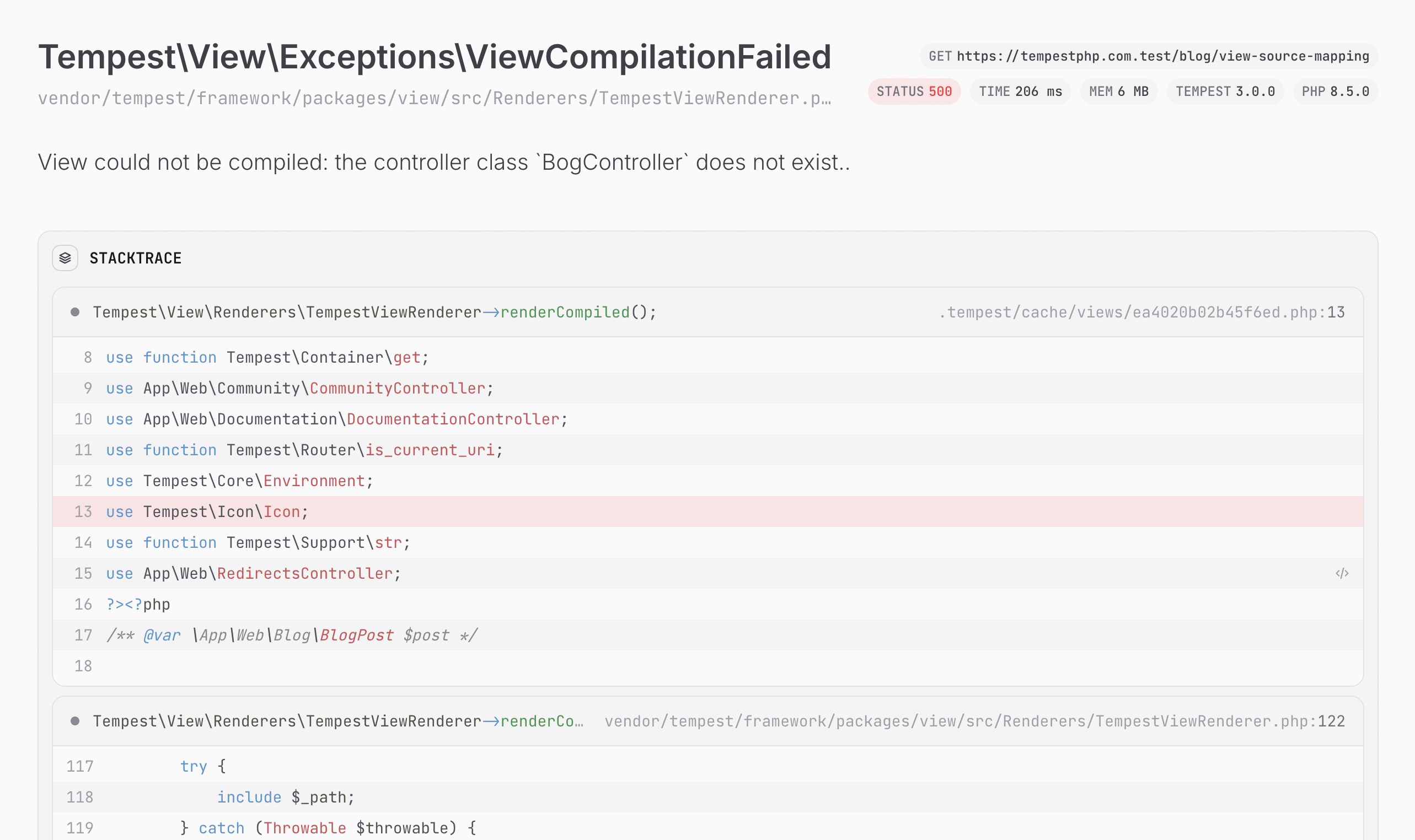
                    <content type="html"><![CDATA[ <p>With Tempest 3.2, we've made a significant improvement for debugging view files. For context: Tempest Views are compiled to normal PHP files, and if you were to encounter a runtime error in those compiled files (unknown variables, missing imports, etc.) — in those cases the stack trace used to look something like this:</p>

<p><img src="/img/view-source-mapping-before.png"></p>

<p>As you can see, there's little useful information here: it points to the compiled file, the line numbers are messed up as well, and in general you wouldn't know the source of the problem. If you wanted to debug this error, you'd have to open the compiled view and read through a lot of compiled (and frankly, ugly) code. Ever since we switched to our own view parser though, we wanted to fix this issue. Even when a runtime error occurred in a compiled view, we want the stack trace to point to the source file.</p>

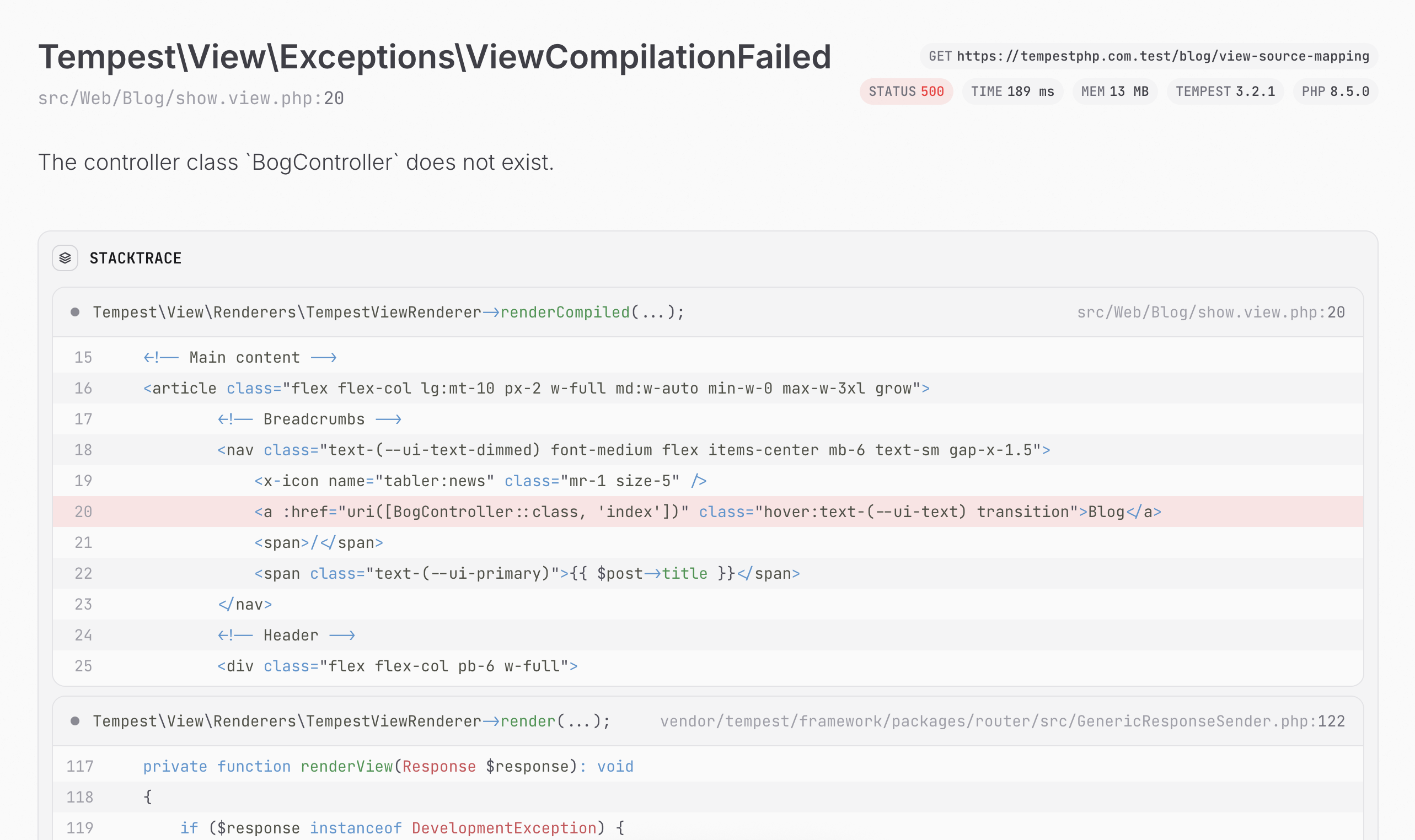
<p>And that's exactly what we did: we now keep track of the source file and line numbers while parsing Tempest View files, and from that data, we can resolve the correct stack trace when an error occurs:</p>

<p><img src="/img/view-source-mapping-after.png"></p>

<p>This was a crucial feature to make Tempest View truly developer-friendly. Special thanks to <a href="https://github.com/tempestphp/tempest-framework/pull/1980">Márk</a> for implementing it!</p> ]]></content>
        <updated>2026-02-20T00:00:00+00:00</updated>
        <published>2026-02-20T00:00:00+00:00</published>
        <media:content url="https://tempestphp.com/meta/blog/view-source-mapping" medium="image"></media:content>
    </entry>
<entry>
        <title><![CDATA[ Generating TypeScript types with Tempest ]]></title>
        <link rel="alternate" href="https://tempestphp.com/blog/generating-typescript-types-with-tempest" />
        <id>https://tempestphp.com/blog/generating-typescript-types-with-tempest</id>
        <category term="PHP"></category>
        <author>
            <name>Brent Roose</name>
            <uri>brendt.bsky.social</uri>
        </author>
                        <summary type="html"><![CDATA[ Tempest now has the ability to generate TypeScript interfaces from PHP classes to ease integration with TypeScript-based front-ends. ]]></summary>
                    <content type="html"><![CDATA[ <p>Tempest 3.1.0 was just released, and with it comes a new <code class="language-php">generate:typescript-types</code> command. This command will take any value objects, DTOs, or enums written in PHP and generate TypeScript equivalents for them that you can use in your frontend. The only thing you need is annotated PHP code with <a href="https://github.com/tempestphp/tempest-framework/blob/3.x/packages/generation/src/TypeScript/AsType.php">`#[AsType]`</a>, and Tempest handles the rest.</p>

<p>Let's say you have this class:</p>

<pre class="language-php"><span class="hl-keyword">namespace</span> <span class="hl-type">App\Web\Blog</span>;

<span class="hl-keyword">use</span> <span class="hl-type">Tempest\Generation\TypeScript\AsType</span>;
<span class="hl-comment">// …</span>

<span class="hl-attribute">#[<span class="hl-type">AsType</span>]</span>
<span class="hl-keyword">final</span> <span class="hl-keyword">class</span> <span class="hl-type">BlogPost</span>
{
    <span class="hl-keyword">public</span> <span class="hl-type">string</span> <span class="hl-property">$slug</span>;
    <span class="hl-keyword">public</span> <span class="hl-type">string</span> <span class="hl-property">$title</span>;
    <span class="hl-keyword">public</span> <span class="hl-type">?Author</span> <span class="hl-property">$author</span>;
    <span class="hl-keyword">public</span> <span class="hl-type">string</span> <span class="hl-property">$content</span>;
    <span class="hl-keyword">public</span> <span class="hl-type">DateTimeImmutable</span> <span class="hl-property">$createdAt</span>;
    <span class="hl-keyword">public</span> <span class="hl-type">?BlogPostTag</span> <span class="hl-property">$tag</span> = <span class="hl-keyword">null</span>;
    <span class="hl-keyword">public</span> <span class="hl-type">?string</span> <span class="hl-property">$description</span> = <span class="hl-keyword">null</span>;
    <span class="hl-keyword">public</span> <span class="hl-type">bool</span> <span class="hl-property">$published</span> = <span class="hl-keyword">true</span>;
    <span class="hl-keyword">public</span> <span class="hl-type">array</span> <span class="hl-property">$meta</span> = [];
    
    <span class="hl-keyword">public</span> <span class="hl-type">string</span> <span class="hl-property">$uri</span> {
        <span class="hl-keyword">get</span> =&gt; <span class="hl-property">uri</span>([<span class="hl-type">BlogController</span>::<span class="hl-keyword">class</span>, <span class="hl-value">'show'</span>], <span class="hl-property">slug</span>: <span class="hl-variable">$this</span>-&gt;<span class="hl-property">slug</span>);
    }
    
    <span class="hl-keyword">public</span> <span class="hl-type">string</span> <span class="hl-property">$metaImageUri</span> {
        <span class="hl-keyword">get</span> =&gt; <span class="hl-property">uri</span>([<span class="hl-type">MetaImageController</span>::<span class="hl-keyword">class</span>, <span class="hl-value">'blog'</span>], <span class="hl-property">slug</span>: <span class="hl-variable">$this</span>-&gt;<span class="hl-property">slug</span>);
    }
}</pre><p>Next, you run:</p>

<pre class="language-console">./tempest generate:typescript-types

<span class="hl-console-success">✓ // Generated 3 type definitions across 1 namespaces.</span></pre><p>Which will generate:</p>

<pre class="language-js"><span class="hl-comment">/*
|----------------------------------------------------------------
| This file contains TypeScript definitions generated by Tempest.
|----------------------------------------------------------------
*/</span>

<span class="hl-keyword">export</span> <span class="hl-keyword">namespace</span> <span class="hl-type"><span class="hl-type">App</span>.<span class="hl-type">Web</span>.<span class="hl-property">Blog</span></span> {
    <span class="hl-keyword">export</span> <span class="hl-keyword">type</span> <span class="hl-type">Author</span> = <span class="hl-value">'brent'</span>;
    <span class="hl-keyword">export</span> <span class="hl-keyword">type</span> <span class="hl-type">BlogPostTag</span> = <span class="hl-value">'release'</span> | <span class="hl-value">'thoughts'</span> | <span class="hl-value">'tutorial'</span>;
    <span class="hl-keyword">export</span> <span class="hl-keyword">interface</span> <span class="hl-type">BlogPost</span> {
        <span class="hl-property">slug</span>: <span class="hl-type">string</span>;
        <span class="hl-property">title</span>: <span class="hl-type">string</span>;
        <span class="hl-property">author?</span>: <span class="hl-type">Author</span>;
        <span class="hl-property">content</span>: <span class="hl-type">string</span>;
        <span class="hl-property">createdAt</span>: <span class="hl-type">string</span>;
        <span class="hl-property">tag?</span>: <span class="hl-type">BlogPostTag</span>;
        <span class="hl-property">description?</span>: <span class="hl-type">string</span>;
        <span class="hl-property">published</span>: <span class="hl-type">boolean</span>;
        <span class="hl-property">meta</span>: <span class="hl-type">any[]</span>;
        <span class="hl-property">uri</span>: <span class="hl-type">string</span>;
        <span class="hl-property">metaImageUri</span>: <span class="hl-type">string</span>;
    }
}</pre><p>Of course, Tempest will <a href="/3.x/essentials/discovery">discover</a> all relevant classes for you, you can optionally configure how TypeScript files are generated, and you can even add your own type resolvers where needed. You can read all about it in <a href="/3.x/features/typescript">the TypeScript docs</a>. A massive thanks to Enzo for building this awesome feature!</p> ]]></content>
        <updated>2026-02-16T00:00:00+00:00</updated>
        <published>2026-02-16T00:00:00+00:00</published>
        <media:content url="https://tempestphp.com/meta/blog/generating-typescript-types-with-tempest" medium="image"></media:content>
    </entry>
<entry>
        <title><![CDATA[ Tempest 3.0 ]]></title>
        <link rel="alternate" href="https://tempestphp.com/blog/tempest-3" />
        <id>https://tempestphp.com/blog/tempest-3</id>
        <category term="PHP"></category>
        <author>
            <name>Brent Roose</name>
            <uri>brendt.bsky.social</uri>
        </author>
                        <summary type="html"><![CDATA[ Tempest 3.0 comes with a new exception handler, several performance improvements,  PHP 8.5 support, and more. ]]></summary>
                    <content type="html"><![CDATA[ <p>Tempest 3.0 is now available, and I want to take a moment to specifically thank all contributors who helped with this release. We've seen a continuous growth in the Tempest community over these past two years, and it's amazing to work with so many talented developers. So thank you all!</p>

<p>Later in this post, I'll list <a href="#breaking-changes-and-automatic-upgrades">all breaking changes and how to use the automatic upgrader for existing projects</a>. First, I want to highlight some of the awesome new features in Tempest 3.0, you can also <a href="https://github.com/tempestphp/tempest-framework/releases/tag/v3.0.0">read the full changelog here</a>.</p>

<h2 id="new-exception-handler"><a href="#new-exception-handler" class="heading-permalink"><span><svg xmlns="http://www.w3.org/2000/svg" width="32" height="32" viewBox="0 0 24 24"><path fill="none" stroke="currentColor" stroke-linecap="round" stroke-linejoin="round" stroke-width="2" d="M5 9h14M5 15h14M11 4L7 20M17 4l-4 16"/></svg></span> New exception handler</a></h2>

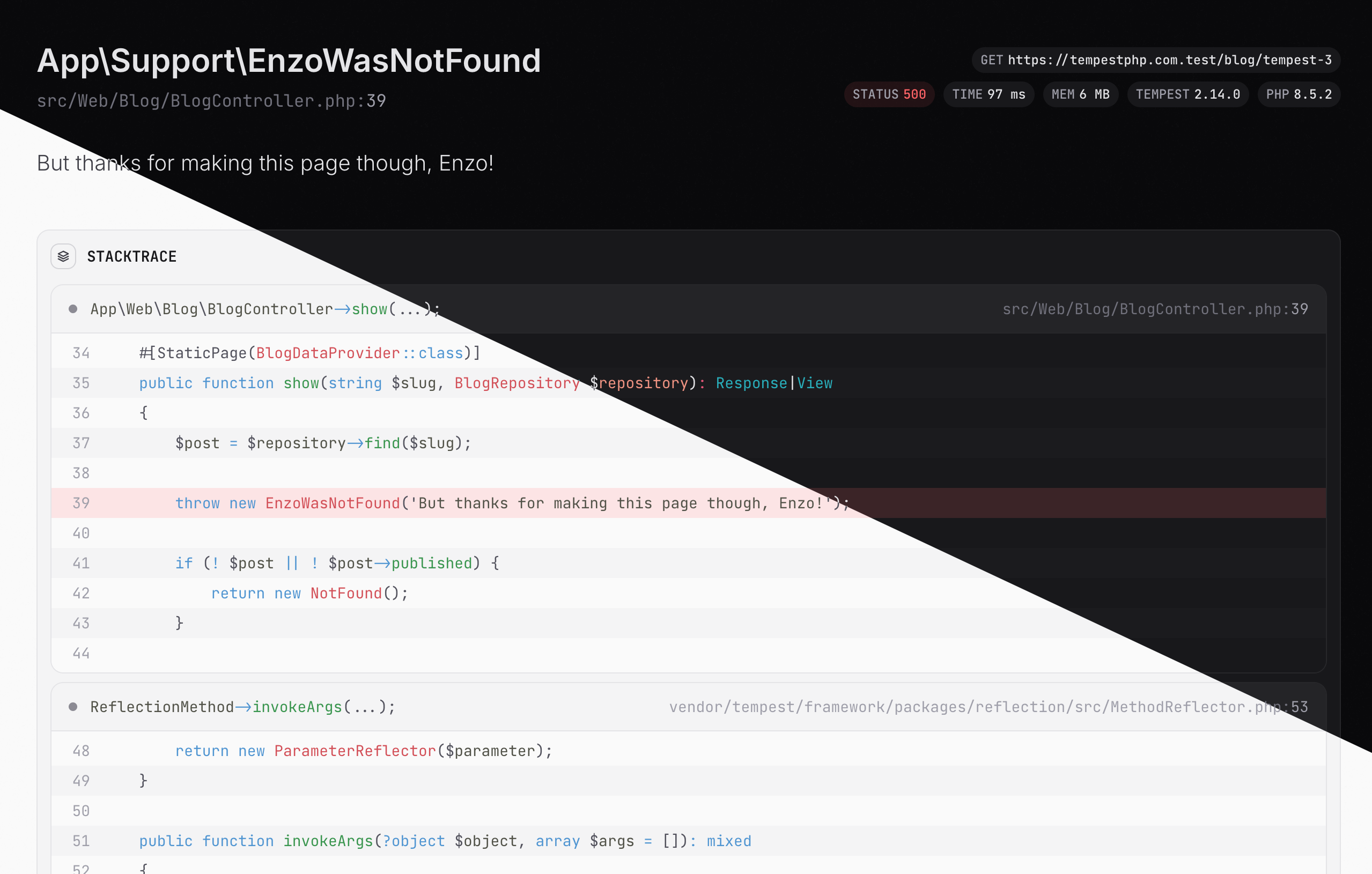
<p>Since the very start of Tempest, we relied on Whoops to render our error pages. While it worked, we always envisioned a more modern exception render that was easier to finetune to our needs. With Tempest 3.0 we took the first steps in making this vision a reality.</p>

<p><img src="/img/tempest-3-exception.png"></p>

<p>Props to Enzo for taking the lead on this one. In the future, we want to continue to improve this page, and also further build on it to make debugging Tempest apps even better.</p>

<h2 id="php-8.5"><a href="#php-8.5" class="heading-permalink"><span><svg xmlns="http://www.w3.org/2000/svg" width="32" height="32" viewBox="0 0 24 24"><path fill="none" stroke="currentColor" stroke-linecap="round" stroke-linejoin="round" stroke-width="2" d="M5 9h14M5 15h14M11 4L7 20M17 4l-4 16"/></svg></span> PHP 8.5</a></h2>

<p>I wrote about my vision for only supporting the latest PHP version over a year ago <a href="https://stitcher.io/blog/php-84-at-least">on my personal blog</a>, and this year we're continuing that same trend: Tempest 3.0 only supports PHP 8.5 or higher. The reasons are outlined in detail in that blog post, but the most prominent reasons are these:</p>

<ul><li>Delaying upgrades only postpones and complicates the work, it never solves any problems.</li><li>I believe in OSS maintainers having a responsibility to push the PHP community forwards.</li><li>We want Tempest to continue to be a modern framework. We can only do that by evolving together with PHP.</li></ul><h2 id="csrf-protection-changes"><a href="#csrf-protection-changes" class="heading-permalink"><span><svg xmlns="http://www.w3.org/2000/svg" width="32" height="32" viewBox="0 0 24 24"><path fill="none" stroke="currentColor" stroke-linecap="round" stroke-linejoin="round" stroke-width="2" d="M5 9h14M5 15h14M11 4L7 20M17 4l-4 16"/></svg></span> CSRF protection changes</a></h2>

<p>We moved away from a classic CRSF-token approach to using <a href="https://developer.mozilla.org/en-US/docs/Web/HTTP/Reference/Headers/Sec-Fetch-Site">`{txt}Sec-Fetch-Site`</a> and <a href="https://developer.mozilla.org/en-US/docs/Web/HTTP/Reference/Headers/Sec-Fetch-Mode">`{txt}Sec-Fetch-Mode`</a>. This means that the <code class="language-html">&lt;<span class="hl-keyword">x-csrf</span> /&gt;</code> token has been removed and you don't need it anymore.</p>

<p>You can read about the behind-the-scenes in <a href="https://github.com/tempestphp/tempest-framework/pull/1829">the pull request</a>.</p>

<h2 id="database-improvements"><a href="#database-improvements" class="heading-permalink"><span><svg xmlns="http://www.w3.org/2000/svg" width="32" height="32" viewBox="0 0 24 24"><path fill="none" stroke="currentColor" stroke-linecap="round" stroke-linejoin="round" stroke-width="2" d="M5 9h14M5 15h14M11 4L7 20M17 4l-4 16"/></svg></span> Database improvements</a></h2>

<p>We've done several improvements in the ORM and database components: we worked on <a href="https://github.com/tempestphp/tempest-framework/pull/1855">performance updates</a> that make our ORM significantly faster; we also <a href="https://github.com/tempestphp/tempest-framework/pull/1807">support UUIDs as primary columns</a>; and we improved <a href="https://github.com/tempestphp/tempest-framework/pull/1861">`Query::toRawSql()`</a> to make debugging complex queries a lot easier.</p>

<h2 id="closure-based-validation"><a href="#closure-based-validation" class="heading-permalink"><span><svg xmlns="http://www.w3.org/2000/svg" width="32" height="32" viewBox="0 0 24 24"><path fill="none" stroke="currentColor" stroke-linecap="round" stroke-linejoin="round" stroke-width="2" d="M5 9h14M5 15h14M11 4L7 20M17 4l-4 16"/></svg></span> Closure-based validation</a></h2>

<p>Thanks to PHP 8.5, we can now support closure-based validation:</p>

<pre class="language-php"><span class="hl-keyword">use</span> <span class="hl-type">Tempest\Database\IsDatabaseModel</span>;
<span class="hl-keyword">use</span> <span class="hl-type">Tempest\Validation\Rules\ValidateWith</span>;

<span class="hl-keyword">final</span> <span class="hl-keyword">class</span> <span class="hl-type">Book</span>
{
    <span class="hl-keyword">use</span> <span class="hl-type">IsDatabaseModel</span>;
    
    <span class="hl-injection"><span class="hl-attribute">#[<span class="hl-type">ValidateWith</span>(<span class="hl-keyword">static</span> <span class="hl-keyword">function</span> (</span><span class="hl-injection"><span class="hl-type">string</span> <span class="hl-variable">$value</span></span><span class="hl-injection">): <span class="hl-type">bool</span> {
        <span class="hl-keyword">return</span> ! <span class="hl-property">str_starts_with</span>(<span class="hl-variable">$value</span>, <span class="hl-value">' '</span>);
    })]</span></span>
    <span class="hl-keyword">public</span> <span class="hl-type">string</span> <span class="hl-property">$title</span>;
}</pre><p>Special thanks to <a href="https://github.com/tempestphp/tempest-framework/pull/1828">Mohammad</a> for adding this!</p>

<h2 id="view-improvements"><a href="#view-improvements" class="heading-permalink"><span><svg xmlns="http://www.w3.org/2000/svg" width="32" height="32" viewBox="0 0 24 24"><path fill="none" stroke="currentColor" stroke-linecap="round" stroke-linejoin="round" stroke-width="2" d="M5 9h14M5 15h14M11 4L7 20M17 4l-4 16"/></svg></span> View improvements</a></h2>

<p>We improved our view parser so that <a href="https://github.com/tempestphp/tempest-framework/pull/1881">whitespaces are kept as-is</a>. This makes it easier to debug compiled views, and also fixes some edge cases where white-spaces were wrongly stripped away. On top of that, we continued to improve Tempest View's performance, and added support for fallthrough attributes (special thanks to <a href="https://github.com/tempestphp/tempest-framework/pull/1811">Márk</a> for that one)!</p>

<pre class="language-html"><span class="hl-comment">&lt;!-- x-test.view.php --&gt;</span>
&lt;<span class="hl-keyword">div</span> <span class="hl-property">class</span>=&quot;test&quot;&gt;
    &lt;<span class="hl-keyword">x-slot</span> /&gt;
&lt;/<span class="hl-keyword">div</span>&gt;

<span class="hl-comment">&lt;!-- home.view.php --&gt;</span>
&lt;<span class="hl-keyword">x-test</span> <span class="hl-property">:class</span>=&quot;<span class="hl-variable">$shouldHighlight</span> <span class="hl-operator">?</span> <span class="hl-value">'bg-red-100'</span> : <span class="hl-value">''</span>&quot;&gt;
    …
&lt;/<span class="hl-keyword">x-test</span>&gt;

<span class="hl-comment">&lt;!-- These attributes will now be merged correctly: --&gt;</span>
<span class="hl-comment">&lt;!-- &lt;div class=&quot;test bg-red-100&quot;&gt; --&gt;</span></pre><h2 id="oauth-improvements"><a href="#oauth-improvements" class="heading-permalink"><span><svg xmlns="http://www.w3.org/2000/svg" width="32" height="32" viewBox="0 0 24 24"><path fill="none" stroke="currentColor" stroke-linecap="round" stroke-linejoin="round" stroke-width="2" d="M5 9h14M5 15h14M11 4L7 20M17 4l-4 16"/></svg></span> OAuth improvements</a></h2>

<p>Thanks to <a href="https://github.com/tempestphp/tempest-framework/pull/1919">iamdadmin</a>, our <a href="../3.x/features/oauth">OAuth support</a> now also includes Twitch.</p>

<div class="code-title">oauth-twitch.config.php</div><pre class="language-php"><span class="hl-keyword">use</span> <span class="hl-type">Tempest\Auth\OAuth\Config\TwitchOAuthConfig</span>;

<span class="hl-keyword">return</span> <span class="hl-keyword">new</span> <span class="hl-type">TwitchOAuthConfig</span>(
    <span class="hl-property">clientId</span>: <span class="hl-property">env</span>(<span class="hl-value">'TWITCH_CLIENT_ID'</span>),
    <span class="hl-property">clientSecret</span>: <span class="hl-property">env</span>(<span class="hl-value">'TWITCH_CLIENT_SECRET'</span>),
    <span class="hl-property">redirectTo</span>: [<span class="hl-type">TwitchOAuthController</span>::<span class="hl-keyword">class</span>, <span class="hl-value">'callback'</span>],
);</pre><p>We also fixed an annoying bug so that you can <a href="https://github.com/tempestphp/tempest-framework/pull/1927">automatically run migrations after installing one or more OAuth providers</a>.</p>

<h2 id="console"><a href="#console" class="heading-permalink"><span><svg xmlns="http://www.w3.org/2000/svg" width="32" height="32" viewBox="0 0 24 24"><path fill="none" stroke="currentColor" stroke-linecap="round" stroke-linejoin="round" stroke-width="2" d="M5 9h14M5 15h14M11 4L7 20M17 4l-4 16"/></svg></span> Console</a></h2>

<p>Márk also added <a href="https://github.com/tempestphp/tempest-framework/pull/1851">support for console autocompletion</a> in zsh and bash. It's as easy as running the <code class="language-php">tempest completion:install</code> command, and you can <a href="/3.x/essentials/console-commands#shell-completion">read more about it here</a>.</p>

<p>Console autocompletion tends to be a tricky one to get right for all systems, so if you run into issues, please <a href="https://github.com/tempestphp/tempest-framework">let us know</a>.</p>

<h2 id="breaking-changes-and-automatic-upgrades"><a href="#breaking-changes-and-automatic-upgrades" class="heading-permalink"><span><svg xmlns="http://www.w3.org/2000/svg" width="32" height="32" viewBox="0 0 24 24"><path fill="none" stroke="currentColor" stroke-linecap="round" stroke-linejoin="round" stroke-width="2" d="M5 9h14M5 15h14M11 4L7 20M17 4l-4 16"/></svg></span> Breaking changes and automatic upgrades</a></h2>

<p>Since Tempest is still a young framework, breaking changes are to be expected as we polish our codebase. As with the previous major release, we shipped an automatic upgrader, powered by <a href="https://getrector.com/">Rector</a>. First, make sure to install Rector in your project if you haven't already:</p>

<pre class="language-php"><span class="hl-comment">~</span> composer <span class="hl-keyword">require</span> rector/rector --dev <span class="hl-comment"><span class="hl-comment"># to require rector as a dev dependency</span><span class="hl-keyword">require</span> rector <span class="hl-keyword">as</span> a dev dependency</span>
<span class="hl-comment">~</span> vendor/bin/rector <span class="hl-comment"><span class="hl-comment"># to create a default rector config file</span><span class="hl-keyword">default</span> rector config file</span></pre><p>Next, update Tempest; it's important to add the <code class="language-php">--no-scripts</code> flag to prevent any errors from being thrown during the update.</p>

<pre class="language-sh"><span class="hl-comment">~</span> composer require tempest/framework:^<span class="hl-number">3</span>.<span class="hl-number">0</span> <span class="hl-generic">--no-scripts</span></pre><p>Then configure Rector to upgrade to Tempest 3.0:</p>

<pre class="language-php"><span class="hl-comment">// rector.php</span>

<span class="hl-keyword">use</span> <span class="hl-type">\Tempest\Upgrade\Set\TempestSetList</span>;

<span class="hl-keyword">return</span> <span class="hl-type">RectorConfig</span>::<span class="hl-property">configure</span>()
    <span class="hl-comment">// …</span>
    -&gt;<span class="hl-property">withSets</span>([<span class="hl-type">TempestSetList</span>::<span class="hl-property">TEMPEST_30</span>]);</pre><p>Finally, run Rector:</p>

<pre class="language-php"><span class="hl-comment">~</span> vendor/bin/rector <span class="hl-comment"><span class="hl-comment"># To update all your project files</span></span></pre><p>Unfortunately we weren't able to automate the full upgrade because we're running into some limitations with Rector. In the future, we want to look into alternatives to truly automate the whole upgrade. If you have very extensive Rector knowledge and want to help out, feel free to get in touch via our <a href="/discord">Discord server</a> or <a href="https://github.com/tempestphp/tempest-framework">GitHub</a>.</p>

<p>To make sure you don't miss anything, here's a list of all breaking changes with links to their pull requests:</p>

<ul><li><a href="https://github.com/tempestphp/tempest-framework/pull/1849">Deprecated testing utilities were removed</a></li><li><a href="https://github.com/tempestphp/tempest-framework/pull/1870">View and route testing helpers were moved to their correct classes</a></li><li><a href="https://github.com/tempestphp/tempest-framework/pull/1819">Exception handling has been reworked</a></li><li><a href="https://github.com/tempestphp/tempest-framework/pull/1829">Session management and CSRF protection has been reworked</a></li><li><a href="https://github.com/tempestphp/tempest-framework/pull/1860">The `view` function has been moved to the `Tempest\View` namespace</a></li><li><a href="https://github.com/tempestphp/tempest-framework/pull/1884">`Arr\map<em>iterable` has been renamed to `Arr\map`</em></a></li><li><a href="https://github.com/tempestphp/tempest-framework/pull/1804">`--force` can now bypass `CautionMiddleware`</a></li><li><a href="https://github.com/tempestphp/tempest-framework/pull/1838">`Environment` was made an injectable dependency</a></li><li><a href="https://github.com/tempestphp/tempest-framework/pull/1878">Enum events are now supported in the event bus</a></li><li><a href="https://github.com/tempestphp/tempest-framework/pull/1880">Several other core functions have been moved to the correct namespace</a></li><li>Both <a href="#">LogConfig</a> and <a href="#">DatabaseConfig</a> have been refactored and must be manually updated.</li></ul><h2 id="what's-next?"><a href="#what's-next?" class="heading-permalink"><span><svg xmlns="http://www.w3.org/2000/svg" width="32" height="32" viewBox="0 0 24 24"><path fill="none" stroke="currentColor" stroke-linecap="round" stroke-linejoin="round" stroke-width="2" d="M5 9h14M5 15h14M11 4L7 20M17 4l-4 16"/></svg></span> What's next?</a></h2>

<p>We've already started work on a new list of features and fixes for the <a href="https://github.com/tempestphp/tempest-framework/milestone/20">3.x release cycle</a>. Some big items coming up are: a dedicated debugging AI, FrankenPHP worker mode support, and a complete overhaul of our event and command bus to make them seriously more powerful. Stay tuned.</p> ]]></content>
        <updated>2026-02-12T00:00:00+00:00</updated>
        <published>2026-02-12T00:00:00+00:00</published>
        <media:content url="https://tempestphp.com/meta/blog/tempest-3" medium="image"></media:content>
    </entry>
<entry>
        <title><![CDATA[ Open source strategies ]]></title>
        <link rel="alternate" href="https://tempestphp.com/blog/open-source-strategies" />
        <id>https://tempestphp.com/blog/open-source-strategies</id>
        <category term="PHP"></category>
        <author>
            <name>Brent Roose</name>
            <uri>brendt.bsky.social</uri>
        </author>
                        <summary type="html"><![CDATA[ Staying happy and productive while doing open source ]]></summary>
                    <content type="html"><![CDATA[ <p>Imagine getting a group of 20 to 50 random people together in a room, all having to work on the same project. They have different backgrounds, educations, timezones, cultures — and your job is to guide them to success. Does that sound challenging enough? Let's say these people come and go whenever they please, sometimes finishing a task, sometimes doing it half, sometimes having AI do it for them without any review, and some people are simply there to angrily shout from the sideline. </p>

<p>Writing it like that, it's crazy to think that any open source project can be successful. </p>

<p>However, many projects are, and I've got to experience that first hand, being involved in open source for over a decade. First were some hobby projects, then I worked at <a href="https://spatie.be/open-source">Spatie</a> where I helped build and maintain around 200 Laravel and PHP packages, and in recent years there's <a href="https://github.com/tempestphp/tempest-framework">Tempest</a>. What's interesting is that, even though I know fairly well how to code, "open source" was a whole new skill I had to learn; one I've come to like as much as writing actual code (or maybe even more). </p>

<p>At its core, <strong>open source is a "people problem", more than a technical one</strong>; and for me, solving that problem is exactly what makes open source so much fun. </p>

<p>Over the years, I had to learn several ways of navigating and dealing with that "people problem". Some things I learned from colleagues, some from other open source maintainers, some lessons I had to learn on my own. In this post, I want to bundle these findings for myself to remember and maybe for others to learn.</p>

<h2 id="putting-my-ego-aside"><a href="#putting-my-ego-aside" class="heading-permalink"><span><svg xmlns="http://www.w3.org/2000/svg" width="32" height="32" viewBox="0 0 24 24"><path fill="none" stroke="currentColor" stroke-linecap="round" stroke-linejoin="round" stroke-width="2" d="M5 9h14M5 15h14M11 4L7 20M17 4l-4 16"/></svg></span> Putting my ego aside</a></h2>

<p>In the past, I've definitely worked on open source projects chasing my own fame and fortune. However, looking at <a href="https://github.com/tempestphp/tempest-framework/graphs/contributors">Tempest's contribution stats</a>, I can only conclude that there is no such thing as <em>my</em> open source project. It was only able to get where it is now because of the efforts, contribution, and collaboration of many people — oftentimes more skilled and talented than me.</p>

<p>I realized that by empowering others, the project benefits. This sometimes means putting <em>my</em> needs aside and truly listening to the needs of others. That isn't always an easy thing to do, but it has a very powerful consequence: when contributors feel appreciated and acknowledged, they often want to be involved even more. Eventually they themselves become advocates for the project, leading to even more people getting involved, and the process repeats.</p>

<p>Helping others to thrive is a core principle in successful collaborative open source. </p>

<h2 id="bdfl"><a href="#bdfl" class="heading-permalink"><span><svg xmlns="http://www.w3.org/2000/svg" width="32" height="32" viewBox="0 0 24 24"><path fill="none" stroke="currentColor" stroke-linecap="round" stroke-linejoin="round" stroke-width="2" d="M5 9h14M5 15h14M11 4L7 20M17 4l-4 16"/></svg></span> BDFL</a></h2>

<p>It might seem contradictory to my first point, but I'm a firm believer of <em>one person having the final say</em> — a <a href="https://en.wikipedia.org/wiki/Benevolent_dictator_for_life"><u>B</u>enevolent <u>D</u>ictator <u>F</u>or <u>L</u>ife</a>. That's what many popular open source projects have called it in the past.</p>

<p>Where people come together, there will inevitably be differences in opinions. Some opinions might be objectively <em>bad</em>, but frequently there are <em>gray</em> areas without one objectively <em>right</em> answer. When these situations arise, a successful open source project needs <em>one person</em> to make the final decision. This <em>dictator</em> should, of course, take all arguments into account. Likely they will surround themselves with a close group of confidants, but in the end, it's their decision and theirs alone. They guard the vision of the project, they make sure it stays on track.</p>

<h2 id="say-no"><a href="#say-no" class="heading-permalink"><span><svg xmlns="http://www.w3.org/2000/svg" width="32" height="32" viewBox="0 0 24 24"><path fill="none" stroke="currentColor" stroke-linecap="round" stroke-linejoin="round" stroke-width="2" d="M5 9h14M5 15h14M11 4L7 20M17 4l-4 16"/></svg></span> Say no</a></h2>

<p>Sometimes an idea isn't bad at all, but still I have to say "no". </p>

<p>Because of the "open" nature of open source, people come and go. They contribute to the codebase free of charge, but they are equally not obliged to maintain their code either. In the end, it's me having the final responsibility over this project, and so sometimes I say "no" because I don't feel capable or comfortable maintaining whatever is being proposed in the long run.</p>

<h2 id="say-thanks"><a href="#say-thanks" class="heading-permalink"><span><svg xmlns="http://www.w3.org/2000/svg" width="32" height="32" viewBox="0 0 24 24"><path fill="none" stroke="currentColor" stroke-linecap="round" stroke-linejoin="round" stroke-width="2" d="M5 9h14M5 15h14M11 4L7 20M17 4l-4 16"/></svg></span> Say thanks</a></h2>

<p>Whether I merge or not; whether a PR is the biggest pile of crap I've ever seen or not; I make a point of always saying thanks. Think about it: people have set apart time to contribute to this project. The least I can do is to write a genuine "thank you" note.</p>

<p>For the same reason, I try to be quick in responding to new issues and PRs — I don't always succeed, but I try. This lets people know their effort is seen — even though it might eventually not end up being merged. I try to value the intent over the result, which again, circles back to making others thrive.</p>

<h2 id="opinion-driven"><a href="#opinion-driven" class="heading-permalink"><span><svg xmlns="http://www.w3.org/2000/svg" width="32" height="32" viewBox="0 0 24 24"><path fill="none" stroke="currentColor" stroke-linecap="round" stroke-linejoin="round" stroke-width="2" d="M5 9h14M5 15h14M11 4L7 20M17 4l-4 16"/></svg></span> Opinion driven</a></h2>

<p>I prefer code to be opinionated. Trying to solve all problems and edge cases is a fallacy, especially within open source where there will always be someone coming up with a use case no one else in the world has thought of. The reality is that time and resources are limited, which means that adding all knobs and pulls and configuration to please everyone is impossible.</p>

<p>Years of practice have shown that this strategy works. While people are often taken aback by it at first, it turns out to not be the blocker they feared it would. </p>

<h2 id="automate-the-boring-parts"><a href="#automate-the-boring-parts" class="heading-permalink"><span><svg xmlns="http://www.w3.org/2000/svg" width="32" height="32" viewBox="0 0 24 24"><path fill="none" stroke="currentColor" stroke-linecap="round" stroke-linejoin="round" stroke-width="2" d="M5 9h14M5 15h14M11 4L7 20M17 4l-4 16"/></svg></span> Automate the boring parts</a></h2>

<p>Besides the people side of open source, my passion is still with code. With Tempest, I'm lucky to have a friend who's very skilled with the devops side and has helped set up a robust CI pipeline. I probably wouldn't have been able to do that myself without help (and many frustrations), but I simply cannot live without it anymore: from code style reviews to static analysis, from testing to subsplitting packages; everything is automated, and it saves so much time.</p>

<h2 id="keep-moving-forward"><a href="#keep-moving-forward" class="heading-permalink"><span><svg xmlns="http://www.w3.org/2000/svg" width="32" height="32" viewBox="0 0 24 24"><path fill="none" stroke="currentColor" stroke-linecap="round" stroke-linejoin="round" stroke-width="2" d="M5 9h14M5 15h14M11 4L7 20M17 4l-4 16"/></svg></span> Keep moving forward</a></h2>

<p>I tag often — usually whenever there's something to tag — I'm not limited to a fixed release cycle. This means that people's contributions become publicly available very quickly, which contributors seem to appreciate. </p>

<p>One thing to take into account with having so many new releases (sometimes several per week, sometimes even several per day), is that you have to disconnect "releases" and "marketing" from each other. Where many open source projects think of "a new major release" as a once-every-one-or-two-years event that has to generate lots of buzz, I find that disconnecting the two makes life a lot more easy. I write feature highlight blog posts whenever there's time to do so, and simply mention "this feature is available since version X".</p>

<p>Another positive consequence is that you can easily spread out public communication about your project across time, which tends to have a strong long-term effect than communicating "everything that's new" in a single blog post or video.</p>

<h2 id="take-breaks"><a href="#take-breaks" class="heading-permalink"><span><svg xmlns="http://www.w3.org/2000/svg" width="32" height="32" viewBox="0 0 24 24"><path fill="none" stroke="currentColor" stroke-linecap="round" stroke-linejoin="round" stroke-width="2" d="M5 9h14M5 15h14M11 4L7 20M17 4l-4 16"/></svg></span> Take breaks</a></h2>

<p>Finally: the realization that the world won't end when people take a break. I just had a three-week break where I totally disconnected. It seriously helped me to reenergize and sharpen my focus again. I want to encourage regular contributors to my projects to do the same. Take a break, you're winning in the long run.</p>

<hr/>

<p>For now, those are the things I wanted to write down. If anything, I'll use this list as a personal reminder from time to time to keep my priorities straight. And maybe it'll help others as well. </p> ]]></content>
        <updated>2026-01-13T00:00:00+00:00</updated>
        <published>2026-01-13T00:00:00+00:00</published>
        <media:content url="https://tempestphp.com/meta/blog/open-source-strategies" medium="image"></media:content>
    </entry>
<entry>
        <title><![CDATA[ Route decorators in Tempest 2.8 ]]></title>
        <link rel="alternate" href="https://tempestphp.com/blog/route-decorators" />
        <id>https://tempestphp.com/blog/route-decorators</id>
        <category term="PHP"></category>
        <author>
            <name>Brent Roose</name>
            <uri>brendt.bsky.social</uri>
        </author>
                        <summary type="html"><![CDATA[ Taking a deep dive in a new Tempest feature ]]></summary>
                    <content type="html"><![CDATA[ <p>When I began working on Tempest, the very first features were a container and a router. I already had a clear vision on what I wanted routing to look like: to embrace attributes to keep routes and controller actions close together. Coming from Laravel, this is quite a different approach, and so I wrote about <a href="/blog/about-route-attributes">my vision on the router's design</a> to make sure everyone understood.</p>

<blockquote>If you decide that route attributes aren't your thing then, well, Tempest won't be your thing. That's ok. I do hope that I was able to present a couple of good arguments in favor of route attributes; and that they might have challenged your opinion if you were absolutely against them.</blockquote><p>One tricky part with the route attributes approach was route grouping. My proposed solution back in the day was to implent custom route attributes that grouped behavior together. For example, where Laravel would define "a route group for admin routes" like so:</p>

<pre class="language-php"><span class="hl-type">Route</span>::<span class="hl-property">middleware</span>([<span class="hl-type">AdminMiddleware</span>::<span class="hl-keyword">class</span>])
    -&gt;<span class="hl-property">prefix</span>(<span class="hl-value">'/admin'</span>)
    -&gt;<span class="hl-property">group</span>(<span class="hl-keyword">function</span> () {
        <span class="hl-type">Route</span>::<span class="hl-property">get</span>(<span class="hl-value">'/books'</span>, [<span class="hl-type">BookAdminController</span>::<span class="hl-keyword">class</span>, <span class="hl-value">'index'</span>])
        <span class="hl-type">Route</span>::<span class="hl-property">get</span>(<span class="hl-value">'/books/{book}/show'</span>, [<span class="hl-type">BookAdminController</span>::<span class="hl-keyword">class</span>, <span class="hl-value">'show'</span>])
        <span class="hl-type">Route</span>::<span class="hl-property">post</span>(<span class="hl-value">'/books/new'</span>, [<span class="hl-type">BookAdminController</span>::<span class="hl-keyword">class</span>, <span class="hl-value">'new'</span>])
        <span class="hl-type">Route</span>::<span class="hl-property">post</span>(<span class="hl-value">'/books/{book}/update'</span>, [<span class="hl-type">BookAdminController</span>::<span class="hl-keyword">class</span>, <span class="hl-value">'update'</span>])
        <span class="hl-type">Route</span>::<span class="hl-property">delete</span>(<span class="hl-value">'/books/{book}/delete'</span>, [<span class="hl-type">BookAdminController</span>::<span class="hl-keyword">class</span>, <span class="hl-value">'delete'</span>])
    });</pre><p>Tempest's approach would look like this:</p>

<pre class="language-php"><span class="hl-keyword">use</span> <span class="hl-type">Attribute</span>;
<span class="hl-keyword">use</span> <span class="hl-type">Tempest\Http\Method</span>;
<span class="hl-keyword">use</span> <span class="hl-type">Tempest\Router\Route</span>;
<span class="hl-keyword">use</span> <span class="hl-keyword">function</span> <span class="hl-type">Tempest\Support\</span><span class="hl-property">path</span>;

<span class="hl-attribute">#[<span class="hl-type">Attribute</span>]</span>
<span class="hl-keyword">final</span> <span class="hl-keyword">class</span> <span class="hl-type">AdminRoute</span> <span class="hl-keyword">implements</span><span class="hl-type"> Route
</span>{
    <span class="hl-keyword">public</span> <span class="hl-keyword">function</span> <span class="hl-property">__construct</span>(<span class="hl-injection">
        <span class="hl-keyword">public</span> <span class="hl-type">string</span> <span class="hl-property">$uri</span>,
        <span class="hl-keyword">public</span> <span class="hl-type">array</span> <span class="hl-property">$middleware</span> = [],
        <span class="hl-keyword">public</span> <span class="hl-type">Method</span> <span class="hl-property">$method</span> = Method::GET,
    </span>) {
        <span class="hl-variable">$this</span>-&gt;<span class="hl-property">uri</span> = <span class="hl-property">path</span>(<span class="hl-value">'/admin'</span>, <span class="hl-variable">$uri</span>);
        <span class="hl-variable">$this</span>-&gt;<span class="hl-property">middleware</span> = [<span class="hl-type">AdminMiddleware</span>::<span class="hl-keyword">class</span>, ...<span class="hl-variable">$middleware</span>];
    }
}</pre><pre class="language-php"><span class="hl-keyword">final</span> <span class="hl-keyword">class</span> <span class="hl-type">BookAdminController</span>
{
    <span class="hl-injection"><span class="hl-attribute">#[<span class="hl-type">AdminRoute</span>(<span class="hl-value">'/books'</span>)]</span></span>
    <span class="hl-keyword">public</span> <span class="hl-keyword">function</span> <span class="hl-property">index</span>(): <span class="hl-type">View</span> { <span class="hl-comment">/* … */</span> }
    
    <span class="hl-injection"><span class="hl-attribute">#[<span class="hl-type">AdminRoute</span>(<span class="hl-value">'/books/{book}/show'</span>)]</span></span>
    <span class="hl-keyword">public</span> <span class="hl-keyword">function</span> <span class="hl-property">show</span>(<span class="hl-injection"><span class="hl-type">Book</span> $book</span>): <span class="hl-type">View</span> { <span class="hl-comment">/* … */</span> }
    
    <span class="hl-injection"><span class="hl-attribute">#[<span class="hl-type">AdminRoute</span>(<span class="hl-value">'/books/new'</span>, <span class="hl-property">method</span>: <span class="hl-type">Method</span>::<span class="hl-property">POST</span>)]</span></span>
    <span class="hl-keyword">public</span> <span class="hl-keyword">function</span> <span class="hl-property">new</span>(): <span class="hl-type">View</span> { <span class="hl-comment">/* … */</span> }
    
    <span class="hl-injection"><span class="hl-attribute">#[<span class="hl-type">AdminRoute</span>(<span class="hl-value">'/books/{book}/update'</span>, <span class="hl-property">method</span>: <span class="hl-type">Method</span>::<span class="hl-property">POST</span>)]</span></span>
    <span class="hl-keyword">public</span> <span class="hl-keyword">function</span> <span class="hl-property">update</span>(): <span class="hl-type">View</span> { <span class="hl-comment">/* … */</span> }
    
    <span class="hl-injection"><span class="hl-attribute">#[<span class="hl-type">AdminRoute</span>(<span class="hl-value">'/books/{book}/delete'</span>, <span class="hl-property">method</span>: <span class="hl-type">Method</span>::<span class="hl-property">DELETE</span>)]</span></span>
    <span class="hl-keyword">public</span> <span class="hl-keyword">function</span> <span class="hl-property">delete</span>(): <span class="hl-type">View</span> { <span class="hl-comment">/* … */</span> }
}</pre><p>While I really like attribute-based routing, grouping route behavior does feel… suboptimal because of attributes. A couple of nitpicks:</p>

<ul><li>Tempest's default route attributes are represented by HTTP verbs: <code class="language-php"><span class="hl-attribute">#[<span class="hl-type">Get</span>]</span></code>, <code class="language-php"><span class="hl-attribute">#[<span class="hl-type">Post</span>]</span></code>, etc. Making admin variants for each verb might be tedious, so in my previous example I decided to use one <code class="language-php"><span class="hl-attribute">#[<span class="hl-type">AdminRoute</span>]</span></code>, where the verb would be specified manually. There's nothing stopping me from adding <code class="language-php"><span class="hl-attribute">#[<span class="hl-type">AdminGet</span>]</span></code>, <code class="language-php"><span class="hl-attribute">#[<span class="hl-type">AdminPost</span>]</span></code>, etc; but it doesn't feel super clean.</li><li>When you prefer to namespace admin-specific route attributes like <code class="language-php">#[<span class="hl-type">Admin\Get</span>]</code>, and <code class="language-php">#[<span class="hl-type">Admin\Post</span>]</code>, you end up with naming collisions between normal- and admin versions. I've always found those types of ambiguities to increase cognitive load while coding.</li><li>This approach doesn't really scale: say there are two types of route groups that require a specific middleware (<code class="language-php"><span class="hl-type">AuthMiddleware</span></code>, for example), then you end up making two or more route attributes, duplicating that logic of adding <code class="language-php"><span class="hl-type">AuthMiddleware</span></code> to both.</li><li>Say you want nested route groups: one for admin routes and then one for book routes (with a <code class="language-php">/admin/books</code> prefix), you end up with yet another variant called <code class="language-php"><span class="hl-attribute">#[<span class="hl-type">AdminBookRoute</span>]</span></code> attribute, not ideal.</li></ul><p>So… what's the solution? I first looked at Symfony, which also uses attributes for routing:</p>

<pre class="language-php"><span class="hl-injection"><span class="hl-attribute">#[<span class="hl-type">Route</span>(<span class="hl-value">'/admin/books'</span>, <span class="hl-property">name</span>: <span class="hl-value">'admin_books_'</span>)]</span></span>
<span class="hl-keyword">class</span> <span class="hl-type">BookAdminController</span> <span class="hl-keyword">extends</span> <span class="hl-type">AbstractController</span>
{
    <span class="hl-injection"><span class="hl-attribute">#[<span class="hl-type">Route</span>(<span class="hl-value">'/'</span>, <span class="hl-property">name</span>: <span class="hl-value">'index'</span>)]</span></span>
    <span class="hl-keyword">public</span> <span class="hl-keyword">function</span> <span class="hl-property">index</span>(): <span class="hl-type">Response</span> { <span class="hl-comment">/* … */</span> }
    
    <span class="hl-injection"><span class="hl-attribute">#[<span class="hl-type">Route</span>(<span class="hl-value">'/{book}/show'</span>)]</span></span>
    <span class="hl-keyword">public</span> <span class="hl-keyword">function</span> <span class="hl-property">show</span>(<span class="hl-injection"><span class="hl-type">Book</span> $book</span>): <span class="hl-type">Response</span> { <span class="hl-comment">/* … */</span> }
    
    <span class="hl-injection"><span class="hl-attribute">#[<span class="hl-type">Route</span>(<span class="hl-value">'/new'</span>, <span class="hl-property">methods</span>: [<span class="hl-value">'POST'</span>])]</span></span>
    <span class="hl-keyword">public</span> <span class="hl-keyword">function</span> <span class="hl-property">new</span>(): <span class="hl-type">Response</span> { <span class="hl-comment">/* … */</span> }
    
    <span class="hl-injection"><span class="hl-attribute">#[<span class="hl-type">Route</span>(<span class="hl-value">'/{book}/update'</span>, <span class="hl-property">methods</span>: [<span class="hl-value">'POST'</span>])]</span></span>
    <span class="hl-keyword">public</span> <span class="hl-keyword">function</span> <span class="hl-property">update</span>(): <span class="hl-type">Response</span> { <span class="hl-comment">/* … */</span> }
    
    <span class="hl-injection"><span class="hl-attribute">#[<span class="hl-type">Route</span>(<span class="hl-value">'/{book}/delete'</span>, <span class="hl-property">methods</span>: [<span class="hl-value">'DELETE'</span>])]</span></span>
    <span class="hl-keyword">public</span> <span class="hl-keyword">function</span> <span class="hl-property">delete</span>(): <span class="hl-type">Response</span> { <span class="hl-comment">/* … */</span> }
}</pre><p>I think Symfony's approach gets us halfway there: it has the benefit of being able to define "shared route behavior" on the controller level, but not across controllers. You could create abstract controllers like <code class="language-php"><span class="hl-type">AdminController</span></code> and <code class="language-php"><span class="hl-type">AdminBookController</span></code>, which doesn't scale horizontally when you want to combine multiple route groups, because PHP doesn't have multi-inheritance. On top of that, I also like Tempest's design of using HTTP verbs to model route attributes like <code class="language-php"><span class="hl-attribute">#[<span class="hl-type">Get</span>]</span></code> and <code class="language-php"><span class="hl-attribute">#[<span class="hl-type">Post</span>]</span></code>, which is missing with Symfony. All of that to say, I like Symfony's approach, but I feel like there's room for improvement.</p>

<p>With the scene now being set, let's see the design we ended up with in Tempest.</p>

<h2 id="a-tempesty-solution"><a href="#a-tempesty-solution" class="heading-permalink"><span><svg xmlns="http://www.w3.org/2000/svg" width="32" height="32" viewBox="0 0 24 24"><path fill="none" stroke="currentColor" stroke-linecap="round" stroke-linejoin="round" stroke-width="2" d="M5 9h14M5 15h14M11 4L7 20M17 4l-4 16"/></svg></span> A Tempesty solution</a></h2>

<p>A week ago, my production server suddenly died. After some debugging, I realized the problem had to do with the recent refactor of <a href="https://stitcher.io">my blog</a> to Tempest. The RSS and meta-image routes apparently started a session, which eventually led to the server being overflooded with hundreds of RSS reader- and social media requests per minute, each of them starting a new session. The solution was to remove all session-related middleware (CSRF protection, and "back URL" support) from these routes. While trying to come up with a proper solution, I had a realization: instead of making a "stateless route" class, why not add an attribute that worked <em>alongside</em> the existing route attributes? That's what led to a new <code class="language-php"><span class="hl-attribute">#[<span class="hl-type">Stateless</span>]</span></code> attribute:</p>

<pre class="language-php">#[<span class="hl-type">Stateless</span>, <span class="hl-type"><span class="hl-property">Get</span></span>(<span class="hl-value">'/rss'</span>)]
<span class="hl-keyword">public</span> <span class="hl-keyword">function</span> <span class="hl-property">rss</span>(): <span class="hl-type">Response</span> {}</pre><p>This felt like a really nice solution: I didn't have to make my own route attributes anymore, but could instead "decorate" them with additional functionality. The first iteration of the <code class="language-php"><span class="hl-attribute">#[<span class="hl-type">Stateless</span>]</span></code> attribute was rather hard-coded in Tempest's router (I was on the clock, trying to revive my server), it looked something like this:</p>

<pre class="language-php"><span class="hl-comment">// Skip middleware that sets cookies or session values when the route is stateless</span>
<span class="hl-keyword">if</span> (
    <span class="hl-variable">$matchedRoute</span>-&gt;<span class="hl-property">route</span>-&gt;<span class="hl-property">handler</span>-&gt;<span class="hl-property">hasAttribute</span>(<span class="hl-type">Stateless</span>::<span class="hl-keyword">class</span>)
    <span class="hl-operator">&amp;&amp;</span> <span class="hl-property">in_array</span>(
        <span class="hl-property">needle</span>: <span class="hl-variable">$middlewareClass</span>-&gt;<span class="hl-property">getName</span>(),
        <span class="hl-property">haystack</span>: [
            <span class="hl-type">VerifyCsrfMiddleware</span>::<span class="hl-keyword">class</span>,
            <span class="hl-type">SetCurrentUrlMiddleware</span>::<span class="hl-keyword">class</span>,
            <span class="hl-type">SetCookieMiddleware</span>::<span class="hl-keyword">class</span>,
        ],
        <span class="hl-property">strict</span>: <span class="hl-keyword">true</span>,
    )
) {
    <span class="hl-keyword">return</span> <span class="hl-variable">$callable</span>(<span class="hl-variable">$request</span>);
}</pre><p>I knew, however, that it would be trivial to make this into a reusable pattern. A couple of days later and that's exactly what I did: route decorators are Tempest's new way of modeling grouped route behavior, and I absolutely love them. Here's a quick overview.</p>

<p>First, route decorators work <em>alongside</em> route attributes, not as a <em>replacement</em>. This means that they can be combined in any way you'd like, and they should all work together seeminglessly:</p>

<pre class="language-php"><span class="hl-keyword">final</span> <span class="hl-keyword">class</span> <span class="hl-type">BookAdminController</span>
{
    #[<span class="hl-type"><span class="hl-type">Admin</span></span>, <span class="hl-type">Books</span>, <span class="hl-type"><span class="hl-property">Get</span></span>(<span class="hl-value">'/{book}/show'</span>)]
    <span class="hl-keyword">public</span> <span class="hl-keyword">function</span> <span class="hl-property">show</span>(<span class="hl-injection"><span class="hl-type">Book</span> $book</span>): <span class="hl-type">View</span> { <span class="hl-comment">/* … */</span> }
    
    <span class="hl-comment">// …</span>
}</pre><p>Furthermore, route decorators can also be defined on the controller level, which means they'll be applied to all its actions:</p>

<pre class="language-php">#[<span class="hl-type"><span class="hl-type">Admin</span></span>, <span class="hl-type">Books</span>]
<span class="hl-keyword">final</span> <span class="hl-keyword">class</span> <span class="hl-type">BookAdminController</span>
{
    <span class="hl-injection"><span class="hl-attribute">#[<span class="hl-type">Get</span>(<span class="hl-value">'/'</span>)]</span></span>
    <span class="hl-keyword">public</span> <span class="hl-keyword">function</span> <span class="hl-property">index</span>(): <span class="hl-type">View</span> { <span class="hl-comment">/* … */</span> }
    
    <span class="hl-injection"><span class="hl-attribute">#[<span class="hl-type">Get</span>(<span class="hl-value">'/{book}/show'</span>)]</span></span>
    <span class="hl-keyword">public</span> <span class="hl-keyword">function</span> <span class="hl-property">show</span>(<span class="hl-injection"><span class="hl-type">Book</span> $book</span>): <span class="hl-type">View</span> { <span class="hl-comment">/* … */</span> }
    
    <span class="hl-injection"><span class="hl-attribute">#[<span class="hl-type">Post</span>(<span class="hl-value">'/new'</span>)]</span></span>
    <span class="hl-keyword">public</span> <span class="hl-keyword">function</span> <span class="hl-property">new</span>(): <span class="hl-type">View</span> { <span class="hl-comment">/* … */</span> }
    
    <span class="hl-injection"><span class="hl-attribute">#[<span class="hl-type">Post</span>(<span class="hl-value">'/{book}/update'</span>)]</span></span>
    <span class="hl-keyword">public</span> <span class="hl-keyword">function</span> <span class="hl-property">update</span>(): <span class="hl-type">View</span> { <span class="hl-comment">/* … */</span> }
    
    <span class="hl-injection"><span class="hl-attribute">#[<span class="hl-type">Delete</span>(<span class="hl-value">'/{book}/delete'</span>)]</span></span>
    <span class="hl-keyword">public</span> <span class="hl-keyword">function</span> <span class="hl-property">delete</span>(): <span class="hl-type">View</span> { <span class="hl-comment">/* … */</span> }
}</pre><p>Finally, you're encouraged to make your custom route attributes as well (you might have already guessed that because of <code class="language-php"><span class="hl-attribute">#[<span class="hl-type">Admin</span>]</span></code> and <code class="language-php"><span class="hl-attribute">#[<span class="hl-type">Books</span>]</span></code>). Here's what both of these attributes would look like:</p>

<pre class="language-php"><span class="hl-keyword">use</span> <span class="hl-type">Attribute</span>;
<span class="hl-keyword">use</span> <span class="hl-type">Tempest\Router\RouteDecorator</span>;

<span class="hl-injection"><span class="hl-attribute">#[<span class="hl-type">Attribute</span>(<span class="hl-type">Attribute</span>::<span class="hl-property">TARGET_METHOD</span> | <span class="hl-type">Attribute</span>::<span class="hl-property">TARGET_CLASS</span>)]</span></span>
<span class="hl-keyword">final</span> <span class="hl-keyword">readonly</span> <span class="hl-keyword">class</span> <span class="hl-type">Admin</span> <span class="hl-keyword">implements</span><span class="hl-type"> RouteDecorator
</span>{
    <span class="hl-keyword">public</span> <span class="hl-keyword">function</span> <span class="hl-property">decorate</span>(<span class="hl-injection"><span class="hl-type">Route</span> $route</span>): <span class="hl-type">Route</span>
    {
        <span class="hl-variable">$route</span>-&gt;<span class="hl-property">uri</span> = <span class="hl-property">path</span>(<span class="hl-value">'/admin'</span>, <span class="hl-variable">$route</span>-&gt;<span class="hl-property">uri</span>)-&gt;<span class="hl-property">toString</span>();
        <span class="hl-variable">$route</span>-&gt;<span class="hl-property">middleware</span>[] = <span class="hl-type">AdminMiddleware</span>::<span class="hl-keyword">class</span>;

        <span class="hl-keyword">return</span> <span class="hl-variable">$route</span>;
    }
}</pre><pre class="language-php"><span class="hl-keyword">use</span> <span class="hl-type">Attribute</span>;
<span class="hl-keyword">use</span> <span class="hl-type">Tempest\Router\RouteDecorator</span>;

<span class="hl-injection"><span class="hl-attribute">#[<span class="hl-type">Attribute</span>(<span class="hl-type">Attribute</span>::<span class="hl-property">TARGET_METHOD</span> | <span class="hl-type">Attribute</span>::<span class="hl-property">TARGET_CLASS</span>)]</span></span>
<span class="hl-keyword">final</span> <span class="hl-keyword">readonly</span> <span class="hl-keyword">class</span> <span class="hl-type">Books</span> <span class="hl-keyword">implements</span><span class="hl-type"> RouteDecorator
</span>{
    <span class="hl-keyword">public</span> <span class="hl-keyword">function</span> <span class="hl-property">decorate</span>(<span class="hl-injection"><span class="hl-type">Route</span> $route</span>): <span class="hl-type">Route</span>
    {
        <span class="hl-variable">$route</span>-&gt;<span class="hl-property">uri</span> = <span class="hl-property">path</span>(<span class="hl-value">'/books'</span>, <span class="hl-variable">$route</span>-&gt;<span class="hl-property">uri</span>)-&gt;<span class="hl-property">toString</span>();

        <span class="hl-keyword">return</span> <span class="hl-variable">$route</span>;
    }
}</pre><p>You can probably guess what a route decorator's job is: it is passed the current route, it can do some changes to it, and then return it. You can add and combine as many route decorators as you'd like, and Tempest's router will stitch them all together. Under the hood, that looks like this:</p>

<pre class="language-php"><span class="hl-comment">// Get the route attribute</span>
<span class="hl-variable">$route</span> = <span class="hl-variable">$method</span>-&gt;<span class="hl-property">getAttributes</span>(<span class="hl-type">Route</span>::<span class="hl-keyword">class</span>);
            
<span class="hl-comment">// Get all decorators from the method and its controller class</span>
 <span class="hl-variable">$decorators</span> = [
    ...<span class="hl-variable">$method</span>-&gt;<span class="hl-property">getDeclaringClass</span>()-&gt;<span class="hl-property">getAttributes</span>(<span class="hl-type">RouteDecorator</span>::<span class="hl-keyword">class</span>),
    ...<span class="hl-variable">$method</span>-&gt;<span class="hl-property">getAttributes</span>(<span class="hl-type">RouteDecorator</span>::<span class="hl-keyword">class</span>),
];

<span class="hl-comment">// Loop over each decorator and apply it one by one</span>
<span class="hl-keyword">foreach</span> (<span class="hl-variable">$decorators</span> <span class="hl-keyword">as</span> <span class="hl-variable">$decorator</span>) {
    <span class="hl-variable">$route</span> = <span class="hl-variable">$decorator</span>-&gt;<span class="hl-property">decorate</span>(<span class="hl-variable">$route</span>);
}</pre><p>As an added benefit: all of this route decorating is done during <a href="/2.x/internals/discovery">Tempest's discovery phase</a>, which means the decorated route will be cached, and decorators themselves won't be run in production.</p>

<p>On top of adding the <a href="https://github.com/tempestphp/tempest-framework/blob/3.x/packages/router/src/RouteDecorator.php"><code><span class="hl-type">RouteDecorator</span></code></a> interface, I've also added a couple of built-in route decorators that come with the framework:</p>

<ul><li><a href="https://github.com/tempestphp/tempest-framework/blob/3.x/packages/router/src/Prefix.php"><code><span class="hl-type">Prefix</span></code></a>: which adds a prefix to all decorated routes.</li><li><a href="https://github.com/tempestphp/tempest-framework/blob/3.x/packages/router/src/WithMiddleware.php"><code><span class="hl-type">WithMiddleware</span></code></a>: which adds one or more middleware classes to all decorated routes.</li><li><a href="https://github.com/tempestphp/tempest-framework/blob/3.x/packages/router/src/WithoutMiddleware.php"><code><span class="hl-type">WithoutMiddleware</span></code></a>: which explicitely removes one or more middleware classes from the default middleware stack to all decorated routes.</li><li><a href="https://github.com/tempestphp/tempest-framework/blob/3.x/packages/router/src/Stateless.php"><code><span class="hl-type">Stateless</span></code></a>: which will remove all session and cookie related middleware from the decorated routes.</li></ul><p>I really like the solution we ended up with. I think it combines the best of both worlds. Maybe you have some thoughts about it as well? <a href="/discord">Join the Tempest Discord</a> to let us know! You can also read all the details of route decorators <a href="/2.x/essentials/routing#route-decorators-route-groups">in the docs</a>.
</p> ]]></content>
        <updated>2025-11-10T00:00:00+00:00</updated>
        <published>2025-11-10T00:00:00+00:00</published>
        <media:content url="https://tempestphp.com/meta/blog/route-decorators" medium="image"></media:content>
    </entry>
<entry>
        <title><![CDATA[ RE: the journey this far ]]></title>
        <link rel="alternate" href="https://tempestphp.com/blog/re-the-journey-thus-far" />
        <id>https://tempestphp.com/blog/re-the-journey-thus-far</id>
        <category term="PHP"></category>
        <author>
            <name>Brent Roose</name>
            <uri>brendt.bsky.social</uri>
        </author>
                        <summary type="html"><![CDATA[ Replying to someone trying out Tempest ]]></summary>
                    <content type="html"><![CDATA[ <p>I recently stumbled upon a blogpost by Vyygir describing their first steps with Tempest, and I loved reading it. There were some good things, some bad things, and it's this kind of real-life feedback that is invaluable for Tempest to grow. I hope more people will do it in the future. Reading through it, I had some thoughts that I think might be a valuable addition, so I figured I'd do a "reply-style" blog post. You can read the <a href="https://starle.sh/tempest-the-journey-thus-far">original one here</a>, but I'll quote the parts I'm replying to over here as well.</p>

<blockquote>Let's start positively, purely so I can demonstrate that I'm not here to shit on someone's hard work.</blockquote><p>Thank you! Appreciate it. What's especially good is that some of the design goals we set out from the very start are acknowledged by so many people who try out Tempest. It's great validation that there is indeed a need for it.</p>

<blockquote>There. I've done the positive bits. Now I can <s>be negative</s> provide my thoughts on my own experiences without feeling bad.</blockquote><p>Don't feel bad, it's nice to hear good things, but even better what can be improved!</p>

<h2 id="the-structure"><a href="#the-structure" class="heading-permalink"><span><svg xmlns="http://www.w3.org/2000/svg" width="32" height="32" viewBox="0 0 24 24"><path fill="none" stroke="currentColor" stroke-linecap="round" stroke-linejoin="round" stroke-width="2" d="M5 9h14M5 15h14M11 4L7 20M17 4l-4 16"/></svg></span> The Structure</a></h2>

<blockquote>I know this doesn't sound very open-minded but the build-your-whatever mindset that exists with Tempest, I feel, presents the same problem that I currently have with React: if you don't know how to actually build software that can scale well, then you're going to build something painfully unmaintainable that you'll hate in a few months. <a href="">…</a> Shipping with some expected structures, even if it's a templated setup option, feels as though it'd offer more guidance and denote a structure from the offset, with expectancy.</blockquote><p>I actually agree with Vyygir. Starting from a completely empty src directory can feel disorienting. It's actually on our roadmap to have two or three scaffold projects, which you can choose from based on your preference. We haven't gotten to that stage yet because, honestly, we're still trying to figure it out ourselves. Maybe we should stop using that excuse and just build <em>something</em>. <a href="https://github.com/tempestphp/tempest-framework/issues/1665">Noted</a>.</p>

<p>That being said, I've experimented a lot, and I've refactored a lot. The one thing that sets Tempest apart from other frameworks is that it truly <em>does not care</em> about how your project is structured, and thus also doesn't care about refactorings. You can move everything around, and everything will keep working (given that you clear discovery caches in production). So even if you run into issues down the line, refactoring your project shouldn't be hard.</p>

<h2 id="discovery"><a href="#discovery" class="heading-permalink"><span><svg xmlns="http://www.w3.org/2000/svg" width="32" height="32" viewBox="0 0 24 24"><path fill="none" stroke="currentColor" stroke-linecap="round" stroke-linejoin="round" stroke-width="2" d="M5 9h14M5 15h14M11 4L7 20M17 4l-4 16"/></svg></span> Discovery</a></h2>

<p>Moving on to Vyygir's thoughts about discovery:</p>

<blockquote>Let me start with this: I love the idea of Discovery. Composer takes us part-way there but Tempest's Discovery implementation absolutely nailed the execution.</blockquote><p>Thank you! <small>Bracing for impact</small></p>

<blockquote>That being said... I definitely missed the scope of what Discovery can do.</blockquote><p>Ah, yes. This highlights a crucial drawback in our documentation. I did write a blog post about discovery to <a href="/blog/discovery-explained">explain it more in depth</a>, but it's rather hidden. Our docs currently assume too much that people already understand the concept of discovery, and this might be confusing to newcomers (Vyygir definitely isn't the only one). Also, <a href="https://github.com/tempestphp/tempest-framework/issues/1666">noted</a>.</p>

<p>However, there was one critique about discovery that I didn't fully understand:</p>

<blockquote>I had an idea that I'd use Discovery to find my entries in ./entries/<em>.md and then load them into a repository. I even tried it. But the major problem I was hitting was that my EntryRepository wasn't actually in the container at the point of discovery which, when you read through the bootstrap steps actually makes a lot of sense.</em></blockquote><p>The way Vyygir describes it should indeed work, and I'm curious to learn why it didn't. It's actually how discovery works at its core: it scans files (PHP files or any you'd like) and registers the result in some kind of dependency. Usually it's a singleton config, but it can be anything that is available in the container. </p>

<p>As a sidenote: Vyygir mentions that he let go of the idea after seeing the <a href="https://github.com/brendt/stitcher.io/blob/main/app/Blog/BlogPostRepository.php#L75">source code of my blog</a> (where I do a runtime filescan on one directory instead of leveraging discovery). A good rule of thumb is to rely on discovery when file locations are unknown: discovery will be scanning your whole project and relevant vendor sources, and your specific discovery classes that interact with that scanning cycle. If you already know which folder will contain all relevant files (a content directory with markdown files, for example), then you're better off just directly interacting with that folder instead of relying on discovery.  </p>

<p>Nevertheless, discovery should technically work for Vyygir's use case (up to you whether you want to use it or not). Maybe ha was running into an underlying issue, maybe something else was at play. Anyway, Vyygir, if you're reading this let me know, and I'm happy to help you debug.</p>

<h2 id="the-structure:-again-but-different"><a href="#the-structure:-again-but-different" class="heading-permalink"><span><svg xmlns="http://www.w3.org/2000/svg" width="32" height="32" viewBox="0 0 24 24"><path fill="none" stroke="currentColor" stroke-linecap="round" stroke-linejoin="round" stroke-width="2" d="M5 9h14M5 15h14M11 4L7 20M17 4l-4 16"/></svg></span> The Structure: Again but Different</a></h2>

<blockquote>I had to make a last minute revision to the structure when I realised that DiscoveryLocation was not pleased with me trying to use a full cache strategy on views whilst having them outside of `src`.</blockquote><p>Ok so, Vyygir wants their view files to live outside of <code class="language-php">src</code>. While I personally disagree with this approach (IMO view files are an equally important part of a project's "source" as anything else), I also don't mind people who want to do it differently. That's the whole point of Tempest's flexibility: do it your way.</p>

<p>Vyygir ran into an issue: view files weren't discovered outside of <code class="language-php">src</code>. This is, again, something <a href="https://github.com/tempestphp/tempest-framework/issues/1667">we should document</a>.</p>

<p>The solution is actually pretty simple: Tempest will discover any PSR-4 valid namespace. So if you want your view files to live outside of <code class="language-php">src</code> or <code class="language-php">app</code> or whatever, just add a namespace for it in composer.json:</p>

<pre class="language-json"><span class="hl-keyword">&quot;autoload&quot;</span>: <span class="hl-property">{</span>
    <span class="hl-keyword">&quot;psr-4&quot;</span>: <span class="hl-property">{</span>
        <span class="hl-keyword">&quot;App\\&quot;</span>: <span class="hl-value">&quot;src/&quot;</span>,
        <span class="hl-keyword">&quot;Views\\&quot;</span>: <span class="hl-value">&quot;views/&quot;</span>
    <span class="hl-property">}</span>,
<span class="hl-property">}</span></pre><p>Your view files themselves don't need a namespace, mind you; this namespace is only here to tell Tempest that <code class="language-php">views/</code> is a directory it should scan. Of course, if you happened to add a class in the <code class="language-php"><span class="hl-type">Views</span></code> namespace (like, for example, a <a href="/2.x/essentials/views#using-dedicated-view-objects">custom view object</a>), then be my guest!</p>

<h2 id="what's-wrong-with-abstractions?"><a href="#what's-wrong-with-abstractions?" class="heading-permalink"><span><svg xmlns="http://www.w3.org/2000/svg" width="32" height="32" viewBox="0 0 24 24"><path fill="none" stroke="currentColor" stroke-linecap="round" stroke-linejoin="round" stroke-width="2" d="M5 9h14M5 15h14M11 4L7 20M17 4l-4 16"/></svg></span> What's wrong with abstractions?</a></h2>

<blockquote>I get the usage of interfaces in the degree they are. But my god, sometimes, finding a reference is painful.

I feel like nearly everything is pointing to a generic upper layer that only vaguely implies what might exist when you're trying to understand how a segment of functionality works to, you know, implement something. And, because of how new Tempest is, not everything is fully documented yet. And the public use cases are slim pickings.</blockquote><p>I get it. The combination of interface + trait isn't the most ideal, and you might be tempted to ask "why not use an abstract class instead?" I have a philosophy on why I prefer interfaces over abstract classes, and I've written and spoken about it many times before:</p>

<ul><li><a href="https://stitcher.io/blog/extends-vs-implements">https://stitcher.io/blog/extends-vs-implements</a></li><li><a href="https://stitcher.io/blog/is-a-or-acts-as">https://stitcher.io/blog/is-a-or-acts-as</a></li><li><a href="https://www.youtube.com/watch?v=HK9W5A-Doxc">https://www.youtube.com/watch?v=HK9W5A-Doxc</a></li></ul><p>The tl;dr is that my view on inheritance is inspired by modern languages like Rust and Go, instead of following the "classic C++-style inheritance" we've become used to over the past decades.</p>

<p>PHP being PHP though, there are some drawbacks. More specifically that you need both the interface and trait, which introduces some complexity. That being said, I still believe that this approach is better than a classic inheritance tree, and I wish — oh how I wish — that PHP would solve it. Again, I've talked and written about this before, and even made a suggestion to internals:</p>

<ul><li><a href="https://www.youtube.com/watch?v=lXsbFXYwxWU">https://www.youtube.com/watch?v=lXsbFXYwxWU</a></li><li><a href="https://externals.io/message/125305#125305">https://externals.io/message/125305#125305</a></li></ul><p>Unfortunately, we haven't gotten a proper solution yet. My hope is that interface default methods will come back on the table, and the problem that Vyygir describes will be solved.</p>

<p>I would really encourage you to read up on the topic though, because as soon as it clicks, I find I almost never want to rely on abstract classes again, and my code becomes a lot more simple.</p>

<h2 id="view-syntax"><a href="#view-syntax" class="heading-permalink"><span><svg xmlns="http://www.w3.org/2000/svg" width="32" height="32" viewBox="0 0 24 24"><path fill="none" stroke="currentColor" stroke-linecap="round" stroke-linejoin="round" stroke-width="2" d="M5 9h14M5 15h14M11 4L7 20M17 4l-4 16"/></svg></span> View Syntax</a></h2>

<blockquote>I'm going to be honest, I just struggle to parse this mentally in comparison to something like Twig. This is almost definitely a problem unique to me (because my brain don't do the working right). I just wanted to mention it though.</blockquote><p>That's fair. That's why we have <a href="/2.x/essentials/views#using-other-engines">built-in support for Twig and Blade</a> as well. We're actively working on a PhpStorm plugin for Tempest View, which will make life easier. </p>

<h2 id="`datetime`-(no,-not-that-one)"><a href="#`datetime`-(no,-not-that-one)" class="heading-permalink"><span><svg xmlns="http://www.w3.org/2000/svg" width="32" height="32" viewBox="0 0 24 24"><path fill="none" stroke="currentColor" stroke-linecap="round" stroke-linejoin="round" stroke-width="2" d="M5 9h14M5 15h14M11 4L7 20M17 4l-4 16"/></svg></span> <code class="language-php"><span class="hl-type">DateTime</span></code> (no, not that one)</a></h2>

<blockquote>Oh. Tempest's DateTime uses... a whole other formatting structure that I'm totally unfamiliar with. Sigh. Do I want to spend the time to figure this out?</blockquote><p>Ok so, story time. We wanted a DateTime library that was more powerful than PHP's built-in datetime, so that you could more easily work with date time objects. Stuff like adding or subtracting days, an easier interface to create datetime objects, … (you can read about it <a href="https://tempestphp.com/2.x/features/datetime">here</a>).</p>

<p>There were two options: <a href="https://carbon.nesbot.com/docs/">Carbon</a> or the <a href="https://github.com/azjezz/psl">PSL</a> implementation. We went with the second one (and added a wrapper for it within the framework). </p>

<p>IMO, we've made a mistake. Here's what I dislike about:</p>

<ul><li>We have <code class="language-php"><span class="hl-type">Tempest\DateTime\DateTime</span></code>, which has a naming collision with <code class="language-php"><span class="hl-type">\DateTime</span></code>. I cannot count the number of times where I accidentally imported the wrong library</li><li>Having used Carbon for years, it's really annoying getting used to another API, eg: <code class="language-php"><span class="hl-property">plusDay</span>()</code> instead of <code class="language-php"><span class="hl-property">addDay</span>()</code>, etc.</li><li>The date format. Oh how I dislike the date format. Just to clarify, PSL's implementation relies on <a href="https://unicode-org.github.io/icu/userguide/format_parse/datetime/#formatting-dates-and-times">the standardized ICU spec</a>, which in fact is more widely used than PHP's "built-in" datetime formatting. For example, with Tempest's implementation you write <code class="language-php"><span class="hl-variable">$dateTime</span>-&gt;<span class="hl-property">format</span>(<span class="hl-value">'yyyy-MM-dd HH:mm:ss'</span>)</code> instead of <code class="language-php"><span class="hl-variable">$dateTime</span>-&gt;<span class="hl-property">format</span>(<span class="hl-value">'Y-m-d H:i:s'</span>)</code>. You could argue that this just requires some "getting used to", but I, for one, haven't gotten used to it, so I can imagine how frustrating it is for newcomers.</li></ul><p>That being said, we should also note that using Tempest's implementation is totally opt-in. You can choose to use either PHP's built-in <code class="language-php"><span class="hl-type">\DateTime</span></code>, or <code class="language-php"><span class="hl-type">Carbon</span></code> instead. However, how to do so is also undocumented. Again, <a href="https://github.com/tempestphp/tempest-framework/issues/1668">noted</a>.</p>

<h2 id="in-conclusion"><a href="#in-conclusion" class="heading-permalink"><span><svg xmlns="http://www.w3.org/2000/svg" width="32" height="32" viewBox="0 0 24 24"><path fill="none" stroke="currentColor" stroke-linecap="round" stroke-linejoin="round" stroke-width="2" d="M5 9h14M5 15h14M11 4L7 20M17 4l-4 16"/></svg></span> In conclusion</a></h2>

<p>I'm so thankful for Vyygir taking the time to write down their thoughts. I'm also happy that most of their pain points come down to improving the docs, more than anything else; and this feedback will make Tempest better. Thank you!</p>

 ]]></content>
        <updated>2025-10-27T00:00:00+00:00</updated>
        <published>2025-10-27T00:00:00+00:00</published>
        <media:content url="https://tempestphp.com/meta/blog/re-the-journey-thus-far" medium="image"></media:content>
    </entry>
<entry>
        <title><![CDATA[ OAuth in Tempest 2.2 ]]></title>
        <link rel="alternate" href="https://tempestphp.com/blog/oauth-in-tempest" />
        <id>https://tempestphp.com/blog/oauth-in-tempest</id>
        <category term="PHP"></category>
        <author>
            <name>Brent Roose</name>
            <uri>brendt.bsky.social</uri>
        </author>
                        <summary type="html"><![CDATA[ Tempest 2.2 gets a new OAuth integration which makes authentication super simple ]]></summary>
                    <content type="html"><![CDATA[ <p>Authentication is a challenging problem to solve. It's not just about logging a user in and session management, it's also about allowing them to manage their profile, email confirmation and password reset flows, custom authentication forms, 2FA, and what not. Ever since the start of Tempest, we've tried a number of approaches to have a built-in authentication layer that ships with the framework, and every time the solution felt suboptimal.</p>

<p>There is one big shortcut when it comes to authentication, though: outsource it to others. In other words: OAuth. Everything account-related can be managed by providers like Google, Meta, Apple, Discord, Slack, Microsoft, etc. All the while the implementation on our side stays incredibly simple. With the newest Tempest 2.2 release, we've added a firm foundation for OAuth support, backed by the incredible work done by the <a href="https://oauth2-client.thephpleague.com/">PHP League</a>. Here's how it works.</p>

<p>Tempest comes with support for many OAuth providers (thanks to the PHP League, again):</p>

<ul><li><a href="https://github.com/tempestphp/tempest-framework/blob/main/packages/auth/src/OAuth/Config/GitHubOAuthConfig.php"><strong>GitHub</strong></a></li><li><a href="https://github.com/tempestphp/tempest-framework/blob/main/packages/auth/src/OAuth/Config/GoogleOAuthConfig.php"><strong>Google</strong></a></li><li><a href="https://github.com/tempestphp/tempest-framework/blob/main/packages/auth/src/OAuth/Config/FacebookOAuthConfig.php"><strong>Facebook</strong></a></li><li><a href="https://github.com/tempestphp/tempest-framework/blob/main/packages/auth/src/OAuth/Config/DiscordOAuthConfig.php"><strong>Discord</strong></a></li><li><a href="https://github.com/tempestphp/tempest-framework/blob/main/packages/auth/src/OAuth/Config/InstagramOAuthConfig.php"><strong>Instagram</strong></a></li><li><a href="https://github.com/tempestphp/tempest-framework/blob/main/packages/auth/src/OAuth/Config/LinkedInOAuthConfig.php"><strong>LinkedIn</strong></a></li><li><a href="https://github.com/tempestphp/tempest-framework/blob/main/packages/auth/src/OAuth/Config/MicrosoftOAuthConfig.php"><strong>Microsoft</strong></a></li><li><a href="https://github.com/tempestphp/tempest-framework/blob/main/packages/auth/src/OAuth/Config/SlackOAuthConfig.php"><strong>Slack</strong></a></li><li><a href="https://github.com/tempestphp/tempest-framework/blob/main/packages/auth/src/OAuth/Config/AppleOAuthConfig.php"><strong>Apple</strong></a></li><li>Any other OAuth platform by using <a href="https://github.com/tempestphp/tempest-framework/blob/3.x/packages/auth/src/OAuth/Config/GenericOAuthConfig.php"><code><span class="hl-type">GenericOAuthConfig</span></code></a>.</li></ul><p>Whatever OAuth providers you want to support, it's as easy as making a config file for them like so:</p>

<div class="code-title">app/Auth/github.config.php</div><pre class="language-php"><span class="hl-keyword">use</span> <span class="hl-type">Tempest\Auth\OAuth\Config\GitHubOAuthConfig</span>;

<span class="hl-keyword">return</span> <span class="hl-keyword">new</span> <span class="hl-type">GitHubOAuthConfig</span>(
    <span class="hl-property">tag</span>: <span class="hl-value">'github'</span>,
    <span class="hl-property">clientId</span>: <span class="hl-property">env</span>(<span class="hl-value">'GITHUB_CLIENT_ID'</span>),
    <span class="hl-property">clientSecret</span>: <span class="hl-property">env</span>(<span class="hl-value">'GITHUB_CLIENT_SECRET'</span>),
    <span class="hl-property">redirectTo</span>: [<span class="hl-type">GitHubAuthController</span>::<span class="hl-keyword">class</span>, <span class="hl-value">'handleCallback'</span>],
    <span class="hl-property">scopes</span>: [<span class="hl-value">'user:email'</span>],
);</pre><div class="code-title">app/Auth/discord.config.php</div><pre class="language-php"><span class="hl-keyword">use</span> <span class="hl-type">Tempest\Auth\OAuth\Config\DiscordOAuthConfig</span>;

<span class="hl-keyword">return</span> <span class="hl-keyword">new</span> <span class="hl-type">DiscordOAuthConfig</span>(
    <span class="hl-property">tag</span>: <span class="hl-value">'discord'</span>,
    <span class="hl-property">clientId</span>: <span class="hl-property">env</span>(<span class="hl-value">'DISCORD_CLIENT_ID'</span>),
    <span class="hl-property">clientSecret</span>: <span class="hl-property">env</span>(<span class="hl-value">'DISCORD_CLIENT_SECRET'</span>),
    <span class="hl-property">redirectTo</span>: [<span class="hl-type">DiscordAuthController</span>::<span class="hl-keyword">class</span>, <span class="hl-value">'callback'</span>],
);</pre><p>Now we're ready to go. Generating a login link can be done by using the <a href="https://github.com/tempestphp/tempest-framework/blob/3.x/packages/auth/src/OAuth/OAuthClient.php"><code><span class="hl-type">OAuthClient</span></code></a> interface:</p>

<pre class="language-php"><span class="hl-keyword">namespace</span> <span class="hl-type">App\Auth</span>;

<span class="hl-keyword">use</span> <span class="hl-type">Tempest\Auth\OAuth\OAuthClient</span>;
<span class="hl-keyword">use</span> <span class="hl-type">Tempest\Container\Tag</span>;
<span class="hl-keyword">use</span> <span class="hl-type">Tempest\Router\Get</span>;

<span class="hl-keyword">final</span> <span class="hl-keyword">readonly</span> <span class="hl-keyword">class</span> <span class="hl-type">DiscordAuthController</span>
{
    <span class="hl-keyword">public</span> <span class="hl-keyword">function</span> <span class="hl-property">__construct</span>(<span class="hl-injection">
        </span><span class="hl-injection"><span class="hl-attribute">#[<span class="hl-type">Tag</span>(<span class="hl-value"><span class="hl-value">'discord'</span></span>)]</span></span><span class="hl-injection"> 
        <span class="hl-keyword">private</span> <span class="hl-type">OAuthClient</span> <span class="hl-property">$oauth</span>,
    </span>) {}

    <span class="hl-injection"><span class="hl-attribute">#[<span class="hl-type">Get</span>(<span class="hl-value">'/auth/discord'</span>)]</span></span>
    <span class="hl-keyword">public</span> <span class="hl-keyword">function</span> <span class="hl-property">redirect</span>(): <span class="hl-type">Redirect</span>
    {
        <span class="hl-keyword">return</span> <span class="hl-variable">$this</span>-&gt;<span class="hl-property">oauth</span>-&gt;<span class="hl-property">createRedirect</span>();
    }
    
    <span class="hl-comment">// …</span>
}</pre><p>Note how we're using <a href="/2.x/essentials/container#tagged-singletons">tagged singletons</a> to inject our <a href="https://github.com/tempestphp/tempest-framework/blob/3.x/packages/auth/src/OAuth/OAuthClient.php"><code><span class="hl-type">OAuthClient</span></code></a> instance. These tags come from the provider-specific configurations, and you can have as many different OAuth clients as you'd like. Finally, after a user was redirected and has authenticated with the OAuth provider, they will end up in the callback action, where we can authenticate the user on our side:</p>

<pre class="language-php"><span class="hl-keyword">namespace</span> <span class="hl-type">App\Auth</span>;

<span class="hl-keyword">use</span> <span class="hl-type">Tempest\Auth\Authentication\Authenticatable</span>;
<span class="hl-keyword">use</span> <span class="hl-type">Tempest\Auth\OAuth\OAuthClient</span>;
<span class="hl-keyword">use</span> <span class="hl-type">Tempest\Auth\OAuth\OAuthUser</span>;
<span class="hl-keyword">use</span> <span class="hl-type">Tempest\Container\Tag</span>;
<span class="hl-keyword">use</span> <span class="hl-type">Tempest\Router\Get</span>;

<span class="hl-keyword">final</span> <span class="hl-keyword">readonly</span> <span class="hl-keyword">class</span> <span class="hl-type">DiscordAuthController</span>
{
    <span class="hl-keyword">public</span> <span class="hl-keyword">function</span> <span class="hl-property">__construct</span>(<span class="hl-injection">
        </span><span class="hl-injection"><span class="hl-attribute">#[<span class="hl-type">Tag</span>(<span class="hl-value"><span class="hl-value">'discord'</span></span>)]</span></span><span class="hl-injection"> 
        <span class="hl-keyword">private</span> <span class="hl-type">OAuthClient</span> <span class="hl-property">$oauth</span>,
    </span>) {}
    
    <span class="hl-injection"><span class="hl-attribute">#[<span class="hl-type">Get</span>(<span class="hl-value">'/auth/discord'</span>)]</span></span>
    <span class="hl-keyword">public</span> <span class="hl-keyword">function</span> <span class="hl-property">redirect</span>(): <span class="hl-type">Redirect</span>
    {
        <span class="hl-keyword">return</span> <span class="hl-variable">$this</span>-&gt;<span class="hl-property">oauth</span>-&gt;<span class="hl-property">createRedirect</span>();
    }
    
    <span class="hl-injection"><span class="hl-attribute">#[<span class="hl-type">Get</span>(<span class="hl-value">'/auth/discord/callback'</span>)]</span></span>
    <span class="hl-keyword">public</span> <span class="hl-keyword">function</span> <span class="hl-property">callback</span>(<span class="hl-injection"><span class="hl-type">Request</span> $request</span>): <span class="hl-type">Redirect</span>
    {
        <span class="hl-variable">$this</span>-&gt;<span class="hl-property">oauth</span>-&gt;<span class="hl-property">authenticate</span>(
            <span class="hl-variable">$request</span>,
            <span class="hl-keyword">function</span> (<span class="hl-injection"><span class="hl-type">OAuthUser</span> $user</span>): <span class="hl-type">Authenticatable</span> {
                <span class="hl-keyword">return</span> <span class="hl-property">query</span>(<span class="hl-type">User</span>::<span class="hl-keyword">class</span>)-&gt;<span class="hl-property">updateOrCreate</span>([
                    <span class="hl-value">'email'</span> =&gt; <span class="hl-variable">$user</span>-&gt;<span class="hl-property">email</span>,
                ], [
                    <span class="hl-value">'discord_id'</span> =&gt; <span class="hl-variable">$user</span>-&gt;<span class="hl-property">id</span>,
                    <span class="hl-value">'username'</span> =&gt; <span class="hl-variable">$user</span>-&gt;<span class="hl-property">nickname</span>,
                ]);
            }
        )

        <span class="hl-keyword">return</span> <span class="hl-keyword">new</span> <span class="hl-type">Redirect</span>(<span class="hl-value">'/'</span>);
    }
}</pre><p>As you can see, there's still a little bit of manual work involved within the OAuth callback action. That's because Tempest doesn't make any assumptions on how "users" are modeled within your project and thus you'll have to create or store those user credentials somewhere yourself. However, we also acknowledge that some kind of "default flow" would be useful for projects that just need a simple OAuth login with a range of providers. That's why we're now working on adding an OAuth installer: it will prompt you which providers to add in your project, prepare all config objects and controllers for you, and will assume you're using our built-in <a href="/2.x/features/authentication">user integration</a>.</p>

<p>All in all, I think this is a very solid base to build upon. You can read more about using Tempest's OAuth integration in the <a href="/2.x/features/oauth">docs</a>, and make sure to <a href="/discord">join our Discord</a> if you want to stay in touch!</p> ]]></content>
        <updated>2025-10-02T00:00:00+00:00</updated>
        <published>2025-10-02T00:00:00+00:00</published>
        <media:content url="https://tempestphp.com/meta/blog/oauth-in-tempest" medium="image"></media:content>
    </entry>
<entry>
        <title><![CDATA[ No more down migrations ]]></title>
        <link rel="alternate" href="https://tempestphp.com/blog/migrations-in-tempest-2" />
        <id>https://tempestphp.com/blog/migrations-in-tempest-2</id>
        <category term="PHP"></category>
        <author>
            <name>Brent Roose</name>
            <uri>brendt.bsky.social</uri>
        </author>
                        <summary type="html"><![CDATA[ Database migrations have had a serious refactor in the newest Tempest release ]]></summary>
                    <content type="html"><![CDATA[ <p>With Tempest 2 comes a pretty significant change to how database migrations work. Luckily, the <a href="/blog/tempest-2">upgrade process is automated</a>. I thought it would be interesting to explain <em>why</em> we made this change, though.</p>

<p>Previously, the <code class="language-php"><span class="hl-type">DatabaseMigration</span></code> interface looked like this:</p>

<pre class="language-php"><span class="hl-keyword">interface</span> <span class="hl-type">DatabaseMigration</span>
{
    <span class="hl-keyword">public</span> <span class="hl-type">string</span> <span class="hl-property">$name</span> { <span class="hl-keyword">get</span>; }

    <span class="hl-keyword">public</span> <span class="hl-keyword">function</span> <span class="hl-property">up</span>(): <span class="hl-type">?QueryStatement</span>;
    
    <span class="hl-keyword">public</span> <span class="hl-keyword">function</span> <span class="hl-property">down</span>(): <span class="hl-type">?QueryStatement</span>;
}</pre><p>Each migration had to implement both an <code class="language-php"><span class="hl-property">up</span>()</code> and <code class="language-php"><span class="hl-property">down</span>()</code> method. If your migration didn't need <code class="language-php"><span class="hl-property">up</span>()</code> or <code class="language-php"><span class="hl-property">down</span>()</code> functionality, you'd have to return <code class="language-php"><span class="hl-keyword">null</span></code>. This design was originally inspired by Laravel, and was one of the very early parts of Tempest that had never really changed. However, Freek recently wrote <a href="https://freek.dev/2900-why-i-dont-use-down-migrations">a good blog post</a> on why he doesn't write down migrations anymore:</p>

<blockquote>At Spatie, we've embraced forward-only migrations for many years now.

When something needs to be reversed, we will first think carefully about the appropriate solution for the particular situation we’re in. If necessary, we’ll handcraft a new migration that moves us forward rather than trying to reverse history.</blockquote><p>Freek makes the point that "trying to reverse history with down migrations" is pretty tricky, especially if the migrations you're trying to roll back are already in production. I have to agree with him: up-migrations can already be tricky; trying to have consistent down-migrations as well is a whole new level of tricky-ness.</p>

<p>After reading Freek's blog post, I remembered: Tempest is a clean slate. Nothing is stopping us from using a different approach. That's why we removed the <code class="language-php"><span class="hl-type">DatabaseMigration</span></code> interface in Tempest 2. Instead there are now both the <a href="https://github.com/tempestphp/tempest-framework/blob/3.x/packages/database/src/MigratesUp.php"><code><span class="hl-type">MigratesUp</span></code></a> and <a href="https://github.com/tempestphp/tempest-framework/blob/3.x/packages/database/src/MigratesDown.php"><code><span class="hl-type">MigratesDown</span></code></a> interfaces. Yes, we kept the <code class="language-php"><span class="hl-type">MigratesDown</span></code> interface for now, and I'll elaborate a bit more on why later. First, let me show you what migrations now look like:</p>

<pre class="language-php"><span class="hl-keyword">use</span> <span class="hl-type">Tempest\Database\MigratesUp</span>;
<span class="hl-keyword">use</span> <span class="hl-type">Tempest\Database\QueryStatement</span>;
<span class="hl-keyword">use</span> <span class="hl-type">Tempest\Database\QueryStatements\CreateTableStatement</span>;

<span class="hl-keyword">final</span> <span class="hl-keyword">class</span> <span class="hl-type">CreateStoredEventTable</span> <span class="hl-keyword">implements</span><span class="hl-type"> MigratesUp
</span>{
    <span class="hl-keyword">public</span> <span class="hl-type">string</span> <span class="hl-property">$name</span> = <span class="hl-value">'2025-01-01-create_stored_events_table'</span>;

    <span class="hl-keyword">public</span> <span class="hl-keyword">function</span> <span class="hl-property">up</span>(): <span class="hl-type">QueryStatement</span>
    {
        <span class="hl-keyword">return</span> <span class="hl-type">CreateTableStatement</span>::<span class="hl-property">forModel</span>(<span class="hl-type">StoredEvent</span>::<span class="hl-keyword">class</span>)
            -&gt;<span class="hl-property">primary</span>()
            -&gt;<span class="hl-property">text</span>(<span class="hl-value">'uuid'</span>)
            -&gt;<span class="hl-property">text</span>(<span class="hl-value">'eventClass'</span>)
            -&gt;<span class="hl-property">text</span>(<span class="hl-value">'payload'</span>)
            -&gt;<span class="hl-property">datetime</span>(<span class="hl-value">'createdAt'</span>);
    }
}</pre><p>This is our recommended way of writing migrations: to only implement the <a href="https://github.com/tempestphp/tempest-framework/blob/3.x/packages/database/src/MigratesUp.php"><code><span class="hl-type">MigratesUp</span></code></a> interface. Thanks to this refactor, we don't have to worry about nullable return statements on the interfaces as well, which I'd say is a nice bonus. Of course, you can still implement both interfaces in the same class if you really want to:</p>

<pre class="language-php"><span class="hl-keyword">use</span> <span class="hl-type">Tempest\Database\MigratesUp</span>;
<span class="hl-keyword">use</span> <span class="hl-type">Tempest\Database\MigratesDown</span>;
<span class="hl-keyword">use</span> <span class="hl-type">Tempest\Database\QueryStatement</span>;
<span class="hl-keyword">use</span> <span class="hl-type">Tempest\Database\QueryStatements\CreateTableStatement</span>;
<span class="hl-keyword">use</span> <span class="hl-type">Tempest\Database\QueryStatements\DropTableStatement</span>;

<span class="hl-keyword">final</span> <span class="hl-keyword">class</span> <span class="hl-type">CreateStoredEventTable</span> <span class="hl-keyword">implements</span><span class="hl-type"> MigratesUp, MigratedDown
</span>{
    <span class="hl-keyword">public</span> <span class="hl-type">string</span> <span class="hl-property">$name</span> = <span class="hl-value">'2025-01-01-stored_events_table'</span>;

    <span class="hl-keyword">public</span> <span class="hl-keyword">function</span> <span class="hl-property">up</span>(): <span class="hl-type">QueryStatement</span>
    {
        <span class="hl-keyword">return</span> <span class="hl-keyword">new</span> <span class="hl-type">CreateTableStatement</span>(<span class="hl-value">'stored_events'</span>)
            -&gt;<span class="hl-property">primary</span>()
            -&gt;<span class="hl-property">text</span>(<span class="hl-value">'uuid'</span>)
            -&gt;<span class="hl-property">text</span>(<span class="hl-value">'eventClass'</span>)
            -&gt;<span class="hl-property">text</span>(<span class="hl-value">'payload'</span>)
            -&gt;<span class="hl-property">datetime</span>(<span class="hl-value">'createdAt'</span>);
    }

    <span class="hl-keyword">public</span> <span class="hl-keyword">function</span> <span class="hl-property">down</span>(): <span class="hl-type">QueryStatement</span>
    {
        <span class="hl-keyword">return</span> <span class="hl-keyword">new</span> <span class="hl-type">DropTableStatement</span>(<span class="hl-value">'stored_events'</span>);
    }
}</pre><p>So why did we keep the <code class="language-php"><span class="hl-type">MigratesDown</span></code> interface? Some developers told me they like to use down migrations during development where they partially roll back the database while working on a feature. Personally, I prefer to always start from a fresh database and use <a href="/2.x/essentials/database#multiple-seeders">database seeders</a> to bring it to a specific state. This way you'll always end up with the same database across developer machines, and can develop in a much more consistent way. You could, for example, make a seeder per feature you're working on, and so rollback the database to the right state during testing much more consistently:</p>

<pre class="language-php">./tempest migrate:fresh --seeder=<span class="hl-value">&quot;Tests\Tempest\Fixtures\MailingSeeder&quot;</span>
<span class="hl-comment"><span class="hl-comment"># Or</span></span>
./tempest migrate:fresh --seeder=<span class="hl-value">&quot;Tests\Tempest\Fixtures\InvoiceSeeder&quot;</span></pre><p>Either way, we decided to keep <code class="language-php"><span class="hl-type">MigrateDown</span></code> in for now, and see the community's reaction to this new approach. We might get rid of down migrations altogether in the future, or we might keep them. Our recommended approach won't change, though: don't try to reverse the past, focus on moving forward. </p> ]]></content>
        <updated>2025-09-19T00:00:00+00:00</updated>
        <published>2025-09-19T00:00:00+00:00</published>
        <media:content url="https://tempestphp.com/meta/blog/migrations-in-tempest-2" medium="image"></media:content>
    </entry>
<entry>
        <title><![CDATA[ Tempest 2.0 ]]></title>
        <link rel="alternate" href="https://tempestphp.com/blog/tempest-2" />
        <id>https://tempestphp.com/blog/tempest-2</id>
        <category term="PHP"></category>
        <author>
            <name>Brent Roose</name>
            <uri>brendt.bsky.social</uri>
        </author>
                        <summary type="html"><![CDATA[ We've just tagged Tempest 2.0. It's a release focussed on fine-tuning and fixing lots of details. It also signifies that we're committed to Tempest, we're in this for the long run! ]]></summary>
                    <content type="html"><![CDATA[ <p>As we've said from the start: our aim is to make upgrades with Tempest as smooth as possible. Breaking changes are bound to happen in any project in this stage, and we want to burden our users as little as possible. That's why we added an easy, automated way which handles the upgrade to Tempest 2.0 for you. It should only take five minutes.</p>

<p>Tempest upgrades are handled via <a href="https://getrector.com/">Rector</a>. So before doing anything else, make sure Rector is installed in your project:</p>

<pre class="language-php"><span class="hl-comment">~</span> composer <span class="hl-keyword">require</span> rector/rector --dev <span class="hl-comment"><span class="hl-comment"># to require rector as a dev dependency</span><span class="hl-keyword">require</span> rector <span class="hl-keyword">as</span> a dev dependency</span>
<span class="hl-comment">~</span> vendor/bin/rector <span class="hl-comment"><span class="hl-comment"># to create a default rector config file</span><span class="hl-keyword">default</span> rector config file</span></pre><p>Next, update Tempest; it's important to add the <code class="language-php">--no-scripts</code> flag to prevent any errors from being thrown during the update.</p>

<pre class="language-sh"><span class="hl-comment">~</span> composer require tempest/framework:^<span class="hl-number">2</span>.<span class="hl-number">0</span> <span class="hl-generic">--no-scripts</span></pre><p>Then you should add the Tempest set to your Rector config file:</p>

<pre class="language-php"><span class="hl-comment">// rector.php</span>

<span class="hl-keyword">use</span> <span class="hl-type">\Tempest\Upgrade\Set\TempestSetList</span>;

<span class="hl-keyword">return</span> <span class="hl-type">RectorConfig</span>::<span class="hl-property">configure</span>()
    <span class="hl-comment">// …</span>
    -&gt;<span class="hl-property">withSets</span>([<span class="hl-type">TempestSetList</span>::<span class="hl-property">TEMPEST_20</span>]);</pre><p>Then run the following commands</p>

<pre class="language-php"><span class="hl-comment">~</span> vendor/bin/rector <span class="hl-comment"><span class="hl-comment"># To update all your project files</span></span>
<span class="hl-comment">~</span> ./tempest discovery:clear <span class="hl-comment"><span class="hl-comment"># Which is needed to make sure discovery cache is updated</span></span>
<span class="hl-comment">~</span> ./tempest key:generate <span class="hl-comment"><span class="hl-comment"># To generate a new signing key and should be done for every environment</span><span class="hl-keyword">new</span> <span class="hl-type">signing</span> key <span class="hl-keyword">and</span> should be done <span class="hl-keyword">for</span> every environment</span>
<span class="hl-comment">~</span> ./tempest migrate:rehash <span class="hl-comment"><span class="hl-comment"># To rehash all migrations, which internal workings were changed with this release</span></span></pre><p>Finally, review and test your project and make sure to read through the list of the breaking changes below. The changes in <strong>bold</strong> are automated by Rector, the other ones are internal changes that should — <em>in theory</em> — have no effect. Yet we wanted to mention them for transparency's sake. </p>

<ul><li><a href="https://github.com/tempestphp/tempest-framework/pull/1458">#1458</a>: <strong>`Tempest\Database\Id` is now called `Tempest\Database\PrimaryKey`</strong>.</li><li><a href="https://github.com/tempestphp/tempest-framework/pull/1458">#1458</a>: <strong>The value property of `Tempest\Database\PrimaryKey` has been renamed from `id` to `value`</strong>.</li><li><a href="https://github.com/tempestphp/tempest-framework/pull/1507">#1507</a>: <strong>`Tempest\CommandBus\AsyncCommand` is now called `Tempest\CommandBus\Async`</strong>.</li><li><a href="https://github.com/tempestphp/tempest-framework/pull/1444">#1444</a>: <strong>Validation rule names were updated</strong>.</li><li><a href="https://github.com/tempestphp/tempest-framework/pull/1513">#1513</a>: <strong>The `DatabaseMigration` interface was split into two</strong>.</li><li><strong>`\Tempest\uri` and `\Tempest\is<em>current</em>uri` are both moved to the `\Tempest\Router` namespace</strong>.</li><li>You cannot longer declare view components via the <code class="language-html">&lt;<span class="hl-keyword">x-component</span> <span class="hl-property">name</span>=&quot;x-my-component&quot;&gt;</code> tag. All files using this syntax must remove the wrapping <code class="language-html">&lt;<span class="hl-keyword">x-component</span></code> tag an<a href="https://github.com/tempestphp/tempest-framework/pull/1439">#1439</a>: d instead rename the filename to <code class="language-php">x-my-component.view.php</code>. This was an undocumented feature and likely not used by anyone.</li><li><a href="https://github.com/tempestphp/tempest-framework/pull/1447">#1447</a>: Cookies are now encrypted by default and developers must run <code class="language-php">tempest key:generate</code> once per environment.</li><li><a href="https://github.com/tempestphp/tempest-framework/pull/1435">#1435</a>: Changes in view component variable scoping rules might affect view files.</li><li><a href="https://github.com/tempestphp/tempest-framework/pull/1444">#1444</a>: The validator now requires the translator, and should always be injected instead of manually created.</li></ul><p>Apart from these breaking changes, Tempest 2.0 also includes a range of bug fixes, internal refactors, and a handful of new features. You can <a href="https://github.com/tempestphp/tempest-framework/releases/tag/v2.0.0">read the full release notes here</a>.</p>

<h2 id="what's-next?"><a href="#what's-next?" class="heading-permalink"><span><svg xmlns="http://www.w3.org/2000/svg" width="32" height="32" viewBox="0 0 24 24"><path fill="none" stroke="currentColor" stroke-linecap="round" stroke-linejoin="round" stroke-width="2" d="M5 9h14M5 15h14M11 4L7 20M17 4l-4 16"/></svg></span> What's next?</a></h2>

<p>There are <a href="https://github.com/tempestphp/tempest-framework/issues">many more things to work on</a>. My personal focus for now will be to get <a href="https://github.com/tempestphp/tempest-framework/issues/1548">FrankenPHP's worker mode support</a> built-into Tempest. We're also working on a proper <a href="https://github.com/tempestphp/tempest-phpstorm-plugin">PhpStorm plugin for Tempest View</a>, and Enzo's focus will be on a debugging UI, as well as asynchronous transport features. Exciting times ahead!  </p>

<p>Finally, if you're interested in trying Tempest out or in contributing, make sure to <a href="/discord">join our Discord</a>, where by now over 500 developers are gathered to work with and talk about Tempest.</p>

<h2 id="troubleshooting"><a href="#troubleshooting" class="heading-permalink"><span><svg xmlns="http://www.w3.org/2000/svg" width="32" height="32" viewBox="0 0 24 24"><path fill="none" stroke="currentColor" stroke-linecap="round" stroke-linejoin="round" stroke-width="2" d="M5 9h14M5 15h14M11 4L7 20M17 4l-4 16"/></svg></span> Troubleshooting</a></h2>

<p>One issue you might run into during deployment are outdated discovery caches. You should be able to run <code class="language-php">tempest discovery:clear</code>, but if for some reason that doesn't work, you can always manually remove your cache folder: <code class="language-php">rm -r .tempest/cache/</code>.</p>

<p>If you happen to encounter such an issue, please let us know on <a href="/discord">Discord</a> or via <a href="https://github.com/tempestphp/tempest-framework">GitHub</a>.</p> ]]></content>
        <updated>2025-09-16T00:00:00+00:00</updated>
        <published>2025-09-16T00:00:00+00:00</published>
        <media:content url="https://tempestphp.com/meta/blog/tempest-2" medium="image"></media:content>
    </entry>
<entry>
        <title><![CDATA[ Tempest 1.5 ]]></title>
        <link rel="alternate" href="https://tempestphp.com/blog/tempest-1-5" />
        <id>https://tempestphp.com/blog/tempest-1-5</id>
        <category term="PHP"></category>
        <author>
            <name>Brent Roose</name>
            <uri>brendt.bsky.social</uri>
        </author>
                        <summary type="html"><![CDATA[ This release brings a new markdown view component, CSRF support, installable view components, and more. ]]></summary>
                    <content type="html"><![CDATA[ <h2 id="installable-view-components"><a href="#installable-view-components" class="heading-permalink"><span><svg xmlns="http://www.w3.org/2000/svg" width="32" height="32" viewBox="0 0 24 24"><path fill="none" stroke="currentColor" stroke-linecap="round" stroke-linejoin="round" stroke-width="2" d="M5 9h14M5 15h14M11 4L7 20M17 4l-4 16"/></svg></span> Installable view components</a></h2>

<p>We made some pretty significant changes to view component's discovery. These changes now make it possible to ship view components from the framework or via third-party packages and publish them when needed:</p>

<pre class="language-console">./tempest install view-components

 <span class="hl-console-dim">│</span> <span class="hl-console-em">Select which view components you want to install</span>
 <span class="hl-console-dim">│</span> / <span class="hl-console-dim">Filter...</span>
 <span class="hl-console-dim">│</span> → ⋅ x-csrf-token
 <span class="hl-console-dim">│</span>   ⋅ x-markdown
 <span class="hl-console-dim">│</span>   ⋅ x-input
 <span class="hl-console-dim">│</span>   ⋅ x-icon
 
<span class="hl-console-comment">// …</span></pre><p>This refactor came with some breaking changes though. Tempest View is still an experimental component of the framework, so occasional breaking changes might happen. We documented the how and why of these changes in <a href="/blog/tempest-view-updates">a separate blog post</a>. In the end, these changes made a lot of sense, and it's great to see how <a href="/blog/discovery-explained">Discovery</a> made the installer part with vendor- and project-based view components trivial to add. </p>

<p>Apart from the view component installer, we also made a bunch of fixes to how view components deal with local and global variable scope, and we added a bunch more built-in view components that ship with the framework:</p>

<ul><li><code class="language-html">&lt;<span class="hl-keyword">x-base</span> /&gt;</code>: a barebone base layout with Tailwind CDN included</li><li><code class="language-html">&lt;<span class="hl-keyword">x-form</span> /&gt;</code>: a form component which posts by default and includes the csrf token out of the box</li><li><code class="language-html">&lt;<span class="hl-keyword">x-input</span> /&gt;</code>: a flexible component to render form inputs</li><li><code class="language-html">&lt;<span class="hl-keyword">x-submit</span> /&gt;</code>: renders a submit button</li><li><code class="language-html">&lt;<span class="hl-keyword">x-markdown</span> /&gt;</code>: a component to render markdown, either inline or from a variable</li></ul><p>You can read more about built-in view components in <a href="/docs/essentials/views#built-in-components">the docs</a>.</p>

<h2 id="csrf-support"><a href="#csrf-support" class="heading-permalink"><span><svg xmlns="http://www.w3.org/2000/svg" width="32" height="32" viewBox="0 0 24 24"><path fill="none" stroke="currentColor" stroke-linecap="round" stroke-linejoin="round" stroke-width="2" d="M5 9h14M5 15h14M11 4L7 20M17 4l-4 16"/></svg></span> CSRF support</a></h2>

<p>Any form request will now have CSRF protection. Because CSRF protection is enabled by default, you will need to add the new <code class="language-html">&lt;<span class="hl-keyword">x-csrf-token</span> /&gt;</code> element to your forms (it is included by default when you use <code class="language-html">&lt;<span class="hl-keyword">x-form</span> /&gt;</code>).</p>

<pre class="language-html">&lt;<span class="hl-keyword">form</span> <span class="hl-property">action</span>=&quot;…&quot;&gt;
    &lt;<span class="hl-keyword">x-csrf-token</span> /&gt;
&lt;/<span class="hl-keyword">form</span>&gt;</pre><h2 id="database-pagination"><a href="#database-pagination" class="heading-permalink"><span><svg xmlns="http://www.w3.org/2000/svg" width="32" height="32" viewBox="0 0 24 24"><path fill="none" stroke="currentColor" stroke-linecap="round" stroke-linejoin="round" stroke-width="2" d="M5 9h14M5 15h14M11 4L7 20M17 4l-4 16"/></svg></span> Database pagination</a></h2>

<p>The select query builder now has pagination support:</p>

<pre class="language-php"><span class="hl-variable">$chapters</span> = <span class="hl-property">query</span>(<span class="hl-type">Chapter</span>::<span class="hl-keyword">class</span>)
    -&gt;<span class="hl-property">select</span>()
    -&gt;<span class="hl-property">whereField</span>(<span class="hl-value">'book_id'</span>, <span class="hl-variable">$book</span>-&gt;<span class="hl-property">id</span>)
    -&gt;<span class="hl-property">paginate</span>();</pre><h2 id="new-`json`-response"><a href="#new-`json`-response" class="heading-permalink"><span><svg xmlns="http://www.w3.org/2000/svg" width="32" height="32" viewBox="0 0 24 24"><path fill="none" stroke="currentColor" stroke-linecap="round" stroke-linejoin="round" stroke-width="2" d="M5 9h14M5 15h14M11 4L7 20M17 4l-4 16"/></svg></span> New <code class="language-php"><span class="hl-type">Json</span></code> response</a></h2>

<p>We've added a new <code class="language-php"><span class="hl-type">Json</span></code> response class that can be returned from controllers and will include the necessary JSON headers:</p>

<pre class="language-php"><span class="hl-keyword">use</span> <span class="hl-type">Tempest\Http\Responses\Json</span>;

<span class="hl-injection"><span class="hl-attribute">#[<span class="hl-type">Get</span>(<span class="hl-value">'/books'</span>)]</span></span>
<span class="hl-keyword">public</span> <span class="hl-keyword">function</span> <span class="hl-property">books</span>(): <span class="hl-type">Response</span>
{
    <span class="hl-comment">// …</span>
    <span class="hl-keyword">return</span> <span class="hl-keyword">new</span> <span class="hl-type">Json</span>(<span class="hl-variable">$books</span>);
}</pre><h2 id="view-data-testers"><a href="#view-data-testers" class="heading-permalink"><span><svg xmlns="http://www.w3.org/2000/svg" width="32" height="32" viewBox="0 0 24 24"><path fill="none" stroke="currentColor" stroke-linecap="round" stroke-linejoin="round" stroke-width="2" d="M5 9h14M5 15h14M11 4L7 20M17 4l-4 16"/></svg></span> View data testers</a></h2>

<p>We added some additional assertion methods to our HTTP tester, so that you can make assertions on view data directly:</p>

<pre class="language-php"><span class="hl-keyword">public</span> <span class="hl-keyword">function</span> <span class="hl-property">test_can_assert_view_data</span>(): <span class="hl-type">void</span>
{
    <span class="hl-variable">$this</span>-&gt;<span class="hl-property">http</span>
        -&gt;<span class="hl-property">get</span>(<span class="hl-property">uri</span>([<span class="hl-type">TestController</span>::<span class="hl-keyword">class</span>, <span class="hl-value">'withView'</span>]))
        -&gt;<span class="hl-property">assertViewData</span>(<span class="hl-value">'name'</span>)
        -&gt;<span class="hl-property">assertViewData</span>(<span class="hl-value">'name'</span>, <span class="hl-keyword">function</span> (<span class="hl-injection"><span class="hl-type">array</span> $data, <span class="hl-type">string</span> $value</span>): <span class="hl-type">void</span> {
            <span class="hl-variable">$this</span>-&gt;<span class="hl-property">assertEquals</span>([<span class="hl-value">'name'</span> =&gt; <span class="hl-value">'Brent'</span>], <span class="hl-variable">$data</span>);
            <span class="hl-variable">$this</span>-&gt;<span class="hl-property">assertEquals</span>(<span class="hl-value">'Brent'</span>, <span class="hl-variable">$value</span>);
        })
        -&gt;<span class="hl-property">assertViewDataMissing</span>(<span class="hl-value">'email'</span>);
}</pre><p>That's all the notable new features in Tempest 1.5. Of course, there are a bunch of bug fixes as well. Click here to read <a href="https://github.com/tempestphp/tempest-framework/releases/tag/v1.5.0">the full changelog</a>.  </p> ]]></content>
        <updated>2025-07-29T00:00:00+00:00</updated>
        <published>2025-07-29T00:00:00+00:00</published>
        <media:content url="https://tempestphp.com/meta/blog/tempest-1-5" medium="image"></media:content>
    </entry>
<entry>
        <title><![CDATA[ Major updates to Tempest views ]]></title>
        <link rel="alternate" href="https://tempestphp.com/blog/tempest-view-updates" />
        <id>https://tempestphp.com/blog/tempest-view-updates</id>
        <category term="PHP"></category>
        <author>
            <name>Brent Roose</name>
            <uri>brendt.bsky.social</uri>
        </author>
                        <summary type="html"><![CDATA[ Tempest 1.5 released with some major improvements to its templating engine ]]></summary>
                    <content type="html"><![CDATA[ <p>Today we released Tempest version 1.5, which includes a bunch of improvements to <a href="/docs/essentials/views">Tempest View</a>, the templating engine that ships by default with the framework. Tempest also has support for Blade and Twig, but we designed Tempest View to take a unique approach to templating with PHP, and I must say: it looks excellent! (I might be biased.)</p>

<p>Designing a new language is hard, even if it's "only" a templating language, which is why we marked Tempest View as experimental when Tempest 1.0 released. This meant the package could still change over time, although we try to keep breaking changes at a minimum.</p>

<p>With the release of Tempest 1.5, we did have to make a handful of breaking changes, but overall they shouldn't have a big impact. And I believe both changes are moving the language forward in the right direction. In this post, I want to highlight the new Tempest View features and explain why they needed a breaking change or two.</p>

<p>Let's take a look!</p>

<h2 id="scoped-variables"><a href="#scoped-variables" class="heading-permalink"><span><svg xmlns="http://www.w3.org/2000/svg" width="32" height="32" viewBox="0 0 24 24"><path fill="none" stroke="currentColor" stroke-linecap="round" stroke-linejoin="round" stroke-width="2" d="M5 9h14M5 15h14M11 4L7 20M17 4l-4 16"/></svg></span> Scoped variables</a></h2>

<p>The first change has to do with view component variable scoping. We didn't properly handle variable scoping before, which often lead to leaked variables into the wrong scope. That has now been solved though, and variable scoping now follows almost exactly the same rules as normal PHP closures would.</p>

<p>With these changes, local variables defined within a view component cannot be leaked to the outer scope anymore:</p>

<pre class="language-html">&lt;<span class="hl-keyword">x-post</span>&gt;
    &lt;?php <span class="hl-variable">$title</span> = <span class="hl-property">str</span>(<span class="hl-variable">$post</span>-&gt;<span class="hl-property">title</span>)-&gt;<span class="hl-property">title</span>(); ?&gt;
    
    &lt;<span class="hl-keyword">h1</span>&gt;{{ <span class="hl-variable">$title</span> }}&lt;/<span class="hl-keyword">h1</span>&gt;
&lt;/<span class="hl-keyword">x-post</span>&gt;

<span class="hl-comment">&lt;!-- $title won't be available outside the view component. --&gt;</span></pre><p>And likewise, view components won't have access to variables from the outer scope, unless explicitly passed in:</p>

<pre class="language-html"><span class="hl-comment">&lt;!-- $title will need to be passed in explicitly: --&gt;</span>

&lt;<span class="hl-keyword">x-post</span> <span class="hl-property">:title</span>=&quot;<span class="hl-variable">$title</span>&quot;&gt;&lt;/<span class="hl-keyword">x-post</span>&gt;</pre><p>There's one exception to this rule: variables defined by the view itself are directly accessible from within view components. This can be useful when you're using view components that are tied to one specific view, but extracted to a component to avoid code repetition.</p>

<div class="code-group"><div class="code-title">x-home-highlight.view.php</div><pre class="language-html">&lt;<span class="hl-keyword">div</span> <span class="hl-property">class</span>=&quot;<span class="hl-comment">&lt;!-- … --&gt;</span>&quot;&gt;
    {!! <span class="hl-variable">$highlights</span>[<span class="hl-variable">$name</span>] !!}
&lt;/<span class="hl-keyword">div</span>&gt;

<span class="hl-comment">&lt;!-- in home.view.php --&gt;</span>
&lt;<span class="hl-keyword">x-home-highlight</span> <span class="hl-property">name</span>=&quot;orm&quot; /&gt;</pre><div class="code-title">app/HomeController.php</div><pre class="language-php"><span class="hl-keyword">final</span> <span class="hl-keyword">class</span> <span class="hl-type">HomeController</span>
{
    <span class="hl-injection"><span class="hl-attribute">#[<span class="hl-type">Get</span>(<span class="hl-value">'/'</span>)]</span></span>
    <span class="hl-keyword">public</span> <span class="hl-keyword">function</span> <span class="hl-property">__invoke</span>(<span class="hl-injection"><span class="hl-type">HighlightRepository</span> $highlightRepository</span>): <span class="hl-type">View</span>
    {
        <span class="hl-keyword">return</span> <span class="hl-property">view</span>(
            <span class="hl-value">'./home.view.php'</span>,
             <span class="hl-property">highlights</span>: <span class="hl-variable">$highlightRepository</span>-&gt;<span class="hl-property">all</span>(),
         );
    }
}</pre></div><p>Variable scoping now works by compiling view components to PHP closures instead of what we used to do: manage variable scope ourselves. Besides fixing some bugs, it also <a href="https://github.com/tempestphp/tempest-framework/pull/1435">simplified view component rendering significantly</a>, which is great!</p>

<h2 id="installable-view-components"><a href="#installable-view-components" class="heading-permalink"><span><svg xmlns="http://www.w3.org/2000/svg" width="32" height="32" viewBox="0 0 24 24"><path fill="none" stroke="currentColor" stroke-linecap="round" stroke-linejoin="round" stroke-width="2" d="M5 9h14M5 15h14M11 4L7 20M17 4l-4 16"/></svg></span> Installable view components</a></h2>

<p>The second feature made some changes to view component discovery. We now have an installation command for components: you can use a selection of built-in components that ship with the framework like <code class="language-html">&lt;<span class="hl-keyword">x-markdown</span> /&gt;</code>, <code class="language-html">&lt;<span class="hl-keyword">x-icon</span> /&gt;</code>, <code class="language-html">&lt;<span class="hl-keyword">x-input</span> /&gt;</code>, etc.; but you can also publish those components into your project. This means that, for quick prototyping, you can use the built-in components without any setup; and for real projects, you can publish the necessary components to style and change them to your liking.</p>

<pre class="language-console">./tempest install view-components

 <span class="hl-console-dim">│</span> <span class="hl-console-em">Select which view components you want to install</span>
 <span class="hl-console-dim">│</span> / <span class="hl-console-dim">Filter...</span>
 <span class="hl-console-dim">│</span> → ⋅ x-csrf-token
 <span class="hl-console-dim">│</span>   ⋅ x-markdown
 <span class="hl-console-dim">│</span>   ⋅ x-input
 <span class="hl-console-dim">│</span>   ⋅ x-icon
 
<span class="hl-console-comment">// …</span></pre><p>This installation process will hook into <em>any</em> third party package, by the way; so it will be trivial to make a third-party frontend component library, for example, Tempest's discovery will be doing the heavy lifting for you.</p>

<p>This feature came with a <a href="https://github.com/tempestphp/tempest-framework/pull/1439">pretty significant refactoring</a>. In order to keep the code clean, we decided to remove a bunch of old and undocumented features. The most significant one is that the <code class="language-php"><span class="hl-type">ViewComponent</span></code> interface is no more, and all view components must now be handled via their view files. Here's, for example, what the <code class="language-html">&lt;<span class="hl-keyword">x-input</span> /&gt;</code> view component's source looks like:</p>

<pre class="language-html">&lt;?php
<span class="hl-comment">/**
 * <span class="hl-value">@var</span> <span class="hl-type">string</span> <span class="hl-variable">$name</span>
 * <span class="hl-value">@var</span> <span class="hl-type">string|null</span> <span class="hl-variable">$label</span>
 * <span class="hl-value">@var</span> <span class="hl-type">string|null</span> <span class="hl-variable">$id</span>
 * <span class="hl-value">@var</span> <span class="hl-type">string|null</span> <span class="hl-variable">$type</span>
 * <span class="hl-value">@var</span> <span class="hl-type">string|null</span> <span class="hl-variable">$default</span>
 */</span>

<span class="hl-keyword">use</span> <span class="hl-type">Tempest\Http\Session\Session</span>;

<span class="hl-keyword">use</span> <span class="hl-keyword">function</span> <span class="hl-type">Tempest\</span><span class="hl-property">get</span>;
<span class="hl-keyword">use</span> <span class="hl-keyword">function</span> <span class="hl-type">Tempest\Support\</span><span class="hl-property">str</span>;

<span class="hl-comment">/** <span class="hl-value">@var</span> <span class="hl-type">Session</span> <span class="hl-variable">$session</span> */</span>
<span class="hl-variable">$session</span> = <span class="hl-property">get</span>(<span class="hl-type">Session</span>::<span class="hl-keyword">class</span>);

<span class="hl-variable">$label</span> ??= <span class="hl-property">str</span>(<span class="hl-variable">$name</span>)-&gt;<span class="hl-property">title</span>();
<span class="hl-variable">$id</span> ??= <span class="hl-variable">$name</span>;
<span class="hl-variable">$type</span> ??= <span class="hl-value">'text'</span>;
<span class="hl-variable">$default</span> ??= <span class="hl-keyword">null</span>;

<span class="hl-variable">$errors</span> = <span class="hl-variable">$session</span>-&gt;<span class="hl-property">getErrorsFor</span>(<span class="hl-variable">$name</span>);
<span class="hl-variable">$original</span> = <span class="hl-variable">$session</span>-&gt;<span class="hl-property">getOriginalValueFor</span>(<span class="hl-variable">$name</span>, <span class="hl-variable">$default</span>);
?&gt;

&lt;<span class="hl-keyword">div</span>&gt;
    &lt;<span class="hl-keyword">label</span> <span class="hl-property">:for</span>=&quot;<span class="hl-variable">$id</span>&quot;&gt;{{ <span class="hl-variable">$label</span> }}&lt;/<span class="hl-keyword">label</span>&gt;

    &lt;<span class="hl-keyword">textarea</span> <span class="hl-property">:if</span>=&quot;<span class="hl-variable">$type</span> === <span class="hl-value">'textarea'</span>&quot; <span class="hl-property">:name</span>=&quot;<span class="hl-variable">$name</span>&quot; <span class="hl-property">:id</span>=&quot;<span class="hl-variable">$id</span>&quot;&gt;{{ <span class="hl-variable">$original</span> }}&lt;/<span class="hl-keyword">textarea</span>&gt;
    &lt;<span class="hl-keyword">input</span> :<span class="hl-property">else</span> <span class="hl-property">:type</span>=&quot;<span class="hl-variable">$type</span>&quot; <span class="hl-property">:name</span>=&quot;<span class="hl-variable">$name</span>&quot; <span class="hl-property">:id</span>=&quot;<span class="hl-variable">$id</span>&quot; <span class="hl-property">:value</span>=&quot;<span class="hl-variable">$original</span>&quot;/&gt;

    &lt;<span class="hl-keyword">div</span> <span class="hl-property">:if</span>=&quot;<span class="hl-variable">$errors</span> !== []&quot;&gt;
        &lt;<span class="hl-keyword">div</span> <span class="hl-property">:foreach</span>=&quot;<span class="hl-variable">$errors</span> <span class="hl-keyword">as</span> <span class="hl-variable">$error</span>&quot;&gt;
            {{ <span class="hl-variable">$error</span>-&gt;<span class="hl-property">message</span>() }}
        &lt;/<span class="hl-keyword">div</span>&gt;
    &lt;/<span class="hl-keyword">div</span>&gt;
&lt;/<span class="hl-keyword">div</span>&gt;</pre><p>While this style might require some getting used to for some people, I think it is the right decision to make: class-based view components had a lot of compiler edge cases that we had to take into account, and often lead to subtle bugs when building new components. I do plan on writing an in-depth post on how to build reusable view components with Tempest soon. Stay tuned for that!</p>

<h2 id="work-in-progress-ide-support"><a href="#work-in-progress-ide-support" class="heading-permalink"><span><svg xmlns="http://www.w3.org/2000/svg" width="32" height="32" viewBox="0 0 24 24"><path fill="none" stroke="currentColor" stroke-linecap="round" stroke-linejoin="round" stroke-width="2" d="M5 9h14M5 15h14M11 4L7 20M17 4l-4 16"/></svg></span> Work in progress IDE support</a></h2>

<p>Then, the final (very much WORK IN PROGRESS) feature: Nicolas and Márk have stepped up to build an <a href="https://github.com/nhedger/tempest-ls">LSP for Tempest</a>, as well as plugins for <a href="https://plugins.jetbrains.com/plugin/27971-tempest">PhpStorm</a> and <a href="https://marketplace.visualstudio.com/items?itemName=nhedger.tempest">VSCode</a>.</p>

<p>There is a lot of work to be done, but it's amazing to see this moving forward. If you want to get involved, definitely <a href="/discord">join our Discord server</a>, and you can also check out the <a href="/docs/internals/view-spec">Tempest View specification</a> to learn more about the language itself.</p>

<h2 id="all-breaking-changes-listed"><a href="#all-breaking-changes-listed" class="heading-permalink"><span><svg xmlns="http://www.w3.org/2000/svg" width="32" height="32" viewBox="0 0 24 24"><path fill="none" stroke="currentColor" stroke-linecap="round" stroke-linejoin="round" stroke-width="2" d="M5 9h14M5 15h14M11 4L7 20M17 4l-4 16"/></svg></span> All breaking changes listed</a></h2>

<ul><li><code class="language-html">&lt;<span class="hl-keyword">x-csrf-token</span> /&gt;</code> must now be added to all forms (<a href="https://github.com/tempestphp/tempest-framework/pull/1411">#1411</a>).</li><li>View component variables must be passed explicitly (<a href="https://github.com/tempestphp/tempest-framework/pull/1435">#1435</a>).</li><li>The <code class="language-php"><span class="hl-type">ViewComponent</span></code> interface and <code class="language-html">&lt;<span class="hl-keyword">x-component</span> <span class="hl-property">name</span>=&quot;&quot;&gt;</code> have been removed (<a href="https://github.com/tempestphp/tempest-framework/pull/1439">#1439</a>). You must now always use file-based view components.</li></ul><h2 id="what's-next?"><a href="#what's-next?" class="heading-permalink"><span><svg xmlns="http://www.w3.org/2000/svg" width="32" height="32" viewBox="0 0 24 24"><path fill="none" stroke="currentColor" stroke-linecap="round" stroke-linejoin="round" stroke-width="2" d="M5 9h14M5 15h14M11 4L7 20M17 4l-4 16"/></svg></span> What's next?</a></h2>

<p>From the beginning I've said that IDE support is a must for any project to succeed. It now looks like there's a real chance of that happening, which is amazing. Besides IDE support, there are a couple of big features to tackle: I want Tempest to ship with some form of "standard component library" that people can use as a scaffold, we're looking into adding HTMX support (or something alike) to build async components, and we plan on making bridges for Laravel and Symfony so that you can use Tempest View in projects outside of Tempest as well.</p>

<p>If you're inspired and interested to help out with any of these features, then you're more than welcome to <a href="/discord">join the Tempest Discord</a> and take it from there.
</p> ]]></content>
        <updated>2025-07-28T00:00:00+00:00</updated>
        <published>2025-07-28T00:00:00+00:00</published>
        <media:content url="https://tempestphp.com/meta/blog/tempest-view-updates" medium="image"></media:content>
    </entry>
<entry>
        <title><![CDATA[ Mailing with Tempest ]]></title>
        <link rel="alternate" href="https://tempestphp.com/blog/mail-component" />
        <id>https://tempestphp.com/blog/mail-component</id>
        <category term="PHP"></category>
        <author>
            <name>Brent Roose</name>
            <uri>brendt.bsky.social</uri>
        </author>
                        <summary type="html"><![CDATA[ The newest Tempest release adds mailing support ]]></summary>
                    <content type="html"><![CDATA[ <p>Mailing is a pretty crucial feature for many apps, and I'm happy that we tagged Tempest 1.4 today, which includes mailing support. We didn't invent mailing from scratch though, we decided to build on top of the excellent Mailer component provided by Symfony (including all of its transport drivers) and build a small layer on top of those that fits well within Tempest.</p>

<p>Here's what an email looks like in Tempest:</p>

<pre class="language-php"><span class="hl-keyword">use</span> <span class="hl-type">Tempest\Mail\Attachment</span>;
<span class="hl-keyword">use</span> <span class="hl-type">Tempest\Mail\Email</span>;
<span class="hl-keyword">use</span> <span class="hl-type">Tempest\Mail\Envelope</span>;
<span class="hl-keyword">use</span> <span class="hl-type">Tempest\Mail\HasAttachments</span>;
<span class="hl-keyword">use</span> <span class="hl-type">Tempest\View\View</span>;
<span class="hl-keyword">use</span> <span class="hl-keyword">function</span> <span class="hl-type">Tempest\</span><span class="hl-property">view</span>;

<span class="hl-keyword">final</span> <span class="hl-keyword">class</span> <span class="hl-type">WelcomeEmail</span> <span class="hl-keyword">implements</span><span class="hl-type"> Email, HasAttachments
</span>{
    <span class="hl-keyword">public</span> <span class="hl-keyword">function</span> <span class="hl-property">__construct</span>(<span class="hl-injection">
        <span class="hl-keyword">private</span> <span class="hl-keyword">readonly</span> <span class="hl-type">User</span> <span class="hl-property">$user</span>,
    </span>) {}

    <span class="hl-keyword">public</span> <span class="hl-type">Envelope</span> <span class="hl-property">$envelope</span> {
        <span class="hl-keyword">get</span> =&gt; <span class="hl-keyword">new</span> <span class="hl-type">Envelope</span>(
            <span class="hl-property">subject</span>: <span class="hl-value">'Welcome'</span>,
            <span class="hl-property">to</span>: <span class="hl-variable">$this</span>-&gt;<span class="hl-property">user</span>-&gt;<span class="hl-property">email</span>,
        );
    }

    <span class="hl-keyword">public</span> <span class="hl-type">string|View</span> <span class="hl-property">$html</span> {
        <span class="hl-keyword">get</span> =&gt; <span class="hl-property">view</span>(<span class="hl-value">'welcome.view.php'</span>, <span class="hl-property">user</span>: <span class="hl-variable">$this</span>-&gt;<span class="hl-property">user</span>);
    }
    
    <span class="hl-keyword">public</span> <span class="hl-type">array</span> <span class="hl-property">$attachments</span> {
        <span class="hl-keyword">get</span> =&gt; [
            <span class="hl-type">Attachment</span>::<span class="hl-property">fromFilesystem</span>(<span class="hl-property">__DIR__</span> . <span class="hl-value">'/welcome.pdf'</span>)
        ];
    }
}</pre><p>And here is how you'd use it:</p>

<pre class="language-php"><span class="hl-keyword">use</span> <span class="hl-type">Tempest\Mail\Mailer</span>;
<span class="hl-keyword">use</span> <span class="hl-type">Tempest\Mail\GenericEmail</span>;
 
<span class="hl-keyword">final</span> <span class="hl-keyword">class</span> <span class="hl-type">UserEventHandlers</span>
{
    <span class="hl-keyword">public</span> <span class="hl-keyword">function</span> <span class="hl-property">__construct</span>(<span class="hl-injection">
        <span class="hl-keyword">private</span> <span class="hl-keyword">readonly</span> <span class="hl-type">Mailer</span> <span class="hl-property">$mailer</span>,
    </span>) {}

    <span class="hl-attribute">#[<span class="hl-type">EventHandler</span>]</span>
    <span class="hl-keyword">public</span> <span class="hl-keyword">function</span> <span class="hl-property">onCreated</span>(<span class="hl-injection"><span class="hl-type">UserCreated</span> $userCreated</span>): <span class="hl-type">void</span>
    {
        <span class="hl-variable">$this</span>-&gt;<span class="hl-property">mailer</span>-&gt;<span class="hl-property">send</span>(<span class="hl-keyword">new</span> <span class="hl-type">WelcomeEmail</span>(<span class="hl-variable">$userCreated</span>-&gt;<span class="hl-property">user</span>));

        <span class="hl-variable">$this</span>-&gt;<span class="hl-property">success</span>(<span class="hl-value">'Done'</span>);
    }
}</pre><p>We have built-in support for SMTP, Amazon SES, and Postmark; as well as the ability to add any transport you'd like, as long as there's a Symfony driver for it. Next, we have convenient testing helpers:</p>

<pre class="language-php"><span class="hl-keyword">public</span> <span class="hl-keyword">function</span> <span class="hl-property">test_welcome_mail</span>()
{
    <span class="hl-variable">$this</span>-&gt;<span class="hl-property">mailer</span>
        -&gt;<span class="hl-property">send</span>(<span class="hl-keyword">new</span> <span class="hl-type">WelcomeEmail</span>(<span class="hl-variable">$this</span>-&gt;<span class="hl-property">user</span>))
        -&gt;<span class="hl-property">assertSentTo</span>(<span class="hl-variable">$this</span>-&gt;<span class="hl-property">user</span>-&gt;<span class="hl-property">email</span>)
        -&gt;<span class="hl-property">assertAttached</span>(<span class="hl-value">'welcome.pdf'</span>);
}</pre><p>And a lot of other niceties you can discover in <a href="/docs/features/mail">the docs</a>.</p>

<p>Finally, we're playing with a handful of ideas for future improvements as well. For example, tagging emails as <code class="language-php"><span class="hl-attribute">#[<span class="hl-type">AsyncEmail</span>]</span></code>, which would automatically send them to our async command bus and handle them in the background:</p>

<pre class="language-php"><span class="hl-comment">// Work in progress!</span>

<span class="hl-attribute">#[<span class="hl-type">AsyncEmail</span>]</span>
<span class="hl-keyword">final</span> <span class="hl-keyword">class</span> <span class="hl-type">WelcomeEmail</span> <span class="hl-keyword">implements</span><span class="hl-type"> Email, HasAttachments
</span>{ <span class="hl-comment">/* … */</span> }</pre><p>And there's also an idea to model emails as views, instead of PHP classes:</p>

<pre class="language-php"><span class="hl-variable">$mailer</span>-&gt;<span class="hl-property">send</span>(<span class="hl-value">'welcome.view.php'</span>, <span class="hl-property">user</span>: <span class="hl-variable">$user</span>);</pre><div class="code-title">welcome.view.php</div><pre class="language-html"><span class="hl-comment">&lt;!-- Work in progress! --&gt;</span>

&lt;<span class="hl-keyword">x-email</span> <span class="hl-property">subject</span>=&quot;Welcome!&quot; <span class="hl-property">:to</span>=&quot;<span class="hl-variable">$user</span>-&gt;<span class="hl-property">to</span>&quot;&gt;
    &lt;<span class="hl-keyword">h1</span>&gt;Welcome {{ <span class="hl-variable">$user</span>-&gt;<span class="hl-property">name</span> }}!&lt;/<span class="hl-keyword">h1</span>&gt;
    
    &lt;<span class="hl-keyword">p</span>&gt;
        Please activate your account by visiting this link: {{ <span class="hl-variable">$user</span>-&gt;<span class="hl-property">activationLink</span> }}
    &lt;/<span class="hl-keyword">p</span>&gt;
&lt;/<span class="hl-keyword">x-email</span>&gt;</pre><p>Mailing is the first big feature we release after Tempest 1.0. We decided to mark all new features as experimental for a couple of releases. This gives us the opportunity to fix any oversights there might be with the design we came up with. Because, let's be real: we're not perfect, and we rarely write code that's perfect from the get-go. We hope that enough enthusiasts will try out our new mailing component though, and provide us with the feedback we need to make it even better. If you want to know how to do that, then <a href="/discord">Discord</a> is the place to be!</p> ]]></content>
        <updated>2025-07-17T00:00:00+00:00</updated>
        <published>2025-07-17T00:00:00+00:00</published>
        <media:content url="https://tempestphp.com/meta/blog/mail-component" medium="image"></media:content>
    </entry>
<entry>
        <title><![CDATA[ Tempest 1.1 released ]]></title>
        <link rel="alternate" href="https://tempestphp.com/blog/tempest-1-1" />
        <id>https://tempestphp.com/blog/tempest-1-1</id>
        <category term="PHP"></category>
        <author>
            <name>Brent Roose</name>
            <uri>brendt.bsky.social</uri>
        </author>
                        <summary type="html"><![CDATA[ A new minor version is available ]]></summary>
                    <content type="html"><![CDATA[ <p>It's been a little over a week since Tempest was released. It's great to see so many people have <a href="/discord">joined the Discord server</a>, created issues and feature requests, and sent PRs! Today we're tagging the first minor release which includes a range of bugfixes, as well as some new features. Let's take a look!</p>

<h2 id="database-seeders"><a href="#database-seeders" class="heading-permalink"><span><svg xmlns="http://www.w3.org/2000/svg" width="32" height="32" viewBox="0 0 24 24"><path fill="none" stroke="currentColor" stroke-linecap="round" stroke-linejoin="round" stroke-width="2" d="M5 9h14M5 15h14M11 4L7 20M17 4l-4 16"/></svg></span> Database seeders</a></h2>

<p>This release adds support for <a href="/docs/essentials/database#database-seeders">database seeders</a>, which allow you to fill your database with dummy data for  local development. The only thing you need is a class implementing the <a href="https://github.com/tempestphp/tempest-framework/blob/3.x/packages/database/src/DatabaseSeeder.php"><code><span class="hl-type">DatabaseSeeder</span></code></a> interface, which Tempest will then discover:</p>

<pre class="language-console">./tempest database:seed

 │ <span class="hl-console-em">Which seeders do you want to run?</span>
 │ / <span class="hl-console-dim">Filter...</span>
 │ → ⋅ Tests\Tempest\Fixtures\MailingSeeder
 │   ⋅ Tests\Tempest\Fixtures\InvoiceSeeder</pre><p>Note how you can create multiple seeders and select them when running the <code class="language-php">database:seed</code> command. Multiple seeders are especially useful when you have larger applications where you want the ability to bring the database to specific states, depending on which feature you're working on.</p>

<p>Database seeding also works with the <code class="language-php">migrate:fresh</code> command, supports multiple databases, and more. You can read all about them <a href="/docs/essentials/database#database-seeders">here</a>.</p>

<h2 id="discovery-improvements"><a href="#discovery-improvements" class="heading-permalink"><span><svg xmlns="http://www.w3.org/2000/svg" width="32" height="32" viewBox="0 0 24 24"><path fill="none" stroke="currentColor" stroke-linecap="round" stroke-linejoin="round" stroke-width="2" d="M5 9h14M5 15h14M11 4L7 20M17 4l-4 16"/></svg></span> Discovery improvements</a></h2>

<p>We made an effort to <a href="https://github.com/tempestphp/tempest-framework/pull/1333">improve discovery performance</a>, increasing non-cached and partial performance with <s>30%. Together with <a href="https://github.com/tempestphp/tempest-framework/pull/1341">config cache improvements</a>, running Tempest locally feels very snappy now. As a reference point, we used this documentation website, which now takes between 100ms and 200ms to load (it used to be between 400ms and 600ms). Keep in mind these numbers though may vary depending on your machine. Overall, there's a clear performance improvement though, and we're really happy with that.</s></p>

<p>If you happen to run into any issues after updating to 1.1, please let us know <a href="/discord">on Discord</a> or <a href="https://github.com/tempestphp/tempest-framework">via GitHub</a>. The upgrade should be as easy as running <code class="language-php">composer up</code>, but if you do encounter errors, we'd like to know so that we can fix them.</p>

<h2 id="smaller-features-and-bug-fixes"><a href="#smaller-features-and-bug-fixes" class="heading-permalink"><span><svg xmlns="http://www.w3.org/2000/svg" width="32" height="32" viewBox="0 0 24 24"><path fill="none" stroke="currentColor" stroke-linecap="round" stroke-linejoin="round" stroke-width="2" d="M5 9h14M5 15h14M11 4L7 20M17 4l-4 16"/></svg></span> Smaller features and bug fixes</a></h2>

<p>There were also a bunch of smaller features and bug fixes added in this release:</p>

<ul><li><a href="https://github.com/tempestphp/tempest-framework/pull/1332">A new `HexColor` validation rule</a></li><li><a href="https://github.com/tempestphp/tempest-framework/pull/1338">A new session `reflash()` method</a></li><li><a href="https://github.com/tempestphp/tempest-framework/pull/1350">The ability to only specify a port when running `tempest serve`</a></li><li><a href="https://github.com/tempestphp/tempest-framework/pull/1349">Support implicit HEAD requests</a></li><li><a href="https://github.com/tempestphp/tempest-framework/pull/1343">Fix log level-specific drivers</a></li><li><a href="https://github.com/tempestphp/tempest-framework/pull/1339">Enable icon cache by default</a></li><li><a href="https://github.com/tempestphp/tempest-framework/releases/tag/v1.1.0">And more</a></li></ul><h2 id="what's-next?"><a href="#what's-next?" class="heading-permalink"><span><svg xmlns="http://www.w3.org/2000/svg" width="32" height="32" viewBox="0 0 24 24"><path fill="none" stroke="currentColor" stroke-linecap="round" stroke-linejoin="round" stroke-width="2" d="M5 9h14M5 15h14M11 4L7 20M17 4l-4 16"/></svg></span> What's next?</a></h2>

<p>We aim to release a new minor version every one to two weeks. We're currently working on the <a href="https://github.com/tempestphp/tempest-framework/pull/1227">new email component</a>, <a href="https://github.com/tempestphp/tempest-framework/pull/1252">redis support</a>, <a href="https://github.com/tempestphp/tempest-framework/pull/1326">a wrapper for symfony/process</a>, discussing oauth support, and more. </p>

<p>As always: you're welcome to join the Tempest community to help shape the future of the framework. The best place to start is by <a href="/discord">joining our Discord server</a>.</p> ]]></content>
        <updated>2025-07-05T00:00:00+00:00</updated>
        <published>2025-07-05T00:00:00+00:00</published>
        <media:content url="https://tempestphp.com/meta/blog/tempest-1-1" medium="image"></media:content>
    </entry>
<entry>
        <title><![CDATA[ Ten Tempest Tips ]]></title>
        <link rel="alternate" href="https://tempestphp.com/blog/ten-tempest-tips" />
        <id>https://tempestphp.com/blog/ten-tempest-tips</id>
        <category term="PHP"></category>
        <author>
            <name>Brent Roose</name>
            <uri>brendt.bsky.social</uri>
        </author>
                        <summary type="html"><![CDATA[ Ten things you might now know about Tempest ]]></summary>
                    <content type="html"><![CDATA[ <p>With the release of Tempest 1.0, many people wonder what the framework is about. There is so much to talk about, and I decided to highlight a couple of features in this blog post. I hope it might intrigue you to give Tempest a try, and discover even more!</p>

<h2 id="1.-make-it-your-own"><a href="#1.-make-it-your-own" class="heading-permalink"><span><svg xmlns="http://www.w3.org/2000/svg" width="32" height="32" viewBox="0 0 24 24"><path fill="none" stroke="currentColor" stroke-linecap="round" stroke-linejoin="round" stroke-width="2" d="M5 9h14M5 15h14M11 4L7 20M17 4l-4 16"/></svg></span> 1. Make it your own</a></h2>

<p>Tempest is designed with the flexibility to structure your projects whatever way you want. You can choose a classic MVC project, a DDD-inspired approach, hexagonal design, or anything else that suits your needs, without any configuration or framework adjustments. It just works the way you want.</p>

<pre class="language-txt">.                                    .
└── src                              └── app
    ├── Authors                          ├── Controllers
    │   ├── Author.php                   │   ├── AuthorController.php
    │   ├── AuthorController.php         │   └── BookController.php
    │   └── authors.view.php             ├── Models
    ├── Books                            │   ├── Author.php
    │   ├── Book.php                     │   ├── Book.php
    │   ├── BookController.php           │   └── Chapter.php
    │   ├── Chapter.php                  ├── Services
    │   └── books.view.php               │   └── PublisherGateway.php
    ├── Publishers                       └── Views
    │   └── PublisherGateway.php             ├── authors.view.php
    └── Support                              ├── books.view.php
        └── x-base.view.php                  └── x-base.view.php</pre><h2 id="2.-discovery"><a href="#2.-discovery" class="heading-permalink"><span><svg xmlns="http://www.w3.org/2000/svg" width="32" height="32" viewBox="0 0 24 24"><path fill="none" stroke="currentColor" stroke-linecap="round" stroke-linejoin="round" stroke-width="2" d="M5 9h14M5 15h14M11 4L7 20M17 4l-4 16"/></svg></span> 2. Discovery</a></h2>

<p>The mechanism that allows such a flexible project structure is called <a href="/blog/discovery-explained">Discovery</a>. With Discovery, Tempest will scan your whole project and infer an incredible amount of information by reading your code, so that you don't have to configure the framework manually. On top of that, Tempest's discovery is designed to be extensible for project developers and package authors. </p>

<p>For example, I built a small event-sourcing implementation to keep track of website analytics <a href="https://github.com/tempestphp/tempest-docs/blob/main/src/StoredEvents/ProjectionDiscovery.php">on this website</a>. For that, I wanted to discover event projections within the app. Instead of manually listing classes in a config file somewhere. So I hooked into Tempest's discovery flow, which only requires implementing a single interface:</p>

<pre class="language-php"><span class="hl-keyword">final</span> <span class="hl-keyword">class</span> <span class="hl-type">ProjectionDiscovery</span> <span class="hl-keyword">implements</span><span class="hl-type"> Discovery
</span>{
    <span class="hl-keyword">use</span> <span class="hl-type">IsDiscovery</span>;

    <span class="hl-keyword">public</span> <span class="hl-keyword">function</span> <span class="hl-property">__construct</span>(<span class="hl-injection">
        <span class="hl-keyword">private</span> <span class="hl-keyword">readonly</span> <span class="hl-type">StoredEventConfig</span> <span class="hl-property">$config</span>,
    </span>) {}

    <span class="hl-keyword">public</span> <span class="hl-keyword">function</span> <span class="hl-property">discover</span>(<span class="hl-injection"><span class="hl-type">DiscoveryLocation</span> $location, <span class="hl-type">ClassReflector</span> $class</span>): <span class="hl-type">void</span>
    {
        <span class="hl-keyword">if</span> (<span class="hl-variable">$class</span>-&gt;<span class="hl-property">implements</span>(<span class="hl-type">Projector</span>::<span class="hl-keyword">class</span>)) {
            <span class="hl-variable">$this</span>-&gt;<span class="hl-property">discoveryItems</span>-&gt;<span class="hl-property">add</span>(<span class="hl-variable">$location</span>, <span class="hl-variable">$class</span>-&gt;<span class="hl-property">getName</span>());
        }
    }

    <span class="hl-keyword">public</span> <span class="hl-keyword">function</span> <span class="hl-property">apply</span>(): <span class="hl-type">void</span>
    {
        <span class="hl-keyword">foreach</span> (<span class="hl-variable">$this</span>-&gt;<span class="hl-property">discoveryItems</span> <span class="hl-keyword">as</span> <span class="hl-variable">$className</span>) {
            <span class="hl-variable">$this</span>-&gt;<span class="hl-property">config</span>-&gt;<span class="hl-property">projectors</span>[] = <span class="hl-variable">$className</span>;
        }
    }
}</pre><p>Of course, Tempest comes with a bunch of discovery implementations built in: routes, console commands, middleware, view components, event and command handlers, migrations, other discovery classes, and more. You can <a href="/blog/discovery-explained">read more about discovery here</a>.</p>

<h2 id="3.-config-classes"><a href="#3.-config-classes" class="heading-permalink"><span><svg xmlns="http://www.w3.org/2000/svg" width="32" height="32" viewBox="0 0 24 24"><path fill="none" stroke="currentColor" stroke-linecap="round" stroke-linejoin="round" stroke-width="2" d="M5 9h14M5 15h14M11 4L7 20M17 4l-4 16"/></svg></span> 3. Config classes</a></h2>

<p><a href="/docs/essentials/configuration#configuration-files">Configuration</a> in Tempest is handled via classes. Any component that needs configuration will have one or more config classes. Config classes are simple data objects and don't require any setup. They might look something like this:</p>

<pre class="language-php"><span class="hl-keyword">final</span> <span class="hl-keyword">class</span> <span class="hl-type">MysqlConfig</span> <span class="hl-keyword">implements</span><span class="hl-type"> DatabaseConfig
</span>{
    <span class="hl-keyword">public</span> <span class="hl-type">string</span> <span class="hl-property">$dsn</span> {
        <span class="hl-keyword">get</span> =&gt; <span class="hl-property">sprintf</span>(
            <span class="hl-value">'mysql:host=%s:%s;dbname=%s'</span>,
            <span class="hl-variable">$this</span>-&gt;<span class="hl-property">host</span>,
            <span class="hl-variable">$this</span>-&gt;<span class="hl-property">port</span>,
            <span class="hl-variable">$this</span>-&gt;<span class="hl-property">database</span>,
        );
    }

    <span class="hl-keyword">public</span> <span class="hl-type">DatabaseDialect</span> <span class="hl-property">$dialect</span> {
        <span class="hl-keyword">get</span> =&gt; <span class="hl-type">DatabaseDialect</span>::<span class="hl-property">MYSQL</span>;
    }

    <span class="hl-keyword">public</span> <span class="hl-keyword">function</span> <span class="hl-property">__construct</span>(<span class="hl-injection">
        <span class="hl-attribute">#[<span class="hl-type">SensitiveParameter</span>]</span>
        <span class="hl-keyword">public</span> <span class="hl-type">string</span> <span class="hl-property">$host</span> = 'localhost',
        <span class="hl-attribute">#[<span class="hl-type">SensitiveParameter</span>]</span>
        <span class="hl-keyword">public</span> <span class="hl-type">string</span> <span class="hl-property">$port</span> = '3306',
        <span class="hl-attribute">#[<span class="hl-type">SensitiveParameter</span>]</span>
        <span class="hl-keyword">public</span> <span class="hl-type">string</span> <span class="hl-property">$username</span> = 'root',
        <span class="hl-attribute">#[<span class="hl-type">SensitiveParameter</span>]</span>
        <span class="hl-keyword">public</span> <span class="hl-type">string</span> <span class="hl-property">$password</span> = '',
        <span class="hl-attribute">#[<span class="hl-type">SensitiveParameter</span>]</span>
        <span class="hl-keyword">public</span> <span class="hl-type">string</span> <span class="hl-property">$database</span> = 'app',
        <span class="hl-comment">// …</span>
    </span>) {}
}</pre><p>The first benefit of config classes is that the configuration schema is defined with class properties, which means you'll have proper static insight when defining and using configuration within Tempest:</p>

<div class="code-title">database.config.php</div><pre class="language-php"><span class="hl-keyword">use</span> <span class="hl-type">Tempest\Database\Config\MysqlConfig</span>;
<span class="hl-keyword">use</span> <span class="hl-keyword">function</span> <span class="hl-type">Tempest\</span><span class="hl-property">env</span>;

<span class="hl-keyword">return</span> <span class="hl-keyword">new</span> <span class="hl-type">MysqlConfig</span>(
    <span class="hl-property">host</span>: <span class="hl-property">env</span>(<span class="hl-value">'DB_HOST'</span>),
    <span class="hl-property">post</span>: <span class="hl-property">env</span>(<span class="hl-value">'DB_PORT'</span>),
    <span class="hl-property">username</span>: <span class="hl-property">env</span>(<span class="hl-value">'DB_USERNAME'</span>),
    <span class="hl-property">password</span>: <span class="hl-property">env</span>(<span class="hl-value">'DB_PASSWORD'</span>),
);</pre><p>The second benefit of config classes is that their instances are discovered and registered in the container. Whenever a file ends with <code class="language-php">.config.php</code> and returns a new config object, then that config object will be available via autowiring throughout your code:</p>

<div class="code-title">app/stored-events.config.php</div><pre class="language-php"><span class="hl-keyword">use</span> <span class="hl-type">App\StoredEvents\StoredEventConfig</span>;

<span class="hl-keyword">return</span> <span class="hl-keyword">new</span> <span class="hl-type">StoredEventConfig</span>();</pre><div class="code-title">app/StoredEvents/EventsReplayCommand.php</div><pre class="language-php"><span class="hl-keyword">use</span> <span class="hl-type">App\StoredEvents\StoredEventConfig</span>;

<span class="hl-keyword">final</span> <span class="hl-keyword">readonly</span> <span class="hl-keyword">class</span> <span class="hl-type">EventsReplayCommand</span>
{
    <span class="hl-keyword">public</span> <span class="hl-keyword">function</span> <span class="hl-property">__construct</span>(<span class="hl-injection">
        <span class="hl-keyword">private</span> <span class="hl-type">StoredEventConfig</span> <span class="hl-property">$storedEventConfig</span>,
        <span class="hl-comment">// …</span>
    </span>) {}
}</pre><h2 id="4.-static-pages"><a href="#4.-static-pages" class="heading-permalink"><span><svg xmlns="http://www.w3.org/2000/svg" width="32" height="32" viewBox="0 0 24 24"><path fill="none" stroke="currentColor" stroke-linecap="round" stroke-linejoin="round" stroke-width="2" d="M5 9h14M5 15h14M11 4L7 20M17 4l-4 16"/></svg></span> 4. Static pages</a></h2>

<p>Tempest has built-in support for generating <a href="/blog/static-websites-with-tempest">static websites</a>. The idea is simple: why boot the framework when all that's needed is the same HTML page for any request to a specific URI? All you need is to mark an existing controller with the <code class="language-php"><span class="hl-attribute">#[<span class="hl-type">StaticPage</span>]</span></code> attribute, optionally add a data provider for dynamic routes, and you're set:</p>

<pre class="language-php"><span class="hl-keyword">use</span> <span class="hl-type">Tempest\Router\StaticPage</span>;

<span class="hl-keyword">final</span> <span class="hl-keyword">readonly</span> <span class="hl-keyword">class</span> <span class="hl-type">BlogController</span>
{
    <span class="hl-comment">// …</span>

    <span class="hl-injection"><span class="hl-attribute">#[<span class="hl-type">StaticPage</span>(<span class="hl-type">BlogDataProvider</span>::<span class="hl-keyword">class</span>)]</span></span>
    <span class="hl-injection"><span class="hl-attribute">#[<span class="hl-type">Get</span>(<span class="hl-value">'/blog/{slug}'</span>)]</span></span>
    <span class="hl-keyword">public</span> <span class="hl-keyword">function</span> <span class="hl-property">show</span>(<span class="hl-injection"><span class="hl-type">string</span> $slug, <span class="hl-type">BlogRepository</span> $repository</span>): <span class="hl-type">Response|View</span>
    {
        <span class="hl-comment">// …</span>
    }
}</pre><p>Finally, all you need to do is run the <code class="language-console">static:generate</code> command, and your static website is ready:</p>

<pre class="language-console">~ tempest static:generate

- <span class="hl-console-underline">/blog</span> &gt; <span class="hl-console-underline">/web/tempestphp.com/public/blog/index.html</span>
- <span class="hl-console-underline">/blog/exit-codes-fallacy</span> &gt; <span class="hl-console-underline">/web/tempestphp.com/public/blog/exit-codes-fallacy/index.html</span>
- <span class="hl-console-underline">/blog/unfair-advantage</span> &gt; <span class="hl-console-underline">/web/tempestphp.com/public/blog/unfair-advantage/index.html</span>
- <span class="hl-console-underline">/blog/alpha-2</span> &gt; <span class="hl-console-underline">/web/tempestphp.com/public/blog/alpha-2/index.html</span>
<span class="hl-console-comment">// …</span>
- <span class="hl-console-underline">/blog/alpha-5</span> &gt; <span class="hl-console-underline">/web/tempestphp.com/public/blog/alpha-5/index.html</span>
- <span class="hl-console-underline">/blog/static-websites-with-tempest</span> &gt; <span class="hl-console-underline">/web/tempestphp.com/public/blog/static-websites-with-tempest/index.html</span>

<span class="hl-console-success">Done</span></pre><h2 id="5.-console-arguments"><a href="#5.-console-arguments" class="heading-permalink"><span><svg xmlns="http://www.w3.org/2000/svg" width="32" height="32" viewBox="0 0 24 24"><path fill="none" stroke="currentColor" stroke-linecap="round" stroke-linejoin="round" stroke-width="2" d="M5 9h14M5 15h14M11 4L7 20M17 4l-4 16"/></svg></span> 5. Console arguments</a></h2>

<p>Console commands in Tempest require as little configuration as possible, and will be defined by the handler method's signature. Once again thanks to discovery, Tempest will infer what kind of input a console command needs, based on the <a href="/docs/essentials/console-commands#command-arguments">method's argument list</a>:</p>

<pre class="language-php"><span class="hl-keyword">final</span> <span class="hl-keyword">readonly</span> <span class="hl-keyword">class</span> <span class="hl-type">EventsReplayCommand</span>
{
    <span class="hl-comment">// …</span>

    <span class="hl-attribute">#[<span class="hl-type">ConsoleCommand</span>]</span>
    <span class="hl-keyword">public</span> <span class="hl-keyword">function</span> <span class="hl-property">__invoke</span>(<span class="hl-injection"><span class="hl-type">?string</span> $replay = <span class="hl-keyword">null</span>, <span class="hl-type">bool</span> $force = <span class="hl-keyword">false</span></span>): <span class="hl-type">void</span>
    { <span class="hl-comment">/* … */</span> }
}

<span class="hl-comment">// ./tempest events:replay PackageDownloadsPerDayProjector --force </span></pre><h2 id="6.-response-classes"><a href="#6.-response-classes" class="heading-permalink"><span><svg xmlns="http://www.w3.org/2000/svg" width="32" height="32" viewBox="0 0 24 24"><path fill="none" stroke="currentColor" stroke-linecap="round" stroke-linejoin="round" stroke-width="2" d="M5 9h14M5 15h14M11 4L7 20M17 4l-4 16"/></svg></span> 6. Response classes</a></h2>

<p>While Tempest has a generic response class that can be returned from controller actions, you're encouraged to use one of the specific response implementations instead:</p>

<pre class="language-php"><span class="hl-keyword">use</span> <span class="hl-type">Tempest\Http\Response</span>;
<span class="hl-keyword">use</span> <span class="hl-type">Tempest\Http\Responses\Ok</span>;
<span class="hl-keyword">use</span> <span class="hl-type">Tempest\Http\Responses\Download</span>;

<span class="hl-keyword">final</span> <span class="hl-keyword">class</span> <span class="hl-type">DownloadController</span>
{
    <span class="hl-injection"><span class="hl-attribute">#[<span class="hl-type">Get</span>(<span class="hl-value">'/downloads'</span>)]</span></span>
    <span class="hl-keyword">public</span> <span class="hl-keyword">function</span> <span class="hl-property">index</span>(): <span class="hl-type">Response</span>
    {
        <span class="hl-comment">// …</span>
        
        <span class="hl-keyword">return</span> <span class="hl-keyword">new</span> <span class="hl-type">Ok</span>(<span class="hl-comment">/* … */</span>);
    }
    
    <span class="hl-injection"><span class="hl-attribute">#[<span class="hl-type">Get</span>(<span class="hl-value">'/downloads/{id}'</span>)]</span></span>
    <span class="hl-keyword">public</span> <span class="hl-keyword">function</span> <span class="hl-property">download</span>(<span class="hl-injection"><span class="hl-type">string</span> $id</span>): <span class="hl-type">Response</span>
    {
        <span class="hl-comment">// …</span>
        
        <span class="hl-keyword">return</span> <span class="hl-keyword">new</span> <span class="hl-type">Download</span>(<span class="hl-variable">$path</span>);
    }
}</pre><p>Making your own response classes is trivial as well: you must implement the <code class="language-php"><span class="hl-type">Tempest\Http\Response</span></code> interface and you're ready to go. For convenience, there's also an <code class="language-php"><span class="hl-type">IsResponse</span></code> trait:</p>

<pre class="language-php"><span class="hl-keyword">use</span> <span class="hl-type">Tempest\Http\Response</span>
<span class="hl-keyword">use</span> <span class="hl-type">Tempest\Http\IsResponse</span>;

<span class="hl-keyword">final</span> <span class="hl-keyword">class</span> <span class="hl-type">BookCreated</span> <span class="hl-keyword">implements</span><span class="hl-type"> Response
</span>{
    <span class="hl-keyword">use</span> <span class="hl-type">IsResponse</span>;

    <span class="hl-keyword">public</span> <span class="hl-keyword">function</span> <span class="hl-property">__construct</span>(<span class="hl-injection"><span class="hl-type">Book</span> $book</span>)
    {
        <span class="hl-variable">$this</span>-&gt;<span class="hl-property">setStatus</span>(<span class="hl-type">\Tempest\Http\Status</span>::<span class="hl-property">CREATED</span>);
        <span class="hl-variable">$this</span>-&gt;<span class="hl-property">addHeader</span>(<span class="hl-value">'x-book-id'</span>, <span class="hl-variable">$book</span>-&gt;<span class="hl-property">id</span>);
    }
}</pre><h2 id="7.-sql-migrations"><a href="#7.-sql-migrations" class="heading-permalink"><span><svg xmlns="http://www.w3.org/2000/svg" width="32" height="32" viewBox="0 0 24 24"><path fill="none" stroke="currentColor" stroke-linecap="round" stroke-linejoin="round" stroke-width="2" d="M5 9h14M5 15h14M11 4L7 20M17 4l-4 16"/></svg></span> 7. SQL migrations</a></h2>

<p>Tempest has a database migration builder to manage your database's schema:</p>

<pre class="language-php"><span class="hl-keyword">use</span> <span class="hl-type">Tempest\Database\DatabaseMigration</span>;
<span class="hl-keyword">use</span> <span class="hl-type">Tempest\Database\QueryStatement</span>;
<span class="hl-keyword">use</span> <span class="hl-type">Tempest\Database\QueryStatements\CreateTableStatement</span>;
<span class="hl-keyword">use</span> <span class="hl-type">Tempest\Database\QueryStatements\DropTableStatement</span>;

<span class="hl-keyword">final</span> <span class="hl-keyword">class</span> <span class="hl-type">CreateBookTable</span> <span class="hl-keyword">implements</span><span class="hl-type"> DatabaseMigration
</span>{
    <span class="hl-keyword">public</span> <span class="hl-type">string</span> <span class="hl-property">$name</span> = <span class="hl-value">'2024-08-12_create_book_table'</span>;

    <span class="hl-keyword">public</span> <span class="hl-keyword">function</span> <span class="hl-property">up</span>(): <span class="hl-type">QueryStatement|null</span>
    {
        <span class="hl-keyword">return</span> <span class="hl-keyword">new</span> <span class="hl-type">CreateTableStatement</span>(<span class="hl-value">'books'</span>)
            -&gt;<span class="hl-property">primary</span>()
            -&gt;<span class="hl-property">text</span>(<span class="hl-value">'title'</span>)
            -&gt;<span class="hl-property">datetime</span>(<span class="hl-value">'created_at'</span>)
            -&gt;<span class="hl-property">datetime</span>(<span class="hl-value">'published_at'</span>, <span class="hl-property">nullable</span>: <span class="hl-keyword">true</span>)
            -&gt;<span class="hl-property">integer</span>(<span class="hl-value">'author_id'</span>, <span class="hl-property">unsigned</span>: <span class="hl-keyword">true</span>)
            -&gt;<span class="hl-property">belongsTo</span>(<span class="hl-value">'books.author_id'</span>, <span class="hl-value">'authors.id'</span>);
    }

    <span class="hl-keyword">public</span> <span class="hl-keyword">function</span> <span class="hl-property">down</span>(): <span class="hl-type">QueryStatement|null</span>
    {
        <span class="hl-keyword">return</span> <span class="hl-keyword">new</span> <span class="hl-type">DropTableStatement</span>(<span class="hl-value">'books'</span>);
    }
}</pre><p>But did you know that Tempest also supports raw SQL migrations? Any <code class="language-php">.sql</code> file within your application directory will be discovered automatically:</p>

<div class="code-title">app/Migrations/2025-01-01_create_publisher_table.sql</div><pre class="language-sql"><span class="hl-keyword">CREATE TABLE</span> Publisher
(
    `id`   INTEGER,
    `name` TEXT <span class="hl-keyword">NOT NULL</span>
);</pre><h2 id="8.-console-middleware"><a href="#8.-console-middleware" class="heading-permalink"><span><svg xmlns="http://www.w3.org/2000/svg" width="32" height="32" viewBox="0 0 24 24"><path fill="none" stroke="currentColor" stroke-linecap="round" stroke-linejoin="round" stroke-width="2" d="M5 9h14M5 15h14M11 4L7 20M17 4l-4 16"/></svg></span> 8. Console middleware</a></h2>

<p>You might know middleware as a concept for HTTP requests, but Tempest's console also supports middleware. This makes it easy to add reusable functionality to multiple console commands. For example, Tempest comes with a <code class="language-php"><span class="hl-type">CautionMiddleware</span></code> and <code class="language-php"><span class="hl-type">ForceMiddleware</span></code> built-in. These middlewares add an extra warning before executing the command in production, and an optional <code class="language-php">--force</code> flag to skip these kinds of warnings.</p>

<pre class="language-php"><span class="hl-keyword">use</span> <span class="hl-type">Tempest\Console\ConsoleCommand</span>;
<span class="hl-keyword">use</span> <span class="hl-type">Tempest\Console\Middleware\ForceMiddleware</span>;
<span class="hl-keyword">use</span> <span class="hl-type">Tempest\Console\Middleware\CautionMiddleware</span>;

<span class="hl-keyword">final</span> <span class="hl-keyword">readonly</span> <span class="hl-keyword">class</span> <span class="hl-type">EventsReplayCommand</span>
{
    <span class="hl-injection"><span class="hl-attribute">#[<span class="hl-type">ConsoleCommand</span>(<span class="hl-property">middleware</span>: [<span class="hl-type">ForceMiddleware</span>::<span class="hl-keyword">class</span>, <span class="hl-type">CautionMiddleware</span>::<span class="hl-keyword">class</span>])]</span></span>
    <span class="hl-keyword">public</span> <span class="hl-keyword">function</span> <span class="hl-property">__invoke</span>(<span class="hl-injection"><span class="hl-type">?string</span> $replay = <span class="hl-keyword">null</span></span>): <span class="hl-type">void</span>
    { <span class="hl-comment">/* … */</span> }
}</pre><p>You can also make your own console middleware, you can <a href="/docs/essentials/console-commands#middleware">find out how here</a>.</p>

<h2 id="9.-interfaces-everywhere"><a href="#9.-interfaces-everywhere" class="heading-permalink"><span><svg xmlns="http://www.w3.org/2000/svg" width="32" height="32" viewBox="0 0 24 24"><path fill="none" stroke="currentColor" stroke-linecap="round" stroke-linejoin="round" stroke-width="2" d="M5 9h14M5 15h14M11 4L7 20M17 4l-4 16"/></svg></span> 9. Interfaces everywhere</a></h2>

<p>When you're diving into Tempest's internals, you'll notice how we prefer to use interfaces over abstract classes. The idea is simple: if there's something framework-related to hook into, you'll be able to implement an interface and register your own implementation in the container. Most of the time, you'll also find a default trait implementation. There's a good reason behind this design, and you can read all about it <a href="https://stitcher.io/blog/extends-vs-implements">here</a>.  </p>

<h2 id="10.-initializers"><a href="#10.-initializers" class="heading-permalink"><span><svg xmlns="http://www.w3.org/2000/svg" width="32" height="32" viewBox="0 0 24 24"><path fill="none" stroke="currentColor" stroke-linecap="round" stroke-linejoin="round" stroke-width="2" d="M5 9h14M5 15h14M11 4L7 20M17 4l-4 16"/></svg></span> 10. Initializers</a></h2>

<p>Finally, let's talk about <a href="/docs/essentials/container#dependency-initializers">dependency initializers</a>. Initializers are tasked with setting up one or more dependencies in the container. Whenever you need a complex dependency available everywhere, your best option is to make a dedicated initializer class for it. Here's an example: setting up a Markdown converter that can be used throughout your app:  </p>

<pre class="language-php"><span class="hl-keyword">use</span> <span class="hl-type">Tempest\Container\Container</span>;
<span class="hl-keyword">use</span> <span class="hl-type">Tempest\Container\Initializer</span>;

<span class="hl-keyword">final</span> <span class="hl-keyword">readonly</span> <span class="hl-keyword">class</span> <span class="hl-type">MarkdownInitializer</span> <span class="hl-keyword">implements</span><span class="hl-type"> Initializer
</span>{
    <span class="hl-keyword">public</span> <span class="hl-keyword">function</span> <span class="hl-property">initialize</span>(<span class="hl-injection"><span class="hl-type">Container</span> $container</span>): <span class="hl-type">MarkdownConverter</span>
    {
        <span class="hl-variable">$environment</span> = <span class="hl-keyword">new</span> <span class="hl-type">Environment</span>();
        <span class="hl-variable">$highlighter</span> = <span class="hl-keyword">new</span> <span class="hl-type">Highlighter</span>(<span class="hl-keyword">new</span> <span class="hl-type">CssTheme</span>());

        <span class="hl-variable">$highlighter</span>
            -&gt;<span class="hl-property">addLanguage</span>(<span class="hl-keyword">new</span> <span class="hl-type">TempestViewLanguage</span>())
            -&gt;<span class="hl-property">addLanguage</span>(<span class="hl-keyword">new</span> <span class="hl-type">TempestConsoleWebLanguage</span>())
            -&gt;<span class="hl-property">addLanguage</span>(<span class="hl-keyword">new</span> <span class="hl-type">ExtendedJsonLanguage</span>());

        <span class="hl-variable">$environment</span>
            -&gt;<span class="hl-property">addExtension</span>(<span class="hl-keyword">new</span> <span class="hl-type">CommonMarkCoreExtension</span>())
            -&gt;<span class="hl-property">addExtension</span>(<span class="hl-keyword">new</span> <span class="hl-type">FrontMatterExtension</span>())
            -&gt;<span class="hl-property">addRenderer</span>(<span class="hl-type">FencedCode</span>::<span class="hl-keyword">class</span>, <span class="hl-keyword">new</span> <span class="hl-type">CodeBlockRenderer</span>(<span class="hl-variable">$highlighter</span>))
            -&gt;<span class="hl-property">addRenderer</span>(<span class="hl-type">Code</span>::<span class="hl-keyword">class</span>, <span class="hl-keyword">new</span> <span class="hl-type">InlineCodeBlockRenderer</span>(<span class="hl-variable">$highlighter</span>));

        <span class="hl-keyword">return</span> <span class="hl-keyword">new</span> <span class="hl-type">MarkdownConverter</span>(<span class="hl-variable">$environment</span>);
    }
}</pre><p>As with most things-Tempest, they are discovered automatically. Creating an initializer class and setting the right return type for the <code class="language-php"><span class="hl-property">initialize</span>()</code> method is enough for Tempest to pick it up and set it up within the container.</p>

<h2 id="there's-a-lot-more!"><a href="#there's-a-lot-more!" class="heading-permalink"><span><svg xmlns="http://www.w3.org/2000/svg" width="32" height="32" viewBox="0 0 24 24"><path fill="none" stroke="currentColor" stroke-linecap="round" stroke-linejoin="round" stroke-width="2" d="M5 9h14M5 15h14M11 4L7 20M17 4l-4 16"/></svg></span> There's a lot more!</a></h2>

<p>To truly appreciate Tempest, you'll have to write code with it. To get started, head over to <a href="/docs/getting-started/installation">the documentation</a> and <a href="/discord">join our Discord server</a>! </p> ]]></content>
        <updated>2025-06-29T00:00:00+00:00</updated>
        <published>2025-06-29T00:00:00+00:00</published>
        <media:content url="https://tempestphp.com/meta/blog/ten-tempest-tips" medium="image"></media:content>
    </entry>
<entry>
        <title><![CDATA[ Tempest 1.0 ]]></title>
        <link rel="alternate" href="https://tempestphp.com/blog/tempest-1" />
        <id>https://tempestphp.com/blog/tempest-1</id>
        <category term="PHP"></category>
        <author>
            <name>Brent Roose</name>
            <uri>brendt.bsky.social</uri>
        </author>
                        <summary type="html"><![CDATA[ Tempest's first stable release ]]></summary>
                    <content type="html"><![CDATA[ <p>After almost 2 years and 656 merged pull requests by 59 contributors, it is finally time to tag the first release of Tempest. In case you don't know: Tempest is a framework for web and console application development. <a href="/blog/tempests-vision">It's community-driven, embraces modern PHP, gets out of your way, and dares to think outside the box</a>. There is so much to tell about Tempest, but I think code says more than words, so let me share a few highlights that I personally am excited about.</p>

<p><a href="/main/essentials/database">A truly decoupled ORM</a>; this is what model classes look like in Tempest:</p>

<pre class="language-php"><span class="hl-keyword">use</span> <span class="hl-type">Tempest\Validation\Rules\Length</span>;
<span class="hl-keyword">use</span> <span class="hl-type">App\Author</span>;

<span class="hl-keyword">final</span> <span class="hl-keyword">class</span> <span class="hl-type">Book</span>
{
    <span class="hl-injection"><span class="hl-attribute">#[<span class="hl-type">Length</span>(<span class="hl-property">min</span>: 1, <span class="hl-property">max</span>: 120)]</span></span>
    <span class="hl-keyword">public</span> <span class="hl-type">string</span> <span class="hl-property">$title</span>;

    <span class="hl-keyword">public</span> <span class="hl-type">?Author</span> <span class="hl-property">$author</span> = <span class="hl-keyword">null</span>;

    <span class="hl-comment">/** <span class="hl-value">@var</span> <span class="hl-type">\App\Chapter[] </span>*/</span>
    <span class="hl-keyword">public</span> <span class="hl-type">array</span> <span class="hl-property">$chapters</span> = [];
}

<span class="hl-variable">$book</span> = <span class="hl-property">query</span>(<span class="hl-type">Book</span>::<span class="hl-keyword">class</span>)
    -&gt;<span class="hl-property">select</span>()
    -&gt;<span class="hl-property">with</span>(<span class="hl-value">'chapters'</span>, <span class="hl-value">'author'</span>)
    -&gt;<span class="hl-property">where</span>(<span class="hl-value">'id = ?'</span>, <span class="hl-variable">$id</span>)
    -&gt;<span class="hl-property">first</span>();</pre><p><a href="/main/essentials/views">A powerful templating engine</a>; which builds on top of the OG-templating engine of all time — HTML:</p>

<pre class="language-html">&lt;<span class="hl-keyword">x-base</span> <span class="hl-property">:title</span>=&quot;<span class="hl-variable">$this</span>-&gt;<span class="hl-property">seo</span>-&gt;<span class="hl-property">title</span>&quot;&gt;
    &lt;<span class="hl-keyword">ul</span>&gt;
        &lt;<span class="hl-keyword">li</span> <span class="hl-property">:foreach</span>=&quot;<span class="hl-variable">$this</span>-&gt;<span class="hl-property">books</span> <span class="hl-keyword">as</span> <span class="hl-variable">$book</span>&quot;&gt;
            {{ <span class="hl-variable">$book</span>-&gt;<span class="hl-property">title</span> }}

            &lt;<span class="hl-keyword">span</span> <span class="hl-property">:if</span>=&quot;<span class="hl-variable">$this</span>-&gt;<span class="hl-property">showDate</span>(<span class="hl-variable">$book</span>)&quot;&gt;
                &lt;<span class="hl-keyword">x-tag</span>&gt;
                    {{ <span class="hl-variable">$book</span>-&gt;<span class="hl-property">publishedAt</span> }}
                &lt;/<span class="hl-keyword">x-tag</span>&gt;
            &lt;/<span class="hl-keyword">span</span>&gt;
        &lt;/<span class="hl-keyword">li</span>&gt;
    &lt;/<span class="hl-keyword">ul</span>&gt;
&lt;/<span class="hl-keyword">x-base</span>&gt;</pre><p><a href="/main/essentials/console-commands">Reimagined console applications</a>; making console programming with PHP super intuitive:</p>

<pre class="language-php"><span class="hl-keyword">final</span> <span class="hl-keyword">readonly</span> <span class="hl-keyword">class</span> <span class="hl-type">BooksCommand</span>
{
    <span class="hl-keyword">use</span> <span class="hl-type">HasConsole</span>;
    
    <span class="hl-keyword">public</span> <span class="hl-keyword">function</span> <span class="hl-property">__construct</span>(<span class="hl-injection">
        <span class="hl-keyword">private</span> <span class="hl-type">BookRepository</span> <span class="hl-property">$repository</span>,
    </span>) {}
    
    <span class="hl-attribute">#[<span class="hl-type">ConsoleCommand</span>]</span>
    <span class="hl-keyword">public</span> <span class="hl-keyword">function</span> <span class="hl-property">find</span>(): <span class="hl-type">void</span>
    {
        <span class="hl-variable">$book</span> = <span class="hl-variable">$this</span>-&gt;<span class="hl-property">search</span>(
            <span class="hl-value">'Find your book'</span>,
            <span class="hl-variable">$this</span>-&gt;<span class="hl-property">repository</span>-&gt;<span class="hl-property">find</span>(...),
        );
    }

    <span class="hl-injection"><span class="hl-attribute">#[<span class="hl-type">ConsoleCommand</span>(<span class="hl-property">middleware</span>: [<span class="hl-type">CautionMiddleware</span>::<span class="hl-keyword">class</span>])]</span></span>
    <span class="hl-keyword">public</span> <span class="hl-keyword">function</span> <span class="hl-property">delete</span>(<span class="hl-injection"><span class="hl-type">string</span> $title, <span class="hl-type">bool</span> $verbose = <span class="hl-keyword">false</span></span>): <span class="hl-type">void</span> 
    { <span class="hl-comment">/* … */</span> }
}</pre><p><a href="/blog/discovery-explained">Discovery</a>; which makes Tempest truly understand your code — no handholding required:</p>

<pre class="language-php"><span class="hl-keyword">final</span> <span class="hl-keyword">class</span> <span class="hl-type">ConsoleCommandDiscovery</span> <span class="hl-keyword">implements</span><span class="hl-type"> Discovery
</span>{
    <span class="hl-keyword">use</span> <span class="hl-type">IsDiscovery</span>;

    <span class="hl-keyword">public</span> <span class="hl-keyword">function</span> <span class="hl-property">__construct</span>(<span class="hl-injection">
        <span class="hl-keyword">private</span> <span class="hl-keyword">readonly</span> <span class="hl-type">ConsoleConfig</span> <span class="hl-property">$consoleConfig</span>,
    </span>) {}

    <span class="hl-keyword">public</span> <span class="hl-keyword">function</span> <span class="hl-property">discover</span>(<span class="hl-injection"><span class="hl-type">DiscoveryLocation</span> $location, <span class="hl-type">ClassReflector</span> $class</span>): <span class="hl-type">void</span>
    {
        <span class="hl-keyword">foreach</span> (<span class="hl-variable">$class</span>-&gt;<span class="hl-property">getPublicMethods</span>() <span class="hl-keyword">as</span> <span class="hl-variable">$method</span>) {
            <span class="hl-keyword">if</span> (<span class="hl-variable">$consoleCommand</span> = <span class="hl-variable">$method</span>-&gt;<span class="hl-property">getAttribute</span>(<span class="hl-type">ConsoleCommand</span>::<span class="hl-keyword">class</span>)) {
                <span class="hl-variable">$this</span>-&gt;<span class="hl-property">discoveryItems</span>-&gt;<span class="hl-property">add</span>(<span class="hl-variable">$location</span>, [<span class="hl-variable">$method</span>, <span class="hl-variable">$consoleCommand</span>]);
            }
        }
    }

    <span class="hl-keyword">public</span> <span class="hl-keyword">function</span> <span class="hl-property">apply</span>(): <span class="hl-type">void</span>
    {
        <span class="hl-keyword">foreach</span> (<span class="hl-variable">$this</span>-&gt;<span class="hl-property">discoveryItems</span> <span class="hl-keyword">as</span> [<span class="hl-variable">$method</span>, <span class="hl-variable">$consoleCommand</span>]) {
            <span class="hl-variable">$this</span>-&gt;<span class="hl-property">consoleConfig</span>-&gt;<span class="hl-property">addCommand</span>(<span class="hl-variable">$method</span>, <span class="hl-variable">$consoleCommand</span>);
        }
    }
}</pre><p>Or what about <a href="/main/features/mapper">the mapper</a>, <a href="/main/features/command-bus">command bus</a>, <a href="/main/features/events">events</a>, <a href="/main/features/logging">logging</a>, <a href="/main/features/cache">caching</a>, <a href="/main/features/localization">localization</a>, <a href="/main/features/scheduling">scheduling</a>, <a href="/main/features/validation">validation</a>, and even more.</p>

<p>There is a lot to tell about Tempest, and honestly, I'm so proud of what a small but very talented community has managed to achieve. When I started Tempest 2 years ago, the goal was for it to be an educational project, nothing more. But people stepped in. They liked the direction of this framework so much, eventually leading to where we are today.</p>

<p>And you might wonder: where does Tempest fit in, in an age where we have mature frameworks like Symfony and Laravel? Well: tagging 1.0 is only the beginning, and there is so much more to be done. At the same time, so many people have tried Tempest and said they like it a lot. It's simple, modern, intuitive, there's no legacy to be dealt with. Developers like Tempest. </p>

<p>I remember the first Reddit posts announcing Laravel, more than a decade ago; people were so skeptical of something new. And yet, see where Laravel is today. I believe there's room for Tempest to continue to grow, and I would say this is the perfect time to get started with it.</p>

<p>If you're ready to give it a try, head over to <a href="/main/getting-started/installation">the docs</a>, and <a href="https://tempestphp.com/discord">join our Discord server</a> to get started!</p> ]]></content>
        <updated>2025-06-27T00:00:00+00:00</updated>
        <published>2025-06-27T00:00:00+00:00</published>
        <media:content url="https://tempestphp.com/meta/blog/tempest-1" medium="image"></media:content>
    </entry>
<entry>
        <title><![CDATA[ Tempest's vision ]]></title>
        <link rel="alternate" href="https://tempestphp.com/blog/tempests-vision" />
        <id>https://tempestphp.com/blog/tempests-vision</id>
        <category term="PHP"></category>
        <author>
            <name>Brent Roose</name>
            <uri>brendt.bsky.social</uri>
        </author>
                        <summary type="html"><![CDATA[ What sets Tempest apart as a framework for modern PHP development. ]]></summary>
                    <content type="html"><![CDATA[ <p>Today I want to share a bit of Tempest's vision. People often ask about the "why" of building a new framework, and so I wanted to take some time to properly think and write down my thoughts.</p>

<p>I tried to summarize Tempest's vision in one sentence, and came up with this: <strong>Tempest is a community-driven, modern PHP framework that gets out of your way and dares to think outside the box</strong>.</p>

<p>There's a lot packed in one sentence though, so let's go through it in depth.</p>

<h2 id="community-driven"><a href="#community-driven" class="heading-permalink"><span><svg xmlns="http://www.w3.org/2000/svg" width="32" height="32" viewBox="0 0 24 24"><path fill="none" stroke="currentColor" stroke-linecap="round" stroke-linejoin="round" stroke-width="2" d="M5 9h14M5 15h14M11 4L7 20M17 4l-4 16"/></svg></span> Community driven</a></h2>

<p>Tempest started out as an educational project, without the intention for it to be something real. People picked up on it, though, and it was only after a strong community had formed that we considered making it anything else but a thought exercise.</p>

<p>Currently, there are three core members dedicating time to Tempest, as well as over <a href="https://github.com/tempestphp/tempest-framework">50 additional contributors</a>. We have an active <a href="/discord">Discord server</a> with close to 400 members.</p>

<p>Tempest isn't a solo project and never has been. It is a new framework and has a way to go compared to Symfony or Laravel, but there already is significant momentum and will only keep growing.</p>

<h2 id="embracing-modern-php"><a href="#embracing-modern-php" class="heading-permalink"><span><svg xmlns="http://www.w3.org/2000/svg" width="32" height="32" viewBox="0 0 24 24"><path fill="none" stroke="currentColor" stroke-linecap="round" stroke-linejoin="round" stroke-width="2" d="M5 9h14M5 15h14M11 4L7 20M17 4l-4 16"/></svg></span> Embracing modern PHP</a></h2>

<p>The benefit of starting from scratch like Tempest did is having a clean slate. Tempest embraced modern PHP features from the start, and its goal is to keep doing this in the future by shipping built-in upgraders whenever breaking changes happen (think of it as Laravel Shift, but built into the framework).</p>

<p>Just to name a couple of examples, Tempest uses property hooks:</p>

<pre class="language-php"><span class="hl-keyword">interface</span> <span class="hl-type">DatabaseMigration</span>
{
    <span class="hl-keyword">public</span> <span class="hl-type">string</span> <span class="hl-property">$name</span> {
        <span class="hl-keyword">get</span>;
    }

    <span class="hl-keyword">public</span> <span class="hl-keyword">function</span> <span class="hl-property">up</span>(): <span class="hl-type">?QueryStatement</span>;

    <span class="hl-keyword">public</span> <span class="hl-keyword">function</span> <span class="hl-property">down</span>(): <span class="hl-type">?QueryStatement</span>;
}</pre><p>Attributes:</p>

<pre class="language-php"><span class="hl-keyword">final</span> <span class="hl-keyword">class</span> <span class="hl-type">BookController</span>
{
    <span class="hl-injection"><span class="hl-attribute">#[<span class="hl-type">Get</span>(<span class="hl-value">'/books/{book}'</span>)]</span></span>
    <span class="hl-keyword">public</span> <span class="hl-keyword">function</span> <span class="hl-property">show</span>(<span class="hl-injection"><span class="hl-type">Book</span> $book</span>): <span class="hl-type">Response</span> { <span class="hl-comment">/* … */</span> }
}</pre><p>Proxy objects:</p>

<pre class="language-php"><span class="hl-keyword">use</span> <span class="hl-type">Tempest\Container\Proxy</span>;

<span class="hl-keyword">final</span> <span class="hl-keyword">readonly</span> <span class="hl-keyword">class</span> <span class="hl-type">BookController</span>
{
    <span class="hl-keyword">public</span> <span class="hl-keyword">function</span> <span class="hl-property">__construct</span>(<span class="hl-injection">
        <span class="hl-attribute">#[<span class="hl-type">Proxy</span>]</span> <span class="hl-keyword">private</span> <span class="hl-type">SlowDependency</span> <span class="hl-property">$slowDependency</span>,
    </span>) { <span class="hl-comment">/* … */</span> }
}</pre><p>And a lot more.</p>

<h2 id="getting-out-of-your-way"><a href="#getting-out-of-your-way" class="heading-permalink"><span><svg xmlns="http://www.w3.org/2000/svg" width="32" height="32" viewBox="0 0 24 24"><path fill="none" stroke="currentColor" stroke-linecap="round" stroke-linejoin="round" stroke-width="2" d="M5 9h14M5 15h14M11 4L7 20M17 4l-4 16"/></svg></span> Getting out of your way</a></h2>

<p>A core part of Tempest's philosophy is that it wants to "get out of your way" as best as possible. For starters, Tempest is designed to structure project code however you want, without making any assumptions or forcing conventions on you. You can prefer a classic MVC application, DDD or hexagonal design, microservices, or something else; Tempest works with any project structure out of the box without any configuration.</p>

<p>Behind Tempest's flexibility is one of its most powerful features: <a href="/main/internals/discovery">discovery</a>. Discovery gives Tempest a great number of insights into your codebase, without any handholding. Discovery handles routing, console commands, view components, event listeners, command handlers, middleware, schedules, migrations, and more.</p>

<pre class="language-php"><span class="hl-keyword">final</span> <span class="hl-keyword">class</span> <span class="hl-type">ConsoleCommandDiscovery</span> <span class="hl-keyword">implements</span><span class="hl-type"> Discovery
</span>{
    <span class="hl-keyword">use</span> <span class="hl-type">IsDiscovery</span>;

    <span class="hl-keyword">public</span> <span class="hl-keyword">function</span> <span class="hl-property">__construct</span>(<span class="hl-injection">
        <span class="hl-keyword">private</span> <span class="hl-keyword">readonly</span> <span class="hl-type">ConsoleConfig</span> <span class="hl-property">$consoleConfig</span>,
    </span>) {}

    <span class="hl-keyword">public</span> <span class="hl-keyword">function</span> <span class="hl-property">discover</span>(<span class="hl-injection"><span class="hl-type">DiscoveryLocation</span> $location, <span class="hl-type">ClassReflector</span> $class</span>): <span class="hl-type">void</span>
    {
        <span class="hl-keyword">foreach</span> (<span class="hl-variable">$class</span>-&gt;<span class="hl-property">getPublicMethods</span>() <span class="hl-keyword">as</span> <span class="hl-variable">$method</span>) {
            <span class="hl-keyword">if</span> (<span class="hl-variable">$consoleCommand</span> = <span class="hl-variable">$method</span>-&gt;<span class="hl-property">getAttribute</span>(<span class="hl-type">ConsoleCommand</span>::<span class="hl-keyword">class</span>)) {
                <span class="hl-variable">$this</span>-&gt;<span class="hl-property">discoveryItems</span>-&gt;<span class="hl-property">add</span>(<span class="hl-variable">$location</span>, [<span class="hl-variable">$method</span>, <span class="hl-variable">$consoleCommand</span>]);
            }
        }
    }

    <span class="hl-keyword">public</span> <span class="hl-keyword">function</span> <span class="hl-property">apply</span>(): <span class="hl-type">void</span>
    {
        <span class="hl-keyword">foreach</span> (<span class="hl-variable">$this</span>-&gt;<span class="hl-property">discoveryItems</span> <span class="hl-keyword">as</span> [<span class="hl-variable">$method</span>, <span class="hl-variable">$consoleCommand</span>]) {
            <span class="hl-variable">$this</span>-&gt;<span class="hl-property">consoleConfig</span>-&gt;<span class="hl-property">addCommand</span>(<span class="hl-variable">$method</span>, <span class="hl-variable">$consoleCommand</span>);
        }
    }
}</pre><p>Discovery makes Tempest truly understand your codebase so that you don't have to explain the framework how to use it. Of course, discovery is heavily optimized for local development and entirely cached in production, so there's no performance overhead. Even better: discovery isn't just a core framework feature, you're encouraged to write your own project-specific discovery classes wherever they make sense. That's the Tempest way.</p>

<p>Besides Discovery, Tempest is designed to be extensible. You'll find that any part of the framework can be replaced and hooked into by implementing an interface and plugging it into the container. No fighting the framework, Tempest gets out of your way.</p>

<pre class="language-php"><span class="hl-keyword">use</span> <span class="hl-type">Tempest\View\ViewRenderer</span>;

<span class="hl-variable">$container</span>-&gt;<span class="hl-property">singleton</span>(<span class="hl-type">ViewRenderer</span>::<span class="hl-keyword">class</span>, <span class="hl-variable">$myCustomViewRenderer</span>);</pre><h2 id="thinking-outside-the-box"><a href="#thinking-outside-the-box" class="heading-permalink"><span><svg xmlns="http://www.w3.org/2000/svg" width="32" height="32" viewBox="0 0 24 24"><path fill="none" stroke="currentColor" stroke-linecap="round" stroke-linejoin="round" stroke-width="2" d="M5 9h14M5 15h14M11 4L7 20M17 4l-4 16"/></svg></span> Thinking outside the box</a></h2>

<p>Finally, since Tempest originated as an educational project, many Tempest features dare to rethink the things we've gotten used to. For example, <a href="/main/1-essentials/04-console-commands">console commands</a>, which in Tempest are designed to be very similar to controller actions:</p>

<pre class="language-php"><span class="hl-keyword">final</span> <span class="hl-keyword">readonly</span> <span class="hl-keyword">class</span> <span class="hl-type">BooksCommand</span>
{
    <span class="hl-keyword">use</span> <span class="hl-type">HasConsole</span>;
    
    <span class="hl-keyword">public</span> <span class="hl-keyword">function</span> <span class="hl-property">__construct</span>(<span class="hl-injection">
        <span class="hl-keyword">private</span> <span class="hl-type">BookRepository</span> <span class="hl-property">$repository</span>,
    </span>) {}
    
    <span class="hl-attribute">#[<span class="hl-type">ConsoleCommand</span>]</span>
    <span class="hl-keyword">public</span> <span class="hl-keyword">function</span> <span class="hl-property">find</span>(<span class="hl-injection"><span class="hl-type">?string</span> $initial = <span class="hl-keyword">null</span></span>): <span class="hl-type">void</span>
    {
        <span class="hl-variable">$book</span> = <span class="hl-variable">$this</span>-&gt;<span class="hl-property">search</span>(
            <span class="hl-value">'Find your book'</span>,
            <span class="hl-variable">$this</span>-&gt;<span class="hl-property">repository</span>-&gt;<span class="hl-property">find</span>(...),
        );
    }

    <span class="hl-injection"><span class="hl-attribute">#[<span class="hl-type">ConsoleCommand</span>(<span class="hl-property">middleware</span>: [<span class="hl-type">CautionMiddleware</span>::<span class="hl-keyword">class</span>])]</span></span>
    <span class="hl-keyword">public</span> <span class="hl-keyword">function</span> <span class="hl-property">delete</span>(<span class="hl-injection"><span class="hl-type">string</span> $title, <span class="hl-type">bool</span> $verbose = <span class="hl-keyword">false</span></span>): <span class="hl-type">void</span> 
    { <span class="hl-comment">/* … */</span> }
}</pre><p>Or what about <a href="/main/1-essentials/03-database">Tempest's ORM</a>, which aims to have truly decoupled models:</p>

<pre class="language-php"><span class="hl-keyword">use</span> <span class="hl-type">Tempest\Validation\Rules\Length</span>;
<span class="hl-keyword">use</span> <span class="hl-type">App\Author</span>;

<span class="hl-keyword">final</span> <span class="hl-keyword">class</span> <span class="hl-type">Book</span>
{
    <span class="hl-injection"><span class="hl-attribute">#[<span class="hl-type">Length</span>(<span class="hl-property">min</span>: 1, <span class="hl-property">max</span>: 120)]</span></span>
    <span class="hl-keyword">public</span> <span class="hl-type">string</span> <span class="hl-property">$title</span>;

    <span class="hl-keyword">public</span> <span class="hl-type">?Author</span> <span class="hl-property">$author</span> = <span class="hl-keyword">null</span>;

    <span class="hl-comment">/** <span class="hl-value">@var</span> <span class="hl-type">\App\Chapter[] </span>*/</span>
    <span class="hl-keyword">public</span> <span class="hl-type">array</span> <span class="hl-property">$chapters</span> = [];
}</pre><pre class="language-php"><span class="hl-keyword">final</span> <span class="hl-keyword">class</span> <span class="hl-type">BookRepository</span>
{
    <span class="hl-keyword">public</span> <span class="hl-keyword">function</span> <span class="hl-property">findById</span>(<span class="hl-injection"><span class="hl-type">int</span> $id</span>): <span class="hl-type">Book</span>
    {
        <span class="hl-keyword">return</span> <span class="hl-property">query</span>(<span class="hl-type">Book</span>::<span class="hl-keyword">class</span>)
            -&gt;<span class="hl-property">select</span>()
            -&gt;<span class="hl-property">with</span>(<span class="hl-value">'chapters'</span>, <span class="hl-value">'author'</span>)
            -&gt;<span class="hl-property">where</span>(<span class="hl-value">'id = ?'</span>, <span class="hl-variable">$id</span>)
            -&gt;<span class="hl-property">first</span>();
    }
}</pre><p>Then there's our view engine, which embraces the most original template engine of all time: HTML;</p>

<pre class="language-html">&lt;<span class="hl-keyword">x-base</span> <span class="hl-property">:title</span>=&quot;<span class="hl-variable">$this</span>-&gt;<span class="hl-property">seo</span>-&gt;<span class="hl-property">title</span>&quot;&gt;
    &lt;<span class="hl-keyword">ul</span>&gt;
        &lt;<span class="hl-keyword">li</span> <span class="hl-property">:foreach</span>=&quot;<span class="hl-variable">$this</span>-&gt;<span class="hl-property">books</span> <span class="hl-keyword">as</span> <span class="hl-variable">$book</span>&quot;&gt;
            {{ <span class="hl-variable">$book</span>-&gt;<span class="hl-property">title</span> }}

            &lt;<span class="hl-keyword">span</span> <span class="hl-property">:if</span>=&quot;<span class="hl-variable">$this</span>-&gt;<span class="hl-property">showDate</span>(<span class="hl-variable">$book</span>)&quot;&gt;
                &lt;<span class="hl-keyword">x-tag</span>&gt;
                    {{ <span class="hl-variable">$book</span>-&gt;<span class="hl-property">publishedAt</span> }}
                &lt;/<span class="hl-keyword">x-tag</span>&gt;
            &lt;/<span class="hl-keyword">span</span>&gt;
        &lt;/<span class="hl-keyword">li</span>&gt;
    &lt;/<span class="hl-keyword">ul</span>&gt;
&lt;/<span class="hl-keyword">x-base</span>&gt;</pre><hr/>

<p>So, those are the four main pillars of Tempest's vision:</p>

<ul><li>Community-driven</li><li>Modern PHP</li><li>Getting out of your way</li><li>Thinking outside the box</li></ul><p>People who use Tempest say it's the sweet spot between the robustness of Symfony and the eloquence of Laravel. It feels lightweight and close to vanilla PHP; and yet powerful and feature-rich.</p>

<p>But, you shouldn't take my word for it. I'd encourage you to <a href="/main/getting-started/installation">give Tempest a try</a>.
</p> ]]></content>
        <updated>2025-05-26T00:00:00+00:00</updated>
        <published>2025-05-26T00:00:00+00:00</published>
        <media:content url="https://tempestphp.com/meta/blog/tempests-vision" medium="image"></media:content>
    </entry>
<entry>
        <title><![CDATA[ Tempest is beta ]]></title>
        <link rel="alternate" href="https://tempestphp.com/blog/beta-1" />
        <id>https://tempestphp.com/blog/beta-1</id>
        <category term="PHP"></category>
        <author>
            <name>Brent Roose</name>
            <uri>brendt.bsky.social</uri>
        </author>
                        <summary type="html"><![CDATA[ Today we release the first beta version of Tempest, the PHP framework for web and console apps that gets out of your way. It's one of the final steps towards a stable 1.0 release. We'll use this beta phase to fix bugs, and we're committed to not making any breaking changes anymore, apart from experimental features.
 ]]></summary>
                    <content type="html"><![CDATA[ <p>Two years ago, Tempest started out as an educational project during one of my livestreams. Since then, we've had 56 people contribute to the framework, merged 591 pull requests, resolved 455 issues, and have written around 50k lines of code. Two contributors joined the core team and dedicated a lot of their time to help make Tempest into something real. And today, we're tagging Tempest as beta.</p>

<p>We have to be real though: we won't get it perfect from the start. Tempest is now in beta, which means we don't plan any breaking changes to stable components anymore, but it also means we expect there to be bugs. And this puts us in an underdog position: why would anyone want to use a framework that has fewer features and likely more bugs than other frameworks?</p>

<p>It turns out, people <em>do</em> see value in Tempest. It's the only reason I decided to work on it in the first place: there is a group of people who <em>want</em> to use it, even when they are aware of its current shortcomings. There is interest in a framework that embraces modern PHP without 10 to 20 years of legacy to carry with it. There is interest in a project that dares to rethink what we've gotten used to over the years. There already is a dedicated community. People already are building with Tempest. Several core members have real use cases for Tempest and are working hard to be able to use it in their own projects as soon as possible. So while Tempest is the underdog, there already seems enough reason for people to use it today.</p>

<p>And I don't want Tempest to remain the underdog. Getting closer to that goal requires getting more people involved. We need hackers to build websites and console applications with Tempest, we need them to run into bugs and edge cases that we haven't thought of. We need entrepreneurs to look into third-party packages, we need to learn what should be improved on our side from their experience. We need you to be involved. That's the next step for Tempest.</p>

<p>Our commitment to you is that we're doing all we can to make Tempest the best developer experience possible. Tempest is and must stay the framework that truly gets out of your way. You need to focus on your code, not on hand-holding and guiding the framework. We're still uncertain about a handful of features and have clearly marked them as <a href="/main/extra-topics/roadmap">experimental</a>, with tried and tested alternatives in place. We're committed to a period of bug fixing to make sure Tempest can be trusted when we release the 1.0 version.</p>

<p>We're committed, and I hope you're intrigued to <a href="/main/getting-started/introduction">give Tempest a go</a>.</p>

<pre class="language-php"><span class="hl-keyword">composer</span> create-project tempest/app &lt;name&gt;</pre><p>All of that being said, let's look at what's new in this first beta release!</p>

<h2 id="a-truly-decoupled-orm"><a href="#a-truly-decoupled-orm" class="heading-permalink"><span><svg xmlns="http://www.w3.org/2000/svg" width="32" height="32" viewBox="0 0 24 24"><path fill="none" stroke="currentColor" stroke-linecap="round" stroke-linejoin="round" stroke-width="2" d="M5 9h14M5 15h14M11 4L7 20M17 4l-4 16"/></svg></span> A truly decoupled ORM</a></h2>

<p>A long-standing issue within Tempest was our ORM: the goal of our model classes was to be truly disconnected from the database, but they weren't really. That's changed in beta.1, where we removed the <code class="language-php"><span class="hl-type">DatabaseModel</span></code> interface. Any object with typed public properties can now be considered "a model class" by the ORM:</p>

<pre class="language-php"><span class="hl-keyword">use</span> <span class="hl-type">Tempest\Validation\Rules\Length</span>;
<span class="hl-keyword">use</span> <span class="hl-type">App\Author</span>;

<span class="hl-keyword">final</span> <span class="hl-keyword">class</span> <span class="hl-type">Book</span>
{
    <span class="hl-injection"><span class="hl-attribute">#[<span class="hl-type">Length</span>(<span class="hl-property">min</span>: 1, <span class="hl-property">max</span>: 120)]</span></span>
    <span class="hl-keyword">public</span> <span class="hl-type">string</span> <span class="hl-property">$title</span>;

    <span class="hl-keyword">public</span> <span class="hl-type">?Author</span> <span class="hl-property">$author</span> = <span class="hl-keyword">null</span>;

    <span class="hl-comment">/** <span class="hl-value">@var</span> <span class="hl-type">\App\Chapter[] </span>*/</span>
    <span class="hl-keyword">public</span> <span class="hl-type">array</span> <span class="hl-property">$chapters</span> = [];
}</pre><p>Now that these model objects aren't tied to the database, they can receive and persistent their data from anywhere, not just a database:</p>

<pre class="language-php"><span class="hl-keyword">use</span> <span class="hl-keyword">function</span> <span class="hl-type">Tempest\</span><span class="hl-property">map</span>;

<span class="hl-variable">$books</span> = <span class="hl-property">map</span>(<span class="hl-variable">$json</span>)-&gt;<span class="hl-property">collection</span>()-&gt;<span class="hl-property">to</span>(<span class="hl-type">Book</span>::<span class="hl-keyword">class</span>);

<span class="hl-variable">$json</span> = <span class="hl-property">map</span>(<span class="hl-variable">$books</span>)-&gt;<span class="hl-property">toJson</span>();</pre><p>We did decide to keep the <code class="language-php"><span class="hl-type">IsDatabaseModel</span></code> trait still, because we reckon database persistence is a very common use case:</p>

<pre class="language-php"><span class="hl-keyword">use</span> <span class="hl-type">Tempest\Database\IsDatabaseModel</span>;

<span class="hl-keyword">final</span> <span class="hl-keyword">class</span> <span class="hl-type">Book</span>
{
    <span class="hl-keyword">use</span> <span class="hl-type">IsDatabaseModel</span>;

    <span class="hl-comment">// …</span>
}

<span class="hl-variable">$book</span> = <span class="hl-type">Book</span>::<span class="hl-property">create</span>(
    <span class="hl-property">title</span>: <span class="hl-value">'Timeline Taxi'</span>,
    <span class="hl-property">author</span>: <span class="hl-variable">$author</span>,
    <span class="hl-property">chapters</span>: [
        <span class="hl-keyword">new</span> <span class="hl-type">Chapter</span>(<span class="hl-property">index</span>: 1, <span class="hl-property">contents</span>: <span class="hl-value">'…'</span>),
        <span class="hl-keyword">new</span> <span class="hl-type">Chapter</span>(<span class="hl-property">index</span>: 2, <span class="hl-property">contents</span>: <span class="hl-value">'…'</span>),
        <span class="hl-keyword">new</span> <span class="hl-type">Chapter</span>(<span class="hl-property">index</span>: 3, <span class="hl-property">contents</span>: <span class="hl-value">'…'</span>),
    ],
);

<span class="hl-variable">$books</span> = <span class="hl-type">Book</span>::<span class="hl-property">select</span>()
    -&gt;<span class="hl-property">where</span>(<span class="hl-value">'publishedAt &gt; ?'</span>, <span class="hl-keyword">new</span> <span class="hl-type">DateTimeImmutable</span>())
    -&gt;<span class="hl-property">orderBy</span>(<span class="hl-value">'title DESC'</span>)
    -&gt;<span class="hl-property">limit</span>(10)
    -&gt;<span class="hl-property">with</span>(<span class="hl-value">'author'</span>)
    -&gt;<span class="hl-property">all</span>();

<span class="hl-variable">$books</span>[0]-&gt;<span class="hl-property">chapters</span>[2]-&gt;<span class="hl-property">delete</span>();</pre><p>However, we also added a new <code class="language-php"><span class="hl-property">query</span>()</code> helper function that can be used instead of the <code class="language-php"><span class="hl-type">IsDatabaseModel</span></code> trait.</p>

<pre class="language-php"><span class="hl-variable">$data</span> = <span class="hl-property">query</span>(<span class="hl-type">Book</span>::<span class="hl-keyword">class</span>)
    -&gt;<span class="hl-property">select</span>(<span class="hl-value">'title'</span>, <span class="hl-value">'index'</span>)
    -&gt;<span class="hl-property">where</span>(<span class="hl-value">'title = ?'</span>, <span class="hl-value">'Timeline Taxi'</span>)
    -&gt;<span class="hl-property">andWhere</span>(<span class="hl-value">'index &lt;&gt; ?'</span>, <span class="hl-value">'1'</span>)
    -&gt;<span class="hl-property">orderBy</span>(<span class="hl-value">'index ASC'</span>)
    -&gt;<span class="hl-property">all</span>();</pre><p>We've managed to truly decouple model classes from the persistence layer, while still making them really convenient to use. This is a great example of how Tempest gets out of your way.</p>

<p>An important note to make here is that our ORM is one of the few experimental components within Tempest. We acknowledge that there's more work to be done to make it even better, and there might be some future breaking changes still. It's one of the prime examples where we need the community to help us learn what should be improved, and how.</p>

<h2 id="`tempest/view`-changes"><a href="#`tempest/view`-changes" class="heading-permalink"><span><svg xmlns="http://www.w3.org/2000/svg" width="32" height="32" viewBox="0 0 24 24"><path fill="none" stroke="currentColor" stroke-linecap="round" stroke-linejoin="round" stroke-width="2" d="M5 9h14M5 15h14M11 4L7 20M17 4l-4 16"/></svg></span> <code class="language-php">tempest/view</code> changes</a></h2>

<p>We've added support for <a href="/main/essentials/views#dynamic-view-components">dynamic view components</a>, which allows you to render view components based on runtime data:</p>

<pre class="language-html"><span class="hl-comment">&lt;!-- $name = 'x-post' --&gt;</span>

&lt;<span class="hl-keyword">x-component</span> <span class="hl-property">:is</span>=&quot;<span class="hl-variable">$name</span>&quot; <span class="hl-property">:title</span>=&quot;<span class="hl-variable">$title</span>&quot; /&gt;</pre><p>We've improved <a href="/main/essentials/views#boolean-attributes">boolean attributes</a>, they now also work for truthy and falsy values, as well as for custom expression attributes:</p>

<pre class="language-html">&lt;<span class="hl-keyword">div</span> <span class="hl-property">:data-active</span>=&quot;{$isActive}&quot;&gt;&lt;/<span class="hl-keyword">div</span>&gt;

<span class="hl-comment">&lt;!-- &lt;div&gt;&lt;/div&gt; when $isActive is falsy --&gt;</span>
<span class="hl-comment">&lt;!-- &lt;div data-active&gt;&lt;/div&gt; when $isActive is truthy --&gt;</span></pre><p>Finally, we switched from PHP's built-in DOM parser to our custom implementation. We realized that trying to parse <a href="https://github.com/tempestphp/tempest-framework/blob/3.x/packages/tempest/src/view.php"><code><span class="hl-type">view</span></code></a> syntax according to the official HTML spec added more problems than it solved. After all, <a href="https://github.com/tempestphp/tempest-framework/blob/3.x/packages/tempest/src/view.php"><code><span class="hl-type">view</span></code></a> syntax is a superset of HTML: it compiles to spec-compliant HTML, but in itself it is not spec-compliant.</p>

<p>Moving to a custom parser written in PHP comes with a small performance price to pay, but our implementation is slightly more performant than <a href="https://github.com/Masterminds/html5-php">masterminds/html5</a>, the most popular PHP-based DOM parser, and everything our parser does is cached as well. You can <a href="https://github.com/tempestphp/tempest-framework/tree/main/packages/view/src/Parser">check out the implementation here</a>.</p>

<h2 id="container-features"><a href="#container-features" class="heading-permalink"><span><svg xmlns="http://www.w3.org/2000/svg" width="32" height="32" viewBox="0 0 24 24"><path fill="none" stroke="currentColor" stroke-linecap="round" stroke-linejoin="round" stroke-width="2" d="M5 9h14M5 15h14M11 4L7 20M17 4l-4 16"/></svg></span> Container features</a></h2>

<p>We've added a new interface called <a href="https://github.com/tempestphp/tempest-framework/blob/3.x/packages/container/src/HasTag.php"><code><span class="hl-type">HasTag</span></code></a>, which allows any object to manually specify its container tag. This feature is especially useful combined with config files, and allows you to define multiple config files for multiple occasions. For example, to define multiple database connections:</p>

<pre class="language-php"><span class="hl-keyword">return</span> <span class="hl-keyword">new</span> <span class="hl-type">PostgresConfig</span>(
    <span class="hl-property">tag</span>: <span class="hl-value">'backup'</span>,

    <span class="hl-comment">// …</span>
);</pre><pre class="language-php"><span class="hl-keyword">use</span> <span class="hl-type">Tempest\Database\Database</span>;
<span class="hl-keyword">use</span> <span class="hl-type">Tempest\Container\Tag</span>;

<span class="hl-keyword">final</span> <span class="hl-keyword">readonly</span> <span class="hl-keyword">class</span> <span class="hl-type">BackupService</span>
{
    <span class="hl-keyword">public</span> <span class="hl-keyword">function</span> <span class="hl-property">__construct</span>(<span class="hl-injection">
        </span><span class="hl-injection"><span class="hl-attribute">#[<span class="hl-type">Tag</span>(<span class="hl-value"><span class="hl-value">'backup'</span></span>)]</span></span><span class="hl-injection">
        <span class="hl-keyword">private</span> <span class="hl-type">Database</span> <span class="hl-property">$database</span>,
    </span>) {}

    <span class="hl-comment">// …</span>
}</pre><p>We also added support for proxy dependencies, using PHP 8.4's new object proxies. Any dependency that might be expensive to construct, but not often used, can be injected as a proxy. As a proxy, the dependency will only get resolved when actually needed:</p>

<pre class="language-php"><span class="hl-keyword">use</span> <span class="hl-type">Tempest\Container\Proxy</span>;

<span class="hl-keyword">final</span> <span class="hl-keyword">readonly</span> <span class="hl-keyword">class</span> <span class="hl-type">BookController</span>
{
    <span class="hl-keyword">public</span> <span class="hl-keyword">function</span> <span class="hl-property">__construct</span>(<span class="hl-injection">
        <span class="hl-attribute">#[<span class="hl-type">Proxy</span>]</span>
        <span class="hl-keyword">private</span> <span class="hl-type">VerySlowClass</span> <span class="hl-property">$verySlowClass</span>
    </span>) { <span class="hl-comment">/* … */</span> }
}</pre><h2 id="middleware-discovery"><a href="#middleware-discovery" class="heading-permalink"><span><svg xmlns="http://www.w3.org/2000/svg" width="32" height="32" viewBox="0 0 24 24"><path fill="none" stroke="currentColor" stroke-linecap="round" stroke-linejoin="round" stroke-width="2" d="M5 9h14M5 15h14M11 4L7 20M17 4l-4 16"/></svg></span> Middleware discovery</a></h2>

<p>One thing that has felt icky for a long time was that middleware classes could not be discovered (this was the case for all HTTP, console, event bus and command bus middleware). The reason for this restriction was that in some cases, it's important to ensure middleware order: some middleware must come before other, and discovery doesn't guarantee that order. This restriction doesn't match our Tempest mindset, though: we forced all middleware to be manually configured, even though only a small number of middleware classes actually needed that flexibility.</p>

<p>So, as of beta.1, we've added middleware discovery to make the most common case very developer-friendly, and we added the tools necessary to make sure the edge cases are covered as well.</p>

<p>First, you can skip discovery for middleware classes entirely when needed:</p>

<pre class="language-php"><span class="hl-keyword">use</span> <span class="hl-type">Tempest\Discovery\SkipDiscovery</span>;
<span class="hl-keyword">use</span> <span class="hl-type">Tempest\Router\HttpMiddleware</span>;

<span class="hl-attribute">#[<span class="hl-type">SkipDiscovery</span>]</span>
<span class="hl-keyword">final</span> <span class="hl-keyword">readonly</span> <span class="hl-keyword">class</span> <span class="hl-type">ValidateWebhook</span> <span class="hl-keyword">implements</span><span class="hl-type"> HttpMiddleware
</span>{
    <span class="hl-keyword">public</span> <span class="hl-keyword">function</span> <span class="hl-property">__invoke</span>(<span class="hl-injection"><span class="hl-type">Request</span> $request, <span class="hl-type">HttpMiddlewareCallable</span> $next</span>): <span class="hl-type">Response</span>
    {
        <span class="hl-comment">// …</span>
    }
}</pre><p>And, second, you can define middleware priority for specific classes to ensure the right order when needed:</p>

<pre class="language-php"><span class="hl-keyword">use</span> <span class="hl-type">Tempest\Core\Priority</span>;

<span class="hl-injection"><span class="hl-attribute">#[<span class="hl-type">Priority</span>(<span class="hl-type">Priority</span>::<span class="hl-property">HIGHEST</span>)]</span></span>
<span class="hl-keyword">final</span> <span class="hl-keyword">readonly</span> <span class="hl-keyword">class</span> <span class="hl-type">OverviewMiddleware</span> <span class="hl-keyword">implements</span><span class="hl-type"> ConsoleMiddleware
</span>{
    <span class="hl-keyword">public</span> <span class="hl-keyword">function</span> <span class="hl-property">__invoke</span>(<span class="hl-injection"><span class="hl-type">Invocation</span> $invocation, <span class="hl-type">ConsoleMiddlewareCallable</span> $next</span>): <span class="hl-type">ExitCode|int</span>
    {
        <span class="hl-comment">// …</span>
    }
}</pre><h2 id="smaller-features"><a href="#smaller-features" class="heading-permalink"><span><svg xmlns="http://www.w3.org/2000/svg" width="32" height="32" viewBox="0 0 24 24"><path fill="none" stroke="currentColor" stroke-linecap="round" stroke-linejoin="round" stroke-width="2" d="M5 9h14M5 15h14M11 4L7 20M17 4l-4 16"/></svg></span> Smaller features</a></h2>

<p>Finishing with a couple of smaller changes, but it's these kinds of small details that make the difference in the long run. So thanks to everyone who contributed:</p>

<ul><li>We've added a couple of new commands: <code class="language-php">make:migration</code> and <code class="language-php">container:show</code></li><li>We've added testing utilities for our <a href="/main/features/events">event bus</a></li><li>There's a new <code class="language-php"><span class="hl-type">Back</span></code> response class to redirect to the previous page</li><li>We now allow controllers to also return strings and arrays directly</li><li>We've added a <a href="/main/features/file-storage">new storage component</a>, which is a slim wrapper around <a href="https://flysystem.thephpleague.com/docs/">Flysystem</a></li><li>And, <a href="https://github.com/tempestphp/tempest-framework/releases/tag/v1.0.0-beta.1">a lot more</a></li></ul><h2 id="in-closing"><a href="#in-closing" class="heading-permalink"><span><svg xmlns="http://www.w3.org/2000/svg" width="32" height="32" viewBox="0 0 24 24"><path fill="none" stroke="currentColor" stroke-linecap="round" stroke-linejoin="round" stroke-width="2" d="M5 9h14M5 15h14M11 4L7 20M17 4l-4 16"/></svg></span> In closing</a></h2>

<p>It's amazing to see what we've achieved in a little less than two years. Tempest has grown from being a dummy project used during livestreams, to a real framework.</p>

<p>There's a long way to go still, but I'm confident when I see how many people are contributing to and excited about Tempest. You can follow along the beta progress on <a href="https://github.com/tempestphp/tempest-framework/milestone/16">GitHub</a>; and you can be part of the journey as well: <a href="/main/getting-started/getting-started">give Tempest a try</a> and <a href="https://tempestphp.com/discord">join our Discord server</a>.</p>

<p>See you soon!</p>

<img class="w-<a href="">1.66em</a> shadow-md rounded-full" src="/tempest-logo.png" alt="Tempest" />
 ]]></content>
        <updated>2025-05-08T00:00:00+00:00</updated>
        <published>2025-05-08T00:00:00+00:00</published>
        <media:content url="https://tempestphp.com/meta/blog/beta-1" medium="image"></media:content>
    </entry>
<entry>
        <title><![CDATA[ About route attributes ]]></title>
        <link rel="alternate" href="https://tempestphp.com/blog/about-route-attributes" />
        <id>https://tempestphp.com/blog/about-route-attributes</id>
        <category term="PHP"></category>
        <author>
            <name>Brent Roose</name>
            <uri>brendt.bsky.social</uri>
        </author>
                        <summary type="html"><![CDATA[ Let's explore Tempest's route attributes in depth ]]></summary>
                    <content type="html"><![CDATA[ <p>Routing in Tempest is done with route attributes: each controller action can have one or more attributes assigned to them, and each attribute represents a route through which that action is accessible. Here's what that looks like:</p>

<pre class="language-php"><span class="hl-keyword">use</span> <span class="hl-type">Tempest\Router\Get</span>;
<span class="hl-keyword">use</span> <span class="hl-type">Tempest\Router\Post</span>;
<span class="hl-keyword">use</span> <span class="hl-type">Tempest\Router\Delete</span>;
<span class="hl-keyword">use</span> <span class="hl-type">Tempest\Http\Response</span>;

<span class="hl-keyword">final</span> <span class="hl-keyword">class</span> <span class="hl-type">BookAdminController</span>
{
    <span class="hl-injection"><span class="hl-attribute">#[<span class="hl-type">Get</span>(<span class="hl-value">'/books'</span>)]</span></span>
    <span class="hl-keyword">public</span> <span class="hl-keyword">function</span> <span class="hl-property">index</span>(): <span class="hl-type">Response</span> { <span class="hl-comment">/* … */</span> }
    
    <span class="hl-injection"><span class="hl-attribute">#[<span class="hl-type">Get</span>(<span class="hl-value">'/books/{book}/show'</span>)]</span></span>
    <span class="hl-keyword">public</span> <span class="hl-keyword">function</span> <span class="hl-property">show</span>(<span class="hl-injection"><span class="hl-type">Book</span> $book</span>): <span class="hl-type">Response</span> { <span class="hl-comment">/* … */</span> }
    
    <span class="hl-injection"><span class="hl-attribute">#[<span class="hl-type">Post</span>(<span class="hl-value">'/books/new'</span>)]</span></span>
    <span class="hl-keyword">public</span> <span class="hl-keyword">function</span> <span class="hl-property">new</span>(<span class="hl-injection"><span class="hl-type">StoreBookRequest</span> $request</span>): <span class="hl-type">Response</span> { <span class="hl-comment">/* … */</span> }
    
    <span class="hl-injection"><span class="hl-attribute">#[<span class="hl-type">Post</span>(<span class="hl-value">'/books/{book}/update'</span>)]</span></span>
    <span class="hl-keyword">public</span> <span class="hl-keyword">function</span> <span class="hl-property">update</span>(<span class="hl-injection"><span class="hl-type">BookRequest</span> $bookRequest, <span class="hl-type">Book</span> $book</span>): <span class="hl-type">Response</span> { <span class="hl-comment">/* … */</span> }
    
    <span class="hl-injection"><span class="hl-attribute">#[<span class="hl-type">Delete</span>(<span class="hl-value">'/books/{book}/delete'</span>)]</span></span>
    <span class="hl-keyword">public</span> <span class="hl-keyword">function</span> <span class="hl-property">delete</span>(<span class="hl-injection"><span class="hl-type">Book</span> $book</span>): <span class="hl-type">Response</span> { <span class="hl-comment">/* … */</span> }
}</pre><p>Not everyone agrees that route attributes are the better solution to configuring routes. I often get questions or arguments against them. However, taking a close look at route attributes reveals that they are superior to big route configuration files or implicit routing based on file names. So let's take a look at each argument against route attributes, and disprove them one by one.</p>

<h2 id="route-visibility"><a href="#route-visibility" class="heading-permalink"><span><svg xmlns="http://www.w3.org/2000/svg" width="32" height="32" viewBox="0 0 24 24"><path fill="none" stroke="currentColor" stroke-linecap="round" stroke-linejoin="round" stroke-width="2" d="M5 9h14M5 15h14M11 4L7 20M17 4l-4 16"/></svg></span> Route Visibility</a></h2>

<p>The number one argument against route attributes compared to a route configuration file is that routes get spread across multiple files, which makes it difficult to get a global sense of which routes are available. People argue that having all routes listed within a single file is better, because all route configuration is bundled in that one place. Whenever you need to make routing changes, you can find all of them grouped together.</p>

<p>This argument quickly falls apart though. First, every decent framework offers a CLI command to list all routes, essentially giving you an overview of available routes and which controller action they handle. Whether you use route attributes or not, you'll always be able to generate a quick overview list of all routes.</p>

<pre class="language-console"><span class="hl-console-em">// REGISTERED ROUTES</span>
These routes are registered in your application.

POST /books/new ................................. App\BookAdminController::new
DELETE /books/{book}/delete ..................... App\BookAdminController::delete
GET /books/{book}/show ......................... App\BookAdminController::show
POST /books/{book}/update ....................... App\BookAdminController::update
GET  /books ..................................... App\BookAdminController::index

<span class="hl-console-comment">// …</span></pre><p>The second reason this argument fails is that in real project, route files become a huge mess. Thousands of lines of route configuration isn't uncommon in projects, and they are definitely not "easier to comprehend". Moving route configuration and controller actions together actually counteracts this problem, since controllers are often already grouped together in modules, components, sub-folders, … Furthermore, to counteract the problem of "huge routing files", a common practice is to split huge route files into separate parts. In essence, that's exactly what route attributes force you to do by keeping the route attribute as close to the controller action as possible.</p>

<h2 id="route-grouping"><a href="#route-grouping" class="heading-permalink"><span><svg xmlns="http://www.w3.org/2000/svg" width="32" height="32" viewBox="0 0 24 24"><path fill="none" stroke="currentColor" stroke-linecap="round" stroke-linejoin="round" stroke-width="2" d="M5 9h14M5 15h14M11 4L7 20M17 4l-4 16"/></svg></span> Route Grouping</a></h2>

<div class="info">Since writing this blog post, route grouping in Tempest has gotten a serious update. Read all about it <a href="/blog/route-decorators">here</a>
</div><p>The second-biggest argument against route attributes is the "route grouping" argument. A single route configuration file like for example in Laravel, allows you to reuse route configuration by grouping them together:</p>

<pre class="language-php"><span class="hl-type">Route</span>::<span class="hl-property">middleware</span>([<span class="hl-type">AdminMiddleware</span>::<span class="hl-keyword">class</span>])
    -&gt;<span class="hl-property">prefix</span>(<span class="hl-value">'/admin'</span>)
    -&gt;<span class="hl-property">group</span>(<span class="hl-keyword">function</span> () {
        <span class="hl-type">Route</span>::<span class="hl-property">get</span>(<span class="hl-value">'/books'</span>, [<span class="hl-type">BookAdminController</span>::<span class="hl-keyword">class</span>, <span class="hl-value">'index'</span>])
        <span class="hl-type">Route</span>::<span class="hl-property">get</span>(<span class="hl-value">'/books/{book}/show'</span>, [<span class="hl-type">BookAdminController</span>::<span class="hl-keyword">class</span>, <span class="hl-value">'show'</span>])
        <span class="hl-type">Route</span>::<span class="hl-property">post</span>(<span class="hl-value">'/books/new'</span>, [<span class="hl-type">BookAdminController</span>::<span class="hl-keyword">class</span>, <span class="hl-value">'new'</span>])
        <span class="hl-type">Route</span>::<span class="hl-property">post</span>(<span class="hl-value">'/books/{book}/update'</span>, [<span class="hl-type">BookAdminController</span>::<span class="hl-keyword">class</span>, <span class="hl-value">'update'</span>])
        <span class="hl-type">Route</span>::<span class="hl-property">delete</span>(<span class="hl-value">'/books/{book}/delete'</span>, [<span class="hl-type">BookAdminController</span>::<span class="hl-keyword">class</span>, <span class="hl-value">'delete'</span>])
    });</pre><p>Laravel's approach is really useful because you can configure several routes as a single group, so that you don't have to repeat middleware configuration, prefixes, etc. for <em>every individual route</em>. With route attributes, you cannot do that — or can you?</p>

<p>Tempest has a concept called <a href="/2.x/essentials/routing#route-decorators-route-groups">route decorators</a> which are a super convenient way to model route groups and share behavior. They look like this:</p>

<pre class="language-php">#[<span class="hl-type"><span class="hl-type">Admin</span></span>, <span class="hl-type">Books</span>]
<span class="hl-keyword">final</span> <span class="hl-keyword">class</span> <span class="hl-type">BookAdminController</span>
{
    <span class="hl-injection"><span class="hl-attribute">#[<span class="hl-type">Get</span>(<span class="hl-value">'/books'</span>)]</span></span>
    <span class="hl-keyword">public</span> <span class="hl-keyword">function</span> <span class="hl-property">index</span>(): <span class="hl-type">View</span> { <span class="hl-comment">/* … */</span> }
    
    <span class="hl-injection"><span class="hl-attribute">#[<span class="hl-type">Get</span>(<span class="hl-value">'/books/{book}/show'</span>)]</span></span>
    <span class="hl-keyword">public</span> <span class="hl-keyword">function</span> <span class="hl-property">show</span>(<span class="hl-injection"><span class="hl-type">Book</span> $book</span>): <span class="hl-type">View</span> { <span class="hl-comment">/* … */</span> }
    
    <span class="hl-injection"><span class="hl-attribute">#[<span class="hl-type">Post</span>(<span class="hl-value">'/books/new'</span>)]</span></span>
    <span class="hl-keyword">public</span> <span class="hl-keyword">function</span> <span class="hl-property">new</span>(): <span class="hl-type">View</span> { <span class="hl-comment">/* … */</span> }
    
    <span class="hl-injection"><span class="hl-attribute">#[<span class="hl-type">Post</span>(<span class="hl-value">'/books/{book}/update'</span>)]</span></span>
    <span class="hl-keyword">public</span> <span class="hl-keyword">function</span> <span class="hl-property">update</span>(): <span class="hl-type">View</span> { <span class="hl-comment">/* … */</span> }
    
    <span class="hl-injection"><span class="hl-attribute">#[<span class="hl-type">Delete</span>(<span class="hl-value">'/books/{book}/delete'</span>)]</span></span>
    <span class="hl-keyword">public</span> <span class="hl-keyword">function</span> <span class="hl-property">delete</span>(): <span class="hl-type">View</span> { <span class="hl-comment">/* … */</span> }
}</pre><p>You can read more about its design in <a href="/blog/route-decorators">this blog post</a>.</p>

<h2 id="route-collisions"><a href="#route-collisions" class="heading-permalink"><span><svg xmlns="http://www.w3.org/2000/svg" width="32" height="32" viewBox="0 0 24 24"><path fill="none" stroke="currentColor" stroke-linecap="round" stroke-linejoin="round" stroke-width="2" d="M5 9h14M5 15h14M11 4L7 20M17 4l-4 16"/></svg></span> Route Collisions</a></h2>

<p>One of the few arguments against route attributes that I kind of understand, is how they deal with route collisions. Let's say we have these two routes:</p>

<pre class="language-php"><span class="hl-keyword">final</span> <span class="hl-keyword">class</span> <span class="hl-type">BookAdminController</span>
{
    <span class="hl-injection"><span class="hl-attribute">#[<span class="hl-type">Get</span>(<span class="hl-value">'/books/{book}'</span>)]</span></span>
    <span class="hl-keyword">public</span> <span class="hl-keyword">function</span> <span class="hl-property">show</span>(<span class="hl-injection"><span class="hl-type">Book</span> $book</span>): <span class="hl-type">Response</span> { <span class="hl-comment">/* … */</span> }
    
    <span class="hl-injection"><span class="hl-attribute">#[<span class="hl-type">Get</span>(<span class="hl-value">'/books/new'</span>)]</span></span>
    <span class="hl-keyword">public</span> <span class="hl-keyword">function</span> <span class="hl-property">new</span>(): <span class="hl-type">Response</span> { <span class="hl-comment">/* … */</span> }
}</pre><p>Here we have a classic collision: when visiting <code class="language-txt">/books/<span class="hl-keyword">new</span></code>, the router would detect it as matching the <code class="language-php">/books/{book}</code> route, and, in turn, match the wrong action for that route. Such collisions occur rarely, but I've had to deal with them myself on the odd occasion. The solution, when they occur in the same file, is to simply switch their order:</p>

<pre class="language-php"><span class="hl-keyword">final</span> <span class="hl-keyword">class</span> <span class="hl-type">BookAdminController</span>
{
    <span class="hl-injection"><span class="hl-attribute">#[<span class="hl-type">Get</span>(<span class="hl-value">'/books/new'</span>)]</span></span>
    <span class="hl-keyword">public</span> <span class="hl-keyword">function</span> <span class="hl-property">new</span>(): <span class="hl-type">Response</span> { <span class="hl-comment">/* … */</span> }
    
    <span class="hl-injection"><span class="hl-attribute">#[<span class="hl-type">Get</span>(<span class="hl-value">'/books/{book}'</span>)]</span></span>
    <span class="hl-keyword">public</span> <span class="hl-keyword">function</span> <span class="hl-property">show</span>(<span class="hl-injection"><span class="hl-type">Book</span> $book</span>): <span class="hl-type">Response</span> { <span class="hl-comment">/* … */</span> }
}</pre><p>This makes it so that <code class="language-txt">/books/<span class="hl-keyword">new</span></code> is the first hit, and thus prevents the route collision. However, if these controller actions with colliding routes were spread across multiple files, you wouldn't be able to control their order. So then what?</p>

<p>First of all, there are a couple of ways to circumvent route collisions, using route files or attributes, all the same; that don't require you to rely on route ordering:</p>

<ul><li>You could change your URI, so that there are no potential collisions: <code class="language-php">/books/{book}/show</code>; or</li><li>you could use regex validation to only match numeric ids: <code class="language-php">/books/{book:\d+}</code>.</li></ul><p>Now, as a sidenote: in Tempest, <code class="language-php">/books/{book}</code> and <code class="language-txt">/book/<span class="hl-keyword">new</span></code> would never collide, no matter their order. That's because Tempest differentiates between static and dynamic routes, i.e. routes without or with variables. If there's a static route match, it will always get precedence over any dynamic routes that might match. That being said, there are still some cases where route collisions might occur, so it's good to know that, even with route attributes, there are multiple ways of dealing with those situations.</p>

<h2 id="performance-impact"><a href="#performance-impact" class="heading-permalink"><span><svg xmlns="http://www.w3.org/2000/svg" width="32" height="32" viewBox="0 0 24 24"><path fill="none" stroke="currentColor" stroke-linecap="round" stroke-linejoin="round" stroke-width="2" d="M5 9h14M5 15h14M11 4L7 20M17 4l-4 16"/></svg></span> Performance Impact</a></h2>

<p>The argument of performance impact is easy to refute. People fear that having to scan a whole application to discover route attributes has a negative impact on performance compared to having one route file.</p>

<p>The answer in Tempest's case is simple: discovery is Tempest's core, not just for routing but for everything. It's super performant and properly cached. You can read more about it <a href="/blog/discovery-explained">here</a>.</p>

<h2 id="file-based-routing"><a href="#file-based-routing" class="heading-permalink"><span><svg xmlns="http://www.w3.org/2000/svg" width="32" height="32" viewBox="0 0 24 24"><path fill="none" stroke="currentColor" stroke-linecap="round" stroke-linejoin="round" stroke-width="2" d="M5 9h14M5 15h14M11 4L7 20M17 4l-4 16"/></svg></span> File-Based Routing</a></h2>

<p>A completely different approach to route configuration is to simply use the document structure to define routes. So a URI like <code class="language-php">/admin/books/{book}/show</code> would match <code class="language-php"><span class="hl-type">App\Controllers\Admin\BooksController</span>::<span class="hl-property">show</span>()</code>. There are a number of issues file-based routing doesn't address: there's no way to solve the route group issue, you can't configure middleware on a per-route basis, and it's very limiting at scale to have your file structure be defined by the URL scheme.</p>

<p>On the other hand, there's a simplicity to file-based routing that I can appreciate as well.</p>

<h2 id="single-responsibility"><a href="#single-responsibility" class="heading-permalink"><span><svg xmlns="http://www.w3.org/2000/svg" width="32" height="32" viewBox="0 0 24 24"><path fill="none" stroke="currentColor" stroke-linecap="round" stroke-linejoin="round" stroke-width="2" d="M5 9h14M5 15h14M11 4L7 20M17 4l-4 16"/></svg></span> Single Responsibility</a></h2>

<p>Finally, the argument that route attributes mix responsibility: a controller action and its route are two separate concerns and shouldn't be mixed in the same file. Personally I feel that's like saying "an id and a model don't belong together", and — to me — that makes no sense. A controller action is nothing without its route, because without its route, that controller action would never be able to run. That's the nature of controller actions: they are the entry points into your application, and for them to be accessible, you <em>need</em> a route.</p>

<p>The best way to show this is to make a controller action. First you create a class and method, and then what? You make a route for it. Isn't it weird that you should go to another file to register the route, only to then return immediately to the controller file to continue your work?</p>

<p>Routes need controllers and controllers need routes. They cannot live without each other, and so keeping them together is the most sensible thing to do.</p>

<h2 id="closing-thoughts"><a href="#closing-thoughts" class="heading-permalink"><span><svg xmlns="http://www.w3.org/2000/svg" width="32" height="32" viewBox="0 0 24 24"><path fill="none" stroke="currentColor" stroke-linecap="round" stroke-linejoin="round" stroke-width="2" d="M5 9h14M5 15h14M11 4L7 20M17 4l-4 16"/></svg></span> Closing Thoughts</a></h2>

<p>I hope it goes without saying, you choose what works best for you. If you decide that route attributes aren't your thing then, well, Tempest won't be your thing. That's ok. I do hope that I was able to present a couple of good arguments in favor of route attributes; and that they might have challenged your opinion if you were absolutely against them.
</p> ]]></content>
        <updated>2025-03-30T00:00:00+00:00</updated>
        <published>2025-03-30T00:00:00+00:00</published>
        <media:content url="https://tempestphp.com/meta/blog/about-route-attributes" medium="image"></media:content>
    </entry>
<entry>
        <title><![CDATA[ The final alpha release ]]></title>
        <link rel="alternate" href="https://tempestphp.com/blog/alpha-6" />
        <id>https://tempestphp.com/blog/alpha-6</id>
        <category term="PHP"></category>
        <author>
            <name>Brent Roose</name>
            <uri>brendt.bsky.social</uri>
        </author>
                        <summary type="html"><![CDATA[ Tempest alpha 6 is released, we'll talk about Tempest's future and highlight the most important new features in this release ]]></summary>
                    <content type="html"><![CDATA[ <p>Tempest alpha 6 is here: the final alpha release for Tempest. The next one will be beta 1, and from there on out it'll be a straight line to a stable 1.0 release! This final alpha release brings a bunch of new features, improvements, and fixes; this time by 8 contributors in total. I'll walk you through the highlights, but I want to start by talking about the future plans.</p>

<pre class="language-php">composer create-project tempest/app:1.0-alpha.6 &lt;name&gt;</pre><h2 id="tempest's-future"><a href="#tempest's-future" class="heading-permalink"><span><svg xmlns="http://www.w3.org/2000/svg" width="32" height="32" viewBox="0 0 24 24"><path fill="none" stroke="currentColor" stroke-linecap="round" stroke-linejoin="round" stroke-width="2" d="M5 9h14M5 15h14M11 4L7 20M17 4l-4 16"/></svg></span> Tempest's future</a></h2>

<p>Tempest's first alpha release was tagged half a year ago. It's amazing to see that, since then, 35 people have contributed to the project, and alpha 6 is so different and so much more feature-rich than alpha 1. At the same time, it's important to realize that we cannot stay in alpha for years. There is so much more to be done, and Tempest is far from "ready", but there's a real danger of ending in an infinite "alpha limbo", where we keep adding awesome stuff, but never get to actually release something for real.</p>

<p>I want Tempest to be real. And real things aren't perfect. They don't <em>have</em> to be perfect. That's why we're now moving towards 1.0. There'll be one or two beta releases after this one, but that's it. The goal of these beta releases will be to fix some final bugs, review the docs, do some touch-ups here and there. The goal of 1.0 isn't to be perfect, it's to be real.</p>

<p>There is one thing we've agreed on with the core team: we'll mark some components and features as <em>experimental</em>. These experimental features can still change after 1.0 in minor releases. This gives us a bit more freedom to iron out the kinks, but also gives Tempest users some more certainty about what's changing and what not. The goal is to have this list ready before beta.1, and then we'll have some more insights in whether there are possibly future breaking changes or not.</p>

<p>All of that being said, let's talk about what's new in Tempest alpha 6!</p>

<h2 id="`tempest/view`-updates"><a href="#`tempest/view`-updates" class="heading-permalink"><span><svg xmlns="http://www.w3.org/2000/svg" width="32" height="32" viewBox="0 0 24 24"><path fill="none" stroke="currentColor" stroke-linecap="round" stroke-linejoin="round" stroke-width="2" d="M5 9h14M5 15h14M11 4L7 20M17 4l-4 16"/></svg></span> <code class="language-php">tempest/view</code> updates</a></h2>

<p>We start with <a href="https://github.com/tempestphp/tempest-framework/blob/3.x/packages/tempest/src/view.php"><code><span class="hl-type">view</span></code></a>, which has gotten a lot of love this release. We've fixed a wide range of edge cases and bugs (many were caused because we switched to PHP's built-in HTML 5 spec compliant parser), but we also added a whole range of cool new features.</p>

<h3 id="`x-template`"><a href="#`x-template`" class="heading-permalink"><span><svg xmlns="http://www.w3.org/2000/svg" width="32" height="32" viewBox="0 0 24 24"><path fill="none" stroke="currentColor" stroke-linecap="round" stroke-linejoin="round" stroke-width="2" d="M5 9h14M5 15h14M11 4L7 20M17 4l-4 16"/></svg></span> <code class="language-php">x-template</code></a></h3>

<p>There's a new <code class="language-html">&lt;<span class="hl-keyword">x-template</span>&gt;</code> component which will only render its contents so that you don't have to wrap that content into another element. For example, the following:</p>

<pre class="language-html">&lt;<span class="hl-keyword">x-template</span> <span class="hl-property">:foreach</span>=&quot;<span class="hl-variable">$posts</span> <span class="hl-keyword">as</span> <span class="hl-variable">$post</span>&quot;&gt;
    &lt;<span class="hl-keyword">div</span>&gt;{{ <span class="hl-variable">$post</span>-&gt;<span class="hl-property">title</span> }}&lt;/<span class="hl-keyword">div</span>&gt;
    &lt;<span class="hl-keyword">span</span>&gt;{{ <span class="hl-variable">$post</span>-&gt;<span class="hl-property">description</span> }}&lt;/<span class="hl-keyword">span</span>&gt;
&lt;/<span class="hl-keyword">x-template</span>&gt;</pre><p>Will be compiled to:</p>

<pre class="language-html">&lt;<span class="hl-keyword">div</span>&gt;Post A&lt;/<span class="hl-keyword">div</span>&gt;
&lt;<span class="hl-keyword">span</span>&gt;Description A&lt;/<span class="hl-keyword">span</span>&gt;
&lt;<span class="hl-keyword">div</span>&gt;Post B&lt;/<span class="hl-keyword">div</span>&gt;
&lt;<span class="hl-keyword">span</span>&gt;Description B&lt;/<span class="hl-keyword">span</span>&gt;
&lt;<span class="hl-keyword">div</span>&gt;Post C&lt;/<span class="hl-keyword">div</span>&gt;
&lt;<span class="hl-keyword">span</span>&gt;Description C&lt;/<span class="hl-keyword">span</span>&gt;</pre><h3 id="dynamic-slots-and-attributes"><a href="#dynamic-slots-and-attributes" class="heading-permalink"><span><svg xmlns="http://www.w3.org/2000/svg" width="32" height="32" viewBox="0 0 24 24"><path fill="none" stroke="currentColor" stroke-linecap="round" stroke-linejoin="round" stroke-width="2" d="M5 9h14M5 15h14M11 4L7 20M17 4l-4 16"/></svg></span> Dynamic slots and attributes</a></h3>

<p>View components now have direct access to the <code class="language-php"><span class="hl-variable">$slots</span></code> and <code class="language-php"><span class="hl-variable">$attributes</span></code> variables, they give a lot more flexibility when building reusable components.</p>

<pre class="language-html">&lt;<span class="hl-keyword">x-component</span> <span class="hl-property">name</span>=&quot;x-tabs&quot;&gt;
    &lt;<span class="hl-keyword">span</span> <span class="hl-property">:foreach</span>=&quot;<span class="hl-variable">$attributes</span>[<span class="hl-value">'tags'</span>] <span class="hl-keyword">as</span> <span class="hl-variable">$tag</span>&quot;&gt;{{ <span class="hl-variable">$tag</span> }}&lt;/<span class="hl-keyword">span</span>&gt;

    &lt;<span class="hl-keyword">x-codeblock</span> <span class="hl-property">:foreach</span>=&quot;<span class="hl-variable">$slots</span> <span class="hl-keyword">as</span> <span class="hl-variable">$slot</span>&quot;&gt;
        &lt;<span class="hl-keyword">h1</span>&gt;{{ <span class="hl-variable">$slot</span>-&gt;<span class="hl-property">name</span> }}&lt;/<span class="hl-keyword">h1</span>&gt;

        &lt;<span class="hl-keyword">h2</span>&gt;{{ <span class="hl-variable">$slot</span>-&gt;<span class="hl-property">attributes</span>[<span class="hl-value">'language'</span>] }}&lt;/<span class="hl-keyword">h2</span>&gt;

        &lt;<span class="hl-keyword">div</span>&gt;{!! <span class="hl-variable">$slot</span>-&gt;<span class="hl-property">content</span> !!}&lt;/<span class="hl-keyword">div</span>&gt;
    &lt;/<span class="hl-keyword">x-codeblock</span>&gt;
&lt;/<span class="hl-keyword">x-component</span>&gt;

&lt;<span class="hl-keyword">x-tabs</span> <span class="hl-property">:tags</span>=&quot;[<span class="hl-value">'a'</span>, <span class="hl-value">'b'</span>, <span class="hl-value">'c'</span>]&quot;&gt;
    &lt;<span class="hl-keyword">x-slot</span> <span class="hl-property">name</span>=&quot;php&quot; <span class="hl-property">language</span>=&quot;PHP&quot;&gt;This is the PHP tab&lt;/<span class="hl-keyword">x-slot</span>&gt;
    &lt;<span class="hl-keyword">x-slot</span> <span class="hl-property">name</span>=&quot;js&quot; <span class="hl-property">language</span>=&quot;JavaScript&quot;&gt;This is the JS tab&lt;/<span class="hl-keyword">x-slot</span>&gt;
    &lt;<span class="hl-keyword">x-slot</span> <span class="hl-property">name</span>=&quot;html&quot; <span class="hl-property">language</span>=&quot;HTML&quot;&gt;This is the HTML tab&lt;/<span class="hl-keyword">x-slot</span>&gt;
&lt;/<span class="hl-keyword">x-tabs</span>&gt;</pre><h3 id="attribute-improvements"><a href="#attribute-improvements" class="heading-permalink"><span><svg xmlns="http://www.w3.org/2000/svg" width="32" height="32" viewBox="0 0 24 24"><path fill="none" stroke="currentColor" stroke-linecap="round" stroke-linejoin="round" stroke-width="2" d="M5 9h14M5 15h14M11 4L7 20M17 4l-4 16"/></svg></span> Attribute improvements</a></h3>

<p>Attributes are now more flexible. For example, the <code class="language-html">:class</code> and <code class="language-html">:style</code> expression attributes will be merged automatically with their normal counterpart:</p>

<pre class="language-html">&lt;<span class="hl-keyword">div</span> <span class="hl-property">class</span>=&quot;bg-red-500&quot; <span class="hl-property">:class</span>=&quot;<span class="hl-variable">$otherClasses</span>&quot;&gt;&lt;/<span class="hl-keyword">div</span>&gt;</pre><p>There's support for fallthrough attributes: any <code class="language-html">class</code>, <code class="language-html">style</code> or <code class="language-html">id</code> attribute on a view component will be automatically placed and merged on the first child of that component:</p>

<pre class="language-html">&lt;<span class="hl-keyword">x-component</span> <span class="hl-property">name</span>=&quot;x-with-fallthrough-attributes&quot;&gt;
    &lt;<span class="hl-keyword">div</span> <span class="hl-property">class</span>=&quot;bar&quot;&gt;&lt;/<span class="hl-keyword">div</span>&gt;
&lt;/<span class="hl-keyword">x-component</span>&gt;

&lt;<span class="hl-keyword">x-with-fallthrough-attributes</span> <span class="hl-property">class</span>=&quot;foo&quot;&gt;&lt;/<span class="hl-keyword">x-with-fallthrough-attributes</span>&gt;

<span class="hl-comment">&lt;!-- &lt;div class=&quot;bar foo&quot;&gt;&lt;/div&gt; --&gt;</span></pre><h3 id="relative-view-paths"><a href="#relative-view-paths" class="heading-permalink"><span><svg xmlns="http://www.w3.org/2000/svg" width="32" height="32" viewBox="0 0 24 24"><path fill="none" stroke="currentColor" stroke-linecap="round" stroke-linejoin="round" stroke-width="2" d="M5 9h14M5 15h14M11 4L7 20M17 4l-4 16"/></svg></span> Relative view paths</a></h3>

<p>There's support for relative view paths when returned from controllers:</p>

<pre class="language-php"><span class="hl-keyword">use</span> <span class="hl-type">Tempest\Router\Get</span>;
<span class="hl-keyword">use</span> <span class="hl-type">Tempest\View\View</span>;
<span class="hl-keyword">use</span> <span class="hl-keyword">function</span> <span class="hl-type">Tempest\</span><span class="hl-property">View</span>;

<span class="hl-keyword">final</span> <span class="hl-keyword">class</span> <span class="hl-type">BookController</span>
{
    <span class="hl-injection"><span class="hl-attribute">#[<span class="hl-type">Get</span>(<span class="hl-value">'/books'</span>)]</span></span>
    <span class="hl-keyword">public</span> <span class="hl-keyword">function</span> <span class="hl-property">index</span>(): <span class="hl-type">View</span>
    {
        <span class="hl-comment">// book_index.view.php can be in the same folder as this directory</span>
        <span class="hl-keyword">return</span> <span class="hl-property">view</span>(<span class="hl-value">'book_index.view.php'</span>);
    }
}</pre><h3 id="view-processors"><a href="#view-processors" class="heading-permalink"><span><svg xmlns="http://www.w3.org/2000/svg" width="32" height="32" viewBox="0 0 24 24"><path fill="none" stroke="currentColor" stroke-linecap="round" stroke-linejoin="round" stroke-width="2" d="M5 9h14M5 15h14M11 4L7 20M17 4l-4 16"/></svg></span> View processors</a></h3>

<p>View processors can add data in bulk across multiple views:</p>

<pre class="language-php"><span class="hl-keyword">use</span> <span class="hl-type">Tempest\View\View</span>;
<span class="hl-keyword">use</span> <span class="hl-type">Tempest\View\ViewProcessor</span>;

<span class="hl-keyword">final</span> <span class="hl-keyword">class</span> <span class="hl-type">StarCountViewProcessor</span> <span class="hl-keyword">implements</span><span class="hl-type"> ViewProcessor
</span>{
    <span class="hl-keyword">public</span> <span class="hl-keyword">function</span> <span class="hl-property">__construct</span>(<span class="hl-injection">
        <span class="hl-keyword">private</span> <span class="hl-keyword">readonly</span> <span class="hl-type">Github</span> <span class="hl-property">$github</span>,
    </span>) {}

    <span class="hl-keyword">public</span> <span class="hl-keyword">function</span> <span class="hl-property">process</span>(<span class="hl-injection"><span class="hl-type">View</span> $view</span>): <span class="hl-type">View</span>
    {
        <span class="hl-keyword">if</span> (! <span class="hl-variable">$view</span> <span class="hl-keyword">instanceof</span> <span class="hl-type">WithStarCount</span>) {
            <span class="hl-keyword">return</span> <span class="hl-variable">$view</span>;
        }

        <span class="hl-keyword">return</span> <span class="hl-variable">$view</span>-&gt;<span class="hl-property">data</span>(<span class="hl-property">starCount</span>: <span class="hl-variable">$this</span>-&gt;<span class="hl-property">github</span>-&gt;<span class="hl-property">getStarCount</span>());
    }
}</pre><h3 id="file-based-view-components"><a href="#file-based-view-components" class="heading-permalink"><span><svg xmlns="http://www.w3.org/2000/svg" width="32" height="32" viewBox="0 0 24 24"><path fill="none" stroke="currentColor" stroke-linecap="round" stroke-linejoin="round" stroke-width="2" d="M5 9h14M5 15h14M11 4L7 20M17 4l-4 16"/></svg></span> File-based view components</a></h3>

<p>View components can now be discovered by file name:</p>

<pre class="language-html"><span class="hl-comment">&lt;!-- x-base.view.php --&gt;</span>

&lt;<span class="hl-keyword">html</span>&gt;
    &lt;<span class="hl-keyword">head</span>&gt;&lt;/<span class="hl-keyword">head</span>&gt;
    &lt;<span class="hl-keyword">body</span>&gt;
        &lt;<span class="hl-keyword">x-slot</span>/&gt;
    &lt;/<span class="hl-keyword">body</span>&gt;
&lt;/<span class="hl-keyword">html</span>&gt;</pre><pre class="language-html">&lt;<span class="hl-keyword">x-base</span>&gt;
  Hello World!
&lt;/<span class="hl-keyword">x-base</span>&gt;</pre><h3 id="the-`x-icon`-component"><a href="#the-`x-icon`-component" class="heading-permalink"><span><svg xmlns="http://www.w3.org/2000/svg" width="32" height="32" viewBox="0 0 24 24"><path fill="none" stroke="currentColor" stroke-linecap="round" stroke-linejoin="round" stroke-width="2" d="M5 9h14M5 15h14M11 4L7 20M17 4l-4 16"/></svg></span> The <code class="language-php">x-icon</code> component</a></h3>

<p>And finally, there's a new <code class="language-html">&lt;<span class="hl-keyword">x-icon</span>&gt;</code> component, added by {gh:nhedger,Nicolas}, which adds built-in support for <a href="https://iconify.design/">Iconify</a> icons:</p>

<pre class="language-html">&lt;<span class="hl-keyword">x-icon</span> <span class="hl-property">name</span>=&quot;tabler:rss&quot; <span class="hl-property">class</span>=&quot;shrink-0 size-4&quot; /&gt;</pre><h2 id="primitive-helpers"><a href="#primitive-helpers" class="heading-permalink"><span><svg xmlns="http://www.w3.org/2000/svg" width="32" height="32" viewBox="0 0 24 24"><path fill="none" stroke="currentColor" stroke-linecap="round" stroke-linejoin="round" stroke-width="2" d="M5 9h14M5 15h14M11 4L7 20M17 4l-4 16"/></svg></span> Primitive helpers</a></h2>

<p>{gh:innocenzi,Enzo} has made some pretty significant changes to our <code class="language-php"><span class="hl-property">arr</span>()</code> and <code class="language-php"><span class="hl-property">str</span>()</code> helpers: there are now two variants available: <code class="language-php"><span class="hl-type">MutableString</span></code> and <code class="language-php"><span class="hl-type">ImmutableString</span></code>, as well as <code class="language-php"><span class="hl-type">MutableArray</span></code> and <code class="language-php"><span class="hl-type">ImmutableArray</span></code>. The helper functions still use the immutable version by default:</p>

<pre class="language-php"><span class="hl-keyword">use</span> <span class="hl-keyword">function</span> <span class="hl-type">Tempest\Support\</span><span class="hl-property">str</span>;

<span class="hl-variable">$excerpt</span> = <span class="hl-property">str</span>(<span class="hl-variable">$content</span>)
    -&gt;<span class="hl-property">excerpt</span>(
        <span class="hl-property">from</span>: <span class="hl-variable">$previous</span>-&gt;<span class="hl-property">getLine</span>() - 5,
        <span class="hl-property">to</span>: <span class="hl-variable">$previous</span>-&gt;<span class="hl-property">getLine</span>() + 5,
        <span class="hl-property">asArray</span>: <span class="hl-keyword">true</span>,
    )
    -&gt;<span class="hl-property">map</span>(<span class="hl-keyword">function</span> (<span class="hl-injection"><span class="hl-type">string</span> $line, <span class="hl-type">int</span> $number) </span><span class="hl-keyword">use</span> (<span class="hl-variable">$previous</span>) {
        <span class="hl-keyword">return</span> <span class="hl-property">sprintf</span>(
            <span class="hl-value">&quot;%s%s | %s&quot;</span>,
            <span class="hl-variable">$number</span> === <span class="hl-variable">$previous</span>-&gt;<span class="hl-property">getLine</span>() <span class="hl-operator">?</span> <span class="hl-value">'&gt; '</span> : <span class="hl-value">'  '</span>,
            <span class="hl-variable">$number</span>,
            <span class="hl-variable">$line</span>
        );
    })
    -&gt;<span class="hl-property">implode</span>(<span class="hl-property">PHP_EOL</span>);</pre><p>We've also made all helper functions available directly as a function:</p>

<pre class="language-php"><span class="hl-keyword">use</span> <span class="hl-keyword">function</span> <span class="hl-type">Tempest\Support\Arr\</span><span class="hl-property">undot</span>;

<span class="hl-variable">$data</span> = <span class="hl-property">undot</span>([
    <span class="hl-value">'author.name'</span> =&gt; <span class="hl-value">'Brent'</span>,
    <span class="hl-value">'author.email'</span> =&gt; <span class="hl-value">'brendt@stitcher.io'</span>,
]);</pre><p>There's also a new <code class="language-php"><span class="hl-type">IsEnumHelper</span></code> trait which adds a bunch of convenient methods for enums:</p>

<pre class="language-php"><span class="hl-keyword">use</span> <span class="hl-type">Tempest\Support\IsEnumHelper</span>;

<span class="hl-keyword">enum</span> <span class="hl-type">MyEnum</span>
{
    <span class="hl-keyword">use</span> <span class="hl-type">IsEnumHelper</span>;

    <span class="hl-keyword">case</span> <span class="hl-property">FOO</span>;
    <span class="hl-keyword">case</span> <span class="hl-property">BAR</span>;
}

<span class="hl-type">MyEnum</span>::<span class="hl-property">FOO</span>-&gt;<span class="hl-property">is</span>(<span class="hl-type">MyEnum</span>::<span class="hl-property">BAR</span>);
<span class="hl-type">MyEnum</span>::<span class="hl-property">names</span>();

<span class="hl-comment">// …</span></pre><h2 id="mapper-improvements"><a href="#mapper-improvements" class="heading-permalink"><span><svg xmlns="http://www.w3.org/2000/svg" width="32" height="32" viewBox="0 0 24 24"><path fill="none" stroke="currentColor" stroke-linecap="round" stroke-linejoin="round" stroke-width="2" d="M5 9h14M5 15h14M11 4L7 20M17 4l-4 16"/></svg></span> Mapper improvements</a></h2>

<p>We've changed the API of the mapper slightly to be more consistent. <code class="language-php"><span class="hl-property">map</span>()-&gt;<span class="hl-property">with</span>()</code> can now be combined both with <code class="language-php">-&gt;<span class="hl-property">to</span>()</code> and <code class="language-php">-&gt;<span class="hl-property">do</span>()</code>:</p>

<pre class="language-php"><span class="hl-keyword">use</span> <span class="hl-keyword">function</span> <span class="hl-type">Tempest\</span><span class="hl-property">map</span>;

<span class="hl-property">map</span>(<span class="hl-variable">$input</span>)-&gt;<span class="hl-property">with</span>(<span class="hl-type">BookMapper</span>::<span class="hl-keyword">class</span>)-&gt;<span class="hl-property">to</span>(<span class="hl-type">Book</span>::<span class="hl-keyword">class</span>);
<span class="hl-property">map</span>(<span class="hl-variable">$input</span>)-&gt;<span class="hl-property">with</span>(<span class="hl-type">BookMapper</span>::<span class="hl-keyword">class</span>)-&gt;<span class="hl-property">do</span>();</pre><p>There are also two new methods to map straight to json and arrays:</p>

<pre class="language-php"><span class="hl-keyword">use</span> <span class="hl-keyword">function</span> <span class="hl-type">Tempest\</span><span class="hl-property">map</span>;

<span class="hl-property">map</span>(<span class="hl-variable">$book</span>)-&gt;<span class="hl-property">toJson</span>();
<span class="hl-property">map</span>(<span class="hl-variable">$book</span>)-&gt;<span class="hl-property">toArray</span>();</pre><p>We also made it possible to add dynamic casters and serializers for non-built in types:</p>

<pre class="language-php"><span class="hl-keyword">use</span> <span class="hl-type">Tempest\Mapper\Casters\CasterFactory</span>;
<span class="hl-keyword">use</span> <span class="hl-type">Tempest\Mapper\Casters\SerializerFactory</span>;

<span class="hl-variable">$container</span>-&gt;<span class="hl-property">get</span>(<span class="hl-type">CasterFactory</span>::<span class="hl-keyword">class</span>)-&gt;<span class="hl-property">addCaster</span>(<span class="hl-type">Carbon</span>::<span class="hl-keyword">class</span>, <span class="hl-type">CarbonCaster</span>::<span class="hl-keyword">class</span>);
<span class="hl-variable">$container</span>-&gt;<span class="hl-property">get</span>(<span class="hl-type">SerializerFactory</span>::<span class="hl-keyword">class</span>)-&gt;<span class="hl-property">addSerializer</span>(<span class="hl-type">Carbon</span>::<span class="hl-keyword">class</span>, <span class="hl-type">CarbonSerializer</span>::<span class="hl-keyword">class</span>);</pre><h2 id="vite-support"><a href="#vite-support" class="heading-permalink"><span><svg xmlns="http://www.w3.org/2000/svg" width="32" height="32" viewBox="0 0 24 24"><path fill="none" stroke="currentColor" stroke-linecap="round" stroke-linejoin="round" stroke-width="2" d="M5 9h14M5 15h14M11 4L7 20M17 4l-4 16"/></svg></span> Vite support</a></h2>

<p>{gh:innocenzi,Enzo} has worked hard to add Vite support, with the option to install Tailwind as well. It's as simple as running the Vite installer:</p>

<pre class="language-php">~ ./tempest install vite</pre><p>Next, add <code class="language-html">&lt;<span class="hl-keyword">x-vite-tags</span> /&gt;</code>, in the <code class="language-html">&lt;<span class="hl-keyword">head</span>&gt;</code> of your template:</p>

<pre class="language-html">&lt;<span class="hl-keyword">html</span> <span class="hl-property">lang</span>=&quot;en&quot; <span class="hl-property">class</span>=&quot;h-dvh flex flex-col&quot;&gt;
  &lt;<span class="hl-keyword">head</span>&gt;
      <span class="hl-comment">&lt;!-- … --&gt;</span>

      &lt;<span class="hl-keyword">x-vite-tags</span>/&gt;
  &lt;/<span class="hl-keyword">head</span>&gt;
  &lt;<span class="hl-keyword">body</span>&gt;
      &lt;<span class="hl-keyword">x-slot</span>/&gt;
  &lt;/<span class="hl-keyword">body</span>&gt;
&lt;/<span class="hl-keyword">html</span>&gt;</pre><p>And run your dev server:</p>

<pre class="language-php">~ bun run dev

<span class="hl-comment"><span class="hl-comment"># or npm run dev</span><span class="hl-keyword">or</span> npm run dev</span></pre><p>Done!</p>

<h2 id="database-improvements"><a href="#database-improvements" class="heading-permalink"><span><svg xmlns="http://www.w3.org/2000/svg" width="32" height="32" viewBox="0 0 24 24"><path fill="none" stroke="currentColor" stroke-linecap="round" stroke-linejoin="round" stroke-width="2" d="M5 9h14M5 15h14M11 4L7 20M17 4l-4 16"/></svg></span> Database improvements</a></h2>

<p>{gh:blackshadev,Vincent} has simplified database configs, instead of having a single <code class="language-php"><span class="hl-type">DatabaseConfig</span></code> object with a connection, we've created a <code class="language-php"><span class="hl-type">DatabaseConfig</span></code> interface, which each driver now implements:</p>

<pre class="language-php"><span class="hl-comment">// app/Config/database.config.php</span>

<span class="hl-keyword">use</span> <span class="hl-type">Tempest\Database\Config\MysqlConfig</span>;
<span class="hl-keyword">use</span> <span class="hl-keyword">function</span> <span class="hl-type">Tempest\</span><span class="hl-property">env</span>;

<span class="hl-keyword">return</span> <span class="hl-keyword">new</span> <span class="hl-type">MysqlConfig</span>(
    <span class="hl-property">host</span>: <span class="hl-property">env</span>(<span class="hl-value">'DB_HOST'</span>),
    <span class="hl-property">port</span>: <span class="hl-property">env</span>(<span class="hl-value">'DB_PORT'</span>),
    <span class="hl-property">username</span>: <span class="hl-property">env</span>(<span class="hl-value">'DB_USERNAME'</span>),
    <span class="hl-property">password</span>: <span class="hl-property">env</span>(<span class="hl-value">'DB_PASSWORD'</span>),
    <span class="hl-property">database</span>: <span class="hl-property">env</span>(<span class="hl-value">'DB_DATABASE'</span>),
);</pre><p>Next, {gh:mattdinthehouse,Matt} added support for a <code class="language-php"><span class="hl-attribute">#[<span class="hl-type">Virtual</span>]</span></code> property, which excludes models fields from the model query:</p>

<pre class="language-php"><span class="hl-keyword">use</span> <span class="hl-type">Tempest\Database\Virtual</span>;
<span class="hl-keyword">use</span> <span class="hl-type">Tempest\Database\IsDatabaseModel</span>;

<span class="hl-keyword">class</span> <span class="hl-type">Book</span>
{
    <span class="hl-keyword">use</span> <span class="hl-type">IsDatabaseModel</span>;

    <span class="hl-comment">// …</span>

    <span class="hl-keyword">public</span> <span class="hl-type">DateTimeImmutable</span> <span class="hl-property">$publishedAt</span>;

    <span class="hl-attribute">#[<span class="hl-type">Virtual</span>]</span>
    <span class="hl-keyword">public</span> <span class="hl-type">DateTimeImmutable</span> <span class="hl-property">$saleExpiresAt</span> {
        <span class="hl-keyword">get</span> =&gt; <span class="hl-variable">$this</span>-&gt;<span class="hl-property">publishedAt</span>-&gt;<span class="hl-property">add</span>(<span class="hl-keyword">new</span> <span class="hl-type">DateInterval</span>(<span class="hl-value">'P5D'</span>));
    }
}</pre><h2 id="new-website"><a href="#new-website" class="heading-permalink"><span><svg xmlns="http://www.w3.org/2000/svg" width="32" height="32" viewBox="0 0 24 24"><path fill="none" stroke="currentColor" stroke-linecap="round" stroke-linejoin="round" stroke-width="2" d="M5 9h14M5 15h14M11 4L7 20M17 4l-4 16"/></svg></span> New website</a></h2>

<p>One last thing to mention — you might have noticed it already — we've completely redesigned the Tempest website! A big shout-out to {gh:innocenzi,Enzo} who made a huge effort to get it ready! Of course, there a lot more changes with this release, you can check the <a href="https://github.com/tempestphp/tempest-framework/releases/tag/v1.0.0-alpha.6">full changelog here</a>.</p>

<h2 id="in-closing"><a href="#in-closing" class="heading-permalink"><span><svg xmlns="http://www.w3.org/2000/svg" width="32" height="32" viewBox="0 0 24 24"><path fill="none" stroke="currentColor" stroke-linecap="round" stroke-linejoin="round" stroke-width="2" d="M5 9h14M5 15h14M11 4L7 20M17 4l-4 16"/></svg></span> In closing</a></h2>

<p>That's it for this release, I hope you're excited to give Tempest a try, because your input is so valuable. Don't hesitate to <a href="https://github.com/tempestphp/tempest-framework/issues">open issues</a> and join our <a href="https://tempestphp.com/discord">Discord server</a>, we'd love to hear from you!
</p> ]]></content>
        <updated>2025-03-24T00:00:00+00:00</updated>
        <published>2025-03-24T00:00:00+00:00</published>
        <media:content url="https://tempestphp.com/meta/blog/alpha-6" medium="image"></media:content>
    </entry>
<entry>
        <title><![CDATA[ Tempest's Discovery explained ]]></title>
        <link rel="alternate" href="https://tempestphp.com/blog/discovery-explained" />
        <id>https://tempestphp.com/blog/discovery-explained</id>
        <category term="PHP"></category>
        <author>
            <name>Brent Roose</name>
            <uri>brendt.bsky.social</uri>
        </author>
                        <summary type="html"><![CDATA[ A deep dive into the heart of Tempest. ]]></summary>
                    <content type="html"><![CDATA[ <p>At the very core of Tempest lies a concept called "discovery". It's <em>the</em> feature that sets Tempest apart from any other framework. While frameworks like Symfony and Laravel have limited discovery capabilities for convenience, Tempest starts from discovery, and makes into what powers everything else. In this blog post, I'll explain how discovery works, why it's so powerful, and how you can easily build your own.</p>

<h2 id="how-discovery-works"><a href="#how-discovery-works" class="heading-permalink"><span><svg xmlns="http://www.w3.org/2000/svg" width="32" height="32" viewBox="0 0 24 24"><path fill="none" stroke="currentColor" stroke-linecap="round" stroke-linejoin="round" stroke-width="2" d="M5 9h14M5 15h14M11 4L7 20M17 4l-4 16"/></svg></span> How discovery works</a></h2>

<p>The idea of discovery is simple: make the framework understand your code, so that you don't have to worry about configuration or bootstrapping. When we say that Tempest is "the framework that gets out of your way", it's mainly thanks to discovery.</p>

<p>Let's start with an example: a controller action, it looks like this:</p>

<pre class="language-php"><span class="hl-keyword">use</span> <span class="hl-type">Tempest\Router\Get</span>;
<span class="hl-keyword">use</span> <span class="hl-type">Tempest\View\View</span>;

<span class="hl-keyword">final</span> <span class="hl-keyword">class</span> <span class="hl-type">BookController</span>
{
    <span class="hl-injection"><span class="hl-attribute">#[<span class="hl-type">Get</span>(<span class="hl-value">'/books'</span>)]</span></span>
    <span class="hl-keyword">public</span> <span class="hl-keyword">function</span> <span class="hl-property">index</span>(): <span class="hl-type">View</span>
    { <span class="hl-comment">/* … */</span> }
}</pre><p>You can place this file anywhere in your project, Tempest will recognise it as a controller action, and register the route into the router. Now, that in itself isn't all that impressive: Symfony, for example, does something similar as well. But let's take a look at some more examples.</p>

<p>Event handlers are marked with the <code class="language-php"><span class="hl-attribute">#[<span class="hl-type">EventHandler</span>]</span></code> attribute, the concrete event they handle is determined by the argument type:</p>

<pre class="language-php"><span class="hl-keyword">use</span> <span class="hl-type">Tempest\EventBus\EventHandler</span>;

<span class="hl-keyword">final</span> <span class="hl-keyword">class</span> <span class="hl-type">BooksEventHandlers</span>
{
    <span class="hl-attribute">#[<span class="hl-type">EventHandler</span>]</span>
    <span class="hl-keyword">public</span> <span class="hl-keyword">function</span> <span class="hl-property">onBookCreated</span>(<span class="hl-injection"><span class="hl-type">BookCreated</span> $event</span>): <span class="hl-type">void</span>
    {
        <span class="hl-comment">// …</span>
    }
}</pre><p>Console commands are discovered based on the <code class="language-php"><span class="hl-attribute">#[<span class="hl-type">ConsoleCommand</span>]</span></code> attribute. The console's definition will be generated based on the method definition:</p>

<pre class="language-php"><span class="hl-keyword">use</span> <span class="hl-type">Tempest\Console\ConsoleCommand</span>;

<span class="hl-keyword">final</span> <span class="hl-keyword">readonly</span> <span class="hl-keyword">class</span> <span class="hl-type">BooksCommand</span>
{
    <span class="hl-attribute">#[<span class="hl-type">ConsoleCommand</span>]</span>
    <span class="hl-keyword">public</span> <span class="hl-keyword">function</span> <span class="hl-property">list</span>(): <span class="hl-type">void</span>
    {
        <span class="hl-comment">// ./tempest books:list</span>
    }

    <span class="hl-attribute">#[<span class="hl-type">ConsoleCommand</span>]</span>
    <span class="hl-keyword">public</span> <span class="hl-keyword">function</span> <span class="hl-property">info</span>(<span class="hl-injection"><span class="hl-type">string</span> $name</span>): <span class="hl-type">void</span>
    {
        <span class="hl-comment">// ./tempest books:info &quot;Timeline Taxi&quot;</span>
    }
}</pre><p>View components are discovered based on their file name:</p>

<pre class="language-html"><span class="hl-comment">&lt;!-- x-button.view.php --&gt;</span>

&lt;<span class="hl-keyword">a</span> <span class="hl-property">:if</span>=&quot;<span class="hl-keyword">isset</span>(<span class="hl-variable">$href</span>)&quot; <span class="hl-property">class</span>=&quot;button&quot; <span class="hl-property">:href</span>=&quot;<span class="hl-variable">$href</span>&quot;&gt;
    &lt;<span class="hl-keyword">x-slot</span>/&gt;
&lt;/<span class="hl-keyword">a</span>&gt;

&lt;<span class="hl-keyword">div</span> :<span class="hl-property">else</span> <span class="hl-property">class</span>=&quot;button&quot;&gt;
    &lt;<span class="hl-keyword">x-slot</span>/&gt;
&lt;/<span class="hl-keyword">div</span>&gt;</pre><p>And there are quite a lot more examples. Now, what makes Tempest's discovery different from eg. Symfony or Laravel finding files automatically? Two things:</p>

<ol><li>Tempest's discovery works everywhere, literally <em>everywhere</em>. There are no specific folders to configure that need scanning, Tempest will scan your whole project, including vendor files — we'll come back to this in a minute.</li><li>Discovery is made to be extensible. Does your project or package need something new to discover? It's one class and you're done.</li></ol><p>These two characteristics make Tempest's discovery really powerful and flexible. It's what allows you to create any project structure you'd like without being told by the framework what it should look like, something many people have said they love about Tempest.</p>

<p>So, how does discovery work? There's are essentially three steps to it:</p>

<ol><li>First, Tempest will look at the installed composer dependencies: any project namespace will be included in discovery, and on top of that all packages that require Tempest will be as well.</li><li>With all the discovery locations determined, Tempest will first scan for classes implementing the <code class="language-php"><span class="hl-type">Discovery</span></code> interface. That's right: discovery classes themselves are discovered as well.</li><li>Finally, with all discovery classes found, Tempest will loop through them, and pass each of them all locations to scan. Each discovery class has access to the container, and register whatever it needs to register in it.</li></ol><p>As a concrete example, let's take a look at how routes are discovered. Here's the full implementation of <code class="language-php"><span class="hl-type">RouteDiscovery</span></code>, with some comments added to explain what's going on.</p>

<pre class="language-php"><span class="hl-keyword">use</span> <span class="hl-type">Tempest\Discovery\Discovery</span>;
<span class="hl-keyword">use</span> <span class="hl-type">Tempest\Discovery\DiscoveryLocation</span>;
<span class="hl-keyword">use</span> <span class="hl-type">Tempest\Discovery\IsDiscovery</span>;
<span class="hl-keyword">use</span> <span class="hl-type">Tempest\Reflection\ClassReflector</span>;

<span class="hl-keyword">final</span> <span class="hl-keyword">class</span> <span class="hl-type">RouteDiscovery</span> <span class="hl-keyword">implements</span><span class="hl-type"> Discovery
</span>{
    <span class="hl-keyword">use</span> <span class="hl-type">IsDiscovery</span>;

    <span class="hl-comment">// Route discovery requires two dependencies,</span>
    <span class="hl-comment">// they are both injected via autowiring</span>
    <span class="hl-keyword">public</span> <span class="hl-keyword">function</span> <span class="hl-property">__construct</span>(<span class="hl-injection">
        <span class="hl-keyword">private</span> <span class="hl-keyword">readonly</span> <span class="hl-type">RouteConfigurator</span> <span class="hl-property">$configurator</span>,
        <span class="hl-keyword">private</span> <span class="hl-keyword">readonly</span> <span class="hl-type">RouteConfig</span> <span class="hl-property">$routeConfig</span>,
    </span>) {
    }

    <span class="hl-comment">// The `discover` method is called</span>
    <span class="hl-comment">// for every possible class that can be discovered</span>
    <span class="hl-keyword">public</span> <span class="hl-keyword">function</span> <span class="hl-property">discover</span>(<span class="hl-injection"><span class="hl-type">DiscoveryLocation</span> $location, <span class="hl-type">ClassReflector</span> $class</span>): <span class="hl-type">void</span>
    {
        <span class="hl-comment">// In case of route registration,</span>
        <span class="hl-comment">// we're searching for methods that have a `Route` attribute</span>
        <span class="hl-keyword">foreach</span> (<span class="hl-variable">$class</span>-&gt;<span class="hl-property">getPublicMethods</span>() <span class="hl-keyword">as</span> <span class="hl-variable">$method</span>) {
            <span class="hl-variable">$routeAttributes</span> = <span class="hl-variable">$method</span>-&gt;<span class="hl-property">getAttributes</span>(<span class="hl-type">Route</span>::<span class="hl-keyword">class</span>);

            <span class="hl-keyword">foreach</span> (<span class="hl-variable">$routeAttributes</span> <span class="hl-keyword">as</span> <span class="hl-variable">$routeAttribute</span>) {
                <span class="hl-comment">// Each method with a `Route` attribute</span>
                <span class="hl-comment">// is stored internally, and will be applied in a second</span>
                <span class="hl-variable">$this</span>-&gt;<span class="hl-property">discoveryItems</span>-&gt;<span class="hl-property">add</span>(<span class="hl-variable">$location</span>, [<span class="hl-variable">$method</span>, <span class="hl-variable">$routeAttribute</span>]);
            }
        }
    }

    <span class="hl-comment">// The `apply` method is used to register the routes in `RouteConfig`</span>
    <span class="hl-comment">// The `discover` and `apply` methods are separate because of caching,</span>
    <span class="hl-comment">// we'll talk about it more later in this post</span>
    <span class="hl-keyword">public</span> <span class="hl-keyword">function</span> <span class="hl-property">apply</span>(): <span class="hl-type">void</span>
    {
        <span class="hl-keyword">foreach</span> (<span class="hl-variable">$this</span>-&gt;<span class="hl-property">discoveryItems</span> <span class="hl-keyword">as</span> [<span class="hl-variable">$method</span>, <span class="hl-variable">$routeAttribute</span>]) {
            <span class="hl-variable">$route</span> = <span class="hl-type">DiscoveredRoute</span>::<span class="hl-property">fromRoute</span>(<span class="hl-variable">$routeAttribute</span>, <span class="hl-variable">$method</span>);
            <span class="hl-variable">$this</span>-&gt;<span class="hl-property">configurator</span>-&gt;<span class="hl-property">addRoute</span>(<span class="hl-variable">$route</span>);
        }

        <span class="hl-keyword">if</span> (<span class="hl-variable">$this</span>-&gt;<span class="hl-property">configurator</span>-&gt;<span class="hl-property">isDirty</span>()) {
            <span class="hl-variable">$this</span>-&gt;<span class="hl-property">routeConfig</span>-&gt;<span class="hl-property">apply</span>(<span class="hl-variable">$this</span>-&gt;<span class="hl-property">configurator</span>-&gt;<span class="hl-property">toRouteConfig</span>());
        }
    }
}</pre><p>As you can see, it's not all too complicated. In fact, route discovery is already a bit more complicated because of some route optimizations that need to happen. Here's another example of a very simple discovery implementation, specific to this documentation website (so, a custom one). It's used to discover all classes that implement the <code class="language-php"><span class="hl-type">Projector</span></code> interface:</p>

<pre class="language-php"><span class="hl-keyword">use</span> <span class="hl-type">Tempest\Discovery\Discovery</span>;
<span class="hl-keyword">use</span> <span class="hl-type">Tempest\Discovery\DiscoveryLocation</span>;
<span class="hl-keyword">use</span> <span class="hl-type">Tempest\Discovery\IsDiscovery</span>;
<span class="hl-keyword">use</span> <span class="hl-type">Tempest\Reflection\ClassReflector</span>;

<span class="hl-keyword">final</span> <span class="hl-keyword">class</span> <span class="hl-type">ProjectionDiscovery</span> <span class="hl-keyword">implements</span><span class="hl-type"> Discovery
</span>{
    <span class="hl-keyword">use</span> <span class="hl-type">IsDiscovery</span>;

    <span class="hl-keyword">public</span> <span class="hl-keyword">function</span> <span class="hl-property">__construct</span>(<span class="hl-injection">
        <span class="hl-keyword">private</span> <span class="hl-keyword">readonly</span> <span class="hl-type">StoredEventConfig</span> <span class="hl-property">$config</span>,
    </span>) {}

    <span class="hl-keyword">public</span> <span class="hl-keyword">function</span> <span class="hl-property">discover</span>(<span class="hl-injection"><span class="hl-type">DiscoveryLocation</span> $location, <span class="hl-type">ClassReflector</span> $class</span>): <span class="hl-type">void</span>
    {
        <span class="hl-keyword">if</span> (<span class="hl-variable">$class</span>-&gt;<span class="hl-property">implements</span>(<span class="hl-type">Projector</span>::<span class="hl-keyword">class</span>)) {
            <span class="hl-variable">$this</span>-&gt;<span class="hl-property">discoveryItems</span>-&gt;<span class="hl-property">add</span>(<span class="hl-variable">$location</span>, <span class="hl-variable">$class</span>-&gt;<span class="hl-property">getName</span>());
        }
    }

    <span class="hl-keyword">public</span> <span class="hl-keyword">function</span> <span class="hl-property">apply</span>(): <span class="hl-type">void</span>
    {
        <span class="hl-keyword">foreach</span> (<span class="hl-variable">$this</span>-&gt;<span class="hl-property">discoveryItems</span> <span class="hl-keyword">as</span> <span class="hl-variable">$className</span>) {
            <span class="hl-variable">$this</span>-&gt;<span class="hl-property">config</span>-&gt;<span class="hl-property">projectors</span>[] = <span class="hl-variable">$className</span>;
        }
    }
}</pre><p>Pretty simple — right? Even though simple, discovery is really powerful, and sets Tempest apart from any other framework.</p>

<h2 id="caching-and-performance"><a href="#caching-and-performance" class="heading-permalink"><span><svg xmlns="http://www.w3.org/2000/svg" width="32" height="32" viewBox="0 0 24 24"><path fill="none" stroke="currentColor" stroke-linecap="round" stroke-linejoin="round" stroke-width="2" d="M5 9h14M5 15h14M11 4L7 20M17 4l-4 16"/></svg></span> Caching and performance</a></h2>

<p>"Now, hang on. This <em>cannot</em> be performant" — is the first thing I thought when Aidan suggested that Tempest's discovery should scan <em>all</em> project and vendor files. Aidan, by the way, is one of the two other core contributors for Tempest.</p>

<p>Aidan said: "don't worry about it, it'll work". And yes, it does. Although there are a couple of considerations to make.</p>

<p>First, in production, all of this "code scanning" doesn't happen. That's why the <code class="language-php"><span class="hl-property">discover</span>()</code> and <code class="language-php"><span class="hl-property">apply</span>()</code> methods are separated: the <code class="language-php"><span class="hl-property">discover</span>()</code> method will determine whether something should be discovered and prepare it, and the <code class="language-php"><span class="hl-property">apply</span>()</code> method will take that prepared data and store it in the right places. In other words: anything that happens in the <code class="language-php"><span class="hl-property">discover</span>()</code> method will be cached.</p>

<p>Still, that leaves local development though, where you can't cache files because you're constantly working on it. Imagine how annoying it would be if, anytime you added a new controller action, you'd have to clear the discovery cache. Well, true: you cannot cache <em>project</em> files, but you <em>can</em> cache all vendor files: they only update when running <code class="language-php">composer up</code>. This is what's called "partial discovery cache": a caching mode where only vendor discovery is cached and project discovery isn't. Toggling between these modes is done with an environment variable:</p>

<pre class="language-env"><span class="hl-comment"><span class="hl-comment"># .env</span></span>

<span class="hl-property"><span class="hl-keyword">DISCOVERY_CACHE</span></span>=<span class="hl-keyword">false</span>
<span class="hl-property"><span class="hl-keyword">DISCOVERY_CACHE</span></span>=<span class="hl-keyword">true</span>
<span class="hl-property"><span class="hl-keyword">DISCOVERY_CACHE</span></span>=<span class="hl-keyword">partial</span></pre><p>Now if you're running full or partial discovery cache, there is one more step to take: after deployment or after updating composer dependencies, you'll have to regenerate the discovery cache:</p>

<pre class="language-console">~ ./tempest discovery:generate

  │ <span class="hl-console-em">Clearing discovery cache</span>
  │ ✔ Done in 132ms.

  │ <span class="hl-console-em">Generating discovery cache using the all strategy</span>
  │ ✔ Done in 411ms.</pre><p>For local development, the <a href="https://github.com/tempestphp/tempest-app">`tempest/app`</a> scaffold project already has the composer hook configured for you, and you can easily add it yourself if you made a project without <code class="language-php">tempest/app</code>:</p>

<pre class="language-json"><span class="hl-property">{</span>
	<span class="hl-keyword">&quot;scripts&quot;</span>: <span class="hl-property">{</span>
		<span class="hl-keyword">&quot;post-package-update&quot;</span>: <span class="hl-property">[</span>
			<span class="hl-value">&quot;@php ./tempest discovery:generate&quot;</span>
		<span class="hl-property">]</span>
	<span class="hl-property">}</span>
<span class="hl-property">}</span></pre><p>Oh, one more thing: we did benchmark non-cached discovery performance with thousands of generated files to simulate a real-life project, you can check the source code for those benchmarks <a href="https://github.com/tempestphp/tempest-benchmark">here</a>. The performance impact of discovery on local development was negligible.</p>

<p>That being said, there are improvements we could make to make discovery even more performant. We could, for example, only do real-time discovery on files with actual changes based on the project's git status. These are changes that might be needed in the future, but we won't make any premature optimizations before we've properly tested our current implementation. So if you're playing around with Tempest and running into any performance issues related to discovery, definitely <a href="https://github.com/tempestphp/tempest-framework/issues">open an issue</a> — that would be very much appreciated!</p>

<p>So, that concludes this dive into discovery. I like to think of it as Tempest's heartbeat. Thanks to discovery, we can ditch most configuration because discovery looks at the code itself and makes decisions based on what's written. It also allows you to structure your project structure any way you want; Tempest won't push you into "controllers go here, models go there".</p>

<p>Do whatever you want, Tempest will figure it out. Why? Because it's <strong>the framework that truly gets out of your way</strong>.
</p> ]]></content>
        <updated>2025-03-16T00:00:00+00:00</updated>
        <published>2025-03-16T00:00:00+00:00</published>
        <media:content url="https://tempestphp.com/meta/blog/discovery-explained" medium="image"></media:content>
    </entry>
<entry>
        <title><![CDATA[ Request objects in Tempest ]]></title>
        <link rel="alternate" href="https://tempestphp.com/blog/request-objects-in-tempest" />
        <id>https://tempestphp.com/blog/request-objects-in-tempest</id>
        <category term="PHP"></category>
        <author>
            <name>Brent Roose</name>
            <uri>brendt.bsky.social</uri>
        </author>
                        <summary type="html"><![CDATA[ Why Tempest requests are super intuitive ]]></summary>
                    <content type="html"><![CDATA[ <p>Tempest's tagline is "the framework that gets out of your way". One of the best examples of that principle in action is request validation. A pattern I learned to appreciate over the years was to represent "raw data" (like for example, request data), as typed objects in PHP — so-called "data transfer objects". The sooner I have a typed object within my app's lifecycle, the sooner I have a bunch of guarantees about that data, which makes coding a lot easier.</p>

<p>For example: not having to worry about whether the "title of the book" is actually present in the request's body. If we have an object of <code class="language-php"><span class="hl-type">BookData</span></code>, and that object has a typed property <code class="language-php"><span class="hl-keyword">public</span> <span class="hl-type">string</span> <span class="hl-property">$title</span></code> then we don't have to worry about adding extra <code class="language-php"><span class="hl-keyword">isset</span></code> or <code class="language-php"><span class="hl-keyword">null</span></code> checks, and fallbacks all over the place.</p>

<p>Data transfer objects aren't unheard of in frameworks like <a href="https://symfony.com/blog/new-in-symfony-6-3-mapping-request-data-to-typed-objects">Symfony</a> or <a href="https://spatie.be/docs/laravel-data/v4/introduction">Laravel</a>, although Tempest takes it a couple of steps further. In Tempest, the starting point of "the request validation flow" is <em>that</em> data object, because <em>that object</em> is what we're <em>actually</em> interested in.</p>

<p>Here's what such a data object looks like:</p>

<pre class="language-php"><span class="hl-keyword">final</span> <span class="hl-keyword">class</span> <span class="hl-type">BookData</span>
{
    <span class="hl-keyword">public</span> <span class="hl-type">string</span> <span class="hl-property">$title</span>;

    <span class="hl-keyword">public</span> <span class="hl-type">string</span> <span class="hl-property">$description</span>;

    <span class="hl-keyword">public</span> <span class="hl-type">?DateTimeImmutable</span> <span class="hl-property">$publishedAt</span> = <span class="hl-keyword">null</span>;
}</pre><p>It doesn't get much simpler than this, right? We have an object representing the fields we expect from the request. Now how do we get the request data into that object? There are several ways of doing so. I'll start by showing the most verbose way, mostly to understand what's going on. This approach makes use of the <code class="language-php"><span class="hl-property">map</span>()</code> function. Tempest has a built-in <a href="/main/features/mapper">mapper component</a>, which is responsible to map data from one point to another. It could from an array to an object, object to json, one class to another, … Or, in our case: the request to our data object.</p>

<p>Here's what that looks like in practice:</p>

<pre class="language-php"><span class="hl-keyword">use</span> <span class="hl-type">Tempest\Http\Request</span>;
<span class="hl-keyword">use</span> <span class="hl-keyword">function</span> <span class="hl-type">Tempest\</span><span class="hl-property">map</span>;

<span class="hl-keyword">final</span> <span class="hl-keyword">readonly</span> <span class="hl-keyword">class</span> <span class="hl-type">BookController</span>
{
    <span class="hl-injection"><span class="hl-attribute">#[<span class="hl-type">Post</span>(<span class="hl-value">'/books'</span>)]</span></span>
    <span class="hl-keyword">public</span> <span class="hl-keyword">function</span> <span class="hl-property">store</span>(<span class="hl-injection"><span class="hl-type">Request</span> $request</span>): <span class="hl-type">Redirect</span>
    {
        <span class="hl-variable">$bookData</span> = <span class="hl-property">map</span>(<span class="hl-variable">$request</span>)-&gt;<span class="hl-property">to</span>(<span class="hl-type">BookData</span>::<span class="hl-keyword">class</span>);

        <span class="hl-comment">// Do something with that book data</span>
    }
}</pre><p>We have a controller action to store a book, we <em>inject</em> the <code class="language-php"><span class="hl-type">Request</span></code> class into that action (this class can be injected everywhere when we're running a web app). Next, we map the request to our <code class="language-php"><span class="hl-type">BookData</span></code> class, and… that's it! We have a validated book object:</p>

<pre class="language-php"><span class="hl-comment">/*
 * Book {
 *      title: Timeline Taxi
 *      description: Brent's newest sci-fi novel
 *      publishedAt: 2024-10-01 00:00:00
 * }
 */</span></pre><p>Now, hang on — <em>validated</em>? Yes, that's what I mean when I say that "Tempest gets out of your way": <code class="language-php"><span class="hl-type">BookData</span></code> uses typed properties, which means we can infer a lot of validation rules from those type signatures alone: <code class="language-php">title</code> and <code class="language-php">description</code> are required since these aren't nullable properties, they should both be text; <code class="language-php">publishedAt</code> is optional, and it expects a valid date time string to be passed via the request.</p>

<p>Tempest infers all this information just by looking at the object itself, without you having to hand-hold the framework every step of the way. There are of course validation attributes for rules that can't be inferred by the type definition itself, but you already get a lot out of the box just by using types.</p>

<pre class="language-php"><span class="hl-keyword">use</span> <span class="hl-type">Tempest\Validation\Rules\DateTimeFormat</span>;
<span class="hl-keyword">use</span> <span class="hl-type">Tempest\Validation\Rules\Length</span>;

<span class="hl-keyword">final</span> <span class="hl-keyword">class</span> <span class="hl-type">BookData</span>
{
    <span class="hl-injection"><span class="hl-attribute">#[<span class="hl-type">Length</span>(<span class="hl-property">min</span>: 5, <span class="hl-property">max</span>: 50)]</span></span>
    <span class="hl-keyword">public</span> <span class="hl-type">string</span> <span class="hl-property">$title</span>;

    <span class="hl-keyword">public</span> <span class="hl-type">string</span> <span class="hl-property">$description</span>;

    <span class="hl-injection"><span class="hl-attribute">#[<span class="hl-type">DateTimeFormat</span>(<span class="hl-value">'Y-m-d'</span>)]</span></span>
    <span class="hl-keyword">public</span> <span class="hl-type">?DateTimeImmutable</span> <span class="hl-property">$publishedAt</span> = <span class="hl-keyword">null</span>;
}</pre><p>This kind of validation also works with nested objects, by the way. Here's for example an <code class="language-php"><span class="hl-type">Author</span></code> class:</p>

<pre class="language-php"><span class="hl-keyword">use</span> <span class="hl-type">Tempest\Validation\Rules\Length</span>;
<span class="hl-keyword">use</span> <span class="hl-type">Tempest\Validation\Rules\Email</span>;

<span class="hl-keyword">final</span> <span class="hl-keyword">class</span> <span class="hl-type">Author</span>
{
    <span class="hl-injection"><span class="hl-attribute">#[<span class="hl-type">Length</span>(<span class="hl-property">min</span>: 2)]</span></span>
    <span class="hl-keyword">public</span> <span class="hl-type">string</span> <span class="hl-property">$name</span>;

    <span class="hl-attribute">#[<span class="hl-type">Email</span>]</span>
    <span class="hl-keyword">public</span> <span class="hl-type">string</span> <span class="hl-property">$email</span>;
}</pre><p>Which can be used on the <code class="language-php"><span class="hl-type">Book</span></code> class:</p>

<pre class="language-php"><span class="hl-keyword">final</span> <span class="hl-keyword">class</span> <span class="hl-type">Book</span>
{
    <span class="hl-injection"><span class="hl-attribute">#[<span class="hl-type">Length</span>(<span class="hl-property">min</span>: 2)]</span></span>
    <span class="hl-keyword">public</span> <span class="hl-type">string</span> <span class="hl-property">$title</span>;

    <span class="hl-keyword">public</span> <span class="hl-type">string</span> <span class="hl-property">$description</span>;

    <span class="hl-keyword">public</span> <span class="hl-type">?DateTimeImmutable</span> <span class="hl-property">$publishedAt</span> = <span class="hl-keyword">null</span>;

    <span class="hl-keyword">public</span> <span class="hl-type">Author</span> <span class="hl-property">$author</span>;
}</pre><p>Now any request mapped to <code class="language-php"><span class="hl-type">Book</span></code> will expect the <code class="language-php">author.name</code> and <code class="language-php">author.email</code> fields to be present as well.</p>

<h2 id="request-objects"><a href="#request-objects" class="heading-permalink"><span><svg xmlns="http://www.w3.org/2000/svg" width="32" height="32" viewBox="0 0 24 24"><path fill="none" stroke="currentColor" stroke-linecap="round" stroke-linejoin="round" stroke-width="2" d="M5 9h14M5 15h14M11 4L7 20M17 4l-4 16"/></svg></span> Request Objects</a></h2>

<p>With validation out of the way, let's take a look at other approaches of mapping request data to objects. Since request objects are such a common use case, Tempest allows you to make custom request implementations. There's only a very small difference between a standalone data object and a request object though: a request object implements the <code class="language-php"><span class="hl-type">Request</span></code> interface. Tempest also provides a <code class="language-php"><span class="hl-type">IsRequest</span></code> trait that will take care of all the interface-related code. This interface/trait combination is a pattern you'll see all throughout Tempest, it's a very deliberate choice instead of relying on abstract classes, but that's a topic for another day.</p>

<p>Here's what our <code class="language-php"><span class="hl-type">BookRequest</span></code> looks like:</p>

<pre class="language-php"><span class="hl-keyword">use</span> <span class="hl-type">Tempest\Http\IsRequest</span>;
<span class="hl-keyword">use</span> <span class="hl-type">Tempest\Http\Request</span>;

<span class="hl-keyword">final</span> <span class="hl-keyword">class</span> <span class="hl-type">BookRequest</span> <span class="hl-keyword">implements</span><span class="hl-type"> Request
</span>{
    <span class="hl-keyword">use</span> <span class="hl-type">IsRequest</span>;

    <span class="hl-injection"><span class="hl-attribute">#[<span class="hl-type">Length</span>(<span class="hl-property">min</span>: 5, <span class="hl-property">max</span>: 50)]</span></span>
    <span class="hl-keyword">public</span> <span class="hl-type">string</span> <span class="hl-property">$title</span>;

    <span class="hl-keyword">public</span> <span class="hl-type">string</span> <span class="hl-property">$description</span>;

    <span class="hl-comment">// …</span>
}</pre><p>With this request class, we can now simply inject it, and we're done. No more mapping from the request to the data object. Of course, Tempest has taken care of validation as well: by the time you've reached the controller, you're certain that whatever data is present, is also valid.</p>

<pre class="language-php"><span class="hl-keyword">use</span> <span class="hl-keyword">function</span> <span class="hl-type">Tempest\</span><span class="hl-property">map</span>;

<span class="hl-keyword">final</span> <span class="hl-keyword">readonly</span> <span class="hl-keyword">class</span> <span class="hl-type">BookController</span>
{
    <span class="hl-injection"><span class="hl-attribute">#[<span class="hl-type">Post</span>(<span class="hl-value">'/books'</span>)]</span></span>
    <span class="hl-keyword">public</span> <span class="hl-keyword">function</span> <span class="hl-property">store</span>(<span class="hl-injection"><span class="hl-type">BookRequest</span> $request</span>): <span class="hl-type">Redirect</span>
    {
        <span class="hl-comment">// Do something with the request</span>
    }
}</pre><h2 id="mapping-to-models"><a href="#mapping-to-models" class="heading-permalink"><span><svg xmlns="http://www.w3.org/2000/svg" width="32" height="32" viewBox="0 0 24 24"><path fill="none" stroke="currentColor" stroke-linecap="round" stroke-linejoin="round" stroke-width="2" d="M5 9h14M5 15h14M11 4L7 20M17 4l-4 16"/></svg></span> Mapping to models</a></h2>

<p>You might be thinking: a request can be mapped to virtually any kind of object. What about models then? Indeed. Requests can be mapped to models directly as well! Let's do some quick setup work.</p>

<p>First we add <code class="language-php">database.config.php</code>, Tempest will discover it, so you can place it anywhere you like. In this example we'll use sqlite as our database:</p>

<pre class="language-php"><span class="hl-comment">// app/database.config.php</span>

<span class="hl-keyword">use</span> <span class="hl-type">Tempest\Database\Config\SQLiteConfig</span>;

<span class="hl-keyword">return</span> <span class="hl-keyword">new</span> <span class="hl-type">SQLiteConfig</span>(
    <span class="hl-property">path</span>: <span class="hl-property">__DIR__</span> . <span class="hl-value">'/database.sqlite'</span>
);</pre><p>Next, create a migration. For the sake of simplicity I like to use raw SQL migrations. You can read more about them <a href="/main/essentials/database#migrations">here</a>. These are discovered as well, so you can place them wherever suits you:</p>

<pre class="language-sql"><span class="hl-comment">-- app/Migrations/CreateBookTable.sql</span>

<span class="hl-keyword">CREATE TABLE</span> `Books`
(
    `id` INTEGER <span class="hl-keyword">PRIMARY KEY</span>,
    `title` TEXT <span class="hl-keyword">NOT NULL</span>,
    `description` TEXT <span class="hl-keyword">NOT NULL</span>,
    `publishedAt` DATETIME
)</pre><p>Next, we'll create a <code class="language-php"><span class="hl-type">Book</span></code> class, which implements <code class="language-php"><span class="hl-type">DatabaseModel</span></code> and uses the <code class="language-php"><span class="hl-type">IsDatabaseModel</span></code> trait:</p>

<pre class="language-php"><span class="hl-keyword">use</span> <span class="hl-type">Tempest\Database\IsDatabaseModel</span>;

<span class="hl-keyword">final</span> <span class="hl-keyword">class</span> <span class="hl-type">Book</span>
{
    <span class="hl-keyword">use</span> <span class="hl-type">IsDatabaseModel</span>;

    <span class="hl-keyword">public</span> <span class="hl-type">string</span> <span class="hl-property">$title</span>;

    <span class="hl-keyword">public</span> <span class="hl-type">string</span> <span class="hl-property">$description</span>;

    <span class="hl-keyword">public</span> <span class="hl-type">?DateTimeImmutable</span> <span class="hl-property">$publishedAt</span> = <span class="hl-keyword">null</span>;
}</pre><p>Then we run our migrations:</p>

<pre class="language-console">~ tempest migrate:up

<span class="hl-console-em">Migrate up…</span>
- 0000-00-00_create_migrations_table
- CreateBookTable_0

<span class="hl-console-success">Migrated 2 migrations</span></pre><p>And, finally, we create our controller class, this time mapping the request straight to the <code class="language-php"><span class="hl-type">Book</span></code>:</p>

<pre class="language-php"><span class="hl-keyword">use</span> <span class="hl-keyword">function</span> <span class="hl-type">Tempest\</span><span class="hl-property">map</span>;

<span class="hl-keyword">final</span> <span class="hl-keyword">readonly</span> <span class="hl-keyword">class</span> <span class="hl-type">BookController</span>
{
    <span class="hl-injection"><span class="hl-attribute">#[<span class="hl-type">Post</span>(<span class="hl-value">'/books'</span>)]</span></span>
    <span class="hl-keyword">public</span> <span class="hl-keyword">function</span> <span class="hl-property">store</span>(<span class="hl-injection"><span class="hl-type">Request</span> $request</span>): <span class="hl-type">Redirect</span>
    {
        <span class="hl-variable">$book</span> = <span class="hl-property">map</span>(<span class="hl-variable">$request</span>)-&gt;<span class="hl-property">to</span>(<span class="hl-type">Book</span>::<span class="hl-keyword">class</span>);

        <span class="hl-variable">$book</span>-&gt;<span class="hl-property">save</span>();

        <span class="hl-comment">// …</span>
    }
}</pre><p>And that is all! Pretty clean, right?
</p> ]]></content>
        <updated>2025-03-13T00:00:00+00:00</updated>
        <published>2025-03-13T00:00:00+00:00</published>
        <media:content url="https://tempestphp.com/meta/blog/request-objects-in-tempest" medium="image"></media:content>
    </entry>
<entry>
        <title><![CDATA[ Static websites with Tempest ]]></title>
        <link rel="alternate" href="https://tempestphp.com/blog/static-websites-with-tempest" />
        <id>https://tempestphp.com/blog/static-websites-with-tempest</id>
        <category term="PHP"></category>
        <author>
            <name>Brent Roose</name>
            <uri>brendt.bsky.social</uri>
        </author>
                        <summary type="html"><![CDATA[ Tempest makes it super convenient to convert any controller action in statically generated pages. ]]></summary>
                    <content type="html"><![CDATA[ <p>Let's say you have a controller that shows blog posts — kind of like the page you're reading now:</p>

<pre class="language-php"><span class="hl-keyword">final</span> <span class="hl-keyword">readonly</span> <span class="hl-keyword">class</span> <span class="hl-type">BlogController</span>
{
    <span class="hl-injection"><span class="hl-attribute">#[<span class="hl-type">Get</span>(<span class="hl-value">'/blog'</span>)]</span></span>
    <span class="hl-keyword">public</span> <span class="hl-keyword">function</span> <span class="hl-property">index</span>(<span class="hl-injection"><span class="hl-type">BlogRepository</span> $repository</span>): <span class="hl-type">View</span>
    {
        <span class="hl-variable">$posts</span> = <span class="hl-variable">$repository</span>-&gt;<span class="hl-property">all</span>();

        <span class="hl-keyword">return</span> <span class="hl-property">view</span>(<span class="hl-property">__DIR__</span> . <span class="hl-value">'/blog_index.view.php'</span>, <span class="hl-property">posts</span>: <span class="hl-variable">$posts</span>);
    }

    <span class="hl-injection"><span class="hl-attribute">#[<span class="hl-type">Get</span>(<span class="hl-value">'/blog/{slug}'</span>)]</span></span>
    <span class="hl-keyword">public</span> <span class="hl-keyword">function</span> <span class="hl-property">show</span>(<span class="hl-injection"><span class="hl-type">string</span> $slug, <span class="hl-type">BlogRepository</span> $repository</span>): <span class="hl-type">Response|View</span>
    {
        <span class="hl-variable">$post</span> = <span class="hl-variable">$repository</span>-&gt;<span class="hl-property">find</span>(<span class="hl-variable">$slug</span>);

        <span class="hl-keyword">return</span> <span class="hl-property">view</span>(<span class="hl-property">__DIR__</span> . <span class="hl-value">'/blog_show.view.php'</span>, <span class="hl-property">post</span>: <span class="hl-variable">$post</span>);
    }
}</pre><p>These type of web pages are abundant: they show content that doesn't change based on the user viewing it — static content. Come to think of it, it's kind of inefficient having to boot a whole PHP framework to render exactly the same HTML over and over again with every request.</p>

<p>However, instead of messing around with complex caches in front of dynamic websites, what if you could mark a controller action as a "static page", and be done? That's exactly what Tempest allows you to do:</p>

<pre class="language-php"><span class="hl-keyword">use</span> <span class="hl-type">Tempest\Router\StaticPage</span>;

<span class="hl-keyword">final</span> <span class="hl-keyword">readonly</span> <span class="hl-keyword">class</span> <span class="hl-type">BlogController</span>
{
    <span class="hl-attribute">#[<span class="hl-type">StaticPage</span>]</span>
    <span class="hl-injection"><span class="hl-attribute">#[<span class="hl-type">Get</span>(<span class="hl-value">'/blog'</span>)]</span></span>
    <span class="hl-keyword">public</span> <span class="hl-keyword">function</span> <span class="hl-property">index</span>(<span class="hl-injection"><span class="hl-type">BlogRepository</span> $repository</span>): <span class="hl-type">View</span>
    {
        <span class="hl-variable">$posts</span> = <span class="hl-variable">$repository</span>-&gt;<span class="hl-property">all</span>();

        <span class="hl-keyword">return</span> <span class="hl-property">view</span>(<span class="hl-property">__DIR__</span> . <span class="hl-value">'/blog_index.view.php'</span>, <span class="hl-property">posts</span>: <span class="hl-variable">$posts</span>);
    }

    <span class="hl-comment">// …</span>
}</pre><p>And… that's it! Now you only need to run <code class="language-console">tempest static:generate</code>, and Tempest will convert all controller actions marked with <code class="language-php"><span class="hl-attribute">#[<span class="hl-type">StaticPage</span>]</span></code> to static HTML pages:</p>

<pre class="language-console">~ tempest static:generate

- <span class="hl-console-underline">/blog</span> &gt; <span class="hl-console-underline">/web/tempestphp.com/public/blog/index.html</span>

<span class="hl-console-success">Done</span></pre><p>Hold on though… that's all fine for a page like <code class="language-php">/blog</code>, but what about <code class="language-php">/blog/{slug}</code> where you have multiple variants of the same static page based on the blog post's slug?</p>

<p>Well for static pages that rely on data, you'll have to take one more step: use a data provider to let Tempest know what variants of that page are available:</p>

<pre class="language-php"><span class="hl-keyword">use</span> <span class="hl-type">Tempest\Router\StaticPage</span>;

<span class="hl-keyword">final</span> <span class="hl-keyword">readonly</span> <span class="hl-keyword">class</span> <span class="hl-type">BlogController</span>
{
    <span class="hl-comment">// …</span>

    <span class="hl-injection"><span class="hl-attribute">#[<span class="hl-type">StaticPage</span>(<span class="hl-type">BlogDataProvider</span>::<span class="hl-keyword">class</span>)]</span></span>
    <span class="hl-injection"><span class="hl-attribute">#[<span class="hl-type">Get</span>(<span class="hl-value">'/blog/{slug}'</span>)]</span></span>
    <span class="hl-keyword">public</span> <span class="hl-keyword">function</span> <span class="hl-property">show</span>(<span class="hl-injection"><span class="hl-type">string</span> $slug, <span class="hl-type">BlogRepository</span> $repository</span>): <span class="hl-type">Response|View</span>
    {
        <span class="hl-comment">// …</span>
    }
}</pre><p>The task of such a data provider is to supply Tempest with an array of strings for every variable required on this page. Here's what it looks like:</p>

<pre class="language-php"><span class="hl-keyword">use</span> <span class="hl-type">Tempest\Router\DataProvider</span>;

<span class="hl-keyword">final</span> <span class="hl-keyword">readonly</span> <span class="hl-keyword">class</span> <span class="hl-type">BlogDataProvider</span> <span class="hl-keyword">implements</span><span class="hl-type"> DataProvider
</span>{
    <span class="hl-keyword">public</span> <span class="hl-keyword">function</span> <span class="hl-property">__construct</span>(<span class="hl-injection">
        <span class="hl-keyword">private</span> <span class="hl-type">BlogRepository</span> <span class="hl-property">$repository</span>,
    </span>) {}

    <span class="hl-keyword">public</span> <span class="hl-keyword">function</span> <span class="hl-property">provide</span>(): <span class="hl-type">Generator</span>
    {
        <span class="hl-keyword">foreach</span> (<span class="hl-variable">$this</span>-&gt;<span class="hl-property">repository</span>-&gt;<span class="hl-property">all</span>() <span class="hl-keyword">as</span> <span class="hl-variable">$post</span>) {
            <span class="hl-keyword">yield</span> [<span class="hl-value">'slug'</span> =&gt; <span class="hl-variable">$post</span>-&gt;<span class="hl-property">slug</span>];
        }
    }
}</pre><p>With that in place, let's rerun <code class="language-console">tempest static:generate</code>:</p>

<pre class="language-console">~ tempest static:generate

- <span class="hl-console-underline">/blog</span> &gt; <span class="hl-console-underline">/web/tempestphp.com/public/blog/index.html</span>
- <span class="hl-console-underline">/blog/exit-codes-fallacy</span> &gt; <span class="hl-console-underline">/web/tempestphp.com/public/blog/exit-codes-fallacy/index.html</span>
- <span class="hl-console-underline">/blog/unfair-advantage</span> &gt; <span class="hl-console-underline">/web/tempestphp.com/public/blog/unfair-advantage/index.html</span>
- <span class="hl-console-underline">/blog/alpha-2</span> &gt; <span class="hl-console-underline">/web/tempestphp.com/public/blog/alpha-2/index.html</span>
<span class="hl-console-comment">// …</span>
- <span class="hl-console-underline">/blog/alpha-5</span> &gt; <span class="hl-console-underline">/web/tempestphp.com/public/blog/alpha-5/index.html</span>
- <span class="hl-console-underline">/blog/static-websites-with-tempest</span> &gt; <span class="hl-console-underline">/web/tempestphp.com/public/blog/static-websites-with-tempest/index.html</span>

<span class="hl-console-success">Done</span></pre><p>And we're done! All static pages are now available as static HTML pages that will be served by your webserver directly instead of having to boot Tempest. Also note that tempest generates <code class="language-php">index.html</code> files within directories, so most webservers can serve these static pages directly without any additional server configuration required.</p>

<p>On a final note, you can always clean up the generated HTML files by running <code class="language-console">tempest static:clean</code>:</p>

<pre class="language-console">~ tempest static:clean

- <span class="hl-console-underline">/web/tempestphp.com/public/blog</span> directory removed
- <span class="hl-console-underline">/web/tempestphp.com/public/blog/exit-codes-fallacy</span> directory removed
- <span class="hl-console-underline">/web/tempestphp.com/public/blog/unfair-advantage</span> directory removed
- <span class="hl-console-underline">/web/tempestphp.com/public/blog/alpha-2</span> directory removed
<span class="hl-console-comment">// …</span>
- <span class="hl-console-underline">/web/tempestphp.com/public/blog/alpha-5</span> directory removed
- <span class="hl-console-underline">/web/tempestphp.com/public/blog/static-websites-with-tempest</span> directory removed

<span class="hl-console-success">Done</span></pre><p>It's a pretty cool feature that requires minimal effort, but will have a huge impact on your website's performance. If you want more insights into Tempest's static pages, you can head over to <a href="/main/features/static-pages">the docs</a> to learn more.
</p> ]]></content>
        <updated>2025-03-08T00:00:00+00:00</updated>
        <published>2025-03-08T00:00:00+00:00</published>
        <media:content url="https://tempestphp.com/meta/blog/static-websites-with-tempest" medium="image"></media:content>
    </entry>
<entry>
        <title><![CDATA[ Chasing bugs down rabbit holes ]]></title>
        <link rel="alternate" href="https://tempestphp.com/blog/chasing-bugs-down-rabbit-holes" />
        <id>https://tempestphp.com/blog/chasing-bugs-down-rabbit-holes</id>
        <category term="PHP"></category>
        <author>
            <name>Brent Roose</name>
            <uri>brendt.bsky.social</uri>
        </author>
                        <summary type="html"><![CDATA[ I had to debug the most interesting bug in Tempest to date. ]]></summary>
                    <content type="html"><![CDATA[ <p>It all started with me noticing the favicon of this website (the blog you're reading right now) was missing. My first thought was that the favicon file somehow got removed from the server, but a quick network inspection told me that wasn't the case: it showed no favicon request at all.</p>

<p>"Weird," I thought, I didn't remember making any changes to the layout code in ages. However, this website uses <a href="https://github.com/tempestphp/tempest-framework/blob/3.x/packages/tempest/src/view.php"><code><span class="hl-type">view</span></code></a>, a new PHP templating engine, and I had been making lots of tweaks and fixes to it these past two weeks. It's still alpha, and naturally things break now and then. That's exactly the reason why I built this website with <code class="language-php">tempest/view</code> from the very start: what better way to find bugs than to dogfood your own code?</p>

<p>So, next option: it's probably a bug in <code class="language-php">tempest/view</code>. But where exactly? I inspected the source of the page — the compiled output of <code class="language-php">tempest/view</code> — and discovered that the favicon was actually there:</p>

<pre class="language-html">&lt;<span class="hl-keyword">link</span> <span class="hl-property">rel</span>=&quot;icon&quot; <span class="hl-property">type</span>=&quot;image/png&quot; <span class="hl-property">sizes</span>=&quot;32x32&quot; <span class="hl-property">href</span>=&quot;/favicon/favicon-32x32.png&quot;/&gt;</pre><p>So why wasn't it rendering? A closer inspection of the page source made it clear: <em>somehow</em> the <code class="language-html">&lt;<span class="hl-keyword">link</span>&gt;</code> tag ended up in the <code class="language-html">&lt;<span class="hl-keyword">body</span>&gt;</code> of the HTML document:</p>

<pre class="language-html">&lt;<span class="hl-keyword">html</span>&gt;
    &lt;<span class="hl-keyword">head</span>&gt;
        &lt;<span class="hl-keyword">title</span>&gt;Chasing Bugs down Rabbit Holes&lt;/<span class="hl-keyword">title</span>&gt;

        <span class="hl-comment">&lt;!-- … --&gt;</span>
    &lt;/<span class="hl-keyword">head</span>&gt;
    &lt;<span class="hl-keyword">body</span>&gt;
        <span class="hl-comment">&lt;!-- This shouldn't be here… --&gt;</span>
        &lt;<span class="hl-keyword">link</span> <span class="hl-property">rel</span>=&quot;icon&quot; <span class="hl-property">type</span>=&quot;image/png&quot; <span class="hl-property">sizes</span>=&quot;32x32&quot; <span class="hl-property">href</span>=&quot;/favicon/favicon-32x32.png&quot;/&gt;
    &lt;/<span class="hl-keyword">body</span>&gt;
&lt;/<span class="hl-keyword">html</span>&gt;</pre><p>Well, that's not good. Why does a tag that clearly belongs in <code class="language-html">&lt;<span class="hl-keyword">head</span>&gt;</code>, ends up in <code class="language-html">&lt;<span class="hl-keyword">body</span>&gt;</code>? I doubt I misplaced it. I opened the source and — as expected — it's in the correct place. I simplified the code a bit, but it's good enough to understand what's going on:</p>

<pre class="language-html">&lt;<span class="hl-keyword">x-component</span> <span class="hl-property">name</span>=&quot;x-base&quot;&gt;
    &lt;<span class="hl-keyword">html</span> <span class="hl-property">lang</span>=&quot;en&quot;&gt;

        &lt;<span class="hl-keyword">head</span>&gt;
            &lt;<span class="hl-keyword">title</span> <span class="hl-property">:if</span>=&quot;<span class="hl-variable">$title</span> ?? <span class="hl-keyword">null</span>&quot;&gt;{{ <span class="hl-variable">$title</span> }} | Tempest&lt;/<span class="hl-keyword">title</span>&gt;
            &lt;<span class="hl-keyword">title</span> :<span class="hl-property">else</span>&gt;Tempest&lt;/<span class="hl-keyword">title</span>&gt;

            &lt;<span class="hl-keyword">link</span> <span class="hl-property">href</span>=&quot;/main.css&quot; <span class="hl-property">rel</span>=&quot;stylesheet&quot;/&gt;

            &lt;<span class="hl-keyword">x-slot</span> <span class="hl-property">name</span>=&quot;styles&quot;/&gt;

            <span class="hl-comment">&lt;!-- Clearly in head: --&gt;</span>
            &lt;<span class="hl-keyword">link</span> <span class="hl-property">rel</span>=&quot;icon&quot; <span class="hl-property">type</span>=&quot;image/png&quot; <span class="hl-property">sizes</span>=&quot;32x32&quot; <span class="hl-property">href</span>=&quot;/favicon/favicon-32x32.png&quot;/&gt;

            &lt;<span class="hl-keyword">x-slot</span> <span class="hl-property">name</span>=&quot;head&quot; /&gt;
        &lt;/<span class="hl-keyword">head</span>&gt;

        &lt;<span class="hl-keyword">body</span>&gt;
            &lt;<span class="hl-keyword">x-slot</span>/&gt;

            &lt;<span class="hl-keyword">x-slot</span> <span class="hl-property">name</span>=&quot;scripts&quot; /&gt;
        &lt;/<span class="hl-keyword">body</span>&gt;

    &lt;/<span class="hl-keyword">html</span>&gt;
&lt;/<span class="hl-keyword">x-component</span>&gt;</pre><p>So what to do to debug a weird bug as this one? Create as small as possible a reproducible scenario in which the error occurs, and take it from there. So I commented out everything but the link tag and refreshed. Now it did end up in <code class="language-html">&lt;<span class="hl-keyword">head</span>&gt;</code>!</p>

<p>Weird.</p>

<p>So let's comment out a little less. Back and forth and back and forth; a little bit of commenting later and I discovered what set it off: whenever I removed that <code class="language-html">&lt;<span class="hl-keyword">x-slot</span> <span class="hl-property">name</span>=&quot;styles&quot;/&gt;</code> tag before the <code class="language-html">&lt;<span class="hl-keyword">link</span>&gt;</code> tag, it worked. If I moved the <code class="language-html">&lt;<span class="hl-keyword">x-slot</span>&gt;</code> tag beneath the <code class="language-html">&lt;<span class="hl-keyword">link</span>&gt;</code> tag, it worked as well!</p>

<pre class="language-html">&lt;<span class="hl-keyword">x-component</span> <span class="hl-property">name</span>=&quot;x-base&quot;&gt;
    &lt;<span class="hl-keyword">html</span> <span class="hl-property">lang</span>=&quot;en&quot;&gt;
        &lt;<span class="hl-keyword">head</span>&gt;
            <span class="hl-comment">&lt;!-- … --&gt;</span>

            <span class="hl-comment">&lt;!-- Removing this slot solves the issue: --&gt;</span>
            <span class="hl-comment">&lt;!-- &lt;x-slot name=&quot;styles&quot;/&gt; --&gt;</span>

            &lt;<span class="hl-keyword">link</span> <span class="hl-property">rel</span>=&quot;icon&quot; <span class="hl-property">type</span>=&quot;image/png&quot; <span class="hl-property">sizes</span>=&quot;32x32&quot; <span class="hl-property">href</span>=&quot;/favicon/favicon-32x32.png&quot;/&gt;

            <span class="hl-comment">&lt;!-- Moving it downstairs also solved it: --&gt;</span>
            &lt;<span class="hl-keyword">x-slot</span> <span class="hl-property">name</span>=&quot;styles&quot;/&gt;
        &lt;/<span class="hl-keyword">head</span>&gt;
    &lt;/<span class="hl-keyword">html</span>&gt;
&lt;/<span class="hl-keyword">x-component</span>&gt;</pre><p>This is the worst case scenario: apparently there's something wrong with slot rendering in <code class="language-php">tempest/view</code>! Now, if you don't know, slots are a way to inject content into parent templates from within a child template. The <code class="language-php">styles</code> slot, for example, can be used by any template that relies on the <code class="language-html">&lt;<span class="hl-keyword">x-base</span>&gt;</code> layout to inject styles into the right place:</p>

<pre class="language-html"><span class="hl-comment">&lt;!-- home.view.php --&gt;</span>

&lt;<span class="hl-keyword">x-base</span>&gt;
    Just some normal content ending up in body

    &lt;<span class="hl-keyword">x-slot</span> <span class="hl-property">name</span>=&quot;styles&quot;&gt;
        <span class="hl-comment">&lt;!-- Additional styles injected into the parent's slot: --&gt;</span>

        &lt;<span class="hl-keyword">style</span>&gt;<span class="hl-keyword">
            body </span>{
                <span class="hl-property">background</span>: red;
            }
        &lt;/<span class="hl-keyword">style</span>&gt;
    &lt;/<span class="hl-keyword">x-slot</span>&gt;
&lt;/<span class="hl-keyword">x-base</span>&gt;</pre><p>Slots are one of the most complex parts of <code class="language-php">tempest/view</code>, so naturally I dreaded heading back into that code. Especially since I wrote it about two months ago — an eternity it felt, no way I remembered how it worked. Luckily, I have gotten pretty good at source diving over the years, so after half an hour, I was up to speed again with my own code.</p>

<p>Important to know is that <code class="language-php">tempest/view</code> relies on PHP's DOM parser to render templates. In contrast to most other PHP template engines who parse their templates with regex, <code class="language-php">tempest/view</code> will parse everything into a DOM, and perform operations on that DOM. This approach gives a lot more flexibility, for example when it comes to attribute expressions like <code class="language-html">&lt;<span class="hl-keyword">div</span> <span class="hl-property">:foreach</span>=&quot;<span class="hl-variable">$books</span> <span class="hl-keyword">as</span> <span class="hl-variable">$book</span>&quot;&gt;</code>, but parsing a DOM is also more complex than regex find/replace operations.</p>

<p>My assumption was that either something went wrong in the DOM parser, or that <code class="language-php">tempest/view</code> converting the DOM back into an HTML file messed something up. Since DOM parsing is done by PHP 8.4's built-in parser, I assumed I was at fault instead of PHP. However, no matter how far I searched, I could not find any place that would result in a tag being moved from <code class="language-html">&lt;<span class="hl-keyword">head</span>&gt;</code> to <code class="language-html">&lt;<span class="hl-keyword">body</span>&gt;</code>! In a final attempt, I decided to debug the DOM, regardless of my assumption that it couldn't be wrong. I took a compiled template from Tempest, passed it to PHP's built-in DOM parser, and observed what happened.</p>

<p>I made this component in Tempest:</p>

<pre class="language-html">&lt;<span class="hl-keyword">x-component</span> <span class="hl-property">name</span>=&quot;x-base&quot;&gt;
    &lt;<span class="hl-keyword">html</span> <span class="hl-property">lang</span>=&quot;en&quot;&gt;
    &lt;<span class="hl-keyword">head</span>&gt;
        &lt;<span class="hl-keyword">x-slot</span> <span class="hl-property">name</span>=&quot;styles&quot; /&gt;
        &lt;<span class="hl-keyword">link</span> <span class="hl-property">rel</span>=&quot;icon&quot; <span class="hl-property">type</span>=&quot;image/png&quot; <span class="hl-property">sizes</span>=&quot;32x32&quot; <span class="hl-property">href</span>=&quot;/favicon/favicon-32x32.png&quot;/&gt;
    &lt;/<span class="hl-keyword">head</span>&gt;
    &lt;/<span class="hl-keyword">html</span>&gt;
&lt;/<span class="hl-keyword">x-component</span>&gt;</pre><p>I then used that component in a template and dumped the compiled output:</p>

<pre class="language-php"><span class="hl-variable">$compiled</span> = <span class="hl-variable">$this</span>-&gt;<span class="hl-property">compiler</span>-&gt;<span class="hl-property">compile</span>(&lt;&lt;&lt;<span class="hl-property"><span class="hl-property">HTML</span></span><span class="hl-injection">
&lt;<span class="hl-keyword">x-base</span>&gt;
    &lt;<span class="hl-keyword">slot</span> <span class="hl-property">name</span>=&quot;styles&quot;&gt;Styles&lt;/<span class="hl-keyword">slot</span>&gt;
&lt;/<span class="hl-keyword">x-base</span>&gt;
</span><span class="hl-property">HTML</span>);

<span class="hl-property">ld</span>(<span class="hl-variable">$compiled</span>);</pre><p>Finally, I manually passed that compiled output to PHP's DOM parser:</p>

<pre class="language-php"><span class="hl-variable">$compiled</span> = &lt;&lt;&lt;<span class="hl-property"><span class="hl-property">HTML</span></span><span class="hl-injection">
&lt;<span class="hl-keyword">html</span> <span class="hl-property">lang</span>=&quot;en&quot;&gt;
&lt;<span class="hl-keyword">head</span>&gt;
    Styles
    &lt;<span class="hl-keyword">link</span> <span class="hl-property">rel</span>=&quot;icon&quot; <span class="hl-property">type</span>=&quot;image/png&quot; <span class="hl-property">sizes</span>=&quot;32x32&quot; <span class="hl-property">href</span>=&quot;/favicon/favicon-32x32.png&quot;/&gt;
&lt;/<span class="hl-keyword">head</span>&gt;
&lt;/<span class="hl-keyword">html</span>&gt;
</span><span class="hl-property"><span class="hl-property">HTML</span></span>;

<span class="hl-variable">$dom</span> = <span class="hl-type">HTMLDocument</span>::<span class="hl-property">createFromString</span>(<span class="hl-variable">$compiled</span>, <span class="hl-property">LIBXML_NOERROR</span> | <span class="hl-property">HTML_NO_DEFAULT_NS</span>)</pre><p>Now I made a mistake here which in the end turned out very lucky, because otherwise I would probably have spent a lot more time debugging: I injected the text <code class="language-php"><span class="hl-type">Styles</span></code> into the styles slot, instead of a valid style tag. This was just me being lazy, but it turned out to be the key to solving this problem.</p>

<p>I noticed that <code class="language-php"><span class="hl-type">Styles</span></code> caused the parsing to break somehow, because the parsed DOM looked like this:</p>

<pre class="language-html">&lt;<span class="hl-keyword">html</span> <span class="hl-property">lang</span>=&quot;en&quot;&gt;
&lt;<span class="hl-keyword">head</span>&gt;
&lt;/<span class="hl-keyword">head</span>&gt;
&lt;<span class="hl-keyword">body</span>&gt;
    Styles
    &lt;<span class="hl-keyword">link</span> <span class="hl-property">rel</span>=&quot;icon&quot; <span class="hl-property">type</span>=&quot;image/png&quot; <span class="hl-property">sizes</span>=&quot;32x32&quot; <span class="hl-property">href</span>=&quot;/favicon/favicon-32x32.png&quot;/&gt;
&lt;/<span class="hl-keyword">body</span>&gt;
&lt;/<span class="hl-keyword">html</span>&gt;</pre><p>This is when I realized: the DOM parser <em>probably</em> only allows HTML tags in the <code class="language-html">&lt;<span class="hl-keyword">head</span>&gt;</code>, instead of any text! So I changed my <code class="language-php"><span class="hl-type">Styles</span></code> to <code class="language-html">&lt;<span class="hl-keyword">style</span>&gt;&lt;/<span class="hl-keyword">style</span>&gt;</code>, and suddenly it worked!</p>

<pre class="language-html">&lt;<span class="hl-keyword">html</span> <span class="hl-property">lang</span>=&quot;en&quot;&gt;
&lt;<span class="hl-keyword">head</span>&gt;
    &lt;<span class="hl-keyword">style</span>&gt;&lt;/<span class="hl-keyword">style</span>&gt;
&lt;/<span class="hl-keyword">head</span>&gt;
&lt;<span class="hl-keyword">body</span>&gt;
    &lt;<span class="hl-keyword">link</span> <span class="hl-property">rel</span>=&quot;icon&quot; <span class="hl-property">type</span>=&quot;image/png&quot; <span class="hl-property">sizes</span>=&quot;32x32&quot; <span class="hl-property">href</span>=&quot;/favicon/favicon-32x32.png&quot;/&gt;
&lt;/<span class="hl-keyword">body</span>&gt;
&lt;/<span class="hl-keyword">html</span>&gt;</pre><p>Ok, that makes sense: the parser kind of breaks when it encounters invalid text in <code class="language-html">&lt;<span class="hl-keyword">head</span>&gt;</code> (or so I thought); fair enough. In case of this website, there are probably some invalid styles injected into that slot, causing it to break.</p>

<p>"But hang on," I thought, "the page where it breaks doesn't have injected styles!" This is where the final piece of the puzzle came to be: the DOM parser doesn't just prevent text from being in <code class="language-html">&lt;<span class="hl-keyword">head</span>&gt;</code>, it prevents <em>any</em> tag that doesn't belong in <code class="language-html">&lt;<span class="hl-keyword">head</span>&gt;</code> to be there!</p>

<p><em>Whenever a slot is empty, `tempest/view` will keep the slot element untouched. It's a custom HTML element without any styling, it's basically nothing and doesn't matter</em> — was my thinking two months ago.</p>

<p>Except when it ends up in the <code class="language-html">&lt;<span class="hl-keyword">head</span>&gt;</code> tag of an HTML document! See, this is invalid HTML:</p>

<pre class="language-html">&lt;<span class="hl-keyword">html</span> <span class="hl-property">lang</span>=&quot;en&quot;&gt;
    &lt;<span class="hl-keyword">head</span>&gt;
        &lt;<span class="hl-keyword">x-slot</span> <span class="hl-property">name</span>=&quot;styles&quot; /&gt;
        &lt;<span class="hl-keyword">link</span> <span class="hl-property">rel</span>=&quot;icon&quot; <span class="hl-property">type</span>=&quot;image/png&quot; <span class="hl-property">sizes</span>=&quot;32x32&quot; <span class="hl-property">href</span>=&quot;/favicon/favicon-32x32.png&quot;/&gt;
    &lt;/<span class="hl-keyword">head</span>&gt;
    &lt;<span class="hl-keyword">body</span>&gt;
    &lt;/<span class="hl-keyword">body</span>&gt;
&lt;/<span class="hl-keyword">html</span>&gt;</pre><p>That's because <code class="language-html">&lt;<span class="hl-keyword">x-slot</span>&gt;</code> isn't a tag allowed within <code class="language-html">&lt;<span class="hl-keyword">head</span>&gt;</code>! And what does the DOM parser do when it encounters an element that doesn't belong in <code class="language-html">&lt;<span class="hl-keyword">head</span>&gt;</code>? It will simply close the <code class="language-html">&lt;<span class="hl-keyword">head</span>&gt;</code> and start the <code class="language-html">&lt;<span class="hl-keyword">body</span>&gt;</code>. Apparently that's part of <a href="https://www.w3.org/TR/2011/WD-html5-20110113/tokenization.html#parsing-main-inhead">the spec</a> (thanks to {bsky:innocenzi.dev} for pointing that out)!</p>

<p>Why is it part of the spec? As far as I understand, HTML5 allows you to write something like this (note that there's no closing <code class="language-html">&lt;/<span class="hl-keyword">head</span>&gt;</code> tag):</p>

<pre class="language-html">&lt;<span class="hl-keyword">hmtl</span>&gt;
    &lt;<span class="hl-keyword">head</span>&gt;
        &lt;<span class="hl-keyword">title</span>&gt;Chasing Bugs down Rabbit Holes&lt;/<span class="hl-keyword">title</span>&gt;
    &lt;<span class="hl-keyword">body</span>&gt;
        &lt;<span class="hl-keyword">h1</span>&gt;This is the body&lt;/<span class="hl-keyword">h1</span>&gt;
    &lt;/<span class="hl-keyword">body</span>&gt;
&lt;/<span class="hl-keyword">hmtl</span>&gt;</pre><p>Because <code class="language-html">&lt;<span class="hl-keyword">head</span>&gt;</code> only allows a specific set of tags that can't exist in <code class="language-html">&lt;<span class="hl-keyword">body</span>&gt;</code>, the DOM parser can infer when the <code class="language-html">&lt;<span class="hl-keyword">head</span>&gt;</code> is done, even if it doesn't have a closing tag. That's why custom elements like <code class="language-html">&lt;<span class="hl-keyword">x-slot</span> <span class="hl-property">name</span>=&quot;styles&quot; /&gt;</code> can't live in <code class="language-html">&lt;<span class="hl-keyword">head</span>&gt;</code>: as soon as the DOM parser encounters it, it'll assume it has entered the body, despite there being an explicit <code class="language-html">&lt;/<span class="hl-keyword">head</span>&gt;</code> further down below.</p>

<p>This is one of these things where I think "this behaviour is bound to cause more problems than it solves." But it is part of the spec, and people much smarter than me have thought this through, so… ¯\\\<em>(ツ)</em>/¯</p>

<p>In the end… the fix was simple: don't render slots when they don't have any content. Or comment them out so that they are still visible in the source code. That's what I settled on eventually:</p>

<pre class="language-php"><span class="hl-keyword">if</span> (<span class="hl-variable">$slot</span> === <span class="hl-keyword">null</span>) {
    <span class="hl-comment">// A slot doesn't have any content, so we'll comment it out.</span>
    <span class="hl-comment">// This is to prevent DOM parsing errors (slots in &lt;head&gt; tags is one example, see #937)</span>
    <span class="hl-keyword">return</span> <span class="hl-value">'&lt;!--'</span> . <span class="hl-variable">$matches</span>[0] . <span class="hl-value">'--&gt;'</span>;
}</pre><p>A pretty simple fix after a pretty intense debugging session. Had I known the HTML5 spec by heart, I would probably have caught this earlier. But hey, we live and learn, and the feeling when I finally fixed it was pretty nice as well!</p>

<p>Until next time!
</p> ]]></content>
        <updated>2025-02-02T00:00:00+00:00</updated>
        <published>2025-02-02T00:00:00+00:00</published>
        <media:content url="https://tempestphp.com/meta/blog/chasing-bugs-down-rabbit-holes" medium="image"></media:content>
    </entry>
<entry>
        <title><![CDATA[ Tempest alpha 5 ]]></title>
        <link rel="alternate" href="https://tempestphp.com/blog/alpha-5" />
        <id>https://tempestphp.com/blog/alpha-5</id>
        <category term="PHP"></category>
        <author>
            <name>Brent Roose</name>
            <uri>brendt.bsky.social</uri>
        </author>
                        <summary type="html"><![CDATA[ Tempest alpha 5 is released with PHP 8.4 support, a major console overhaul, and more! ]]></summary>
                    <content type="html"><![CDATA[ <p>It took a bit longer than anticipated, but Tempest alpha 5 is out. This release gets us an important step closer towards Tempest 1.0: support for PHP 8.4! Apart from that, {gh:innocenzi} has made a significant effort to improve our console component, and many, many other things have been added, fixed, and changed; this time by a total of 14 contributors.</p>

<p>Let's take a look!</p>

<pre class="language-php">composer <span class="hl-keyword">require</span> tempest/framework:1.0-alpha.5</pre><h2 id="php-8.4"><a href="#php-8.4" class="heading-permalink"><span><svg xmlns="http://www.w3.org/2000/svg" width="32" height="32" viewBox="0 0 24 24"><path fill="none" stroke="currentColor" stroke-linecap="round" stroke-linejoin="round" stroke-width="2" d="M5 9h14M5 15h14M11 4L7 20M17 4l-4 16"/></svg></span> PHP 8.4</a></h2>

<p>The main goal of this alpha release was to lay the groundwork for PHP 8.4 support. We've updated many of our interfaces to use property hooks instead of methods, which is a pretty big breaking change, but also feels very liberating. No more boring boilerplate getters!</p>

<pre class="language-php"><span class="hl-keyword">interface</span> <span class="hl-type">Request</span>
{
    <span class="hl-keyword">public</span> <span class="hl-type">Method</span> <span class="hl-property">$method</span> { <span class="hl-keyword">get</span>; }

    <span class="hl-keyword">public</span> <span class="hl-type">string</span> <span class="hl-property">$uri</span> { <span class="hl-keyword">get</span>; }

    <span class="hl-comment">// …</span>
}</pre><p>Supporting PHP 8.4 as the minimum has been a goal for Tempest <a href="https://stitcher.io/blog/php-84-at-least">from the start</a>. While it's a bit annoying to deal with at the moment, I believe it'll be good for the framework in the long run.</p>

<p>Besides property hooks, we now also use PHP's new DOM parser for <a href="https://github.com/tempestphp/tempest-framework/blob/3.x/packages/tempest/src/view.php"><code><span class="hl-type">view</span></code></a>, instead replying on third-party userland implementations. Most likely, we'll have to update a lot more 8.4-related tidbits, but the work up until this point has been very productive. Most importantly: all interfaces that should use property hooks now do, which I think is a huge win.</p>

<p>Something we noticed while upgrading to PHP 8.4: the biggest pain point for us isn't PHP itself, it's the <strong>QA tools that don't support PHP 8.4 from the get-go</strong>: Tempest relies on PHPStan, Rector, and PHP CS Fixer, and all these tools needed at least weeks after the PHP 8.4 release to have support for it. PHP CS Fixer, in fact, currently still doesn't support 8.4: running CS Fixer on an 8.4 codebase results in broken PHP files. PHP 8.4 specific feature support <a href="https://github.com/PHP-CS-Fixer/PHP-CS-Fixer/milestone/173">will, most likely, have to wait a lot longer</a>.</p>

<p><strong>This is by no means a critique on those open source tools, rather it's a call for help from the PHP community</strong>: so much of our code and projects (of the PHP community as a whole) relies on a handful of crucial QA tools, we should make sure there are enough resources (time and/or money) to make sure these tools can thrive.</p>

<h2 id="console-improvements"><a href="#console-improvements" class="heading-permalink"><span><svg xmlns="http://www.w3.org/2000/svg" width="32" height="32" viewBox="0 0 24 24"><path fill="none" stroke="currentColor" stroke-linecap="round" stroke-linejoin="round" stroke-width="2" d="M5 9h14M5 15h14M11 4L7 20M17 4l-4 16"/></svg></span> Console improvements</a></h2>

<p>Apart from PHP 8.4, what I'm most excited about in this release are the features that {gh:innocenzi} worked on for weeks on end: he has made a tremendous effort to improve <a href="https://github.com/tempestphp/tempest-framework/blob/3.x/packages/tempest/src/console.php"><code><span class="hl-type">console</span></code></a>, both from the UX side, the styling perspective, and architecturally.</p>

<pre class="language-console">~ php tempest

<span class="hl-console-em">// TEMPEST</span>
This is an overview of available commands.
Type <span class="hl-console-underline">&lt;command&gt; --help</span> to get more help about a specific command.

          <span class="hl-console-em">// GENERAL</span>
             install   <span class="hl-console-dim">Applies the specified installer</span>
              routes   <span class="hl-console-dim">Lists all registered routes</span>
               serve   <span class="hl-console-dim">Starts a PHP development server</span>
                tail   <span class="hl-console-dim">Tail multiple logs</span>

            <span class="hl-console-em">// CACHE</span>
         cache:clear   <span class="hl-console-dim">Clears all or specified caches</span>
        cache:status   <span class="hl-console-dim">Shows which caches are enabled</span>

                       <span class="hl-console-comment">// …</span></pre><p>Besides many awesome UX changes — you should play around with them yourself to get a proper idea of what they are about — {gh:innocenzi} also reworked many of the internals. For example, you can now <strong>pass enums into the ask component</strong>:</p>

<pre class="language-php"><span class="hl-variable">$this</span>-&gt;<span class="hl-property">console</span>-&gt;<span class="hl-property">ask</span>(
    <span class="hl-property">question</span>: <span class="hl-value">'Pick a value'</span>,
    <span class="hl-property">options</span>: <span class="hl-type">MyEnum</span>::<span class="hl-keyword">class</span>,
    <span class="hl-property">default</span>: <span class="hl-type">MyEnum</span>::<span class="hl-property">OTHER</span>,
);</pre><pre class="language-console"><span class="hl-console-dim">│</span> <span class="hl-console-em">Pick one or more</span>
<span class="hl-console-dim">│</span> / <span class="hl-console-dim">Filter...</span>
<span class="hl-console-dim">│</span> → Foo
<span class="hl-console-dim">│</span>   Bar
<span class="hl-console-dim">│</span>   Baz
<span class="hl-console-dim">│</span>   Other <span class="hl-console-dim">(default)</span></pre><p>There's <strong>a new key/value component</strong>:</p>

<pre class="language-php"><span class="hl-variable">$this</span>-&gt;<span class="hl-property">console</span>-&gt;<span class="hl-property">keyValue</span>(<span class="hl-value">'Hello'</span>, <span class="hl-value">'World'</span>);</pre><pre class="language-console">Hello <span class="hl-console-dim">.......................................................</span> World</pre><p>And finally, <strong>the task component</strong>:</p>

<pre class="language-php"><span class="hl-variable">$this</span>-&gt;<span class="hl-property">console</span>-&gt;<span class="hl-property">task</span>(<span class="hl-value">'Working'</span>, <span class="hl-keyword">fn</span> () =&gt; <span class="hl-property">sleep</span>(1));</pre><video controls>
  <source src="/img/alpha-5-console-task.mp4" type="video/mp4" />
</video>

<p>Of course, there's also a non-interactive version of the task component:</p>

<pre class="language-console">~ php tempest test --no-interaction

Step 1 <span class="hl-console-dim">........................................</span> 2025-02-22 06:07:36
Step 1 <span class="hl-console-dim">.......................................................</span> <span class="hl-console-success">DONE</span>
Step 2 <span class="hl-console-dim">........................................</span> 2025-02-22 06:07:37
Step 2 <span class="hl-console-dim">.......................................................</span> <span class="hl-console-success">DONE</span></pre><p>I'm really excited to see how <a href="https://github.com/tempestphp/tempest-framework/blob/3.x/packages/tempest/src/console.php"><code><span class="hl-type">console</span></code></a> is growing. For sure there are a lot of details to fine-tune, but it's going to be a great alternative to existing console frameworks. If you didn't know, by the way, <a href="https://github.com/tempestphp/tempest-framework/blob/3.x/packages/tempest/src/console.php"><code><span class="hl-type">console</span></code></a> can be installed on its own in any project you want, not just Tempest projects.</p>

<h2 id="`tempest/view`"><a href="#`tempest/view`" class="heading-permalink"><span><svg xmlns="http://www.w3.org/2000/svg" width="32" height="32" viewBox="0 0 24 24"><path fill="none" stroke="currentColor" stroke-linecap="round" stroke-linejoin="round" stroke-width="2" d="M5 9h14M5 15h14M11 4L7 20M17 4l-4 16"/></svg></span> <code class="language-php">tempest/view</code></a></h2>

<p>An important part of Tempest's vision is to think outside the box. One of the results of that outside-box-thinking is a new templating engine for PHP. I'm of course biased, but I really like how <code class="language-php">{tempest/view`} leans much closer to <span class="hl-property">HTML</span> than other <span class="hl-property">PHP</span> templating engines. <span class="hl-property">I</span> would say that </code>{tempest/view<code class="language-php">}'s goal is to make <span class="hl-property">PHP</span> templating more like <span class="hl-property">HTML</span> — the <span class="hl-property">OG</span> templating language — instead of the other way around.</code></p>

<p>Here's a short snippet of what <code class="language-php">{tempest/view`} looks like:</code></p>

<pre class="language-html">&lt;<span class="hl-keyword">x-base</span> <span class="hl-property">title</span>=&quot;Home&quot;&gt;
    &lt;<span class="hl-keyword">x-post</span> <span class="hl-property">:foreach</span>=&quot;<span class="hl-variable">$this</span>-&gt;<span class="hl-property">posts</span> <span class="hl-keyword">as</span> <span class="hl-variable">$post</span>&quot;&gt;
        {!! <span class="hl-variable">$post</span>-&gt;<span class="hl-property">title</span> !!}

        &lt;<span class="hl-keyword">span</span> <span class="hl-property">:if</span>=&quot;<span class="hl-variable">$this</span>-&gt;<span class="hl-property">showDate</span>(<span class="hl-variable">$post</span>)&quot;&gt;
            {{ <span class="hl-variable">$post</span>-&gt;<span class="hl-property">date</span> }}
        &lt;/<span class="hl-keyword">span</span>&gt;
        &lt;<span class="hl-keyword">span</span> :<span class="hl-property">else</span>&gt;
            -
        &lt;/<span class="hl-keyword">span</span>&gt;
    &lt;/<span class="hl-keyword">x-post</span>&gt;
    &lt;<span class="hl-keyword">div</span> :<span class="hl-property">forelse</span>&gt;
        &lt;<span class="hl-keyword">p</span>&gt;It's quite empty here…&lt;/<span class="hl-keyword">p</span>&gt;
    &lt;/<span class="hl-keyword">div</span>&gt;

    &lt;<span class="hl-keyword">x-footer</span> /&gt;
&lt;/<span class="hl-keyword">x-base</span>&gt;</pre><p>While this alpha release brings a bunch of small improvements and bugfixes, I'm most excited about something that's still upcoming: only recently, I've sat down with a colleague developer advocate at JetBrains, and we decided to work together on <strong>IDE support for {`tempest/view`}</strong>. This is huge, since a templating language is only as good as the support it has in your IDE: autocompletion, code insights, file references, … We're going to make all of that happen. It's a project that will take a couple of months, but I'm looking forward to see where it leads us!</p>

<h2 id="vite-support"><a href="#vite-support" class="heading-permalink"><span><svg xmlns="http://www.w3.org/2000/svg" width="32" height="32" viewBox="0 0 24 24"><path fill="none" stroke="currentColor" stroke-linecap="round" stroke-linejoin="round" stroke-width="2" d="M5 9h14M5 15h14M11 4L7 20M17 4l-4 16"/></svg></span> Vite support</a></h2>

<p>Tempest now comes with optional Vite support. Simply run <code class="language-php">php tempest install</code>, choose <code class="language-php">vite</code>, and Tempest will take care of setting up your frontend stack for you:</p>

<video controls>
  <source src="/img/alpha-5-vite.mp4" type="video/mp4" />
</video>

<h2 id="a-lot-more!"><a href="#a-lot-more!" class="heading-permalink"><span><svg xmlns="http://www.w3.org/2000/svg" width="32" height="32" viewBox="0 0 24 24"><path fill="none" stroke="currentColor" stroke-linecap="round" stroke-linejoin="round" stroke-width="2" d="M5 9h14M5 15h14M11 4L7 20M17 4l-4 16"/></svg></span> A lot more!</a></h2>

<p>I've shared the three main highlights of this release, but there have been a lot more features and fixes over the past two months, just to name a few:</p>

<ul><li>{gh:gturpin-dev} added a bunch of new <code class="language-php">make:</code> commands</li><li><code class="language-txt"><span class="hl-keyword">static</span>:clean</code> now also clears empty directories</li><li>Vincent has refactored and simplified route attributes</li><li>I have done a bunch of small improvements in the database layer</li><li>Discovery is now a standalone component, thanks to Alex</li><li>And much <a href="https://github.com/tempestphp/tempest-framework/releases/tag/v1.0.0-alpha.5">more</a></li></ul><p>Despite this release taking a bit longer than anticipated, I'm super happy and proud of what the Tempest community has achieved. Let's continue the work, I'm so looking forward to Tempest 1.0!</p>

<h2 id="on-a-personal-note"><a href="#on-a-personal-note" class="heading-permalink"><span><svg xmlns="http://www.w3.org/2000/svg" width="32" height="32" viewBox="0 0 24 24"><path fill="none" stroke="currentColor" stroke-linecap="round" stroke-linejoin="round" stroke-width="2" d="M5 9h14M5 15h14M11 4L7 20M17 4l-4 16"/></svg></span> On a personal note</a></h2>

<p>I wanted to share some clarification why alpha 5 took longer to release. Mainly, it had to do with a number of real-life things: I went to some conferences, I got really sick with the flu, then my kids got really sick with the flu, and then I've been unfortunately dealing with severe heating problems in my house. There's lots of damage and costs, and insurance/the people involved still need to figure out who has to pay.</p>

<p>All of that lead to little time and energy to work on Tempest. I was really moved to see so many people still keeping up the work on Tempest, even though I had been rather unresponsive for a month or more. So here's hoping for a very productive Spring season! Thank you everyone who contributes!</p>

<img class="w-<a href="">1.66em</a> shadow-md rounded-full" src="/tempest-logo.png" alt="Tempest" />
 ]]></content>
        <updated>2025-01-22T00:00:00+00:00</updated>
        <published>2025-01-22T00:00:00+00:00</published>
        <media:content url="https://tempestphp.com/meta/blog/alpha-5" medium="image"></media:content>
    </entry>
<entry>
        <title><![CDATA[ Start with developer experience ]]></title>
        <link rel="alternate" href="https://tempestphp.com/blog/start-with-the-customer-experience" />
        <id>https://tempestphp.com/blog/start-with-the-customer-experience</id>
        <category term="PHP"></category>
        <author>
            <name>Brent Roose</name>
            <uri>brendt.bsky.social</uri>
        </author>
                        <summary type="html"><![CDATA[ Everything else is secondary. ]]></summary>
                    <content type="html"><![CDATA[ <p>Within the PhpStorm team, we're preparing a blog post that digests the results of our 2024 dev ecosystem survey, and I was asked to pitch in and comment on Laravel's success. I had more thoughts than what fit into that blog post, so I decided to write them down here.</p>

<p>Let's set the scene: data across platforms (<a href="https://www.jetbrains.com/lp/devecosystem-2023/php/#php_frameworks">dev</a> <a href="https://survey.stackoverflow.co/2024/technology/#1-web-frameworks-and-technologies">surveys</a>, <a href="https://packagist.org/packages/laravel/framework/stats">packagist</a>, <a href="https://github.com/EvanLi/Github-Ranking/blob/master/Top100/PHP">GitHub</a>, …) shows that Laravel is by far the most popular framework in the PHP world today. It's interesting to see how, over the course of a decade, it went from being the underdog the most reputable PHP framework, even well known and looked at outside the PHP world.</p>

<p>This is the point where non-Laravel-PHP-developers might say they don't like Laravel — and they have all right to do so, I have a couple of grievances with Laravel as well. But data doesn't lie: around twice as many people are making a living with Laravel compared to Symfony. Note that that doesn't say anything about Symfony; it's a great framework! It <em>does</em> mean that Laravel is far more poplar.</p>

<p>Why?</p>

<p>There are <em>a lot</em> of factors in play when it comes to software's success, and it's naive to think that this blogpost will encapsulate all the details and intricacies. However, in my experience, there's one thing that stands out, one thing that has been the driving force behind Laravel's success. And how great is it that Steve Jobs already talked about it in 1997:</p>

<blockquote>You gotta start with the customer's experience, and work backwards towards the technology — <a href="https://www.youtube.com/watch?v=XcG6CpxKFnU">Steve Jobs, 1997</a></blockquote><p>Start with the customer's experience. "Customers" being "developers" in the case of a framework. Laravel didn't care about best practices. It didn't care about what's "theoretically best". It didn't care about patterns and principles defined by a group of programmers two decades earlier.</p>

<p>It cared about what people had to write when they used Laravel. It put developer experience — DX — first.</p>

<p>I have to admit that there are many things about Laravel that I don't like. Things that I think are <em>wrong</em>. Things that <em>shouldn't be done that way</em> — IMHO™. But at the end of the day? People get the job done with Laravel, and often with a lot less friction than other frameworks. Laravel is easier, faster, and — dare I say — more eloquent than other frameworks. The majority of developers and projects don't <em>need</em> perfection, don't <em>need</em> everything to be a 100% correct. They need frameworks that support <em>them</em>, and get out of their way.</p>

<p>Now, I could conclude this post by explaining how Tempest has that same mindset (which I'm cleverly doing by saying I won't do it 😉), <em>but I won't do that</em>. In all seriousness: I really wanted this post to be about giving kudos to Laravel. Since it's about framework development, I decided to write it on this blog instead of my personal one. I hope that works for everyone!</p>

<p>If anything, please <a href="https://www.youtube.com/watch?v=XcG6CpxKFnU">watch that full talk by Steve Jobs</a>, it's <em>really</em> inspiring!
</p> ]]></content>
        <updated>2025-01-16T00:00:00+00:00</updated>
        <published>2025-01-16T00:00:00+00:00</published>
        <media:content url="https://tempestphp.com/meta/blog/start-with-the-customer-experience" medium="image"></media:content>
    </entry>
<entry>
        <title><![CDATA[ Tempest alpha 4 ]]></title>
        <link rel="alternate" href="https://tempestphp.com/blog/alpha-4" />
        <id>https://tempestphp.com/blog/alpha-4</id>
        <category term="PHP"></category>
        <author>
            <name>Brent Roose</name>
            <uri>brendt.bsky.social</uri>
        </author>
                        <summary type="html"><![CDATA[ Tempest alpha 4 is released with support for asynchronous commands, the new filesystem component, partial discovery cache, and more! ]]></summary>
                    <content type="html"><![CDATA[ <p>Once again a month has passed, and we're tagging a new alpha release of Tempest. This time we have over 70 merged pull requests by 12 contributors. We've also created a <a href="https://github.com/tempestphp/tempest-framework/milestone/12">backlog of issues</a> to tackle before 1.0, it's a fast-shrinking list!</p>

<p>I'll share some more updates about the coming months at the end of this post, but first let's take a look at what's new and changed in Tempest alpha.4!</p>

<h2 id="asynchronous-commands"><a href="#asynchronous-commands" class="heading-permalink"><span><svg xmlns="http://www.w3.org/2000/svg" width="32" height="32" viewBox="0 0 24 24"><path fill="none" stroke="currentColor" stroke-linecap="round" stroke-linejoin="round" stroke-width="2" d="M5 9h14M5 15h14M11 4L7 20M17 4l-4 16"/></svg></span> Asynchronous Commands</a></h2>

<p>Async commands are a new feature in Tempest that allow developers to handle tasks in a background process. Tempest already came with a <a href="/main/essentials/console-commands">command bus</a> before this release, and running commands asynchronously is as easy as adding the <code class="language-php"><span class="hl-attribute">#[<span class="hl-type">AsyncCommand</span>]</span></code> attribute to a command class.</p>

<pre class="language-php"><span class="hl-comment">// app/SendMail.php</span>

<span class="hl-keyword">use</span> <span class="hl-type">Tempest\CommandBus\AsyncCommand</span>;

<span class="hl-attribute">#[<span class="hl-type">AsyncCommand</span>]</span>
<span class="hl-keyword">final</span> <span class="hl-keyword">readonly</span> <span class="hl-keyword">class</span> <span class="hl-type">SendMail</span>
{
    <span class="hl-keyword">public</span> <span class="hl-keyword">function</span> <span class="hl-property">__construct</span>(<span class="hl-injection">
        <span class="hl-keyword">public</span> <span class="hl-type">string</span> <span class="hl-property">$to</span>,
        <span class="hl-keyword">public</span> <span class="hl-type">string</span> <span class="hl-property">$body</span>,
    </span>) {}
}</pre><p>Dispatching async commands is done exactly the same as dispatching normal commands:</p>

<pre class="language-php"><span class="hl-keyword">use</span> <span class="hl-keyword">function</span> <span class="hl-type">Tempest\</span><span class="hl-property">command</span>;

<span class="hl-property">command</span>(<span class="hl-keyword">new</span> <span class="hl-type">SendMail</span>(
    <span class="hl-property">to</span>: <span class="hl-value">'brendt@stitcher.io'</span>,
    <span class="hl-property">body</span>: <span class="hl-value">'Hello!'</span>
));</pre><p>Finally, in order to actually run the associated command handler after an async command has been dispatched, you'll have to run <code class="language-php">./tempest command:monitor</code>. This console command should always be running, so you'll need to configure it as a daemon on your production server.</p>

<pre class="language-console">~ ./tempest command:monitor
<span class="hl-console-success"> Monitoring for new commands. Press ctrl+c to stop.</span></pre><p>While the core functionality of async command handling is in place, we plan on building more features like multi-driver support and balancing strategies on top of it in the future.</p>

<h2 id="partial-discovery-cache"><a href="#partial-discovery-cache" class="heading-permalink"><span><svg xmlns="http://www.w3.org/2000/svg" width="32" height="32" viewBox="0 0 24 24"><path fill="none" stroke="currentColor" stroke-linecap="round" stroke-linejoin="round" stroke-width="2" d="M5 9h14M5 15h14M11 4L7 20M17 4l-4 16"/></svg></span> Partial Discovery Cache</a></h2>

<p>Before this release, discovery cache could either be on or off. This wasn't ideal for local development environments where you'd potentially have lots of vendor packages that have to be discovered as well. Partial discovery cache solves this by caching vendor code, but no project code.</p>

<p>Partial discovery cache is enabled via an environment variable:</p>

<pre class="language-env"><span class="hl-comment"><span class="hl-comment"># .env</span></span>
<span class="hl-property"><span class="hl-keyword">DISCOVERY_CACHE</span></span>=<span class="hl-keyword">partial</span></pre><p>This caching strategy comes with one additional requirement: it will only work whenever the partial cache has been generated. This is done via the <code class="language-php">discovery:generate</code> command:</p>

<pre class="language-console">~ ./tempest discovery:generate
<span class="hl-console-em">Clearing existing discovery cache…</span>
<span class="hl-console-success">Discovery cached has been cleared</span>
<span class="hl-console-em">Generating new discovery cache… (cache strategy used: partial)</span>
<span class="hl-console-success">Done</span> 111 items cached</pre><p>The same manual generation is now also required when deploying to production with full discovery cache enabled. You can read more about automating this process in <a href="/main/getting-started/installation#about-discovery">the docs</a>. Finally, if you're interested in some more behind-the-scenes info and benchmarks, you can check out <a href="https://github.com/tempestphp/tempest-framework/issues/395#issuecomment-2492127638">the GitHub issue</a>.</p>

<h2 id="make-commands"><a href="#make-commands" class="heading-permalink"><span><svg xmlns="http://www.w3.org/2000/svg" width="32" height="32" viewBox="0 0 24 24"><path fill="none" stroke="currentColor" stroke-linecap="round" stroke-linejoin="round" stroke-width="2" d="M5 9h14M5 15h14M11 4L7 20M17 4l-4 16"/></svg></span> Make Commands</a></h2>

<p>{gh:gturpin-dev} has laid the groundwork for a wide variaty of <code class="language-php">make:</code> commands! The first ones are already added: <code class="language-php">make:controller</code>, <code class="language-php">make:model</code>, <code class="language-php">make:request</code>, and <code class="language-php">make:response</code>. There are many more to come!</p>

<pre class="language-console">~ ./tempest make:controller FooController
<span class="hl-console-h2">Where do you want to save the file &quot;FooController&quot;?</span> app/FooController.php
<span class="hl-console-success">Controller successfully created at &quot;app/FooController.php&quot;.</span></pre><p>If you're interested in helping, you can <a href="https://github.com/tempestphp/tempest-framework/issues/759">check out the list of TODO `make:` commands here</a>. We're always welcoming to people who want to contribute!</p>

<h2 id="filesystem-component"><a href="#filesystem-component" class="heading-permalink"><span><svg xmlns="http://www.w3.org/2000/svg" width="32" height="32" viewBox="0 0 24 24"><path fill="none" stroke="currentColor" stroke-linecap="round" stroke-linejoin="round" stroke-width="2" d="M5 9h14M5 15h14M11 4L7 20M17 4l-4 16"/></svg></span> Filesystem Component</a></h2>

<p>{gh:aidan-casey} added the first iteration of our filesystem component. The next step is to implement it all throughout the framework — there are many places where we're relying on PHP's suboptimal built-in file system API that could be replaced.</p>

<pre class="language-php"><span class="hl-keyword">use</span> <span class="hl-type">Tempest\Filesystem\LocalFilesystem</span>;

<span class="hl-variable">$fs</span> = <span class="hl-keyword">new</span> <span class="hl-type">LocalFilesystem</span>();

<span class="hl-variable">$fs</span>-&gt;<span class="hl-property">ensureDirectoryExists</span>(<span class="hl-property">root_path</span>(<span class="hl-value">'.cache/discovery/partial/'</span>));</pre><h2 id="`#[inject]`-attribute"><a href="#`#[inject]`-attribute" class="heading-permalink"><span><svg xmlns="http://www.w3.org/2000/svg" width="32" height="32" viewBox="0 0 24 24"><path fill="none" stroke="currentColor" stroke-linecap="round" stroke-linejoin="round" stroke-width="2" d="M5 9h14M5 15h14M11 4L7 20M17 4l-4 16"/></svg></span> <code class="language-php"><span class="hl-attribute">#[<span class="hl-type">Inject</span>]</span></code> Attribute</a></h2>

<p>The <code class="language-php"><span class="hl-attribute">#[<span class="hl-type">Inject</span>]</span></code> attribute can be used to tell the container that a property's value should be injected right after construction. This feature is especially useful with framework-provided traits, where you don't want to occupy the constructor within the trait.</p>

<pre class="language-php"><span class="hl-comment">// Tempest/Console/src/HasConsole.php</span>

<span class="hl-keyword">use</span> <span class="hl-type">Tempest\Container\Inject</span>;

<span class="hl-keyword">trait</span> <span class="hl-type">HasConsole</span>
{
    <span class="hl-attribute">#[<span class="hl-type">Inject</span>]</span>
    <span class="hl-keyword">private</span> <span class="hl-type">Console</span> <span class="hl-property">$console</span>;

    <span class="hl-comment">// …</span>
}</pre><p>You can read more about when and when not to use this feature <a href="/main/essentials/container#injected-properties">in the docs</a>.</p>

<h2 id="`config:show`-command"><a href="#`config:show`-command" class="heading-permalink"><span><svg xmlns="http://www.w3.org/2000/svg" width="32" height="32" viewBox="0 0 24 24"><path fill="none" stroke="currentColor" stroke-linecap="round" stroke-linejoin="round" stroke-width="2" d="M5 9h14M5 15h14M11 4L7 20M17 4l-4 16"/></svg></span> <code class="language-php">config:show</code> Command</a></h2>

<p>Samir added a new <code class="language-php">config:show</code> command that dumps all loaded config in different formats.</p>

<pre class="language-json">~ ./tempest config:show

<span class="hl-property">{</span>
    <span class="hl-value">&quot;…/vendor/tempest/framework/src/Tempest/Log/src/Config/logs.config.php&quot;</span>: <span class="hl-property">{</span>
        <span class="hl-value">&quot;@type&quot;</span>: <span class="hl-value">&quot;Tempest\\Log\\LogConfig&quot;</span>,
        <span class="hl-keyword">&quot;channels&quot;</span>: <span class="hl-property">[</span><span class="hl-property">]</span>,
        <span class="hl-keyword">&quot;prefix&quot;</span>: <span class="hl-value">&quot;tempest&quot;</span>,
        <span class="hl-keyword">&quot;debugLogPath&quot;</span>: null,
        <span class="hl-keyword">&quot;serverLogPath&quot;</span>: null
    <span class="hl-property">}</span>,
    <span class="hl-value">&quot;…/vendor/tempest/framework/src/Tempest/Auth/src/Config/auth.config.php&quot;</span>: <span class="hl-property">{</span>
        <span class="hl-value">&quot;@type&quot;</span>: <span class="hl-value">&quot;Tempest\\Auth\\AuthConfig&quot;</span>,
        <span class="hl-keyword">&quot;authenticatorClass&quot;</span>: <span class="hl-value">&quot;Tempest\\Auth\\SessionAuthenticator&quot;</span>,
        <span class="hl-keyword">&quot;userModelClass&quot;</span>: <span class="hl-value">&quot;Tempest\\Auth\\Install\\User&quot;</span>
    <span class="hl-property">}</span>,
    <span class="hl-comment">// …</span>
<span class="hl-property">}</span></pre><p>This command can come in handy for debugging, as well as for future IDE integrations.</p>

<h2 id="middleware-refactor"><a href="#middleware-refactor" class="heading-permalink"><span><svg xmlns="http://www.w3.org/2000/svg" width="32" height="32" viewBox="0 0 24 24"><path fill="none" stroke="currentColor" stroke-linecap="round" stroke-linejoin="round" stroke-width="2" d="M5 9h14M5 15h14M11 4L7 20M17 4l-4 16"/></svg></span> Middleware Refactor</a></h2>

<p>We made a small change to all middleware interfaces (HTTP, console, event bus, and command bus middlewares). The <code class="language-php"><span class="hl-variable">$callable</span></code> argument of a middleware is now always properly typed, so that you get autocompletion in your IDE without having to add doc blocks.</p>

<p>As a comparison, this is what you had to write before:</p>

<pre class="language-php"><span class="hl-keyword">use</span> <span class="hl-type">Tempest\Router\HttpMiddleware</span>;
<span class="hl-keyword">use</span> <span class="hl-type">Tempest\Http\Request</span>;
<span class="hl-keyword">use</span> <span class="hl-type">Tempest\Http\Response</span>;

<span class="hl-keyword">class</span> <span class="hl-type">MyMiddleware</span> <span class="hl-keyword">implements</span><span class="hl-type"> HttpMiddleware
</span>{
    <span class="hl-keyword">public</span> <span class="hl-keyword">function</span> <span class="hl-property">__invoke</span>(<span class="hl-injection"><span class="hl-type">Request</span> $request, <span class="hl-type">callable</span> $next</span>): <span class="hl-type">Response</span>
    {
        <span class="hl-comment">/** <span class="hl-value">@var</span> <span class="hl-type">\Tempest\Http\Response</span> <span class="hl-variable">$response</span> */</span>
        <span class="hl-variable">$response</span> = <span class="hl-variable">$next</span>(<span class="hl-variable">$request</span>);

        <span class="hl-comment">// …</span>
    }
}</pre><p>And now you can write this:</p>

<pre class="language-php"><span class="hl-keyword">use</span> <span class="hl-type">Tempest\Router\HttpMiddleware</span>;
<span class="hl-keyword">use</span> <span class="hl-type">Tempest\Http\Request</span>;
<span class="hl-keyword">use</span> <span class="hl-type">Tempest\Http\Response</span>;
<span class="hl-keyword">use</span> <span class="hl-type">Tempest\Router\HttpMiddlewareCallable</span>;

<span class="hl-keyword">class</span> <span class="hl-type">MyMiddleware</span> <span class="hl-keyword">implements</span><span class="hl-type"> HttpMiddleware
</span>{
    <span class="hl-keyword">public</span> <span class="hl-keyword">function</span> <span class="hl-property">__invoke</span>(<span class="hl-injection"><span class="hl-type">Request</span> $request, <span class="hl-type">HttpMiddlewareCallable</span> $next</span>): <span class="hl-type">Response</span>
    {
        <span class="hl-variable">$response</span> = <span class="hl-variable">$next</span>(<span class="hl-variable">$request</span>);

        <span class="hl-comment">// …</span>
    }
}</pre><h2 id="router-improvements"><a href="#router-improvements" class="heading-permalink"><span><svg xmlns="http://www.w3.org/2000/svg" width="32" height="32" viewBox="0 0 24 24"><path fill="none" stroke="currentColor" stroke-linecap="round" stroke-linejoin="round" stroke-width="2" d="M5 9h14M5 15h14M11 4L7 20M17 4l-4 16"/></svg></span> Router Improvements</a></h2>

<p>Next, Vincent made a lot of improvements to the router alongside contributions by many others. There's too much to show in detail, so I'll make another list with the highlights:</p>

<ul><li><a href="https://github.com/tempestphp/tempest-framework/pull/626">Router optimizations</a>, <a href="https://github.com/tempestphp/tempest-framework/pull/666">Router refactorings</a>, and <a href="https://github.com/tempestphp/tempest-framework/pull/714">regex optimizations</a> by {gh:blackshadev};</li><li><a href="https://github.com/tempestphp/tempest-framework/pull/702">File upload mapping</a> by {gh:yassiNebeL};</li><li>Support for <a href="https://github.com/tempestphp/tempest-framework/pull/733">Delete</a>, <a href="https://github.com/tempestphp/tempest-framework/pull/742">Put, and Patch</a>, by {gh:MrYamous}; and</li><li><a href="https://github.com/tempestphp/tempest-framework/pull/667">Multiple routes per action</a>, and <a href="https://github.com/tempestphp/tempest-framework/pull/668">enum route binding</a> by {gh:brendt}.</li></ul><h2 id="view-improvements"><a href="#view-improvements" class="heading-permalink"><span><svg xmlns="http://www.w3.org/2000/svg" width="32" height="32" viewBox="0 0 24 24"><path fill="none" stroke="currentColor" stroke-linecap="round" stroke-linejoin="round" stroke-width="2" d="M5 9h14M5 15h14M11 4L7 20M17 4l-4 16"/></svg></span> View Improvements</a></h2>

<p>We added <a href="https://github.com/tempestphp/tempest-framework/pull/700">boolean attribute support</a> in tempest/view:</p>

<pre class="language-html">&lt;<span class="hl-keyword">option</span> <span class="hl-property">:value</span>=&quot;<span class="hl-variable">$value</span>&quot; <span class="hl-property">:selected</span>=&quot;<span class="hl-variable">$selected</span>&quot;&gt;{{ <span class="hl-variable">$name</span> }}&lt;/<span class="hl-keyword">option</span>&gt;</pre><h2 id="database"><a href="#database" class="heading-permalink"><span><svg xmlns="http://www.w3.org/2000/svg" width="32" height="32" viewBox="0 0 24 24"><path fill="none" stroke="currentColor" stroke-linecap="round" stroke-linejoin="round" stroke-width="2" d="M5 9h14M5 15h14M11 4L7 20M17 4l-4 16"/></svg></span> Database</a></h2>

<p>Matthieu added support for <a href="https://github.com/tempestphp/tempest-framework/pull/709">`json`</a> and <a href="https://github.com/tempestphp/tempest-framework/pull/725">`set`</a> data types in the ORM:</p>

<pre class="language-php"><span class="hl-keyword">use</span> <span class="hl-type">Tempest\Database\Migration</span>;
<span class="hl-keyword">use</span> <span class="hl-type">Tempest\Database\QueryStatement</span>;
<span class="hl-keyword">use</span> <span class="hl-type">Tempest\Database\QueryStatements\CreateTableStatement</span>;

<span class="hl-keyword">class</span> <span class="hl-type">BookMigration</span> <span class="hl-keyword">implements</span><span class="hl-type"> Migration
</span>{
    <span class="hl-keyword">public</span> <span class="hl-keyword">function</span> <span class="hl-property">up</span>(): <span class="hl-type">QueryStatement|null</span>
    {
        <span class="hl-keyword">return</span> <span class="hl-type">CreateTableStatement</span>::<span class="hl-property">forModel</span>(<span class="hl-type">Book</span>::<span class="hl-keyword">class</span>))
            -&gt;<span class="hl-property"><span class="hl-keyword">set</span></span>(<span class="hl-value">'setField'</span>, <span class="hl-property">values</span>: [<span class="hl-value">'foo'</span>, <span class="hl-value">'bar'</span>], <span class="hl-property">default</span>: <span class="hl-value">'foo'</span>)
            -&gt;<span class="hl-property">json</span>(<span class="hl-value">'jsonField'</span>, <span class="hl-property">default</span>: <span class="hl-value">'{&quot;default&quot;: &quot;foo&quot;}'</span>);
    }

    <span class="hl-comment">// …</span>
}</pre><h2 id="console-improvements"><a href="#console-improvements" class="heading-permalink"><span><svg xmlns="http://www.w3.org/2000/svg" width="32" height="32" viewBox="0 0 24 24"><path fill="none" stroke="currentColor" stroke-linecap="round" stroke-linejoin="round" stroke-width="2" d="M5 9h14M5 15h14M11 4L7 20M17 4l-4 16"/></svg></span> Console Improvements</a></h2>

<p>And finally, let's look at tempest/console: we added a range of small features to our console component:</p>

<ul><li><a href="https://github.com/tempestphp/tempest-framework/pull/660">negative arguments</a>, <a href="https://github.com/tempestphp/tempest-framework/pull/703">style injections</a>, and <a href="https://github.com/tempestphp/tempest-framework/pull/661">the "no prompt" mode</a> by {gh:innocenzi};</li><li><a href="https://github.com/tempestphp/tempest-framework/pull/617">custom argument names</a> by {gh:gturpin-dev};</li><li><a href="https://github.com/tempestphp/tempest-framework/pull/722">enum support</a> by {gh:aazsamir}; and</li><li>improved <a href="https://github.com/tempestphp/tempest-framework/pull/741">exit code</a> support by {gh:brendt}.</li></ul><p>Besides all those smaller changes, {gh:innocenzi} is also working on a complete overhaul of the dynamic component system, it's still a work in progress, but it is looking great! You can <a href="https://github.com/tempestphp/tempest-framework/pull/754">check out the full PR (with examples) here</a>.</p>

<video controls>
  <source src="/img/alpha-4-console-wip.mp4" type="video/mp4" />
</video>

<hr/>

<p>And that's it! Well, actually, lots more things were done, but it's way too much to list in one blog post. These were the highlights, but you can also <a href="https://github.com/tempestphp/tempest-framework/releases/tag/v1.0.0-alpha.4">read the full changelog</a> if you want to know all the details.</p>

<p>Once again, I'm amazed by how much the community is helping out with Tempest, at such an early stage of its lifecycle. I'm also looking forward to what's next: we plan to release alpha.5 somewhere mid-January. With it, we hope to support PHP 8.4 at the minimum, and update the whole framework to use new PHP 8.4 features wherever it makes sense. I blogged about the "why" behind that decision a while ago, if you're interested: <a href="https://stitcher.io/blog/php-84-at-least">https://stitcher.io/blog/php-84-at-least</a>.</p>

<p>PHP 8.4 is one of the last big things on our roadmap that's blocking a 1.0 release, so… 2025 will be a good year. If you want to be kept in the loop, <a href="https://tempestphp.com/discord">Discord</a> is the place to be. If you're interested in contributing, then make sure to head over to the <a href="https://github.com/tempestphp/tempest-framework/milestone/11">alpha.5</a> and <a href="https://github.com/tempestphp/tempest-framework/milestone/12">pre-1.0</a> milestones. They give a pretty accurate overview of what's still on our plate before we tag the first stable release of Tempest. Exiting times!</p>

<p>Until next time!</p>

<img class="w-<a href="">1.66em</a> shadow-md rounded-full" src="/tempest-logo.png" alt="Tempest" />
 ]]></content>
        <updated>2024-11-25T00:00:00+00:00</updated>
        <published>2024-11-25T00:00:00+00:00</published>
        <media:content url="https://tempestphp.com/meta/blog/alpha-4" medium="image"></media:content>
    </entry>
<entry>
        <title><![CDATA[ Exit code fallacy ]]></title>
        <link rel="alternate" href="https://tempestphp.com/blog/exit-codes-fallacy" />
        <id>https://tempestphp.com/blog/exit-codes-fallacy</id>
        <category term="PHP"></category>
        <author>
            <name>Brent Roose</name>
            <uri>brendt.bsky.social</uri>
        </author>
                        <summary type="html"><![CDATA[ Was I wrong about exit codes? ]]></summary>
                    <content type="html"><![CDATA[ <p>Last week I wrote <a href="https://tempestphp.com/blog/unfair-advantage/">a blog post</a> comparing Symfony,
Laravel, and Tempest. It was very well received and I got a lot of great feedback. One thing stood
out though:
a <a href="https://x.com/_Codito_/status/1855210473706197276">handful</a> <a href="https://phpc.social/@wouterj/113453310817058010">of</a> <a href="https://www.reddit.com/r/PHP/comments/1gmgpa2/unfair_advantage/lw2fntc/">people</a>
were adamant that the way I designed exit codes for console commands was absolutely wrong.</p>

<p>I was surprised that one little detail grabbed so much attention, after all it was just one example
amongst others, but it prompted people to respond, which led me to think: was I wrong?</p>

<p>I want to share my thought process today. I think it's a fascinating exercise in software design, and it will help me further process the feedback I got. It might inspire you as well, so in my mind, a win-win!</p>

<h2 id="setting-the-scene"><a href="#setting-the-scene" class="heading-permalink"><span><svg xmlns="http://www.w3.org/2000/svg" width="32" height="32" viewBox="0 0 24 24"><path fill="none" stroke="currentColor" stroke-linecap="round" stroke-linejoin="round" stroke-width="2" d="M5 9h14M5 15h14M11 4L7 20M17 4l-4 16"/></svg></span> Setting the scene</a></h2>

<p>I designed console commands to feel very similar to web requests: a client sends a
request, or invokes a command. There's an optional payload — the body in case of a request, input
arguments in case of a console command. The request or invocation is mapped to a handler — the
controller action or command handler; and that handler eventually returns a response or exit code.</p>

<p>I like that symmetry between controller actions and command handlers. It makes Tempest feel more
cohesive and consistent because there is familiarity between different parts of the framework.
If you know one part, you'll have a much easier time learning another part. I believe
familiarity is a great selling point if you want people to try out something new.</p>

<p>In case of console commands though, I had to figure out how to deal with return types. Any PHP script that's run via the console must eventually exit with an exit code: a number between 0 and 255, indicating some kind of status. If you don't manually provide one, PHP will do it for you.</p>

<p>Exit codes might feel very similar to HTTP response codes: you return a number that has a meaning. In most cases, the exit code will be <code class="language-php">0</code>, meaning success. In case of an error, the exit code can be anything between <code class="language-php">1</code> and <code class="language-php">255</code>, but <code class="language-php">1</code> is considered "a standard" everywhere: it simply means there was some kind of failure. But apart from that?</p>

<blockquote>Apart from zero and the macros EXIT<em>SUCCESS and EXIT</em>FAILURE, the C standard does not define the
meaning of return codes. Rules for the use of return codes vary on different platforms (see the
platform-specific sections). — <a href="https://en.wikipedia.org/wiki/Exit_status">Wikipedia</a></blockquote><p>That's a pretty important distinction between HTTP response status codes and console exit codes: an application is allowed to assign whatever meaning they want to any exit code. Luckily, some exit codes are now so commonly used that everyone agrees on their meaning: <code class="language-php">0</code> for success, <code class="language-php">1</code> for generic error, but also <code class="language-php">2</code> for invalid command usage, <code class="language-php">25</code> for a cancelled command, or <code class="language-php">127</code> when a command wasn't found, and a handful more.</p>

<p>Apart from those few, an exit could mean anything depending on the context it originated from. A pretty vague system if you'd ask me, but hey, it is what it is.</p>

<p>Ideally though, I wanted Tempest's exit codes to be represented by an enum, just like HTTP status codes. I like the discoverability of an enum: you don't have to figure out how to construct it, it's just a collection of values. By representing exit codes like <code class="language-php">0</code>, <code class="language-php">1</code>, and <code class="language-php">2</code> in an enum, developers have a much easier time understanding the meaning of "standard" exit codes:</p>

<pre class="language-php"><span class="hl-keyword">enum</span> <span class="hl-type">ExitCode</span>: <span class="hl-type">int</span>
{
    <span class="hl-keyword">case</span> <span class="hl-property">SUCCESS</span> = 0;
    <span class="hl-keyword">case</span> <span class="hl-property">ERROR</span> = 1;
    <span class="hl-keyword">case</span> <span class="hl-property">INVALID</span> = 2;

    <span class="hl-comment">// …</span>
}</pre><p>Obviously, I should add a handful more exit codes here.</p>

<p>I like how a developers don't have to worry about learning the right exit codes, they could simply use the <code class="language-php"><span class="hl-type">ExitCode</span></code> enum and find what's right for them. It's "self-documented" code, and I like it.</p>

<pre class="language-php"><span class="hl-keyword">use</span> <span class="hl-type">Tempest\Console\ConsoleCommand</span>;
<span class="hl-keyword">use</span> <span class="hl-type">Tempest\Console\ExitCode</span>

<span class="hl-keyword">final</span> <span class="hl-keyword">readonly</span> <span class="hl-keyword">class</span> <span class="hl-type">Package</span>
{
    <span class="hl-attribute">#[<span class="hl-type">ConsoleCommand</span>]</span>
    <span class="hl-keyword">public</span> <span class="hl-keyword">function</span> <span class="hl-property">all</span>(): <span class="hl-type">ExitCode</span>
    {
        <span class="hl-keyword">if</span> (! <span class="hl-variable">$this</span>-&gt;<span class="hl-property">hasBeenSetup</span>()) {
            <span class="hl-keyword">return</span> <span class="hl-type">ExitCode</span>::<span class="hl-property">ERROR</span>;
        }

        <span class="hl-comment">// …</span>

        <span class="hl-keyword">return</span> <span class="hl-type">ExitCode</span>::<span class="hl-property">SUCCESS</span>;
    }
}</pre><p>Apart from an enum, I also allowed console commands to return <code class="language-php">void</code>. Whenever nothing is returned, Tempest considers the command to have successfully finished, and thus return <code class="language-php">0</code>. Whenever an error occurs or exception is thrown, Tempest will convert it to <code class="language-php">1</code>.</p>

<pre class="language-php"><span class="hl-keyword">use</span> <span class="hl-type">Tempest\Console\ConsoleCommand</span>;
<span class="hl-keyword">use</span> <span class="hl-type">Tempest\Console\ExitCode</span>

<span class="hl-keyword">final</span> <span class="hl-keyword">readonly</span> <span class="hl-keyword">class</span> <span class="hl-type">Package</span>
{
    <span class="hl-attribute">#[<span class="hl-type">ConsoleCommand</span>]</span>
    <span class="hl-keyword">public</span> <span class="hl-keyword">function</span> <span class="hl-property">all</span>(): <span class="hl-type">void</span>
    {
        <span class="hl-keyword">if</span> (! <span class="hl-variable">$this</span>-&gt;<span class="hl-property">hasBeenSetup</span>()) {
            <span class="hl-keyword">throw</span> <span class="hl-keyword">new</span> <span class="hl-type">HasNotBeenSetup</span>();
        }

        <span class="hl-comment">// Handle the command</span>

        <span class="hl-comment">// Don't return anything</span>
    }
}</pre><p>When I talk about "focusing on the 95% case", this is a great example of what I
mean. 95% of console commands don't need fine-grained control over their exit codes. They take user
input, perform some actions, write output to the console, and will then exit successfully. Why
should developers be bothered with manually returning <code class="language-php">0</code>, while it's only necessary to do so for edge cases? (I'm looking at you, Symfony 😅)</p>

<p>So, all in all, I like how the 95% case is solved:</p>

<ul><li>The <code class="language-php"><span class="hl-type">ExitCode</span></code> enum provides discoverability for commonly used exit codes.</li><li>There's symmetry between HTTP status codes and console exit codes (both are enums in Tempest).</li><li>Developers don't <em>have</em> to return an exit code, Tempest will infer the most obvious one wherever possible.</li></ul><p>But what about the real edge cases?</p>

<h2 id="my-mistake"><a href="#my-mistake" class="heading-permalink"><span><svg xmlns="http://www.w3.org/2000/svg" width="32" height="32" viewBox="0 0 24 24"><path fill="none" stroke="currentColor" stroke-linecap="round" stroke-linejoin="round" stroke-width="2" d="M5 9h14M5 15h14M11 4L7 20M17 4l-4 16"/></svg></span> My mistake</a></h2>

<p>Whenever I say "focus on the 95% case", I also always add: "and make sure the other 5% is solvable, but it
doesn't have to be super convenient". And that's where I went wrong with my exit code design: I
wrapped the most common ones in an enum, but didn't account for all the other possibilities.</p>

<p>Ok, I actually did consider all other exit codes, but decided to ignore them "and revisit it later". This decision has led to a problem though, where the 5% use case cannot be solved! Developers simply can't return anything but those handful of predefined exit codes from a console command. That's a problem.</p>

<p>So, how to solve this? We brainstormed a couple of options on the <a href="https://tempestphp.com/discord">Tempest Discord</a>, and came up with two possible solutions:</p>

<h4 id="1.-exit-codes-as-value-objects">1. Exit codes as value objects</h4>

<p>The downside of using an enum to model exit codes is that you can't have dynamic exit codes as they might differ in meaning depending on the context. An alternative to using an enum is to use a class instead — a value object:</p>

<pre class="language-php"><span class="hl-keyword">final</span> <span class="hl-keyword">readonly</span> <span class="hl-keyword">class</span> <span class="hl-type">ExitCode</span>
{
    <span class="hl-keyword">public</span> <span class="hl-keyword">function</span> <span class="hl-property">__construct</span>(<span class="hl-injection">
        <span class="hl-keyword">public</span> <span class="hl-type">int</span> <span class="hl-property">$code</span>,
    </span>) {}

    <span class="hl-keyword">public</span> <span class="hl-keyword">static</span> <span class="hl-keyword">function</span> <span class="hl-property">success</span>(): <span class="hl-type">self</span>
    {
        <span class="hl-keyword">return</span> <span class="hl-keyword">new</span> <span class="hl-type">self</span>(0);
    }

    <span class="hl-keyword">public</span> <span class="hl-keyword">static</span> <span class="hl-keyword">function</span> <span class="hl-property">error</span>(): <span class="hl-type">self</span>
    {
        <span class="hl-keyword">return</span> <span class="hl-keyword">new</span> <span class="hl-type">self</span>(1);
    }
}</pre><p>This way, you can still discover standard exit codes thanks to the static constructor, but you can also make custom ones wherever needed:</p>

<pre class="language-php"><span class="hl-keyword">class</span> <span class="hl-type">MyCommand</span>
{
    <span class="hl-attribute">#[<span class="hl-type">ConsoleCommand</span>]</span>
    <span class="hl-keyword">public</span> <span class="hl-keyword">function</span> <span class="hl-property">foo</span>(): <span class="hl-type">ExitCode</span>
    {
        <span class="hl-keyword">return</span> <span class="hl-type">ExitCode</span>::<span class="hl-property">success</span>();
    }

    <span class="hl-attribute">#[<span class="hl-type">ConsoleCommand</span>]</span>
    <span class="hl-keyword">public</span> <span class="hl-keyword">function</span> <span class="hl-property">bar</span>(): <span class="hl-type">ExitCode</span>
    {
        <span class="hl-keyword">return</span> <span class="hl-keyword">new</span> <span class="hl-type">ExitCode</span>(48);
    }
}</pre><p>On top of that, you could even throw an exception for invalid exit codes:</p>

<pre class="language-php"><span class="hl-keyword">final</span> <span class="hl-keyword">readonly</span> <span class="hl-keyword">class</span> <span class="hl-type">ExitCode</span>
{
    <span class="hl-keyword">public</span> <span class="hl-keyword">function</span> <span class="hl-property">__construct</span>(<span class="hl-injection">
        <span class="hl-keyword">public</span> <span class="hl-type">int</span> <span class="hl-property">$code</span>,
    </span>) {
        <span class="hl-keyword">if</span> (<span class="hl-variable">$this</span>-&gt;<span class="hl-property">code</span> &lt; 0 <span class="hl-operator">||</span> <span class="hl-variable">$this</span>-&gt;<span class="hl-property">code</span> &gt; 255) {
            <span class="hl-keyword">throw</span> <span class="hl-keyword">new</span> <span class="hl-type">InvalidExitCode</span>(<span class="hl-variable">$this</span>-&gt;<span class="hl-property">code</span>);
        }
    }

    <span class="hl-comment">// …</span>
}</pre><p>Not bad! Let's take a look at the other approach.</p>

<h4 id="2.-enums-and-ints">2. Enums and ints</h4>

<p>Let's say we keep our enum, but also allow console commands to return integers whenever people want to. In other words: the enum represents the exit codes that are "constant" or "standard", and all the other ones are represented by plain integers — if people really need them.</p>

<pre class="language-php"><span class="hl-keyword">class</span> <span class="hl-type">MyCommand</span>
{
    <span class="hl-attribute">#[<span class="hl-type">ConsoleCommand</span>]</span>
    <span class="hl-keyword">public</span> <span class="hl-keyword">function</span> <span class="hl-property">foo</span>(): <span class="hl-type">ExitCode</span>
    {
        <span class="hl-keyword">return</span> <span class="hl-type">ExitCode</span>::<span class="hl-property">SUCCESS</span>;
    }

    <span class="hl-attribute">#[<span class="hl-type">ConsoleCommand</span>]</span>
    <span class="hl-keyword">public</span> <span class="hl-keyword">function</span> <span class="hl-property">bar</span>(): <span class="hl-type">int</span>
    {
        <span class="hl-keyword">return</span> 48;
    }
}</pre><p>What are the benefits of this approach? To me, the biggest advantage here is the symmetry within the framework:</p>

<ul><li>There's already precedence of allowing multiple return types from command handlers and controller actions. Tempest knows how to deal with it. A controller action may return <code class="language-php"><span class="hl-type">Response</span></code> or <code class="language-php"><span class="hl-type">View</span></code>. A command handler may return <code class="language-php"><span class="hl-type">ExitCode</span></code> or <code class="language-php">void</code>. Allowing <code class="language-php">int</code> would be in line with that train of thought.</li><li>HTTP response codes are modelled with an enum. Modelling exit codes with value objects would break symmetry. It would make the framework slightly less intuitive.</li><li>Speaking of symmetry: Symfony and Laravel allow <code class="language-php">int</code> as return types. Bash scripting requires an <code class="language-php">int</code> to be returned. Allowing <code class="language-php">int</code> is possibly something that people will instinctively reach for anyway. It would make sense.</li></ul><p>Oh and, by the way: exit code validation could still be done with this approach, the only difference would be that the <code class="language-php"><span class="hl-type">InvalidExitCode</span></code> exception would be thrown from a different place, not when constructing the value object. The result for the end-user remains the same though: invalid exit codes will be blocked with an exception. Does it really matter to end users <em>where</em> that exception originated from?</p>

<hr/>

<p>So those are the two options: value objects or enum + int. Of course, there are some possible variations like allowing both integers and value objects, using an interface and have the enum extend from it, or only allowing integers; but after lots of thinking, I settled on choosing between one of the two options I described.</p>

<p>And so the question is: now what? Well, I don't know, yet. I lean more towards the enum option because I value that symmetry most. But others disagree. I'd love to hear some more opinions though, so if you have something on your mind, feel free to share it <a href="https://tempestphp.com/discord">on the Tempest Discord</a> (there's a discussion thread called "Console Command ExitCodes").</p>

<p>I hope to see you there, and be able to settle this question once and for all!</p>

<img class="w-<a href="">1.66em</a> shadow-md rounded-full" src="/tempest-logo.png" alt="Tempest" />
 ]]></content>
        <updated>2024-11-15T00:00:00+00:00</updated>
        <published>2024-11-15T00:00:00+00:00</published>
        <media:content url="https://tempestphp.com/meta/blog/exit-codes-fallacy" medium="image"></media:content>
    </entry>
<entry>
        <title><![CDATA[ Unfair advantage ]]></title>
        <link rel="alternate" href="https://tempestphp.com/blog/unfair-advantage" />
        <id>https://tempestphp.com/blog/unfair-advantage</id>
        <category term="PHP"></category>
        <author>
            <name>Brent Roose</name>
            <uri>brendt.bsky.social</uri>
        </author>
                        <summary type="html"><![CDATA[ Why Tempest instead of Symfony or Laravel? ]]></summary>
                    <content type="html"><![CDATA[ <p>Someone asked me: <a href="https://bsky.app/profile/laueist.bsky.social/post/3l7y5v3bm772y"><em>why Tempest</em></a>? What areas do I expect Tempest to be better in than Laravel or Symfony? What gives me certainty that Laravel or Symfony won't just be able to copy what makes Tempest currently unique? What is Tempest's <em>unfair advantage</em> compared to existing PHP frameworks?</p>

<p>I love this question: of course there is already a small group of people excited and vocal about Tempest, but does it really stand a chance against the real frameworks?</p>

<p>Ok so, here's my answer: Tempest's unfair advantage is <strong>its ability to start from scratch and the courage to question and rethink the things we have gotten used to</strong>.</p>

<p>Let me work through that with a couple of examples.</p>

<h2 id="the-curse"><a href="#the-curse" class="heading-permalink"><span><svg xmlns="http://www.w3.org/2000/svg" width="32" height="32" viewBox="0 0 24 24"><path fill="none" stroke="currentColor" stroke-linecap="round" stroke-linejoin="round" stroke-width="2" d="M5 9h14M5 15h14M11 4L7 20M17 4l-4 16"/></svg></span> The Curse</a></h2>

<p>The curse of any mature project: with popularity comes the need for <em>backwards compatibility</em>. Laravel can't make 20 breaking changes over the course of one month; they can't add modern PHP features to the framework without making sure 10 years of code isn't affected too much. They have a huge userbase, and naturally prefer stability. If Tempest ever grows popular enough, we will have to deal with the same problem, we might make some different decisions when it comes to backwards compatibility, but for now it opens opportunities.</p>

<p>Combine that with the fact that Tempest started out in 2023 instead of 2011 as Laravel did or 2005 as Symfony did. PHP and its ecosystem have evolved tremendously. Laravel's facades are a good example: there is a small group of hard-core fans of facades to this day; but my view on facades (or better: service locators disguised behind magic methods) is that they represent a pattern that made sense at a time when PHP didn't have a proper type system (so no easy autowiring), where IDEs were a lot less popular (so no autocompletion and auto importing), and where static analysis in PHP was non-existent.</p>

<p>It makes sense that Laravel tried to find ways to make code as easy as possible to access within that context. Facades reduced a lot of friction during an era where PHP looked entirely different, and where we didn't have the language capabilities and tooling we have today.</p>

<p>That brings us back to the backwards compatibility curse: over the years, facades have become so ingrained into Laravel that it would be madness to try remove them today. It's naive to think the Tempest won't have its facade-like warts ten years from now — it will — but at this stage, we're lucky to be able to start from scratch where we can embrace modern PHP as the standard instead of the exception; and where tooling like IDEs, code formatters, and static analysers have become an integral part of PHP. To make that concrete:</p>

<ul><li>Tempest relies on attributes wherever possible, not as an option, but as the standard.</li><li>We embraced enums from the start, and don't have to worry about supporting older variants.</li><li>Tempest relies much more on reflection; its performance impact has become insignificant since the PHP 7 era.</li><li>We can use the type system as much as possible: for dependency autowiring, console definitions, ORM and database models, event and command handlers, and more.</li></ul><p>That <em>clean slate</em> is an unfair advantage. Of course, it means nothing if you cannot convince enough people about the benefits of <em>your</em> solution. That's where the second part comes in.</p>

<h2 id="the-courage-to-question"><a href="#the-courage-to-question" class="heading-permalink"><span><svg xmlns="http://www.w3.org/2000/svg" width="32" height="32" viewBox="0 0 24 24"><path fill="none" stroke="currentColor" stroke-linecap="round" stroke-linejoin="round" stroke-width="2" d="M5 9h14M5 15h14M11 4L7 20M17 4l-4 16"/></svg></span> The courage to question</a></h2>

<p>The second part of Tempest's unfair advantage is the courage to question and rethink the things we have gotten used to. One of the best examples to illustrate this is <code class="language-php">symfony/console</code>: the de-facto standard for console applications in PHP for over a decade. It's used everywhere, and it has the absolute monopoly when it comes to building console applications in PHP.</p>

<p>So I thought… what if I had to build a console framework today from scratch? What would that look like? Well, here's what a console command looks like in Symfony today:</p>

<pre class="language-php"><span class="hl-injection"><span class="hl-attribute">#[<span class="hl-type">AsCommand</span>(<span class="hl-property">name</span>: <span class="hl-value">'make:user'</span>)]</span></span>
<span class="hl-keyword">class</span> <span class="hl-type">MakeUserCommand</span> <span class="hl-keyword">extends</span> <span class="hl-type">Command</span>
{
    <span class="hl-keyword">protected</span> <span class="hl-keyword">function</span> <span class="hl-property">configure</span>(): <span class="hl-type">void</span>
    {
        <span class="hl-variable">$this</span>
            -&gt;<span class="hl-property">addArgument</span>(<span class="hl-value">'email'</span>, <span class="hl-type">InputArgument</span>::<span class="hl-property">REQUIRED</span>)
            -&gt;<span class="hl-property">addArgument</span>(<span class="hl-value">'password'</span>, <span class="hl-type">InputArgument</span>::<span class="hl-property">REQUIRED</span>)
            -&gt;<span class="hl-property">addOption</span>(<span class="hl-value">'admin'</span>, <span class="hl-keyword">null</span>, <span class="hl-type">InputOption</span>::<span class="hl-property">VALUE_NONE</span>);
    }

    <span class="hl-keyword">protected</span> <span class="hl-keyword">function</span> <span class="hl-property">execute</span>(<span class="hl-injection"><span class="hl-type">InputInterface</span> $input, <span class="hl-type">OutputInterface</span> $output</span>): <span class="hl-type">int</span>
    {
        <span class="hl-variable">$email</span> = <span class="hl-variable">$this</span>-&gt;<span class="hl-property">getArgument</span>(<span class="hl-value">'email'</span>);
        <span class="hl-variable">$password</span> = <span class="hl-variable">$this</span>-&gt;<span class="hl-property">getArgument</span>(<span class="hl-value">'password'</span>);
        <span class="hl-variable">$isAdmin</span> = <span class="hl-variable">$this</span>-&gt;<span class="hl-property">getOption</span>(<span class="hl-value">'admin'</span>);

        <span class="hl-comment">// …</span>

        <span class="hl-keyword">return</span> <span class="hl-type">Command</span>::<span class="hl-property">SUCCESS</span>;
    }
}</pre><p>The same command in Laravel would look something like this:</p>

<pre class="language-php"><span class="hl-keyword">class</span> <span class="hl-type">MakeUser</span> <span class="hl-keyword">extends</span> <span class="hl-type">Command</span>
{
    <span class="hl-keyword">protected</span> <span class="hl-property">$signature</span> = <span class="hl-value">'make:user {email} {password} {--admin}'</span>;

    <span class="hl-keyword">public</span> <span class="hl-keyword">function</span> <span class="hl-property">handle</span>(): <span class="hl-type">void</span>
    {
        <span class="hl-variable">$email</span> = <span class="hl-variable">$this</span>-&gt;<span class="hl-property">argument</span>(<span class="hl-value">'email'</span>);
        <span class="hl-variable">$password</span> = <span class="hl-variable">$this</span>-&gt;<span class="hl-property">argument</span>(<span class="hl-value">'password'</span>);
        <span class="hl-variable">$isAdmin</span> = <span class="hl-variable">$this</span>-&gt;<span class="hl-property">option</span>(<span class="hl-value">'admin'</span>);

        <span class="hl-comment">// …</span>
    }
}</pre><p>And here's Tempest's approach:</p>

<pre class="language-php"><span class="hl-keyword">use</span> <span class="hl-type">Tempest\Console\ConsoleCommand</span>;
<span class="hl-keyword">use</span> <span class="hl-type">Tempest\Console\HasConsole</span>;

<span class="hl-keyword">final</span> <span class="hl-keyword">readonly</span> <span class="hl-keyword">class</span> <span class="hl-type">Make</span>
{
    <span class="hl-keyword">use</span> <span class="hl-type">HasConsole</span>;

    <span class="hl-attribute">#[<span class="hl-type">ConsoleCommand</span>]</span>
    <span class="hl-keyword">public</span> <span class="hl-keyword">function</span> <span class="hl-property">user</span>(<span class="hl-injection"><span class="hl-type">string</span> $email, <span class="hl-type">string</span> $password, <span class="hl-type">bool</span> $isAdmin</span>): <span class="hl-type">void</span>
    {
        <span class="hl-comment">// …</span>
    }
}</pre><p>Which differences do you notice?</p>

<ul><li>Compare the verbose <code class="language-php"><span class="hl-property">configure</span>()</code> method in Symfony, vs Laravel's <code class="language-php"><span class="hl-variable">$signature</span></code> string, vs Tempest's approach. Which one feels the most natural? The only thing you need to know in Tempest is PHP. In Symfony you need a separate configure method and learn about the configuration API, while in Laravel you need to remember the textual syntax for the signature property. That's all unnecessary boilerplate. Tempest skips all the boilerplate, and figures out how to build a console definition for you based on the PHP parameters you actually need. That's what's meant when we say that "Tempest gets out of your way". The framework helps you, not the other way around.</li></ul><pre class="language-console">~ ./tempest

<span class="hl-console-h2">Make</span>
 <span class="hl-console-strong"><span class="hl-console-em">make:user</span></span> &lt;<span class="hl-console-em">email</span>&gt; &lt;<span class="hl-console-em">password</span>&gt; [<span class="hl-console-em">--admin</span>]</pre><ul><li>Another difference is that Laravel's <code class="language-php"><span class="hl-type">Command</span></code> class extends from Symfony's implementation, which means its constructor isn't free for dependency injection. It's one of the things I dislike about Laravel: the convention that <code class="language-php"><span class="hl-property">handle</span>()</code> methods can have injected dependencies. It's so confusing compared to other parts of the framework where dependencies are injected in the constructor. In Tempest, console commands don't extend from any class — in fact nothing does — there's a very good reason for this, inspired by Rust. If you want to learn more about that, you can watch me explain it <a href="https://www.youtube.com/watch?v=HK9W5A-Doxc">here</a>. The result is that any project class' constructor is free to use for dependency injection, which is the most obvious approach.</li><li>Symfony's console commands must return an exit code — an integer. It's probably because of compatibility reasons that it's an int and not an enum. You can optionally return an exit code in Tempest as well, but of course it's an enum:</li></ul><pre class="language-php"><span class="hl-keyword">use</span> <span class="hl-type">Tempest\Console\ConsoleCommand</span>;
<span class="hl-keyword">use</span> <span class="hl-type">Tempest\Console\HasConsole</span>;
<span class="hl-keyword">use</span> <span class="hl-type">Tempest\Console\ExitCode</span>

<span class="hl-keyword">final</span> <span class="hl-keyword">readonly</span> <span class="hl-keyword">class</span> <span class="hl-type">Package</span>
{
    <span class="hl-keyword">use</span> <span class="hl-type">HasConsole</span>;

    <span class="hl-attribute">#[<span class="hl-type">ConsoleCommand</span>]</span>
    <span class="hl-keyword">public</span> <span class="hl-keyword">function</span> <span class="hl-property">all</span>(): <span class="hl-type">ExitCode</span>
    {
        <span class="hl-keyword">if</span> (! <span class="hl-variable">$this</span>-&gt;<span class="hl-property">hasBeenSetup</span>()) {
            <span class="hl-keyword">return</span> <span class="hl-type">ExitCode</span>::<span class="hl-property">ERROR</span>;
        }

        <span class="hl-comment">// …</span>

        <span class="hl-keyword">return</span> <span class="hl-type">ExitCode</span>::<span class="hl-property">SUCCESS</span>;
    }
}</pre><ul><li>Something that's not obvious from these code samples is the fact that one of Tempest's more powerful features is <a href="https://tempestphp.com/docs/internals/discovery/">discovery</a>: Tempest will discover classes like controllers, console commands, view components, etc. for you, without you having to configure them anywhere. It's a really powerful feature that Symfony doesn't have, and Laravel only applies to a very limited extent.</li><li>Finally, a feature that's not present in Symfony nor Laravel are console command middlewares. They work exactly as you expect them to work, just like HTTP middleware: they are executed in between the command invocation and handling. You can build you own middleware, or use some of Tempest's built-in middleware:</li></ul><pre class="language-php"><span class="hl-keyword">use</span> <span class="hl-type">Tempest\Console\Middleware\CautionMiddleware</span>;

<span class="hl-keyword">final</span> <span class="hl-keyword">readonly</span> <span class="hl-keyword">class</span> <span class="hl-type">Make</span>
{
    <span class="hl-keyword">use</span> <span class="hl-type">HasConsole</span>;

    <span class="hl-injection"><span class="hl-attribute">#[<span class="hl-type">ConsoleCommand</span>(
        <span class="hl-property">middleware</span>: [<span class="hl-type">CautionMiddleware</span>::<span class="hl-keyword">class</span>]
    )]</span></span>
    <span class="hl-keyword">public</span> <span class="hl-keyword">function</span> <span class="hl-property">user</span>(<span class="hl-injection">
        <span class="hl-type">string</span> $email,
        <span class="hl-type">string</span> $password,
        <span class="hl-type">bool</span> $isAdmin
    </span>): <span class="hl-type">void</span> {
        <span class="hl-comment">// …</span>

        <span class="hl-variable">$this</span>-&gt;<span class="hl-property">success</span>(<span class="hl-value">'Done!'</span>);
    }
}</pre><pre class="language-console"><span class="hl-console-h2">Caution! Do you wish to continue?</span> [<span class="hl-console-em"><span class="hl-console-underline">yes</span></span>/no]

<span class="hl-console-comment">// …</span>

<span class="hl-console-success">Done!</span></pre><p>Now, you may like Tempest's style or not, I realize there's a subjective part to it as well. Practice shows though that more and more people do in fact like Tempest's approach, some even go out of their way to tell me about it:</p>

<blockquote>I must say I really enjoy what little I have seen from the Tempest until now and my next free-time project is going to be build with it. I have 20 years of experience at building webpages with PHP and Tempest is surprisingly close to how I envision web-development should look in 2024.
— <a href="https://www.reddit.com/r/PHP/comments/1gg99la/tempest_alpha_3_releases_with_installer_support/luprt9i/">/u/SparePartsHere</a>
I really like the way this framework turns out. It is THE framework in the PHP space out there for which I am most excited about <a href="">…</a>
— <a href="https://github.com/tempestphp/tempest-framework/issues/681">Wulfheart</a></blockquote><h2 id="decisions"><a href="#decisions" class="heading-permalink"><span><svg xmlns="http://www.w3.org/2000/svg" width="32" height="32" viewBox="0 0 24 24"><path fill="none" stroke="currentColor" stroke-linecap="round" stroke-linejoin="round" stroke-width="2" d="M5 9h14M5 15h14M11 4L7 20M17 4l-4 16"/></svg></span> Decisions</a></h2>

<p>Two months ago, I released the first alpha version of Tempest, making very clear that I was still uncertain whether Tempest would actually become <em>a thing</em> or not. And, sure, there are some important remarks to be made:</p>

<ul><li>Tempest is still in alpha, there are bugs and missing features, there is a lot of work to be done.</li><li>It's impossible to rival the feature set of Laravel or Symfony, our initial target audience is a much smaller group of developers and projects. That might change in the future, but right now it's a reality we need to embrace.</li></ul><p>But.</p>

<p>I've also seen a lot of involvement and interest in Tempest since its first alpha release. A small but dedicated community has begun to grow. We now almost have 250 members on <a href="https://tempestphp.com/discord">our Discord</a>, the <a href="https://github.com/tempestphp/tempest-framework">GitHub repository</a> has almost reached 1k stars, we've merged 82 pull requests made by 12 people this past month, with 300 merged pull requests in total.</p>

<p>On top of that, we have a strong core team of experienced open-source developers: {gh:brendt,myself}, {gh:aidan-casey,Aidan}, and {gh:innocenzi,Enzo Innocenzi}, flanked by another <a href="https://github.com/tempestphp/tempest-framework/graphs/contributors">dozen contributors</a>.</p>

<p>We also decided to make Tempest's individual components available as standalone packages, so that people don't have to commit to Tempest in full, but can pull one or several of these components into their projects — Laravel, Symfony, or whatever they are building. <a href="https://github.com/tempestphp/tempest-framework/blob/3.x/packages/tempest/src/console.php"><code><span class="hl-type">console</span></code></a> is probably the best example, but I'm very excited about <a href="https://github.com/tempestphp/tempest-framework/blob/3.x/packages/tempest/src/view.php"><code><span class="hl-type">view</span></code></a> as well, and <a href="https://tempestphp.com/docs/framework/standalone-components/">there are more</a>.</p>

<p>All of that to say, my uncertainty about Tempest becoming <em>a thing</em> or not, is quickly dissipating. People are excited about Tempest, more than I expected. It seems they are picking up on Tempest's unfair advantage, and I am excited for the future.</p>

<img class="w-<a href="">1.66em</a> shadow-md rounded-full" src="/tempest-logo.png" alt="Tempest" />
 ]]></content>
        <updated>2024-11-08T00:00:00+00:00</updated>
        <published>2024-11-08T00:00:00+00:00</published>
        <media:content url="https://tempestphp.com/meta/blog/unfair-advantage" medium="image"></media:content>
    </entry>
<entry>
        <title><![CDATA[ Tempest alpha 3 ]]></title>
        <link rel="alternate" href="https://tempestphp.com/blog/alpha-3" />
        <id>https://tempestphp.com/blog/alpha-3</id>
        <category term="PHP"></category>
        <author>
            <name>Brent Roose</name>
            <uri>brendt.bsky.social</uri>
        </author>
                        <summary type="html"><![CDATA[ Tempest alpha 3 is released with deferred tasks support, installers, a refactored view engine, and more! ]]></summary>
                    <content type="html"><![CDATA[ <p>It's been a month since the previous alpha release of Tempest. Since then, we've merged <a href="https://github.com/tempestphp/tempest-framework/pulls?q=is%3Apr+is%3Amerged+">over 60 pull requests, created by 13 contributors</a> and our <a href="https://tempestphp.com/discord">Discord server</a> now has over 200 members.</p>

<p>I have to admit: I never imagined so many people would be interested in trying out and contributing to Tempest so early in the project's lifetime. A big <em>thank you</em> to everyone who's contributing — either by trying out Tempest, making issues, or submitting PRs — you're awesome!</p>

<p>There's a lot of work to be done still, and today I'm happy to announce we've tagged the next alpha release. Let's take a look at what's new!</p>

<pre class="language-php">composer <span class="hl-keyword">require</span> tempest/framework:1.0-alpha.3</pre><h2 id="refactored-tempest-view"><a href="#refactored-tempest-view" class="heading-permalink"><span><svg xmlns="http://www.w3.org/2000/svg" width="32" height="32" viewBox="0 0 24 24"><path fill="none" stroke="currentColor" stroke-linecap="round" stroke-linejoin="round" stroke-width="2" d="M5 9h14M5 15h14M11 4L7 20M17 4l-4 16"/></svg></span> Refactored Tempest View</a></h2>

<p>One of the most significant refactors I've worked on since the dawn of Tempest: large parts of Tempest View have been rewritten. View files are now compiled and cached, and lots of bugs have been fixed.</p>

<pre class="language-html">&lt;<span class="hl-keyword">x-base</span> <span class="hl-property">title</span>=&quot;Home&quot;&gt;
    &lt;<span class="hl-keyword">x-post</span> <span class="hl-property">:foreach</span>=&quot;<span class="hl-variable">$this</span>-&gt;<span class="hl-property">posts</span> <span class="hl-keyword">as</span> <span class="hl-variable">$post</span>&quot;&gt;
        {!! <span class="hl-variable">$post</span>-&gt;<span class="hl-property">title</span> !!}

        &lt;<span class="hl-keyword">span</span> <span class="hl-property">:if</span>=&quot;<span class="hl-variable">$this</span>-&gt;<span class="hl-property">showDate</span>(<span class="hl-variable">$post</span>)&quot;&gt;
            {{ <span class="hl-variable">$post</span>-&gt;<span class="hl-property">date</span> }}
        &lt;/<span class="hl-keyword">span</span>&gt;
        &lt;<span class="hl-keyword">span</span> :<span class="hl-property">else</span>&gt;
            -
        &lt;/<span class="hl-keyword">span</span>&gt;
    &lt;/<span class="hl-keyword">x-post</span>&gt;
    &lt;<span class="hl-keyword">div</span> :<span class="hl-property">forelse</span>&gt;
        &lt;<span class="hl-keyword">p</span>&gt;It's quite empty here…&lt;/<span class="hl-keyword">p</span>&gt;
    &lt;/<span class="hl-keyword">div</span>&gt;

    &lt;<span class="hl-keyword">x-footer</span> /&gt;
&lt;/<span class="hl-keyword">x-base</span>&gt;</pre><p>One of our most important TODOs now is <strong>IDE support</strong>. If you're reading this blog post and have experience with writing LSPs or IntelliJ language plugins, feel free to contact me via <a href="mailto:brendt@stitcher.io">email</a> or <a href="https://tempestphp.com/discord">Discord</a>.</p>

<h2 id="`arrayhelper`-and-`stringhelper`-additions"><a href="#`arrayhelper`-and-`stringhelper`-additions" class="heading-permalink"><span><svg xmlns="http://www.w3.org/2000/svg" width="32" height="32" viewBox="0 0 24 24"><path fill="none" stroke="currentColor" stroke-linecap="round" stroke-linejoin="round" stroke-width="2" d="M5 9h14M5 15h14M11 4L7 20M17 4l-4 16"/></svg></span> <code class="language-php"><span class="hl-type">ArrayHelper</span></code> and <code class="language-php"><span class="hl-type">StringHelper</span></code> additions</a></h2>

<p>During October, a handful of people have pitched in and added a lot of new functions to our <a href="https://github.com/tempestphp/tempest-framework/blob/main/src/Tempest/Support/src/StringHelper.php">StringHelper</a> and <a href="https://github.com/tempestphp/tempest-framework/blob/main/src/Tempest/Support/src/ArrayHelper.php">ArrayHelper</a> classes. The docs for these classes are still work in progress, but we've been using them all over the place, and they are really helpful.</p>

<pre class="language-php"><span class="hl-keyword">use</span> <span class="hl-keyword">function</span> <span class="hl-type">Tempest\Support\</span><span class="hl-property">str</span>;

<span class="hl-variable">$excerpt</span> = <span class="hl-property">str</span>(<span class="hl-variable">$content</span>)
    -&gt;<span class="hl-property">excerpt</span>(
        <span class="hl-variable">$previous</span>-&gt;<span class="hl-property">getLine</span>() - 5,
        <span class="hl-variable">$previous</span>-&gt;<span class="hl-property">getLine</span>() + 5,
        <span class="hl-property">asArray</span>: <span class="hl-keyword">true</span>,
    )
    -&gt;<span class="hl-property">map</span>(<span class="hl-keyword">function</span> (<span class="hl-injection"><span class="hl-type">string</span> $line, <span class="hl-type">int</span> $number) </span><span class="hl-keyword">use</span> (<span class="hl-variable">$previous</span>) {
        <span class="hl-keyword">return</span> <span class="hl-property">sprintf</span>(
            <span class="hl-value">&quot;%s%s | %s&quot;</span>,
            <span class="hl-variable">$number</span> === <span class="hl-variable">$previous</span>-&gt;<span class="hl-property">getLine</span>() <span class="hl-operator">?</span> <span class="hl-value">'&gt; '</span> : <span class="hl-value">'  '</span>,
            <span class="hl-variable">$number</span>,
            <span class="hl-variable">$line</span>
        );
    })
    -&gt;<span class="hl-property">implode</span>(<span class="hl-property">PHP_EOL</span>);</pre><p>Special thanks to {gh:innocenzi}, {gh:yassiNebeL}, and {gh:gturpin-dev} for all the contributions!</p>

<h2 id="custom-route-param-regex"><a href="#custom-route-param-regex" class="heading-permalink"><span><svg xmlns="http://www.w3.org/2000/svg" width="32" height="32" viewBox="0 0 24 24"><path fill="none" stroke="currentColor" stroke-linecap="round" stroke-linejoin="round" stroke-width="2" d="M5 9h14M5 15h14M11 4L7 20M17 4l-4 16"/></svg></span> Custom route param regex</a></h2>

<p>Tempest's router now supports regex parameters, giving you even more flexibility for route matching. Thanks to <a href="https://github.com/tempestphp/tempest-framework/pull/486">Sergiu for the PR</a>!</p>

<pre class="language-php"><span class="hl-injection"><span class="hl-attribute">#[<span class="hl-type">Get</span>(<span class="hl-property">uri</span>: <span class="hl-value">'/blog/{category}/{type:article|news}'</span>)]</span></span>
<span class="hl-keyword">public</span> <span class="hl-keyword">function</span> <span class="hl-property">category</span>(<span class="hl-injection"><span class="hl-type">string</span> $category, <span class="hl-type">string</span> $type</span>): <span class="hl-type">Response</span>
{
    <span class="hl-comment">// …</span>
}</pre><p>We're also still working on making the router <a href="https://github.com/tempestphp/tempest-framework/pull/626">even more performant</a> (even though it already is pretty fast).</p>

<h2 id="defer-helper"><a href="#defer-helper" class="heading-permalink"><span><svg xmlns="http://www.w3.org/2000/svg" width="32" height="32" viewBox="0 0 24 24"><path fill="none" stroke="currentColor" stroke-linecap="round" stroke-linejoin="round" stroke-width="2" d="M5 9h14M5 15h14M11 4L7 20M17 4l-4 16"/></svg></span> Defer Helper</a></h2>

<p>Inspired by Laravel, we added a <code class="language-php"><span class="hl-property">defer</span>()</code> helper: any closure passed to it will be executed after the response has been sent to the client. This is especially useful for tasks that take a little bit more time and don't affect the response: analytics tracking, email sending, caching, …</p>

<pre class="language-php"><span class="hl-keyword">use</span> <span class="hl-keyword">function</span> <span class="hl-type">Tempest\</span><span class="hl-property">defer</span>;

<span class="hl-keyword">final</span> <span class="hl-keyword">readonly</span> <span class="hl-keyword">class</span> <span class="hl-type">PageVisitedMiddleware</span> <span class="hl-keyword">implements</span><span class="hl-type"> HttpMiddleware
</span>{
    <span class="hl-keyword">public</span> <span class="hl-keyword">function</span> <span class="hl-property">__invoke</span>(<span class="hl-injection"><span class="hl-type">Request</span> $request, <span class="hl-type">callable</span> $next</span>): <span class="hl-type">Response</span>
    {
        <span class="hl-property">defer</span>(<span class="hl-keyword">fn</span> () =&gt; <span class="hl-property">event</span>(<span class="hl-keyword">new</span> <span class="hl-type">PageVisited</span>(<span class="hl-variable">$request</span>-&gt;<span class="hl-property">getUri</span>())));

        <span class="hl-keyword">return</span> <span class="hl-variable">$next</span>(<span class="hl-variable">$request</span>);
    }
}</pre><p>We still plan on adding asynchronous commands as well for even more complex background tasks, that's planned for the next alpha release.</p>

<h2 id="initializers-for-built-in-types"><a href="#initializers-for-built-in-types" class="heading-permalink"><span><svg xmlns="http://www.w3.org/2000/svg" width="32" height="32" viewBox="0 0 24 24"><path fill="none" stroke="currentColor" stroke-linecap="round" stroke-linejoin="round" stroke-width="2" d="M5 9h14M5 15h14M11 4L7 20M17 4l-4 16"/></svg></span> Initializers for built-in types</a></h2>

<p>Vincent added support for <a href="https://github.com/tempestphp/tempest-framework/pull/541">tagged built-in types</a> in the container. This feature can come in handy when you want to, for example, inject an array of grouped dependencies.</p>

<pre class="language-php"><span class="hl-keyword">final</span> <span class="hl-keyword">readonly</span> <span class="hl-keyword">class</span> <span class="hl-type">BookValidatorsInitializer</span> <span class="hl-keyword">implements</span><span class="hl-type"> Initializer
</span>{
    <span class="hl-injection"><span class="hl-attribute">#[<span class="hl-type">Singleton</span>(<span class="hl-property">tag</span>: <span class="hl-value">'book-validators'</span>)]</span></span>
    <span class="hl-keyword">public</span> <span class="hl-keyword">function</span> <span class="hl-property">initialize</span>(<span class="hl-injection"><span class="hl-type">Container</span> $container</span>): <span class="hl-type">array</span>
    {
        <span class="hl-keyword">return</span> [
            <span class="hl-variable">$container</span>-&gt;<span class="hl-property">get</span>(<span class="hl-type">HeaderValidator</span>::<span class="hl-keyword">class</span>),
            <span class="hl-variable">$container</span>-&gt;<span class="hl-property">get</span>(<span class="hl-type">BodyValidator</span>::<span class="hl-keyword">class</span>),
            <span class="hl-variable">$container</span>-&gt;<span class="hl-property">get</span>(<span class="hl-type">FooterValidator</span>::<span class="hl-keyword">class</span>),
        ];
    }
}</pre><pre class="language-php"><span class="hl-keyword">final</span> <span class="hl-keyword">readonly</span> <span class="hl-keyword">class</span> <span class="hl-type">BookService</span>
{
    <span class="hl-keyword">public</span> <span class="hl-keyword">function</span> <span class="hl-property">__construct</span>(<span class="hl-injection">
        </span><span class="hl-injection"><span class="hl-attribute">#[<span class="hl-type">Tag</span>(<span class="hl-value"><span class="hl-value">'book-validators'</span></span>)]</span></span><span class="hl-injection"> <span class="hl-keyword">private</span> <span class="hl-type">array</span> <span class="hl-property">$validators</span>,
    </span>) {}
}</pre><h2 id="closure-based-event-listeners"><a href="#closure-based-event-listeners" class="heading-permalink"><span><svg xmlns="http://www.w3.org/2000/svg" width="32" height="32" viewBox="0 0 24 24"><path fill="none" stroke="currentColor" stroke-linecap="round" stroke-linejoin="round" stroke-width="2" d="M5 9h14M5 15h14M11 4L7 20M17 4l-4 16"/></svg></span> Closure-based event listeners</a></h2>

<p>{gh:innocenzi} added support for <a href="https://github.com/tempestphp/tempest-framework/pull/540">closure-based event listeners</a>. These are useful to create local scoped event listeners that shouldn't be discovered globally.</p>

<pre class="language-php"><span class="hl-injection"><span class="hl-attribute">#[<span class="hl-type">ConsoleCommand</span>(<span class="hl-property">name</span>: <span class="hl-value">'migrate:down'</span>)]</span></span>
<span class="hl-keyword">public</span> <span class="hl-keyword">function</span> <span class="hl-property">__invoke</span>(): <span class="hl-type">void</span>
{
	<span class="hl-variable">$this</span>-&gt;<span class="hl-property">eventBus</span>-&gt;<span class="hl-property">listen</span>(<span class="hl-type">MigrationFailed</span>::<span class="hl-keyword">class</span>, <span class="hl-keyword">function</span> (<span class="hl-injection"><span class="hl-type">MigrationFailed</span> $event</span>) {
		<span class="hl-variable">$this</span>-&gt;<span class="hl-property">console</span>-&gt;<span class="hl-property">error</span>(<span class="hl-variable">$event</span>-&gt;<span class="hl-property">exception</span>-&gt;<span class="hl-property">getMessage</span>());
	});

	<span class="hl-variable">$this</span>-&gt;<span class="hl-property">migrationManager</span>-&gt;<span class="hl-property">up</span>();
}</pre><h2 id="classgenerator"><a href="#classgenerator" class="heading-permalink"><span><svg xmlns="http://www.w3.org/2000/svg" width="32" height="32" viewBox="0 0 24 24"><path fill="none" stroke="currentColor" stroke-linecap="round" stroke-linejoin="round" stroke-width="2" d="M5 9h14M5 15h14M11 4L7 20M17 4l-4 16"/></svg></span> ClassGenerator</a></h2>

<p>{gh:innocenzi} also created <a href="https://github.com/tempestphp/tempest-framework/pull/544">a wrapper for `nette/php-generator`</a>, which opens the door for "make commands" and installers.</p>

<pre class="language-php"><span class="hl-keyword">use</span> <span class="hl-type">Tempest\Generation\ClassManipulator</span>;

<span class="hl-keyword">new</span> <span class="hl-type">ClassManipulator</span>(<span class="hl-type">PackageMigration</span>::<span class="hl-keyword">class</span>)
    -&gt;<span class="hl-property">removeClassAttribute</span>(<span class="hl-type">SkipDiscovery</span>::<span class="hl-keyword">class</span>)
    -&gt;<span class="hl-property">setNamespace</span>(<span class="hl-value">'App\\Migrations'</span>)
    -&gt;<span class="hl-property">print</span>();</pre><h2 id="installers"><a href="#installers" class="heading-permalink"><span><svg xmlns="http://www.w3.org/2000/svg" width="32" height="32" viewBox="0 0 24 24"><path fill="none" stroke="currentColor" stroke-linecap="round" stroke-linejoin="round" stroke-width="2" d="M5 9h14M5 15h14M11 4L7 20M17 4l-4 16"/></svg></span> Installers</a></h2>

<p>A pretty neat new feature in Tempest are installers: these are classes that know how to install a package or framework component. They are discovered automatically, and Tempest provides a CLI interface for them:</p>

<pre class="language-console">./tempest install auth

<span class="hl-console-h2">Running the `auth` installer, continue?</span> [<span class="hl-console-underline"><span class="hl-console-em">yes</span></span>/no]

<span class="hl-console-h2">app/User.php already exists. Do you want to overwrite it?</span> [<span class="hl-console-underline"><span class="hl-console-em">yes</span></span>/no]
<span class="hl-console-success">app/User.php created</span>

<span class="hl-console-h2">app/UserMigration.php already exists. Do you want to overwrite it?</span> [yes/<span class="hl-console-underline"><span class="hl-console-em">no</span></span>]

<span class="hl-console-h2">app/Permission.php already exists. Do you want to overwrite it?</span> [yes/<span class="hl-console-underline"><span class="hl-console-em">no</span></span>]

<span class="hl-console-h2">app/PermissionMigration.php already exists. Do you want to overwrite it?</span> [<span class="hl-console-underline"><span class="hl-console-em">yes</span></span>/no]
<span class="hl-console-success">app/PermissionMigration.php created</span>

<span class="hl-console-h2">app/UserPermission.php already exists Do you want to overwrite it?</span> [yes/<span class="hl-console-underline"><span class="hl-console-em">no</span></span>]
<span class="hl-console-success">Done</span></pre><p>We're still fine-tuning the API, but here's what an installer looks like currently:</p>

<pre class="language-php"><span class="hl-keyword">use</span> <span class="hl-type">Tempest\Core\Installer</span>;
<span class="hl-keyword">use</span> <span class="hl-type">Tempest\Core\PublishesFiles</span>;
<span class="hl-keyword">use</span> <span class="hl-keyword">function</span> <span class="hl-type">Tempest\</span><span class="hl-property">src_path</span>;

<span class="hl-keyword">final</span> <span class="hl-keyword">readonly</span> <span class="hl-keyword">class</span> <span class="hl-type">AuthInstaller</span> <span class="hl-keyword">implements</span><span class="hl-type"> Installer
</span>{
    <span class="hl-keyword">use</span> <span class="hl-type">PublishesFiles</span>;

    <span class="hl-keyword">public</span> <span class="hl-keyword">function</span> <span class="hl-property">getName</span>(): <span class="hl-type">string</span>
    {
        <span class="hl-keyword">return</span> <span class="hl-value">'auth'</span>;
    }

    <span class="hl-keyword">public</span> <span class="hl-keyword">function</span> <span class="hl-property">install</span>(): <span class="hl-type">void</span>
    {
        <span class="hl-variable">$publishFiles</span> = [
            <span class="hl-property">__DIR__</span> . <span class="hl-value">'/User.php'</span> =&gt; <span class="hl-property">src_path</span>(<span class="hl-value">'User.php'</span>),
            <span class="hl-property">__DIR__</span> . <span class="hl-value">'/UserMigration.php'</span> =&gt; <span class="hl-property">src_path</span>(<span class="hl-value">'UserMigration.php'</span>),
            <span class="hl-property">__DIR__</span> . <span class="hl-value">'/Permission.php'</span> =&gt; <span class="hl-property">src_path</span>(<span class="hl-value">'Permission.php'</span>),
            <span class="hl-property">__DIR__</span> . <span class="hl-value">'/PermissionMigration.php'</span> =&gt; <span class="hl-property">src_path</span>(<span class="hl-value">'PermissionMigration.php'</span>),
            <span class="hl-property">__DIR__</span> . <span class="hl-value">'/UserPermission.php'</span> =&gt; <span class="hl-property">src_path</span>(<span class="hl-value">'UserPermission.php'</span>),
            <span class="hl-property">__DIR__</span> . <span class="hl-value">'/UserPermissionMigration.php'</span> =&gt; <span class="hl-property">src_path</span>(<span class="hl-value">'UserPermissionMigration.php'</span>),
        ];

        <span class="hl-keyword">foreach</span> (<span class="hl-variable">$publishFiles</span> <span class="hl-keyword">as</span> <span class="hl-variable">$source</span> =&gt; <span class="hl-variable">$destination</span>) {
            <span class="hl-variable">$this</span>-&gt;<span class="hl-property">publish</span>(
                <span class="hl-property">source</span>: <span class="hl-variable">$source</span>,
                <span class="hl-property">destination</span>: <span class="hl-variable">$destination</span>,
            );
        }

        <span class="hl-variable">$this</span>-&gt;<span class="hl-property">publishImports</span>();
    }
}</pre><h2 id="cache-improvements"><a href="#cache-improvements" class="heading-permalink"><span><svg xmlns="http://www.w3.org/2000/svg" width="32" height="32" viewBox="0 0 24 24"><path fill="none" stroke="currentColor" stroke-linecap="round" stroke-linejoin="round" stroke-width="2" d="M5 9h14M5 15h14M11 4L7 20M17 4l-4 16"/></svg></span> Cache improvements</a></h2>

<p>Finally, we've integrated the previously added cache component within several parts of the framework: discovery, config, and view compiling. We also added support for environment-based cache toggling.</p>

<pre class="language-console">./tempest cache:status

<span class="hl-console-em">Tempest\Core\DiscoveryCache</span> <span class="hl-console-success">enabled</span>
<span class="hl-console-em">Tempest\Core\ConfigCache</span> <span class="hl-console-success">enabled</span>
<span class="hl-console-em">Tempest\Cache\ProjectCache</span> <span class="hl-console-error">disabled</span>
<span class="hl-console-em">Tempest\View\ViewCache</span> <span class="hl-console-error">disabled</span></pre><p>You can read more about caching <a href="/main/features/cache">here</a>.</p>

<h2 id="up-next"><a href="#up-next" class="heading-permalink"><span><svg xmlns="http://www.w3.org/2000/svg" width="32" height="32" viewBox="0 0 24 24"><path fill="none" stroke="currentColor" stroke-linecap="round" stroke-linejoin="round" stroke-width="2" d="M5 9h14M5 15h14M11 4L7 20M17 4l-4 16"/></svg></span> Up next</a></h2>

<p>I am amazed by how much the community got done in a single month's time. Like I said at the start of this post: I didn't expect so many people to pitch in so early, and it's really encouraging to see.</p>

<p>That being said, there's still a lot of work to be done before a stable 1.0 release. We plan for the next alpha release to be available end of November, right after the PHP 8.4 release. These are the things we want to solve by then:</p>

<ul><li>Even more router improvements</li><li>Async commands</li><li>Filesystem</li><li>Discovery cache improvements</li><li>PHP 8.4 support — although this one will depend on whether our dependencies are able to update in time</li><li>A handeful of <a href="https://github.com/tempestphp/tempest-framework/milestone/10">smaller improvements</a></li></ul><p>If you want to help out with Tempest, the best starting point is to <a href="https://tempestphp.com/discord">join our Discord server</a>.</p>

<p>Until next time!</p>

<img class="w-<a href="">1.66em</a> shadow-md rounded-full" src="/tempest-logo.png" alt="Tempest" />
 ]]></content>
        <updated>2024-10-31T00:00:00+00:00</updated>
        <published>2024-10-31T00:00:00+00:00</published>
        <media:content url="https://tempestphp.com/meta/blog/alpha-3" medium="image"></media:content>
    </entry>
<entry>
        <title><![CDATA[ Tempest alpha 2 ]]></title>
        <link rel="alternate" href="https://tempestphp.com/blog/alpha-2" />
        <id>https://tempestphp.com/blog/alpha-2</id>
        <category term="PHP"></category>
        <author>
            <name>Brent Roose</name>
            <uri>brendt.bsky.social</uri>
        </author>
                        <summary type="html"><![CDATA[ Tempest alpha 2 is released with auth support, caching, and more! ]]></summary>
                    <content type="html"><![CDATA[ <p>It's been three weeks since we released the first alpha version of Tempest, and since then, many people have joined and contributed to the project. It's been great seeing so many people excited about Tempest, on <a href="https://www.reddit.com/r/PHP/comments/1fi2dny/introducing_tempest_the_framework_that_gets_out/">Reddit</a>, <a href="https://x.com/LukeDowning19/status/1836083961174397420">Twitter</a>, <a href="https://tempestphp.com/discord">Discord</a>, and on <a href="https://github.com/tempestphp/tempest-framework">GitHub</a>.</p>

<p>Over the past three weeks, we made lots of bug fixes <em>and</em> added lots of new features as well! In this blog post, I want to show the most prominent highlights: what's new in Tempest alpha 2!</p>

<p>By the way, this blog is new, we'll use it for Tempest-related updates. You can subscribe via <a href="/rss">RSS</a> if you want to!</p>

<pre class="language-php">composer <span class="hl-keyword">require</span> tempest/framework:1.0-alpha2</pre><h2 id="authentication-and-authorization"><a href="#authentication-and-authorization" class="heading-permalink"><span><svg xmlns="http://www.w3.org/2000/svg" width="32" height="32" viewBox="0 0 24 24"><path fill="none" stroke="currentColor" stroke-linecap="round" stroke-linejoin="round" stroke-width="2" d="M5 9h14M5 15h14M11 4L7 20M17 4l-4 16"/></svg></span> Authentication and Authorization</a></h2>

<p>Being able to log in and protect routes is a pretty important feature of any framework. For alpha 2, we've laid the groundwork to build upon: Tempest handles user sessions, and checks their permissions with a clean API:</p>

<pre class="language-php"><span class="hl-variable">$authenticator</span>-&gt;<span class="hl-property">login</span>(<span class="hl-variable">$user</span>);</pre><pre class="language-php"><span class="hl-keyword">final</span> <span class="hl-keyword">readonly</span> <span class="hl-keyword">class</span> <span class="hl-type">AdminController</span>
{
    <span class="hl-injection"><span class="hl-attribute">#[<span class="hl-type">Get</span>(<span class="hl-value">'/admin'</span>)]</span></span>
    <span class="hl-injection"><span class="hl-attribute">#[<span class="hl-type">Allow</span>(<span class="hl-type">UserPermission</span>::<span class="hl-property">ADMIN</span>)]</span></span>
    <span class="hl-keyword">public</span> <span class="hl-keyword">function</span> <span class="hl-property">admin</span>(): <span class="hl-type">Response</span>
    { <span class="hl-comment">/* … */</span> }
}</pre><p>What we haven't tackled yet, is user management — account registration, password resets, etc. We've deliberately left those features in the hand of framework users for now, since we're unsure how we want to handle these kinds of "higher level features".</p>

<p>The main question is: how opinionated should Tempest be? Should we provide all forms out of the box? How will we allow users to overwrite those? Which frontend stack(s) should we use? This is something we don't yet have an answer for, and would like to hear your feedback on as well.</p>

<h2 id="new-website"><a href="#new-website" class="heading-permalink"><span><svg xmlns="http://www.w3.org/2000/svg" width="32" height="32" viewBox="0 0 24 24"><path fill="none" stroke="currentColor" stroke-linecap="round" stroke-linejoin="round" stroke-width="2" d="M5 9h14M5 15h14M11 4L7 20M17 4l-4 16"/></svg></span> New website</a></h2>

<p>You can't miss it: the Tempest website has gotten a great new design. Thanks to <a href="https://github.com/tempestphp/tempest-docs/pull/20">Matt</a> who put a lot of effort into making something that's much nicer than what I could come up with! I like how the website visualizes Tempest's vision: to be modern and clean, sometimes a little bit slanted: we dare to go against what people take for granted, and we dare to rethink and venture into uncharted waters.</p>

<p>Thanks, Matt, for helping us visualize that vision!</p>

<h2 id="`str()`-and-`arr()`-helpers"><a href="#`str()`-and-`arr()`-helpers" class="heading-permalink"><span><svg xmlns="http://www.w3.org/2000/svg" width="32" height="32" viewBox="0 0 24 24"><path fill="none" stroke="currentColor" stroke-linecap="round" stroke-linejoin="round" stroke-width="2" d="M5 9h14M5 15h14M11 4L7 20M17 4l-4 16"/></svg></span> <code class="language-php"><span class="hl-property">str</span>()</code> and <code class="language-php"><span class="hl-property">arr</span>()</code> helpers</a></h2>

<p>Next, we've added classes that wrap two of PHP's primitives: <code class="language-php"><span class="hl-type">StringHelper</span></code> and <code class="language-php"><span class="hl-type">ArrayHelper</span></code>. In practice though, you'd most likely use their <code class="language-php"><span class="hl-property">str</span>()</code> and <code class="language-php"><span class="hl-property">arr</span>()</code> shorthands.</p>

<p>Ideally, PHP would have built-in object primitives, but while we're waiting for that to ever happen, we wrote our own small wrappers around strings and arrays, and it turns out to be really useful.</p>

<p>Here are a couple of examples, but there is of course much more to it. I still need to write the docs, so for now I'll link to the <a href="https://github.com/tempestphp/tempest-framework/blob/main/src/Tempest/Support/src/ArrayHelper.php">source</a>&nbsp;<a href="https://github.com/tempestphp/tempest-framework/blob/main/src/Tempest/Support/src/StringHelper.php">code</a>, it's no rocket science to understand what's going on!</p>

<p>Here are a couple of examples:</p>

<pre class="language-php"><span class="hl-keyword">if</span>(<span class="hl-property">str</span>(<span class="hl-variable">$path</span>)
    -&gt;<span class="hl-property">trim</span>(<span class="hl-value">'/'</span>)
    -&gt;<span class="hl-property">afterLast</span>(<span class="hl-value">'/'</span>)
    -&gt;<span class="hl-property">matches</span>(<span class="hl-value">'/\d+-/'</span>)
) {
    <span class="hl-comment">// …</span>
}</pre><pre class="language-php"><span class="hl-variable">$arr</span>
    -&gt;<span class="hl-property">map</span>(<span class="hl-keyword">fn</span> (<span class="hl-injection"><span class="hl-type">string</span> $path</span>) =&gt; <span class="hl-comment">/* … */</span> )
    -&gt;<span class="hl-property">filter</span>(<span class="hl-keyword">fn</span> (<span class="hl-injection"><span class="hl-type">string</span> $content</span>) =&gt; <span class="hl-comment">/* … */</span>)
    -&gt;<span class="hl-property">map</span>(<span class="hl-keyword">fn</span> (<span class="hl-injection"><span class="hl-type">string</span> $content</span>) =&gt; <span class="hl-comment">/* … */</span> )
    -&gt;<span class="hl-property">mapTo</span>(<span class="hl-type">BlogPost</span>::<span class="hl-keyword">class</span>);</pre><p>By the way, we're always open for PRs that add more methods to these classes, so if you want to <a href="https://github.com/tempestphp/tempest-framework/blob/main/.github/CONTRIBUTING">contribute to Tempest</a>, this might be a good starting point!</p>

<h2 id="cache"><a href="#cache" class="heading-permalink"><span><svg xmlns="http://www.w3.org/2000/svg" width="32" height="32" viewBox="0 0 24 24"><path fill="none" stroke="currentColor" stroke-linecap="round" stroke-linejoin="round" stroke-width="2" d="M5 9h14M5 15h14M11 4L7 20M17 4l-4 16"/></svg></span> Cache</a></h2>

<p>We also added a cache component, which is a small wrapper around <a href="https://www.php-fig.org/psr/psr-6/">PSR-6</a>. All PSR-6 compliant libraries can be plugged in, but we made the user-facing interface much simpler. I was inspired by an <a href="https://blog.ircmaxell.com/2014/10/an-open-letter-to-php-fig.html">awesome blogpost by Anthony Ferrera</a>, which talks about a cleaner approach to PSR-6 — a must-read!</p>

<p>Here's what caching in Tempest looks like in a nutshell:</p>

<pre class="language-php"><span class="hl-keyword">final</span> <span class="hl-keyword">readonly</span> <span class="hl-keyword">class</span> <span class="hl-type">RssController</span>
{
    <span class="hl-keyword">public</span> <span class="hl-keyword">function</span> <span class="hl-property">__construct</span>(<span class="hl-injection">
        <span class="hl-keyword">private</span> <span class="hl-type">Cache</span> <span class="hl-property">$cache</span>
    </span>) {}

    <span class="hl-keyword">public</span> <span class="hl-keyword">function</span> <span class="hl-property">__invoke</span>(): <span class="hl-type">Response</span>
    {
        <span class="hl-variable">$rss</span> = <span class="hl-variable">$this</span>-&gt;<span class="hl-property">cache</span>-&gt;<span class="hl-property">resolve</span>(
            <span class="hl-property">key</span>: <span class="hl-value">'rss'</span>,
            <span class="hl-property">cache</span>: <span class="hl-keyword">function</span> () {
                <span class="hl-keyword">return</span> <span class="hl-property">file_get_contents</span>(<span class="hl-value">'https://stitcher.io/rss'</span>)
            },
            <span class="hl-property">expiresAt</span>: <span class="hl-keyword">new</span> <span class="hl-type">DateTimeImmutable</span>()-&gt;<span class="hl-property">add</span>(<span class="hl-keyword">new</span> <span class="hl-type">DateInterval</span>(<span class="hl-value">'P1D'</span>))
        );
    }
}</pre><p>You can read all the details about caching <a href="/main/features/cache">in the docs</a>.</p>

<h2 id="discovery-improvements"><a href="#discovery-improvements" class="heading-permalink"><span><svg xmlns="http://www.w3.org/2000/svg" width="32" height="32" viewBox="0 0 24 24"><path fill="none" stroke="currentColor" stroke-linecap="round" stroke-linejoin="round" stroke-width="2" d="M5 9h14M5 15h14M11 4L7 20M17 4l-4 16"/></svg></span> Discovery improvements</a></h2>

<p>Finally, we made a lot of bugfixes and performance improvements to <a href="/main/internals/discovery">discovery</a>, one of Tempests most powerful features. Besides bugfixes, we've also started making discovery more powerful, for example by allowing vendor classes to be hidden from discovery:</p>

<pre class="language-php"><span class="hl-injection"><span class="hl-attribute">#[<span class="hl-type">SkipDiscovery</span>(<span class="hl-property">except</span>: [<span class="hl-type">MigrationDiscovery</span>::<span class="hl-keyword">class</span>])]</span></span>
<span class="hl-keyword">final</span> <span class="hl-keyword">class</span> <span class="hl-type">HiddenMigration</span> <span class="hl-keyword">implements</span><span class="hl-type"> Migration
</span>{
    <span class="hl-comment">/* … */</span>
}</pre><p>On top of that, {gh:innocenzi} is working on a <a href="https://github.com/tempestphp/tempest-framework/pull/513">`#[CanBePublished]` attribute</a>, which is going to make third-party package development a lot easier. But that'll have to wait until alpha 3.</p>

<h2 id="up-next"><a href="#up-next" class="heading-permalink"><span><svg xmlns="http://www.w3.org/2000/svg" width="32" height="32" viewBox="0 0 24 24"><path fill="none" stroke="currentColor" stroke-linecap="round" stroke-linejoin="round" stroke-width="2" d="M5 9h14M5 15h14M11 4L7 20M17 4l-4 16"/></svg></span> Up next</a></h2>

<p>Of course, there are a lot more small things fixed, changed, and added. You can read the full changelog here: <a href="https://github.com/tempestphp/tempest-framework/releases/tag/1.0-alpha2">https://github.com/tempestphp/tempest-framework/releases/tag/1.0-alpha2</a>.</p>

<p>So, what's next? We keep on working towards the next alpha version: {gh:aidan-casey,Aidan}'s working on a filesystem component, {gh:innocenzi} works on that <code class="language-php"><span class="hl-attribute">#[<span class="hl-type">CanBePublished</span>]</span></code> attribute, Sergiu is working on extended regex support for routing, and I'll tackle async command handling.</p>

<p>There's a lot going on, and we're super excited for it! Make sure to either <a href="https://tempestphp.com/rss">subscribe via RSS</a> or <a href="https://tempestphp.com/discord">join our Discord</a> if you want to stay up-to-date!</p>

<p>Until next time</p>

<img class="w-<a href="">1.66em</a> shadow-md rounded-full" src="/tempest-logo.png" alt="Tempest" />
 ]]></content>
        <updated>2024-10-02T00:00:00+00:00</updated>
        <published>2024-10-02T00:00:00+00:00</published>
        <media:content url="https://tempestphp.com/meta/blog/alpha-2" medium="image"></media:content>
    </entry>
</feed>